
ആമുഖം
The Yesido YSP13 Air Conduction Bluetooth Earphones are designed to provide a comfortable and secure audio experience without blocking your ear canals. Featuring Bluetooth 5.3 for stable connectivity, an ear hook design for active use, and IPX4 waterproofing, these earphones are suitable for various activities. The included charging case offers extended battery life and a digital display for convenience.
സജ്ജമാക്കുക
1. ഇയർഫോണുകൾ ചാർജ് ചെയ്യലും ചാർജിംഗ് കേസും
ആദ്യ ഉപയോഗത്തിന് മുമ്പ്, ഇയർഫോണുകളും ചാർജിംഗ് കേസും പൂർണ്ണമായും ചാർജ് ചെയ്യുക.
- ചാർജിംഗ് കേസിൽ ഇയർഫോണുകൾ വയ്ക്കുക. ചാർജിംഗ് ആരംഭിക്കാൻ അവ ശരിയായി സ്ഥാപിച്ചിട്ടുണ്ടെന്ന് ഉറപ്പാക്കുക.
- നൽകിയിരിക്കുന്ന USB കേബിൾ ഉപയോഗിച്ച് ചാർജിംഗ് കേസ് ഒരു പവർ സ്രോതസ്സിലേക്ക് ബന്ധിപ്പിക്കുക.
- The digital display on the charging case will indicate the battery level.
- Charging time for the earphones is approximately 1 hour. The charging case takes approximately 2.5 hours to fully charge.
- A fully charged earphone battery provides about 6 hours of music/call time. The charging case has a capacity of 600mAh, allowing for multiple earphone recharges.

ചിത്രം: Earphones inside the charging case, showing the digital battery display. This display indicates the current charge level of the case and the charging status of the earbuds.
2. ബ്ലൂടൂത്ത് ജോടിയാക്കൽ
Follow these steps to pair your Yesido YSP13 earphones with your device:
- ഇയർഫോണുകൾ ചാർജ് ചെയ്തിട്ടുണ്ടെന്ന് ഉറപ്പാക്കുക.
- ചാർജിംഗ് കേസ് തുറക്കുക. ഇയർഫോണുകൾ സ്വയമേവ ജോടിയാക്കൽ മോഡിലേക്ക് പ്രവേശിക്കും.
- നിങ്ങളുടെ സ്മാർട്ട്ഫോണിലോ ബ്ലൂടൂത്ത് പ്രവർത്തനക്ഷമമാക്കിയ ഉപകരണത്തിലോ, ബ്ലൂടൂത്ത് ക്രമീകരണങ്ങളിലേക്ക് പോകുക.
- ഇതിനായി തിരയുക available devices and select "YSP13" (or similar name) from the list.
- കണക്റ്റ് ചെയ്തുകഴിഞ്ഞാൽ, ഒരു സ്ഥിരീകരണ ശബ്ദം പ്ലേ ചെയ്യും, ഇയർഫോണുകൾ ഉപയോഗത്തിന് തയ്യാറാകും.
- വേഗതയേറിയതും സ്ഥിരതയുള്ളതുമായ കണക്ഷനായി ഇയർഫോണുകൾ ബ്ലൂടൂത്ത് 5.3 ഉപയോഗിക്കുന്നു.
ചിത്രം: Earphones shown next to a smartphone, illustrating quick connection and readiness for music playback.
പ്രവർത്തന നിർദ്ദേശങ്ങൾ
1. ഇയർഫോണുകൾ ധരിക്കൽ
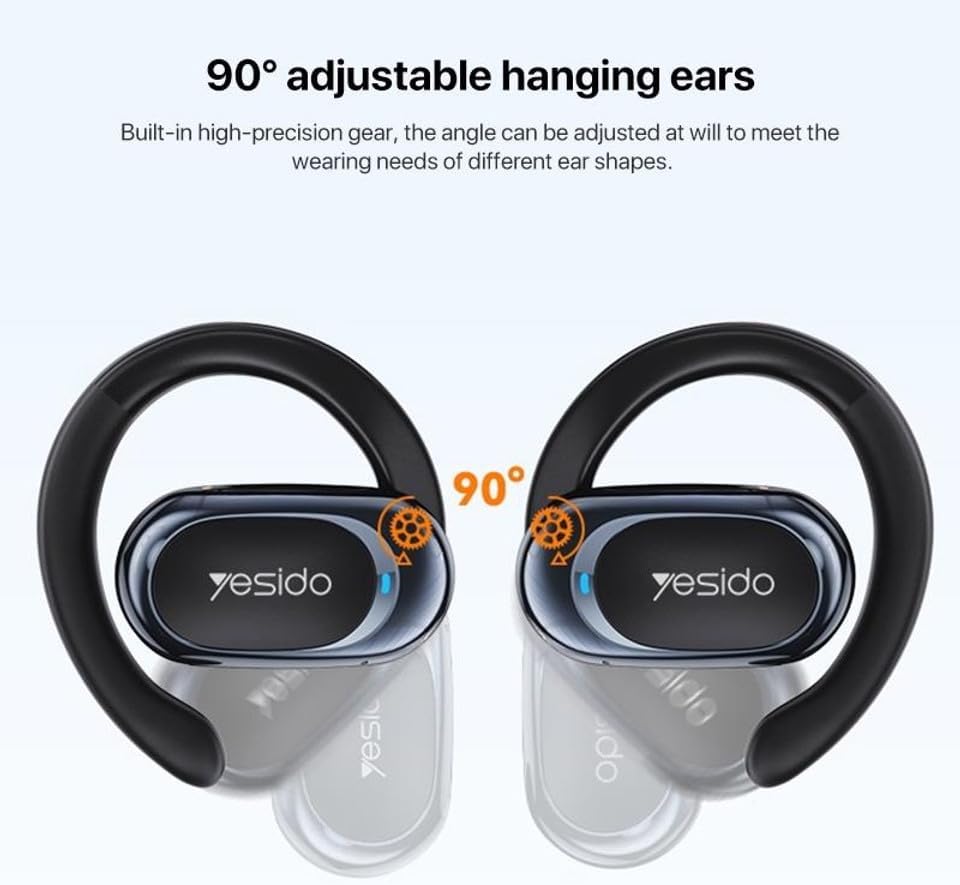
The Yesido YSP13 earphones feature a rotatable ear hook design for a secure and comfortable fit.
- Gently place the earphone over your ear, positioning the main body in front of your ear canal.
- Adjust the ear hook to fit snugly and comfortably around the back of your ear. The ear hooks are 90° adjustable to accommodate different ear shapes.
- The air conduction technology allows you to hear your audio while remaining aware of your surroundings.

ചിത്രം: Illustration showing the 90° adjustable ear hooks, highlighting their flexibility for a custom fit.

ചിത്രം: An earphone positioned on an ear, illustrating the adaptive directional sound transmission technology.
2. ടച്ച് നിയന്ത്രണങ്ങൾ
The earphones feature intuitive touch controls for managing audio playback and calls. The specific touch functions are typically:
- പ്ലേ/താൽക്കാലികമായി നിർത്തുക: ഏതെങ്കിലും ഇയർഫോണിൽ ഒറ്റ ടാപ്പ് ചെയ്യുക.
- അടുത്ത ട്രാക്ക്: വലതുവശത്തെ ഇയർഫോണിൽ രണ്ടുതവണ ടാപ്പ് ചെയ്യുക.
- മുമ്പത്തെ ട്രാക്ക്: ഇടതുവശത്തെ ഇയർഫോണിൽ രണ്ടുതവണ ടാപ്പ് ചെയ്യുക.
- ഉത്തരം/അവസാന കോൾ: Single tap on either earphone during an incoming call or active call.
- കോൾ നിരസിക്കുക: ഇൻകമിംഗ് കോൾ വരുമ്പോൾ ഏതെങ്കിലും ഒരു ഇയർഫോണിൽ അമർത്തിപ്പിടിക്കുക.
- വോയ്സ് അസിസ്റ്റന്റ്: Triple tap on either earphone (functionality may vary by device).
Note: Specific touch control mappings may vary slightly. Refer to the quick start guide included in your product packaging for precise instructions.
3. Sound Quality and Calls
The Yesido YSP13 earphones deliver HiFi sound quality through master-level tuning, providing a balanced audio experience with clear highs, rich mids, and strong lows. The built-in microphone ensures clear voice transmission for hands-free calls.

ചിത്രം: An exploded diagram illustrating the internal components responsible for the high-fidelity sound production.
മെയിൻ്റനൻസ്
1. വൃത്തിയാക്കൽ
To maintain optimal performance and hygiene, regularly clean your earphones.
- ഇയർഫോണുകളും ചാർജിംഗ് കെയ്സും മൃദുവായതും ഉണങ്ങിയതും ലിന്റ് രഹിതവുമായ തുണി ഉപയോഗിച്ച് തുടയ്ക്കുക.
- കഠിനമായ അഴുക്കിന്, അല്പം ഡിamp cloth can be used, ensuring no moisture enters any openings.
- ഉരച്ചിലുകൾ ഉള്ള വസ്തുക്കൾ, ലായകങ്ങൾ, അല്ലെങ്കിൽ കഠിനമായ രാസവസ്തുക്കൾ എന്നിവ ഉപയോഗിക്കുന്നത് ഒഴിവാക്കുക.
2. ജല പ്രതിരോധം
The Yesido YSP13 earphones feature an IPX4 waterproof design, providing protection against splashing water from any direction.
- This makes them suitable for workouts and light rain.
- Do not submerge the earphones in water or expose them to strong jets of water.
- കേടുപാടുകൾ സംഭവിക്കാതിരിക്കാൻ ചാർജിംഗ് കെയ്സിലേക്ക് തിരികെ വയ്ക്കുന്നതിന് മുമ്പ് ഇയർഫോണുകൾ ഉണങ്ങിയെന്ന് ഉറപ്പാക്കുക.
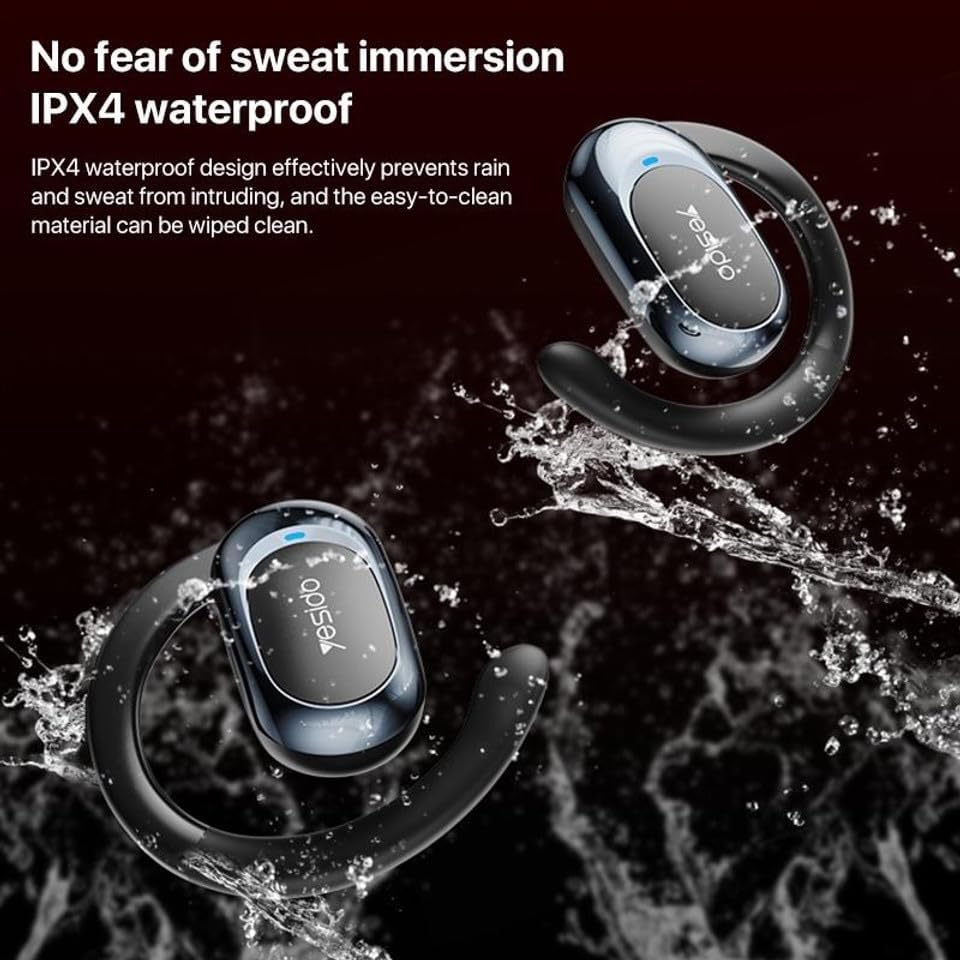
ചിത്രം: Earphones shown with water splashing, demonstrating their IPX4 waterproof capability against sweat and light rain.
3. സംഭരണം
Store the earphones in their charging case when not in use to protect them from dust, damage, and to keep them charged.
ട്രബിൾഷൂട്ടിംഗ്
If you encounter issues with your Yesido YSP13 earphones, try the following solutions:
- No Sound/Cannot Connect:
- ഇയർഫോണുകൾ ചാർജ് ചെയ്തിട്ടുണ്ടെന്ന് ഉറപ്പാക്കുക.
- നിങ്ങളുടെ ഉപകരണത്തിൽ ബ്ലൂടൂത്ത് പ്രവർത്തനക്ഷമമാക്കിയിട്ടുണ്ടെന്ന് ഉറപ്പാക്കുക.
- Check if the earphones are paired with another device. Disconnect and re-pair if necessary.
- Try resetting the earphones (refer to specific reset instructions if available in the product's quick start guide, otherwise, place them in the case and close/open).
- Move closer to your device to ensure you are within the 10-meter Bluetooth range.
- ഒരു ഇയർഫോൺ പ്രവർത്തിക്കുന്നില്ല:
- Place both earphones back into the charging case and then take them out again.
- രണ്ട് ഇയർഫോണുകളും ചാർജ് ചെയ്തിട്ടുണ്ടെന്ന് ഉറപ്പാക്കുക.
- Try re-pairing the earphones with your device.
- ചാർജിംഗ് പ്രശ്നങ്ങൾ:
- ചാർജിംഗ് കേബിളും അഡാപ്റ്ററും ശരിയായി പ്രവർത്തിക്കുന്നുണ്ടെന്ന് ഉറപ്പാക്കുക.
- ഇയർഫോണുകളിലെയും കേസിനുള്ളിലെയും ചാർജിംഗ് കോൺടാക്റ്റുകൾ വൃത്തിയുള്ളതും അവശിഷ്ടങ്ങളില്ലാത്തതുമാണെന്ന് ഉറപ്പാക്കുക.
- Check the digital display on the charging case for charging indicators.
- മോശം കോൾ നിലവാരം:
- മൈക്രോഫോൺ തടസ്സപ്പെട്ടിട്ടില്ലെന്ന് ഉറപ്പാക്കുക.
- ശാന്തമായ അന്തരീക്ഷത്തിലേക്ക് നീങ്ങുക.
- നിങ്ങളുടെ ഉപകരണത്തിന്റെ നെറ്റ്വർക്ക് സിഗ്നൽ പരിശോധിക്കുക.
സ്പെസിഫിക്കേഷനുകൾ
| ബ്രാൻഡ് | YESIDO |
| മോഡലിൻ്റെ പേര് | YSP13 (Model Number: BUF58) |
| കണക്റ്റിവിറ്റി ടെക്നോളജി | വയർലെസ്സ് (ബ്ലൂടൂത്ത് 5.3) |
| ബ്ലൂടൂത്ത് പതിപ്പ് | BT8926B2 V5.3 |
| ബ്ലൂടൂത്ത് ശ്രേണി | 10 മീറ്റർ വരെ |
| ഇയർഫോൺ ബാറ്ററി ശേഷി | 50mAh x 2 |
| ചാർജിംഗ് ബോക്സ് ബാറ്ററി കപ്പാസിറ്റി | 600mAh |
| സംഗീതം/കോൾ സമയം | ഏകദേശം 6 മണിക്കൂർ |
| ഇയർഫോൺ ചാർജിംഗ് സമയം | ഏകദേശം 1 മണിക്കൂർ |
| ചാർജിംഗ് ബോക്സ് ചാർജിംഗ് സമയം | ഏകദേശം 2.5 മണിക്കൂർ |
| ജല പ്രതിരോധ നില | IPX4 (വാട്ടർപ്രൂഫ്) |
| നിയന്ത്രണ രീതി | സ്പർശിക്കുക |
| മെറ്റീരിയൽ | PC+ABS+Electroplating UV |
| ഫോം ഫാക്ടർ | On Ear (Ear Hook Design) |
| അധിക സവിശേഷതകൾ | Air Conduction Technology, Digital Display, Built-in Microphone |
വാറൻ്റി വിവരങ്ങൾ
The product comes with a manufacturer's warranty. For detailed information regarding the warranty period and terms, please refer to the warranty card included in your product packaging or contact your retailer. Please retain your proof of purchase for any warranty claims.
ഉപഭോക്തൃ പിന്തുണ
For further assistance, technical support, or inquiries, please visit the official YESIDO website or contact the customer service department of your retailer.