
ആമുഖം
Thank you for choosing the eufy LR20 Robot Vacuum. This manual provides essential information for the safe operation, maintenance, and troubleshooting of your device. Please read it thoroughly before using the product and retain it for future reference.
പ്രധാനപ്പെട്ട സുരക്ഷാ നിർദ്ദേശങ്ങൾ
Before using this product, read all safety instructions. Failure to follow these instructions may result in electric shock, fire, or serious injury.
- 8 വയസ്സും അതിനുമുകളിലും പ്രായമുള്ള കുട്ടികൾക്കും ശാരീരികമോ ഇന്ദ്രിയപരമോ മാനസികമോ ആയ കഴിവുകൾ കുറഞ്ഞവർക്കും അനുഭവപരിചയവും അറിവും ഇല്ലാത്തവർക്കും സുരക്ഷിതമായ രീതിയിൽ ഉപകരണം ഉപയോഗിക്കുന്നതുമായി ബന്ധപ്പെട്ട മേൽനോട്ടമോ നിർദ്ദേശമോ നൽകുകയും അപകടസാധ്യതകൾ മനസ്സിലാക്കുകയും ചെയ്തിട്ടുണ്ടെങ്കിൽ ഈ ഉപകരണം ഉപയോഗിക്കാൻ കഴിയും. .
- കുട്ടികൾ ഉപകരണം ഉപയോഗിച്ച് കളിക്കുന്നില്ലെന്ന് ഉറപ്പാക്കാൻ മേൽനോട്ടം വഹിക്കണം.
- മേൽനോട്ടമില്ലാതെ കുട്ടികൾ വൃത്തിയാക്കലും ഉപയോക്തൃ പരിപാലനവും നടത്തരുത്.
- നിർമ്മാതാവ് നൽകുന്ന യഥാർത്ഥ പവർ അഡാപ്റ്റർ മാത്രം ഉപയോഗിക്കുക.
- Do not use the appliance in wet environments or on wet surfaces.
- മുടി, അയഞ്ഞ വസ്ത്രങ്ങൾ, വിരലുകൾ, ശരീരത്തിൻ്റെ എല്ലാ ഭാഗങ്ങളും തുറസ്സുകളിൽ നിന്നും ചലിക്കുന്ന ഭാഗങ്ങളിൽ നിന്നും അകറ്റി നിർത്തുക.
- കത്തുന്നതോ പുകവലിക്കുന്നതോ ആയ സിഗരറ്റ്, തീപ്പെട്ടി, ചൂടുള്ള ചാരം എന്നിവയൊന്നും എടുക്കരുത്.
- ഡസ്റ്റ് ബിൻ കൂടാതെ/അല്ലെങ്കിൽ ഫിൽട്ടറുകൾ ഇല്ലാതെ ഉപയോഗിക്കരുത്.
- വീട്ടുപകരണങ്ങൾ വീടിനുള്ളിൽ സംഭരിക്കുക.
പാക്കേജ് ഉള്ളടക്കം
പാക്കേജിൽ എല്ലാ ഘടകങ്ങളും ഉണ്ടെന്ന് ഉറപ്പാക്കുക:
- eufy LR20 Robot Vacuum
- ചാർജിംഗ് ബേസ്
- പവർ അഡാപ്റ്റർ
- സൈഡ് ബ്രഷുകൾ (x2)
- ക്ലീനിംഗ് ടൂൾ
- ഉപയോക്തൃ മാനുവൽ
ഉൽപ്പന്നം കഴിഞ്ഞുview
Familiarize yourself with the components of your eufy LR20 Robot Vacuum.
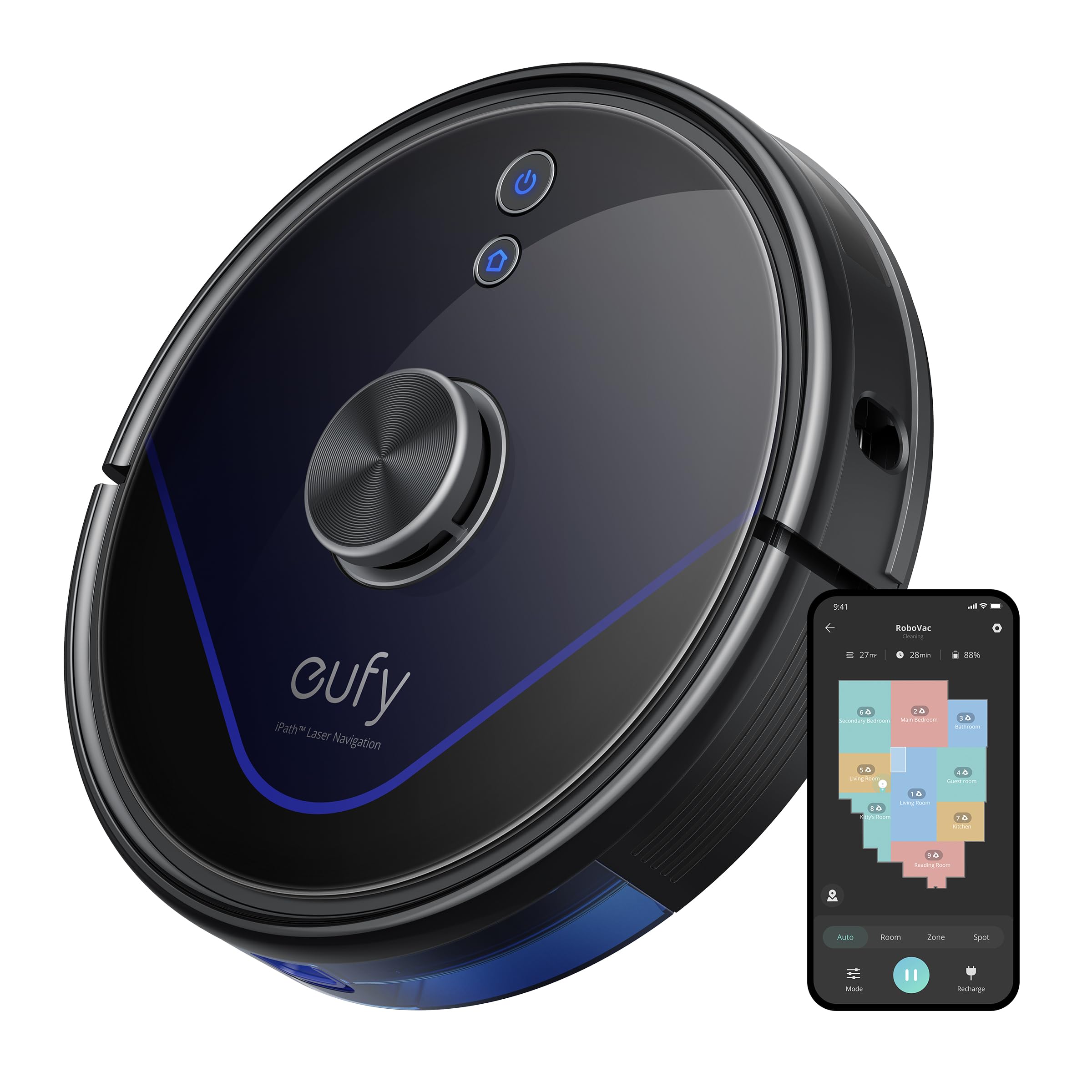
Image: The eufy LR20 Robot Vacuum shown with its charging base. The robot is black, circular, and features a laser navigation dome on top. The charging base is compact and designed for the robot to dock automatically.
Robot Vacuum Components:
- മുകളിൽ: Laser Navigation Sensor (LiDAR), Power/Clean Button, Wi-Fi Indicator.
- മുൻഭാഗം: Bumper Sensor.
- താഴെ: Side Brushes, Main Brush, Driving Wheels, Universal Wheel, Drop Sensors, Charging Contacts.
- ഡസ്റ്റ് ബിൻ: Located under the top cover, includes a filter.
Charging Base Components:
- ചാർജിംഗ് പിന്നുകൾ
- പവർ സൂചകം
- പവർ പോർട്ട്
സജ്ജമാക്കുക
1. Prepare the Cleaning Area
- Remove power cords, small objects, and anything that could entangle the robot.
- Fold tasseled edges of area rugs underneath to prevent tangling.
- Avoid placing the robot on very dark-colored carpets or surfaces, as this may interfere with drop sensors.
2. സൈഡ് ബ്രഷുകൾ ഇൻസ്റ്റാൾ ചെയ്യുക
- റോബോട്ടിന്റെ അടിയിലുള്ള പോസ്റ്റുകളിൽ സൈഡ് ബ്രഷുകൾ അമർത്തിപ്പിടിച്ച് അവ സ്ഥലത്ത് ക്ലിക്ക് ചെയ്യുന്നത് വരെ വയ്ക്കുക.
3. Place the Charging Base
- ചാർജിംഗ് ബേസ് ഒരു ഭിത്തിയോട് ചേർന്ന് കട്ടിയുള്ളതും നിരപ്പായതുമായ പ്രതലത്തിൽ വയ്ക്കുക.
- ചാർജിംഗ് ബേസിന്റെ മുൻവശത്ത് കുറഞ്ഞത് 3 അടി (1 മീ) വ്യക്തമായ ഇടവും ഇരുവശത്തും 1 അടി (0.3 മീ) സ്വതന്ത്ര ഇടവും ഉണ്ടെന്ന് ഉറപ്പാക്കുക.
- Connect the power adapter to the charging base and plug the other end into a wall outlet.
- Do not place the charging base near stairs or open doorways.
4. പ്രാരംഭ ചാർജിംഗ്
- Place the robot onto the charging base, ensuring its charging contacts align with the pins on the base.
- The robot will automatically turn on and begin charging. The LED indicator on the robot will breathe orange while charging and turn solid blue when fully charged.
- ആദ്യ ഉപയോഗത്തിന് മുമ്പ് (ഏകദേശം 5-6 മണിക്കൂർ) റോബോട്ട് പൂർണ്ണമായും ചാർജ് ചെയ്യുക.
5. Download the EufyHome App
- Download the "EufyHome" app from the App Store (iOS devices) or Google Play (Android devices).
- Open the app and follow the on-screen instructions to create an account and add your LR20 robot vacuum.
- Ensure your Wi-Fi network is 2.4GHz, as the LR20 only supports 2.4GHz Wi-Fi.
റോബോട്ട് വാക്വം പ്രവർത്തിപ്പിക്കുന്നു
ഭാഗം 1 ഒരു ക്ലീനിംഗ് സൈക്കിൾ ആരംഭിക്കുക
- റോബോട്ട് വഴി: Press the Power/Clean button once to start cleaning in Auto mode. Press again to pause.
- ആപ്പ് വഴി: Open the EufyHome app, select your LR20, and tap "Start" or choose a specific cleaning mode.
ക്ലീനിംഗ് മോഡുകൾ
- ഓട്ടോ ക്ലീൻ: The robot cleans automatically using iPath Laser Navigation, following a Z-shaped path for efficient coverage.
- സ്പോട്ട് ക്ലീൻ: Cleans a specific area intensely. Place the robot in the center of the desired area and select Spot Clean in the app.
- സോൺ ക്ലീൻ: Define a specific area on the map in the EufyHome app for the robot to clean.
BoostIQ Technology
The LR20 automatically increases suction power within 1.5 seconds when it detects extra vacuuming strength is needed, such as on carpets.
Multi-Floor Mapping and No-Go Zones
- The robot can recognize and store up to three different floor maps.
- Use the EufyHome app to set virtual boundaries or "No-Go Zones" on your map to prevent the robot from entering specific areas.
ഷെഡ്യൂളിംഗ്
Set cleaning schedules through the EufyHome app for automated cleaning at preferred times.
മെയിൻ്റനൻസ്
Regular maintenance ensures optimal performance of your eufy LR20. Always turn off the robot and disconnect it from the charging base before performing any maintenance.
Emptying the Dust Bin (After each use)
- ഡസ്റ്റ് ബിൻ റിലീസ് ബട്ടൺ അമർത്തി ഡസ്റ്റ് ബിൻ പുറത്തെടുക്കുക.
- Open the dust bin cover and empty its contents into a trash can.
Cleaning the Filter (Weekly)
- ഡസ്റ്റ് ബിന്നിൽ നിന്ന് ഫിൽട്ടർ നീക്കം ചെയ്യുക.
- Tap the filter to remove dust and debris. Do not wash the filter with water.
- ഉപയോഗത്തിനനുസരിച്ച് ഓരോ 3-6 മാസത്തിലും ഫിൽട്ടർ മാറ്റിസ്ഥാപിക്കുക.
Cleaning the Main Brush (Weekly)
- Remove the brush guard by pressing the release tabs.
- പ്രധാന ബ്രഷ് ഉയർത്തുക.
- Use the cleaning tool to remove hair and debris wrapped around the brush.
- Reinstall the main brush and brush guard.
Cleaning the Side Brushes (Monthly)
- അവരുടെ പോസ്റ്റുകളിൽ നിന്ന് സൈഡ് ബ്രഷുകൾ വലിച്ചെടുക്കുക.
- ഏതെങ്കിലും രോമമോ അവശിഷ്ടങ്ങളോ നീക്കം ചെയ്യുക.
- കേടുപാടുകൾ സംഭവിച്ചാലോ തേഞ്ഞുപോയാലോ മാറ്റിസ്ഥാപിക്കുക.
Cleaning Sensors and Charging Contacts (Monthly)
- Wipe the drop sensors, bumper sensor, and charging contacts on both the robot and the charging base with a dry cloth.
ട്രബിൾഷൂട്ടിംഗ്
If the robot vacuum encounters an issue, refer to the following table for common problems and solutions.
| പ്രശ്നം | പരിഹാരം |
|---|---|
| റോബോട്ട് ഓണാക്കുന്നില്ല. | Ensure the robot is fully charged. Check if the power switch is ON. |
| Robot cannot charge. | Verify the charging base is powered on. Clean the charging contacts on both the robot and the base. |
| റോബോട്ട് ഇടയ്ക്കിടെ കുടുങ്ങിപ്പോകാറുണ്ട്. | Clear obstacles from the cleaning path. Use No-Go Zones in the app for problematic areas. Clean driving wheels. |
| സക്ഷൻ പവർ ദുർബലമാണ്. | Empty the dust bin. Clean or replace the filter. Clean the main brush. |
| റോബോട്ടിന് വൈഫൈയിലേക്ക് കണക്റ്റ് ചെയ്യാൻ കഴിയില്ല. | Ensure your Wi-Fi is 2.4GHz. Restart your router and the robot. Follow app instructions for re-pairing. |
| Robot makes unusual noises. | Check the main brush and side brushes for tangled hair or debris. Inspect the universal wheel for obstructions. |
സ്പെസിഫിക്കേഷനുകൾ
| ഫീച്ചർ | സ്പെസിഫിക്കേഷൻ |
|---|---|
| മോഡൽ | LR20 |
| സക്ഷൻ പവർ | 3200Pa (Ultra-strong) |
| നാവിഗേഷൻ സിസ്റ്റം | iPath Laser Navigation (LiDAR) |
| ഡസ്റ്റ് ബിൻ കപ്പാസിറ്റി | 600 മില്ലി ലിറ്റർ |
| ബാറ്ററി തരം | ലിഥിയം അയോൺ |
| ബാറ്ററി ലൈഫ് | 145 മിനിറ്റ് വരെ |
| ശബ്ദ നില | 57.9 ഡെസിബെൽ |
| Wi-Fi പിന്തുണ | 2.4GHz മാത്രം |
| നിയന്ത്രണ രീതി | App Control, Alexa, Google system |
| പ്രത്യേക സവിശേഷതകൾ | BoostIQ Technology, Multi-Floor Mapping, HEPA Filtration |
വാറൻ്റിയും പിന്തുണയും
eufy provides a limited warranty for this product. For detailed warranty information, please refer to the warranty card included in your package or visit the official eufy webസൈറ്റ്.
സാങ്കേതിക പിന്തുണ, ട്രബിൾഷൂട്ടിംഗ് സഹായം, അല്ലെങ്കിൽ മാറ്റിസ്ഥാപിക്കാനുള്ള ഭാഗങ്ങൾ വാങ്ങുന്നതിന്, ദയവായി eufy ഉപഭോക്തൃ സേവനവുമായി ബന്ധപ്പെടുക:
- Webസൈറ്റ്: www.eufylife.com
- ഇമെയിൽ: Refer to your warranty card or webനിർദ്ദിഷ്ട കോൺടാക്റ്റ് ഇമെയിലിനുള്ള സൈറ്റ്.
- ഫോൺ: Refer to your warranty card or webനിർദ്ദിഷ്ട കോൺടാക്റ്റ് നമ്പറിനുള്ള സൈറ്റ്.
Please have your model number (LR20) and purchase information ready when contacting support.