
1. ആമുഖം
Thank you for choosing MEIHUA Solar RGB Spotlights. This manual provides detailed instructions for the installation, operation, and maintenance of your new outdoor lighting system. Please read this manual carefully before use to ensure proper function and longevity of the product.
2. ബോക്സിൽ എന്താണുള്ളത്?
Upon opening your package, please verify that all the following components are included:
- MEIHUA Solar RGB Spotlights (6 units)
- Solar Panel with integrated control box
- റിമോട്ട് കൺട്രോൾ
- Mounting Hardware (stakes for ground installation, screws for wall mounting)
- ഉപയോക്തൃ മാനുവൽ
3. സജ്ജീകരണവും ഇൻസ്റ്റാളേഷനും
The MEIHUA Solar RGB Spotlights offer two primary installation methods: ground insertion or wall mounting. Ensure the solar panel is placed in an open, unobstructed area to receive maximum sunlight for optimal charging.
3.1 ഗ്രൗണ്ട് ഇൻസ്റ്റലേഷൻ
- Attach the ground stakes to the bottom of each spotlight.
- Insert the spotlights into the ground in your desired locations.
- Position the solar panel in an area with direct sunlight.
- Connect the spotlights to the control box on the solar panel.
3.2 വാൾ മൗണ്ടിംഗ്
- Use the provided screws to mount the spotlights on a wall or fence.
- Ensure the mounting surface is stable and can support the weight of the lights.
- Position the solar panel in an area with direct sunlight.
- Connect the spotlights to the control box on the solar panel.
The system includes an 18.5m (60.7ft) cable, allowing flexible placement of the spotlights relative to the solar panel.

Figure 1: Installation methods for MEIHUA Solar RGB Spotlights. The image displays both ground-inserted and wall-mounted spotlights, along with the solar panel and control box dimensions. The cable length is 18.5m/60.7ft.
വീഡിയോ 1: കഴിഞ്ഞുview of MEIHUA Solar Spot Lights Outdoor Color Changing, demonstrating charging during the day and automatic illumination at night, along with installation options.
4. പ്രവർത്തന നിർദ്ദേശങ്ങൾ
Your MEIHUA Solar RGB Spotlights are designed for ease of use with automatic functions and remote control capabilities.
4.1 ഓട്ടോമാറ്റിക് പ്രവർത്തനം
The solar panels automatically charge during the day. At night, the spotlights will turn on automatically, providing illumination for 8-20 hours when fully charged.

Figure 2: Solar panel charging during the day (over 8 hours) and automatic illumination of spotlights at night (8-20 hours working time after full charge).
4.2 വിദൂര നിയന്ത്രണ പ്രവർത്തനങ്ങൾ
The included remote control allows for customization of lighting effects:
- ഓൺ/ഓഫ്: ലൈറ്റുകൾ ഓണാക്കുക അല്ലെങ്കിൽ ഓഫാക്കുക.
- തെളിച്ച ക്രമീകരണം: Switch between high and low brightness settings.
- സ്റ്റാറ്റിക് നിറങ്ങൾ: Select from 10 fixed static colors (Red, Green, Blue, etc.).
- ഡൈനാമിക് മോഡുകൾ: Choose from 12 dynamic color-changing modes, including FLASH, SMOOTH, and STROBE.
- വേഗത ക്രമീകരണം: Adjust the speed of dynamic modes using the Speed +/- buttons.
- സമയ പ്രവർത്തനം: Set the lights to automatically turn off after 2, 4, or 6 hours.
- മെമ്മറി പ്രവർത്തനം: The spotlights will recall the last used setting when turned on again.

Figure 3: Remote control layout and functions, illustrating options for 10 fixed single colors, brightness control, dynamic modes, and timing functions.

Figure 4: Illustration of the Memory Function, which retains the last mode setting, and the Timing Function, allowing automatic shut-off after 2, 4, or 6 hours.
5. സവിശേഷതകൾ
- Multiple Color Changing and Remote Control: 10 static colors and 12 dynamic colors available via remote control.
- ഊർജ്ജ സംരക്ഷണം: Automatic charging during the day and automatic illumination at night.
- വലിയ ശേഷിയുള്ള ബാറ്ററി: 6000mAh battery with power indicator (30%, 70%, 100%).
- Memory and Timing Function: Retains last setting and offers 2H/4H/6H auto-off options.
- 2 ഇൻസ്റ്റലേഷൻ രീതികൾ: Ground stake or wall mount.
- IP66 വാട്ടർപ്രൂഫ്: വ്യത്യസ്ത കാലാവസ്ഥകളിൽ ഔട്ട്ഡോർ ഉപയോഗത്തിനായി രൂപകൽപ്പന ചെയ്തിരിക്കുന്നു.
- നീണ്ടുനിൽക്കുന്ന നിർമ്മാണം: Aluminum material, heat and frost resistant.
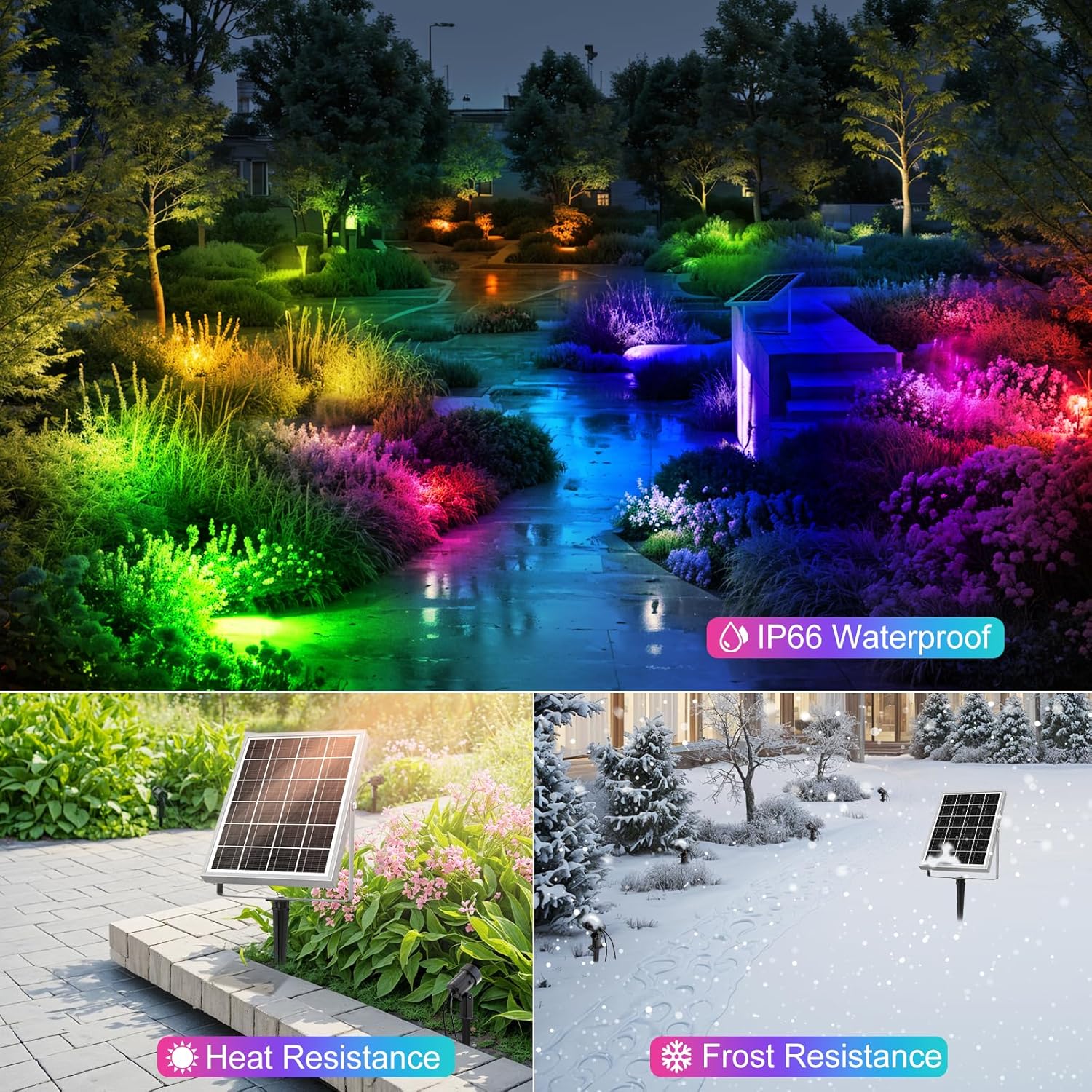
Figure 5: The spotlights are IP66 waterproof, heat resistant, and frost resistant, ensuring durability in diverse outdoor environments.
Video 2: Demonstrates the MEIHUA Solar Landscape Lights Spotlight Outdoor Waterproof IP66, showcasing its features and performance in an outdoor setting.
6. പരിപാലനം
To ensure optimal performance and extend the lifespan of your MEIHUA Solar RGB Spotlights, follow these maintenance guidelines:
- വൃത്തിയുള്ള സോളാർ പാനൽ: പതിവായി സോഫ്റ്റ്, ഡി ക്ലീനർ ഉപയോഗിച്ച് സോളാർ പാനൽ തുടയ്ക്കുക.amp പൊടി, അഴുക്ക്, അവശിഷ്ടങ്ങൾ എന്നിവ നീക്കം ചെയ്യാൻ തുണി ഉപയോഗിക്കുക. വൃത്തിയുള്ള പാനൽ കാര്യക്ഷമമായ ചാർജിംഗ് ഉറപ്പാക്കുന്നു.
- തടസ്സങ്ങൾ മായ്ക്കുക: Ensure no trees, bushes, or other objects are blocking sunlight from reaching the solar panel throughout the day.
- വയറിംഗ് പരിശോധിക്കുക: Periodically check all wiring connections for any signs of damage or wear.
- ബാറ്ററി കെയർ: While the battery is designed for outdoor use, extreme temperatures can affect its performance. Ensure the control box is not submerged in water.
- Spotlight Cleaning: Clean the spotlight lenses as needed to maintain light output clarity.
7. പ്രശ്നപരിഹാരം
If you encounter issues with your MEIHUA Solar RGB Spotlights, try the following troubleshooting steps:
- Lights Not Turning On at Night:
- Ensure the solar panel is receiving at least 8 hours of direct sunlight daily.
- Check if the ON/OFF button on the control box or remote is activated.
- Verify that all cable connections are secure.
- The battery might be low; allow for a full day of charging.
- Lights Not Changing Colors/Modes:
- Ensure the remote control has working batteries and is pointed towards the control box.
- Try resetting the system by turning it off and on again.
- Reduced Brightness or Short Operating Time:
- ഏതെങ്കിലും അഴുക്കോ അവശിഷ്ടങ്ങളോ നീക്കം ചെയ്യാൻ സോളാർ പാനലിന്റെ ഉപരിതലം വൃത്തിയാക്കുക.
- Ensure the solar panel is not shaded by objects.
- Check the battery indicator on the control box for charge level.
ഈ ഘട്ടങ്ങൾ പരീക്ഷിച്ചതിനു ശേഷവും പ്രശ്നങ്ങൾ നിലനിൽക്കുകയാണെങ്കിൽ, ദയവായി ഉപഭോക്തൃ പിന്തുണയുമായി ബന്ധപ്പെടുക.
8 സ്പെസിഫിക്കേഷനുകൾ
| ഫീച്ചർ | സ്പെസിഫിക്കേഷൻ |
|---|---|
| ബ്രാൻഡ് | MEIHUA |
| മോഡൽ നമ്പർ | MH-SL-SP06 |
| നിറം | RGB (ചുവപ്പ്, പച്ച, നീല) |
| മെറ്റീരിയൽ | അലുമിനിയം |
| പവർ ഉറവിടം | സൗരോർജ്ജം |
| പ്രകാശ സ്രോതസ്സ് | എൽഇഡി |
| പ്രകാശ സ്രോതസ്സുകളുടെ എണ്ണം | 6 |
| നിയന്ത്രണ രീതി | റിമോട്ട് കൺട്രോൾ |
| ജല പ്രതിരോധ നില | IP66 വാട്ടർപ്രൂഫ് |
| ബാറ്ററി ശേഷി | 6000mAh |
| കേബിൾ നീളം | 18.5മീ / 60.7 അടി |
| ഇനത്തിൻ്റെ ഭാരം | 1.77 കിലോഗ്രാം |
| അളവുകൾ (L x W x H) | 6.5"L x 3"W x 8"H |
9. വാറൻ്റിയും പിന്തുണയും
MEIHUA provides a 1 വർഷത്തെ നിർമ്മാതാവിന്റെ വാറന്റി for the MH-SL-SP06 Solar RGB Spotlights. This warranty covers defects in materials and workmanship under normal use.
For technical support, warranty claims, or any questions regarding your product, please refer to the contact information provided on the product packaging or the official MEIHUA website. Please have your model number (MH-SL-SP06) and proof of purchase ready when contacting support.