
ആമുഖം
Welcome to the user manual for the ZEBRONICS H310 D4M2 Micro-ATX Motherboard. This guide provides essential information for the proper installation, configuration, and maintenance of your motherboard. Please read these instructions carefully before beginning the installation process to ensure correct setup and optimal performance.
ഉൽപ്പന്നം കഴിഞ്ഞുview
The ZEBRONICS H310 D4M2 is a Micro-ATX motherboard designed for Intel 8th and 9th Generation processors using the LGA 1151 socket. It supports DDR4 memory, features an NVMe M.2 slot, 5.1 channel audio, and a variety of connectivity options including USB 3.0, HDMI, and DisplayPort.
പ്രധാന സവിശേഷതകൾ
- DDR4 Memory Support: Compatible with memory modules offering speeds between 2133MHz and 2666MHz.
- LGA 1151 Socket: Designed to support Intel 8th & 9th Generation Processors.
- 5.1 Channel Audio: Provides an immersive audio experience.
- LAN Support: Ensures fast and reliable internet connectivity with speeds of 10/100 Mbps.
- PCIe 16x Slot: Facilitates seamless data transfer for graphics cards and other expansion cards.
- 3 SATA Ports: Allows connection of multiple storage devices.
- SATA M.2 Slot: Supports M.2 (NVMe and NGFF) drives for high-speed storage.
- USB 3.0 Ports: Offers swifter and more effective connectivity for external devices.
മദർബോർഡ് ലേayട്ട്

This diagram illustrates the main components and connectors on the ZEBRONICS H310 D4M2 motherboard. Refer to this layout for component identification during installation.

Visual representation of the motherboard's core features including DDR4 support, M.2 slot, H310 chipset, and PCIe x16.
സജ്ജീകരണവും ഇൻസ്റ്റാളേഷനും
Before starting, ensure your system is powered off and disconnected from the power source. Handle the motherboard by its edges to avoid static discharge. It is recommended to wear an anti-static wrist strap.
CPU ഇൻസ്റ്റാളേഷൻ
- മദർബോർഡിൽ LGA 1151 CPU സോക്കറ്റ് കണ്ടെത്തുക.
- സിപിയു സോക്കറ്റ് ലിവർ തുറന്ന് മെറ്റൽ ലോഡ് പ്ലേറ്റ് ഉയർത്തുക.
- Carefully align the CPU with the socket, matching the golden triangle indicator on the CPU to the corresponding mark on the socket. Do not force the CPU into the socket; it should sit naturally.
- Close the load plate and secure it by pushing down the lever until it clicks into place.
- Apply a thin, even layer of thermal paste to the CPU's integrated heat spreader (IHS) and install the CPU cooler according to its manufacturer's instructions.
RAM (Memory) Installation
- മദർബോർഡിൽ രണ്ട് DDR4 DIMM സ്ലോട്ടുകൾ കണ്ടെത്തുക.
- Open the clips at both ends of the DIMM slot by pushing them outwards.
- മെമ്മറി മൊഡ്യൂൾ സ്ലോട്ടുമായി വിന്യസിക്കുക, മൊഡ്യൂളിലെ നോച്ച് സ്ലോട്ടിലെ കീയുമായി പൊരുത്തപ്പെടുന്നുണ്ടെന്ന് ഉറപ്പാക്കുക.
- ക്ലിപ്പുകൾ സ്ഥാപിക്കുന്നതുവരെ മെമ്മറി മൊഡ്യൂളിന്റെ രണ്ട് അറ്റങ്ങളിലും ദൃഢമായി അമർത്തി മൊഡ്യൂൾ സുരക്ഷിതമാക്കുക.
സ്റ്റോറേജ് ഡിവൈസ് ഇൻസ്റ്റലേഷൻ
ഈ മദർബോർഡ് SATA, M.2 സ്റ്റോറേജ് ഡിവൈസുകളെ പിന്തുണയ്ക്കുന്നു.
SATA ഡ്രൈവുകൾ
- Connect one end of a SATA data cable to an available SATA port on the motherboard (SATA1, SATA2, or SATA3).
- SATA ഡാറ്റ കേബിളിന്റെ മറ്റേ അറ്റം നിങ്ങളുടെ SATA ഹാർഡ് ഡ്രൈവിലേക്കോ SSD-യിലേക്കോ ബന്ധിപ്പിക്കുക.
- നിങ്ങളുടെ പവർ സപ്ലൈ യൂണിറ്റിൽ (PSU) നിന്ന് ഒരു SATA പവർ കേബിൾ SATA ഡ്രൈവിലേക്ക് ബന്ധിപ്പിക്കുക.
M.2 ഡ്രൈവ്
- മദർബോർഡിൽ M.2 സ്ലോട്ട് കണ്ടെത്തുക.
- Insert the M.2 drive into the slot at approximately a 30-degree angle.
- Gently push down the M.2 drive and secure it with the provided screw into the standoff.

Image showing included SATA cables and I/O shield, essential for storage and case installation.
പവർ കണക്ഷനുകൾ
- Connect the 24-pin ATX power connector from your PSU to the main power socket on the motherboard. Ensure it is fully seated.
- Connect the 8-pin CPU power connector (EPS 12V) from your PSU to the CPU power socket located near the CPU.
Peripheral Connections (Front Panel, USB, Audio, LAN)
Refer to the Motherboard Layout diagram in the Product Overview section for exact locations of these headers and ports.
- Connect front panel headers (Power SW, Reset SW, HDD LED, Power LED) to the corresponding pins on the motherboard's front panel header block.
- Connect front panel USB 2.0 and USB 3.0 headers from your PC case to the respective headers on the motherboard.
- Connect the front panel audio header from your PC case to the motherboard's audio header.
- Install the I/O shield into your PC case's rear opening before mounting the motherboard.
- Connect external peripherals such as keyboard, mouse, monitor, and network cable to the rear I/O ports.
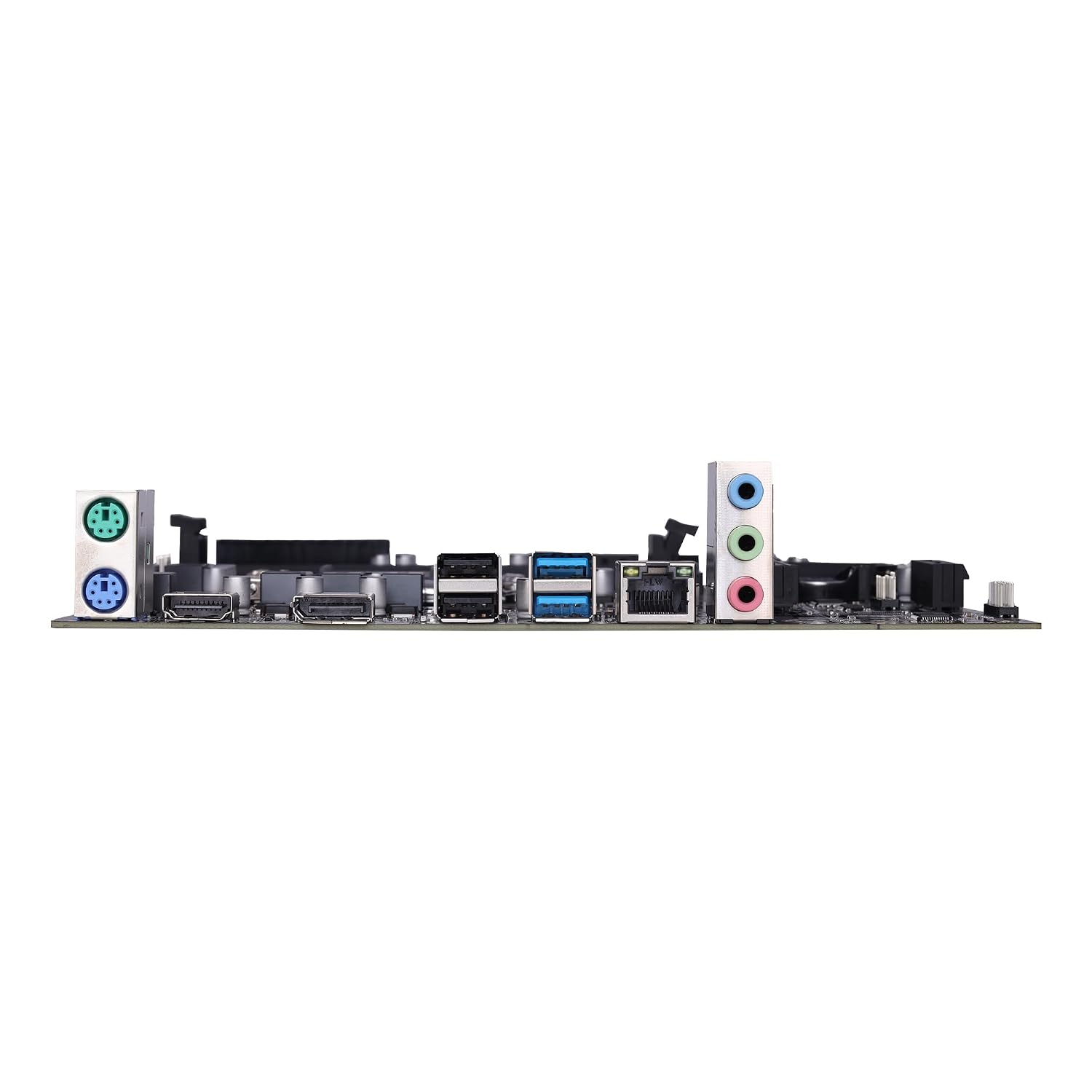
This image displays the rear input/output ports available on the motherboard, including USB, video outputs (HDMI, DP), and audio jacks.
ഓപ്പറേറ്റിംഗ് സിസ്റ്റവും ഡ്രൈവറുകളും
ആദ്യ ബൂട്ടും ബയോസ് സജ്ജീകരണവും
After assembling your system, power it on. During the initial startup sequence, press the designated key (commonly DEL or F2) repeatedly to enter the BIOS/UEFI setup utility. Here you can configure boot order, system time, and other advanced settings necessary for your operating system installation.
ഡ്രൈവർ ഇൻസ്റ്റാളേഷൻ
For optimal performance and stability, it is crucial to install all necessary drivers after installing your operating system.
- Use the included driver CD (if applicable) to install chipset, audio, LAN, and other essential drivers.
- Alternatively, download the latest drivers from the official ZEBRONICS website by navigating to the support section and searching for the H310 D4M2 model.
മെയിൻ്റനൻസ്
Regular maintenance helps ensure the longevity and stable operation of your motherboard and overall system.
- Keep the system clean: Periodically clean dust from the motherboard and components using compressed air. Ensure all fans and heatsinks are free of obstructions to maintain efficient cooling.
- ശരിയായ വായുപ്രവാഹം ഉറപ്പാക്കുക: Maintain good ventilation within your PC case by ensuring proper cable management and fan placement to prevent overheating.
- സോഫ്റ്റ്വെയർ അപ്ഡേറ്റുകൾ: Keep your operating system, device drivers, and BIOS/UEFI firmware updated to the latest versions for improved performance, security, and compatibility.
ട്രബിൾഷൂട്ടിംഗ്
If you encounter issues with your system, refer to the following common troubleshooting steps:
- ശക്തിയില്ല: Check all power connections, including the 24-pin ATX and 8-pin CPU power cables, the power supply unit (PSU) switch, and the wall outlet.
- ഡിസ്പ്ലേ ഇല്ല: Ensure the monitor is connected to the correct video output port (HDMI or DisplayPort) on the motherboard or dedicated graphics card. Verify that RAM modules and any installed graphics card are properly seated.
- സിസ്റ്റം അസ്ഥിരത/ക്രാഷുകൾ: Verify that all RAM modules are correctly installed. Check CPU and GPU temperatures to ensure they are within safe operating limits. Update all system drivers.
- ഉപകരണം കണ്ടെത്തിയില്ല: Ensure the device (e.g., hard drive, SSD, USB device) is properly connected and powered. Check BIOS settings to confirm the device is detected and enabled.
- ബയോസ് റീസെറ്റ്: If the system becomes unbootable due to incorrect BIOS settings, locate the CMOS reset pins on the motherboard and short them briefly, or remove the CMOS battery for a few minutes to reset BIOS to default settings.
സ്പെസിഫിക്കേഷനുകൾ
| ഫീച്ചർ | വിശദാംശങ്ങൾ |
|---|---|
| ബ്രാൻഡ് | സെബ്രോണിക്സ് |
| മോഡലിൻ്റെ പേര് | ZEBRONICS H310 D4M2 |
| സിപിയു സോക്കറ്റ് | LGA 1151 |
| അനുയോജ്യമായ പ്രോസസ്സറുകൾ | Intel 8th & 9th Generation Processors |
| ചിപ്സെറ്റ് തരം | ഇൻ്റൽ H310 |
| റാം മെമ്മറി ടെക്നോളജി | DDR4 |
| മെമ്മറി ക്ലോക്ക് സ്പീഡ് | 2133 മെഗാഹെട്സ് - 2666 മെഗാഹെട്സ് |
| മെമ്മറി സ്ലോട്ടുകൾ ലഭ്യമാണ് | 2 |
| Max Drive Memory Storage Capacity | 32 ജിബി |
| Total SATA Ports | 3 |
| ഗ്രാഫിക്സ് കാർഡ് ഇൻ്റർഫേസ് | PCI Express (PCIe 16x) |
| Total PCIe Ports | 1 (PCIe 16x) |
| മൊത്തം USB പോർട്ടുകൾ | 4 (Rear I/O, plus internal headers) |
| Total HDMI Port | 1 |
| ഇതർനെറ്റ് പോർട്ടുകളുടെ എണ്ണം | 1 (10/100 Mbps LAN) |
| പ്രധാന പവർ കണക്റ്റർ തരം | 24-പിൻ |
| ഇനത്തിൻ്റെ അളവുകൾ L x W x H | 22L x 5.5W x 27H സെൻ്റീമീറ്റർ |
| ഇനത്തിൻ്റെ ഭാരം | 800 ഗ്രാം |
വാറൻ്റിയും പിന്തുണയും
വാറൻ്റി വിവരങ്ങൾ
This ZEBRONICS H310 D4M2 Motherboard comes with a 1-year carry-in warranty. For warranty claims, please retain your proof of purchase and contact the authorized ZEBRONICS service center.
സാങ്കേതിക സഹായം
For further assistance, technical support, or detailed product information, please visit the official ZEBRONICS webസൈറ്റ് അല്ലെങ്കിൽ അവരുടെ ഉപഭോക്തൃ സേവന വിഭാഗവുമായി ബന്ധപ്പെടുക.