
ആമുഖം
Thank you for choosing the ATTACK SHARK K85 Rapid Trigger Mechanical Gaming Keyboard. This 75% layout wired keyboard features advanced magnetic switches with adjustable actuation and rapid trigger functionality, designed for precision and speed in gaming and efficient typing. It includes a programmable multimedia knob, full RGB backlighting, and PBT keycaps for durability. This manual provides detailed instructions for setup, operation, maintenance, and troubleshooting to ensure you get the most out of your K85 keyboard.
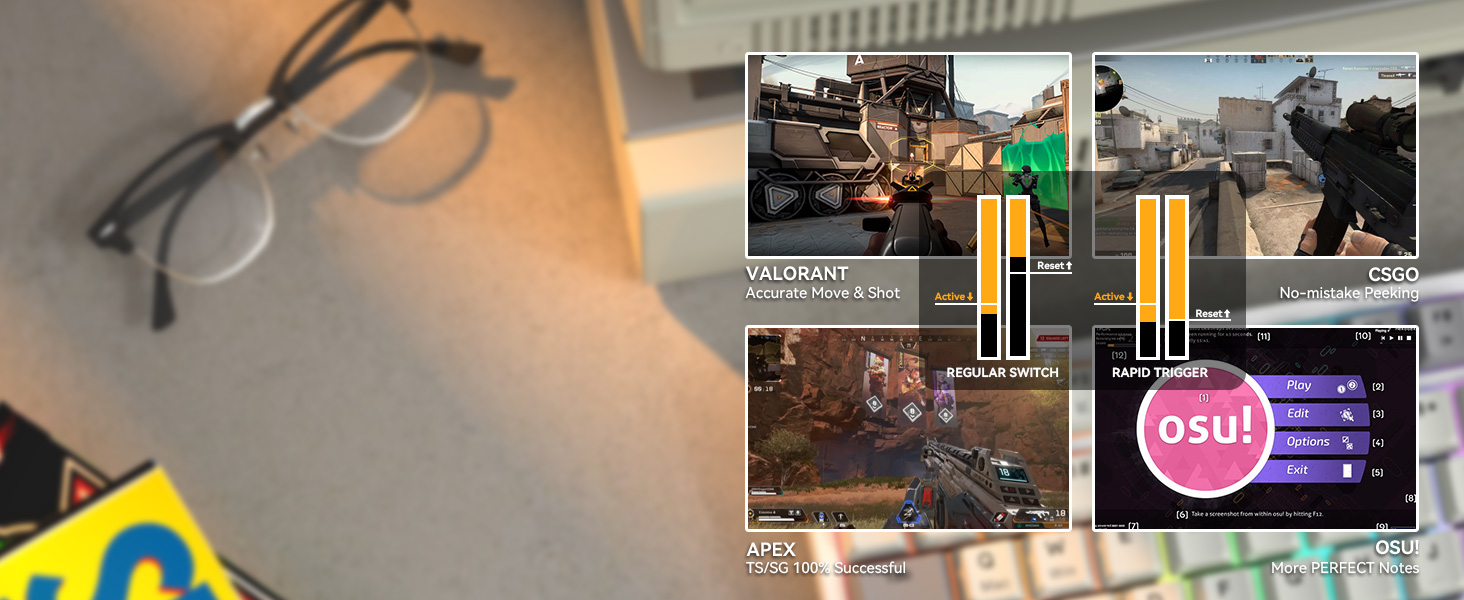
ചിത്രം: കഴിഞ്ഞുview of the ATTACK SHARK K85 keyboard highlighting its key features.
പാക്കേജ് ഉള്ളടക്കം
എല്ലാ ഇനങ്ങളും ഉണ്ടെന്ന് ഉറപ്പാക്കാൻ പാക്കേജ് ഉള്ളടക്കങ്ങൾ പരിശോധിക്കുക:
- ATTACK SHARK K85 Mechanical Gaming Keyboard
- USB-C to USB-A Cable (Braided Coiled Cable)
- കീക്യാപ് പുള്ളർ
- സ്വിച്ച് പുള്ളർ
- ഉപയോക്തൃ മാനുവൽ
സജ്ജീകരണ നിർദ്ദേശങ്ങൾ
- കീബോർഡ് ബന്ധിപ്പിക്കുക: Plug the USB-C end of the provided cable into the Type-C port on the keyboard and the USB-A end into an available USB port on your computer. The keyboard is plug-and-play.
- സോഫ്റ്റ്വെയർ ഇൻസ്റ്റാളേഷൻ: For advanced customization of actuation points, rapid trigger, dynamic keystrokes, and RGB lighting, download the official ATTACK SHARK software from the manufacturer's webസൈറ്റ്. ഇൻസ്റ്റാളേഷനായി ഓൺ-സ്ക്രീൻ നിർദ്ദേശങ്ങൾ പാലിക്കുക.
- സിസ്റ്റം സ്വിച്ചിംഗ്: The keyboard supports both Windows and Mac operating systems. To switch between systems, press FN + Q for Mac OS or FN + W വിൻഡോസിനായി.

Image: The Type-C port for connecting the keyboard.
പ്രവർത്തന നിർദ്ദേശങ്ങൾ
1. Rapid Trigger (RT) and Dynamic Keystrokes (DKS)
The K85 keyboard features magnetic switches that allow for highly customizable actuation points and rapid trigger functionality. These features are primarily configured through the dedicated software.
- ക്രമീകരിക്കാവുന്ന ആക്ച്വേഷൻ പോയിന്റ്: Customize the keystroke actuation point from a light 0.2mm to a strong 3.8mm. This allows you to fine-tune the sensitivity of each key to your preference.
- റാപ്പിഡ് ട്രിഗർ (ആർടി): This function enables keys to reset and re-press faster than traditional mechanical switches. It allows for instant re-actuation upon key lift, providing a significant advantagവേഗതയേറിയ ഗെയിമുകളിൽ.
- ഡൈനാമിക് കീസ്ട്രോക്കുകൾ (DKS): Bind up to 4 functions to a single key based on different pressing depths. For example, a light press could activate one action, while a deeper press activates another.

Image: Visual representation of adjustable actuation points.

Image: Benefits of Rapid Trigger mode in various gaming scenarios.
Video: Demonstrating the ATTACK SHARK K85 Rapid Trigger Mechanical Gaming Keyboard features.
Video: Highlighting the magnetic switch technology of the ATTACK SHARK K85 keyboard.
2. മൾട്ടിമീഡിയ നോബ്
The aluminum alloy multimedia knob located in the upper right corner provides quick access to volume control and mute functions. It can also be customized via the software for other functions.
- Rotate Right: Increase volume
- Rotate Left: Decrease volume
- Press Down: Mute/Unmute
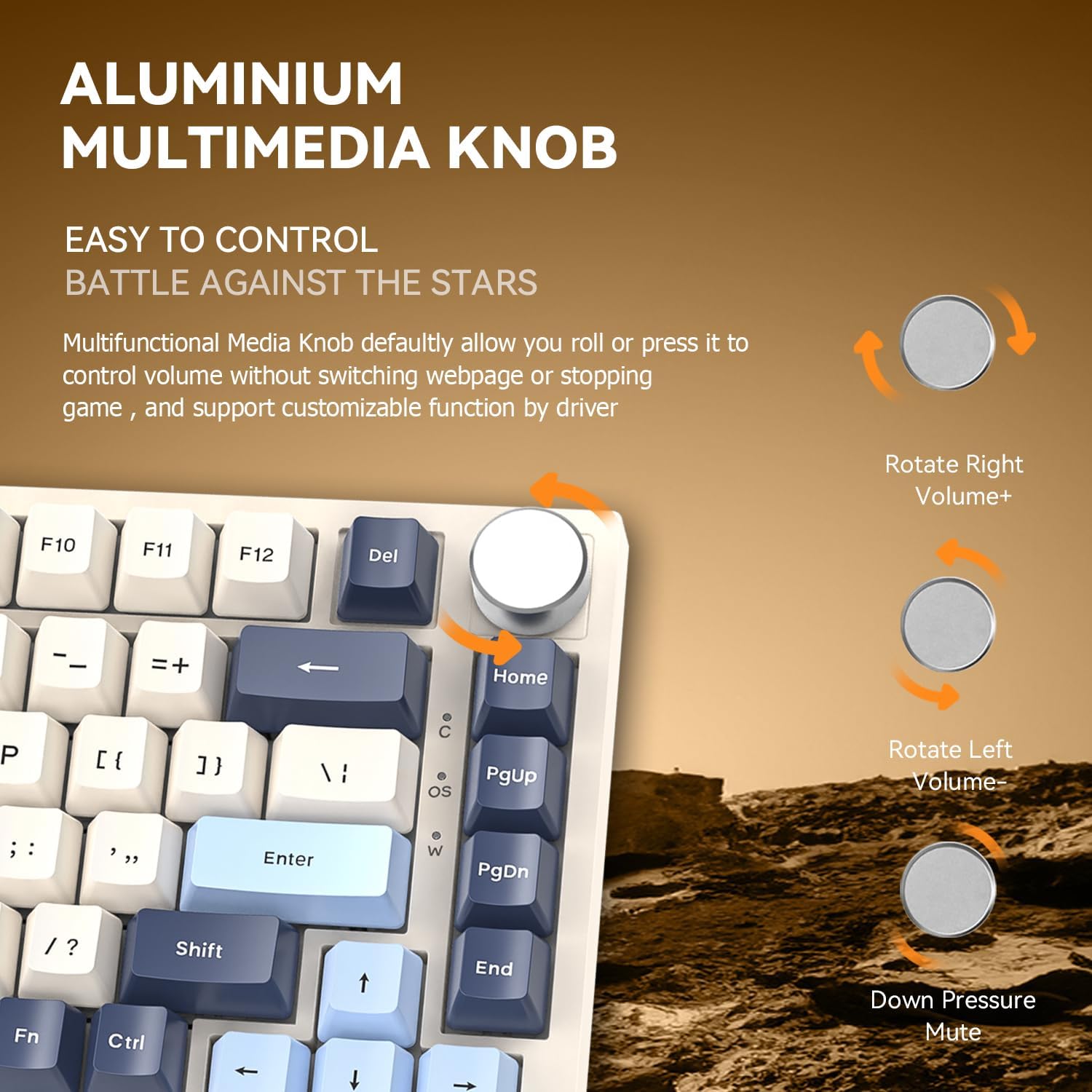
Image: Details of the aluminum multimedia knob and its functions.
3. RGB ബാക്ക്ലൈറ്റിംഗ്
The K85 features full RGB backlighting with 18 pre-installed modes and 9 color options. You can customize lighting effects using the software or through FN key combinations:
- എഫ്എൻ + < / >: Adjust Backlit Speed
- FN + Up / Down Arrow: Adjust Backlit Brightness
- FN + Del: Switch Light Mode
- FN + ഹോം: Switch Light Color
- FN + Esc: Restore to Factory Settings
- FN + വിൻ: Window Lock
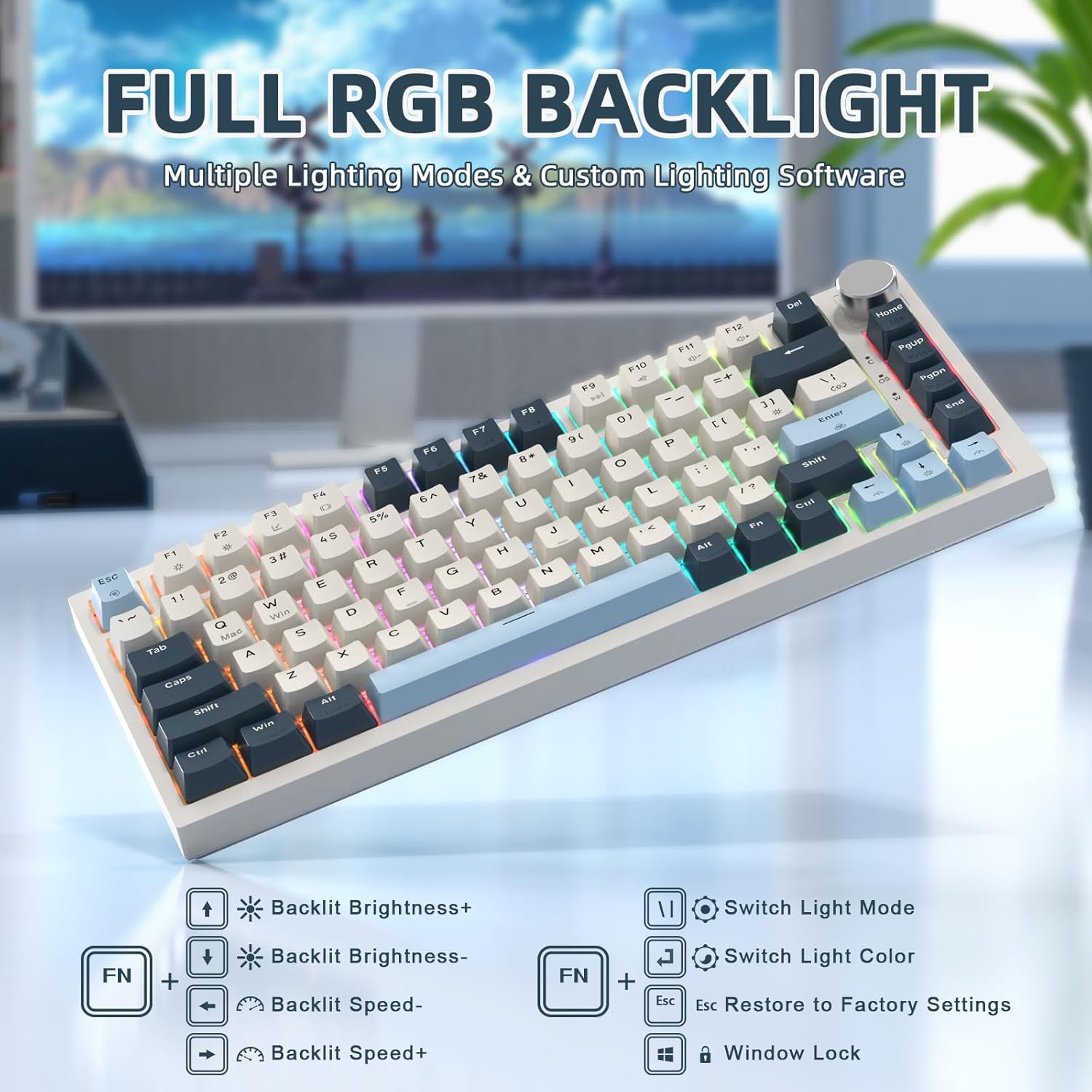
Image: RGB backlighting controls and effects.
4. ഹോട്ട്-സ്വാപ്പബിൾ സ്വിച്ചുകൾ
The K85 keyboard features a full-key hot-swappable PCB base, allowing you to easily change switches without soldering. Please note that it is currently only compatible with Outemu magnetic switches.
പ്രധാനപ്പെട്ടത്: After replacing any Outemu magnetic switch, recalibration in the software is necessary. Navigate to the "About" section in the software, then "Maximum stroke calibration," and press "Start Calibration" by gently pressing every key.

Image: Hot-swappable switches on the K85 keyboard.
മെയിൻ്റനൻസ്
ശരിയായ അറ്റകുറ്റപ്പണി നിങ്ങളുടെ കീബോർഡിന്റെ ദീർഘായുസ്സും പ്രകടനവും ഉറപ്പാക്കുന്നു.
- കീക്യാപ്പുകൾ വൃത്തിയാക്കൽ: നൽകിയിരിക്കുന്ന കീക്യാപ്പ് പുള്ളർ ഉപയോഗിച്ച് കീക്യാപ്പുകൾ ശ്രദ്ധാപൂർവ്വം നീക്കം ചെയ്യുക. മൃദുവായ, d ക്ലീനർ ഉപയോഗിച്ച് അവ വൃത്തിയാക്കുക.amp ആവശ്യമെങ്കിൽ തുണിയും വീര്യം കുറഞ്ഞ സോപ്പും ഉപയോഗിക്കുക. വീണ്ടും ഘടിപ്പിക്കുന്നതിന് മുമ്പ് അവ പൂർണ്ണമായും ഉണങ്ങിയെന്ന് ഉറപ്പാക്കുക.
- ക്ലീനിംഗ് സ്വിച്ചുകൾ: Use compressed air to remove dust and debris from around the switches. Avoid spraying liquids directly into the switches.
- പൊതുവായ ശുചീകരണം: Wipe the keyboard surface with a soft, dry cloth. Avoid abrasive cleaners or solvents.
ട്രബിൾഷൂട്ടിംഗ്
If you encounter issues with your ATTACK SHARK K85 keyboard, refer to the following common solutions:
| പ്രശ്നം | പരിഹാരം |
|---|---|
| കീബോർഡ് പ്രതികരിക്കുന്നില്ല | Ensure the USB-C cable is securely connected to both the keyboard and the computer. Try a different USB port or cable. Restart your computer. |
| കീകൾ രജിസ്റ്റർ ചെയ്യുന്നില്ല അല്ലെങ്കിൽ ഇരട്ട ടൈപ്പ് ചെയ്യുന്നില്ല. | Recalibrate the magnetic switches using the software (refer to "Hot-Swappable Switches" section). Ensure no debris is lodged under the keycaps or switches. |
| RGB ലൈറ്റിംഗ് പ്രവർത്തിക്കുന്നില്ല അല്ലെങ്കിൽ തെറ്റാണ് | Check lighting settings in the software. Try resetting to factory settings using FN + Esc. Ensure the software is up to date. |
| Multimedia knob not functioning | Verify software settings for the knob. Ensure no other software is conflicting with multimedia controls. |
| Keyboard prevents computer from sleeping | This can sometimes occur with certain peripherals. Check your computer's power management settings for USB devices. You may need to adjust settings to allow the computer to put USB devices to sleep. |
| Cannot switch between Windows/Mac modes | നിങ്ങൾ ശരിയായ കീ കോമ്പിനേഷനാണ് ഉപയോഗിക്കുന്നതെന്ന് ഉറപ്പാക്കുക (FN + Q for Mac, FN + W for Windows). |
സ്പെസിഫിക്കേഷനുകൾ
| ഫീച്ചർ | വിശദാംശങ്ങൾ |
|---|---|
| മോഡൽ നമ്പർ | K85 |
| ലേഔട്ട് | 75% (82-കീ) |
| സ്വിച്ച് തരം | Magnetic Switch (Outemu compatible) |
| ആക്ച്വേഷൻ പോയിന്റ് | 0.2 എംഎം മുതൽ 3.8 എംഎം വരെ ക്രമീകരിക്കാം |
| കണക്റ്റിവിറ്റി | USB-C Wired with Braided Coiled Cable |
| കീകാപ്പുകൾ | PBT Keycaps (Tri-color Theme) |
| ബാക്ക്ലൈറ്റിംഗ് | Full RGB (18 modes, 9 colors) |
| പ്രത്യേക സവിശേഷതകൾ | Rapid Trigger, Dynamic Keystrokes, Programmable Keys, Hotkeys, Media Keys, Metal Media Knob, Hot-Swappable |
| അനുയോജ്യമായ ഉപകരണങ്ങൾ | ലാപ്ടോപ്പ്, പിസി, മാക് |
| ഓപ്പറേറ്റിംഗ് സിസ്റ്റം പിന്തുണ | വിൻഡോസ്, മാക് ഒഎസ് |
| ഇനത്തിൻ്റെ ഭാരം | 2.07 പൗണ്ട് |
| പാക്കേജ് അളവുകൾ | 14.13 x 7.24 x 1.93 ഇഞ്ച് |
| മെറ്റീരിയൽ | Plastic (retro blue finish) |
വാറൻ്റിയും പിന്തുണയും
The ATTACK SHARK K85 keyboard comes with a standard manufacturer's warranty. For specific warranty details, please refer to the warranty card included in your package or contact ATTACK SHARK customer support.
If you require further assistance, encounter issues not covered in this manual, or need to download the latest software, please visit the official ATTACK SHARK website or contact their customer support team. Contact information can typically be found on the product packaging or the brand's official webസൈറ്റ്.