
ആമുഖം
Thank you for choosing the AWEI T61 Wireless Earbuds. These earbuds are designed to provide a high-quality audio experience with advanced features such as Bluetooth 5.3 connectivity, AI call noise reduction, and IPX5 water resistance. This manual will guide you through the setup, operation, and maintenance of your new earbuds to ensure optimal performance.
പാക്കേജ് ഉള്ളടക്കം
പാക്കേജിൽ ഇനിപ്പറയുന്ന ഇനങ്ങൾ ഉണ്ടോ എന്ന് പരിശോധിക്കുക:
- Wireless Bluetooth Headset (Earbuds)
- Wireless Bluetooth Headset Charging Case
- USB-C ചാർജിംഗ് കേബിൾ
- User Instructions (This Manual)
ഉൽപ്പന്നം കഴിഞ്ഞുview
The AWEI T61 Wireless Earbuds are equipped with several features for an enhanced listening experience.
പ്രധാന സവിശേഷതകൾ:
- ഉയർന്ന മിഴിവുള്ള ഓഡിയോ: Features 13mm dynamic speakers for immersive sound.
- AI Call Noise Reduction (ENC): പരിസ്ഥിതിയിലെ ശബ്ദം കുറച്ചുകൊണ്ട് കോൾ വ്യക്തത വർദ്ധിപ്പിക്കുന്നു.
- ബ്ലൂടൂത്ത് 5.3 സാങ്കേതികവിദ്യ: Provides stable and fast wireless connection with low latency.
- വിപുലീകരിച്ച ബാറ്ററി ലൈഫ്: Up to 6 hours of playback per charge, with the charging case extending total playback to 30 hours (dual-ear mode) or 60 hours (single-ear mode).
- സ്മാർട്ട് ടച്ച് നിയന്ത്രണം: Intuitive touch controls for managing music, calls, and volume.
- IPX5 വാട്ടർപ്രൂഫ് ഡിസൈൻ: Resistant to sweat and light rain, suitable for various activities.
ഘടകങ്ങൾ:
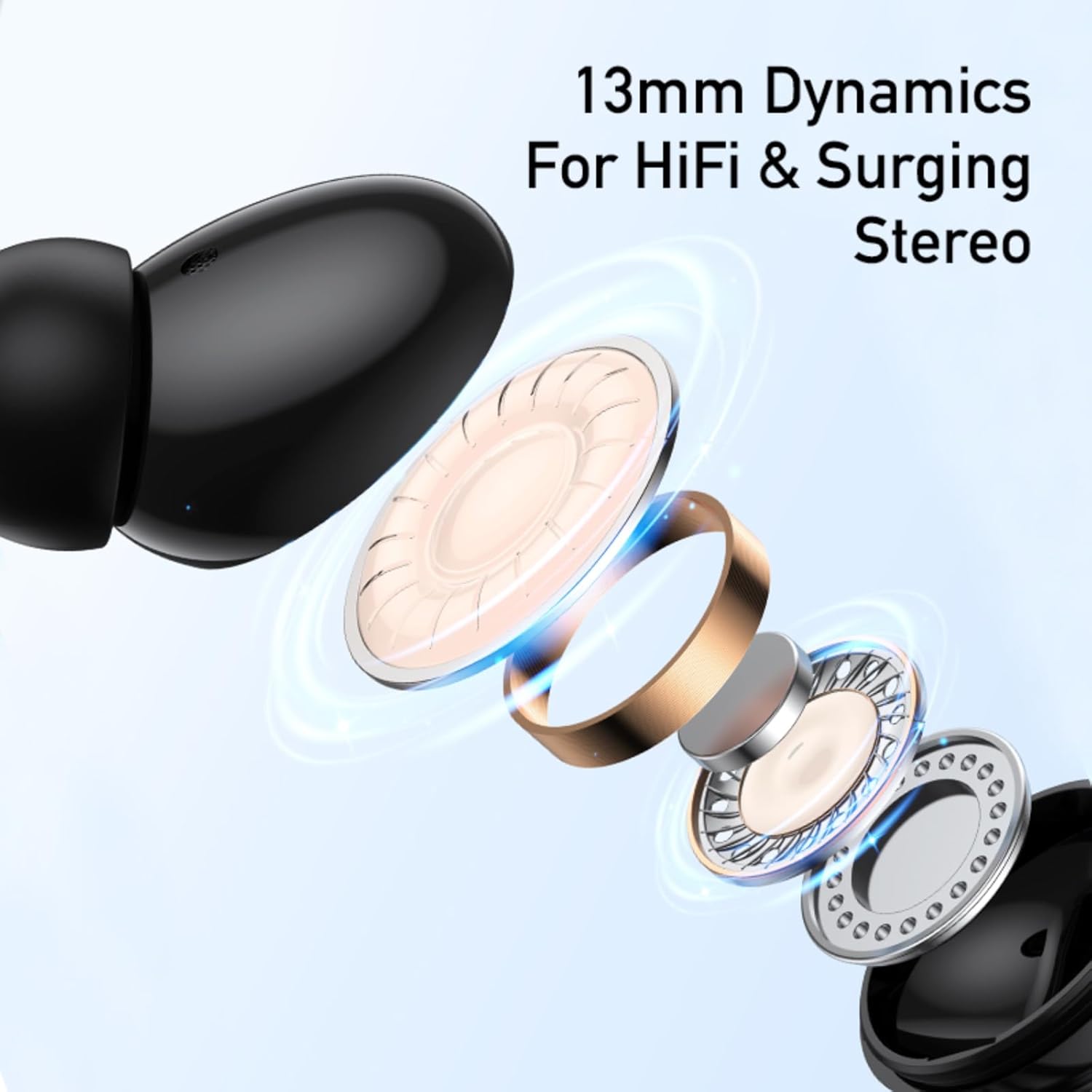
ചിത്രം 1: Internal structure of an AWEI T61 earbud, highlighting the 13mm dynamic speaker for high-fidelity audio.
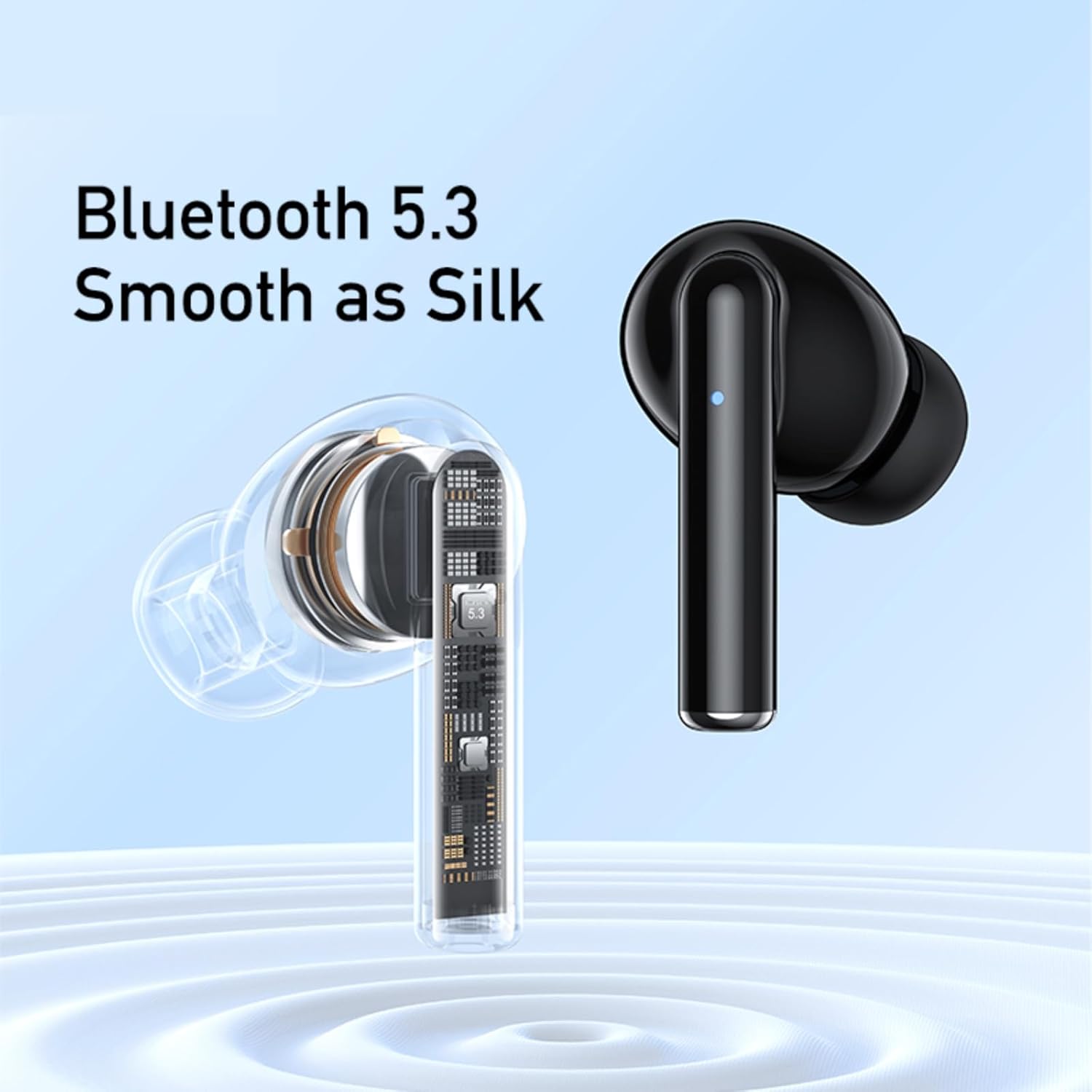
ചിത്രം 2: AWEI T61 earbuds showcasing the integrated Bluetooth 5.3 chipset for stable and smooth wireless communication.
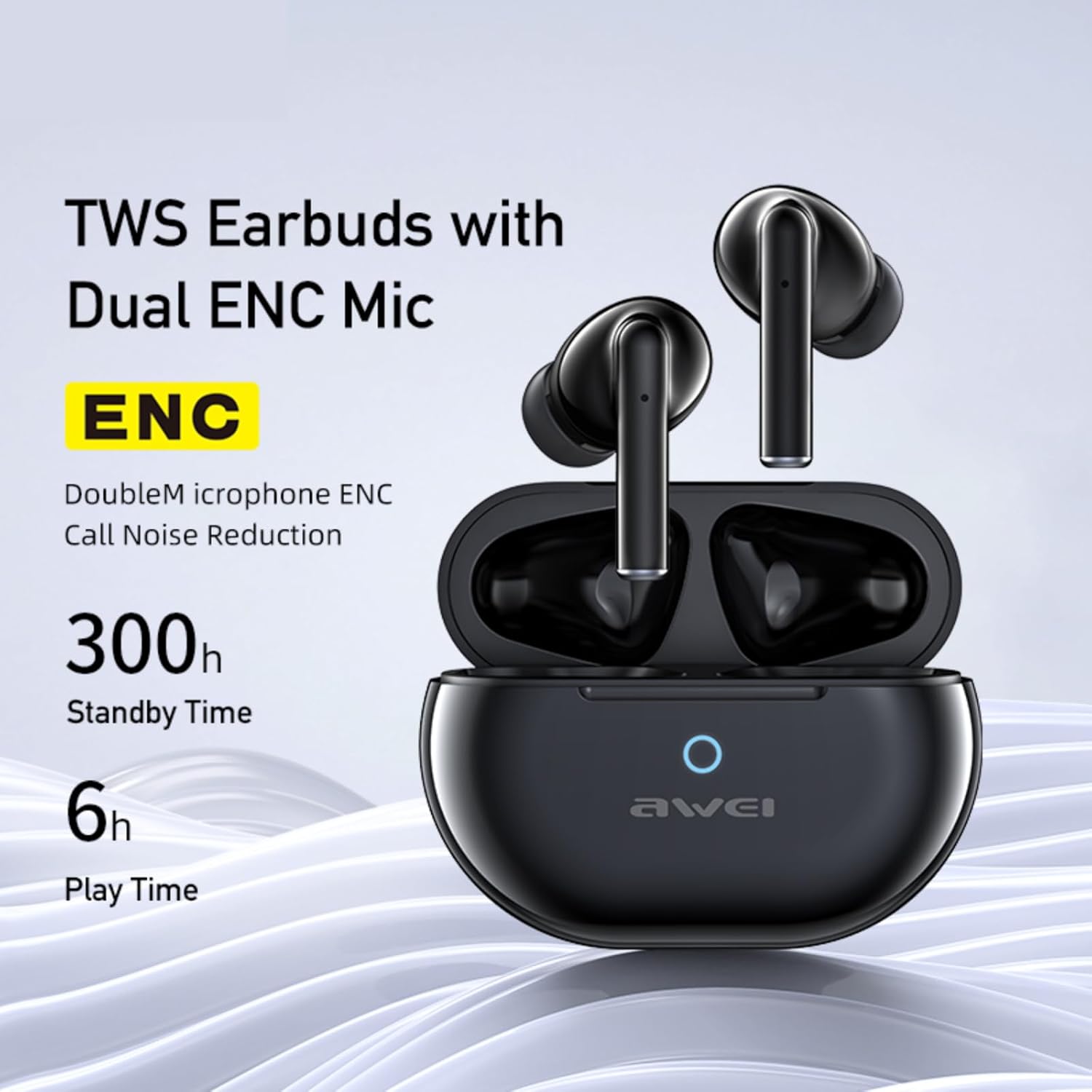
ചിത്രം 3: AWEI T61 earbuds in their charging case, indicating Dual ENC Microphones for call noise reduction, 300 hours standby time, and 6 hours play time per charge.

ചിത്രം 4: Illustration of ENC (Environmental Noise Cancellation) technology, demonstrating how background noise is reduced for clearer voice calls.
സജ്ജമാക്കുക
1. ഇയർബഡുകളും കേസും ചാർജ് ചെയ്യുന്നു
ആദ്യമായി ഉപയോഗിക്കുന്നതിന് മുമ്പ്, ഇയർബഡുകളും ചാർജിംഗ് കേസും പൂർണ്ണമായും ചാർജ് ചെയ്യുക. ചാർജിംഗ് കേസിൽ 300mAh ബാറ്ററി ശേഷിയുണ്ട്.
- നൽകിയിരിക്കുന്ന USB-C ചാർജിംഗ് കേബിൾ കേസിലെ ചാർജിംഗ് പോർട്ടിലേക്കും ഒരു പവർ സ്രോതസ്സിലേക്കും ബന്ധിപ്പിക്കുക.
- The charging case will indicate its charging status (e.g., LED indicator).
- A full charge for the case takes approximately 1 hour.
- ഇയർബഡുകൾ ചാർജിംഗ് കെയ്സിൽ വയ്ക്കുക. അവ സ്വയമേവ ചാർജ് ചെയ്യാൻ തുടങ്ങും.

ചിത്രം 5: The AWEI T61 charging case and earbuds, illustrating battery performance with 6 hours play time, 5 hours talk time, 300 hours standby, and 300mAh battery capacity.
2. ഒരു ഉപകരണവുമായി ജോടിയാക്കൽ
The earbuds support automatic pairing and are compatible with various Bluetooth-enabled devices.
- ഇയർബഡുകൾ ചാർജ്ജ് ചെയ്തിട്ടുണ്ടെന്ന് ഉറപ്പാക്കുക.
- ചാർജിംഗ് കെയ്സിന്റെ ലിഡ് തുറക്കുക. ഇയർബഡുകൾ സ്വയമേവ ജോടിയാക്കൽ മോഡിലേക്ക് പ്രവേശിക്കും.
- On your device (smartphone, PC, tablet, laptop, TV), go to Bluetooth settings and turn Bluetooth on.
- ഇതിനായി തിരയുക available devices and select "AWEI T61" from the list.
- കണക്റ്റ് ചെയ്തുകഴിഞ്ഞാൽ, ഒരു സ്ഥിരീകരണ ടോൺ നിങ്ങൾ കേൾക്കും, ഇയർബഡുകൾ ഉപയോഗത്തിന് തയ്യാറാകും.
- ഉപകരണത്തിൽ ബ്ലൂടൂത്ത് പ്രവർത്തനക്ഷമമാക്കിയിട്ടുണ്ടെങ്കിൽ, കേസിൽ നിന്ന് പുറത്തെടുക്കുമ്പോൾ ഇയർബഡുകൾ അവസാനം ജോടിയാക്കിയ ഉപകരണവുമായി യാന്ത്രികമായി വീണ്ടും കണക്റ്റുചെയ്യും.

ചിത്രം 6: The AWEI T61 earbuds automatically connecting to a smartphone when the charging case lid is opened.
പ്രവർത്തന നിർദ്ദേശങ്ങൾ
The AWEI T61 earbuds feature smart touch controls for easy management of audio and calls.
ടച്ച് നിയന്ത്രണ പ്രവർത്തനങ്ങൾ:
| ആക്ഷൻ | ഫംഗ്ഷൻ |
|---|---|
| ഒറ്റ ടാപ്പ് (ഇടത്/വലത് ഇയർബഡ്) | സംഗീതം പ്ലേ ചെയ്യുക/താൽക്കാലികമായി നിർത്തുക, കോൾ സ്വീകരിക്കുക/അവസാനിപ്പിക്കുക |
| ഡബിൾ ടാപ്പ് (വലത് ഇയർബഡ്) | അടുത്ത ഗാനം |
| ഡബിൾ ടാപ്പ് (ഇടത് ഇയർബഡ്) | മുൻ ഗാനം |
| ട്രിപ്പിൾ ടാപ്പ് (വലത് ഇയർബഡ്) | വോളിയം കൂട്ടുക |
| ട്രിപ്പിൾ ടാപ്പ് (ഇടത് ഇയർബഡ്) | വോളിയം ഡൗൺ |
| ദീർഘനേരം അമർത്തുക (2 സെക്കൻഡ്) | കോൾ നിരസിക്കുക, വോയ്സ് അസിസ്റ്റന്റ് സജീവമാക്കുക |
കുറിപ്പ്: നിങ്ങളുടെ ബന്ധിപ്പിച്ച ഉപകരണത്തെയും ഓപ്പറേറ്റിംഗ് സിസ്റ്റത്തെയും ആശ്രയിച്ച് നിർദ്ദിഷ്ട പ്രവർത്തനങ്ങൾ അല്പം വ്യത്യാസപ്പെടാം.
മെയിൻ്റനൻസ്
Proper care will extend the lifespan of your AWEI T61 Wireless Earbuds.
- വൃത്തിയാക്കൽ: ഇയർബഡുകൾ, പ്രത്യേകിച്ച് ഇയർ ടിപ്പുകൾ, ചാർജിംഗ് കോൺടാക്റ്റുകൾ എന്നിവ മൃദുവായതും ഉണങ്ങിയതും ലിന്റ് രഹിതവുമായ തുണി ഉപയോഗിച്ച് പതിവായി വൃത്തിയാക്കുക. കഠിനമായ രാസവസ്തുക്കളോ ഉരച്ചിലുകളോ ഉള്ള വസ്തുക്കൾ ഉപയോഗിക്കരുത്.
- ജല പ്രതിരോധം: ഇയർബഡുകൾ IPX5 വാട്ടർപ്രൂഫ് ആണ്, അതായത് അവ തെറിക്കുന്നതിനെയും വിയർപ്പിനെയും പ്രതിരോധിക്കും. വെള്ളത്തിൽ മുക്കുകയോ കനത്ത മഴയിൽ തുറന്നുവിടുകയോ ചെയ്യരുത്. ചാർജിംഗ് കേസിൽ തിരികെ വയ്ക്കുന്നതിന് മുമ്പ് അവ ഉണങ്ങിയെന്ന് ഉറപ്പാക്കുക.
- സംഭരണം: ഉപയോഗത്തിലില്ലാത്തപ്പോൾ, പൊടിയിൽ നിന്നും കേടുപാടുകളിൽ നിന്നും സംരക്ഷിക്കാൻ ഇയർബഡുകൾ അവയുടെ ചാർജിംഗ് കേസിൽ സൂക്ഷിക്കുക. കടുത്ത താപനിലയിൽ നിന്ന് മാറി തണുത്തതും വരണ്ടതുമായ സ്ഥലത്ത് സൂക്ഷിക്കുക.
- ബാറ്ററി കെയർ: To maintain battery health, avoid fully discharging the earbuds and charging case frequently. Charge them regularly, even if not in constant use.
ട്രബിൾഷൂട്ടിംഗ്
നിങ്ങളുടെ ഇയർബഡുകളിൽ പ്രശ്നങ്ങൾ നേരിടുകയാണെങ്കിൽ, ഇനിപ്പറയുന്ന പൊതുവായ പരിഹാരങ്ങൾ പരിശോധിക്കുക:
- ഇയർബഡുകൾ ജോടിയാക്കുന്നില്ല/കണക്റ്റ് ചെയ്യുന്നില്ല:
- രണ്ട് ഇയർബഡുകളും ചാർജ്ജ് ചെയ്തിട്ടുണ്ടെന്ന് ഉറപ്പാക്കുക.
- നിങ്ങളുടെ ഉപകരണത്തിൽ ബ്ലൂടൂത്ത് ഓഫാക്കി ഓണാക്കുക.
- Delete "AWEI T61" from your device's Bluetooth list and try pairing again.
- Place earbuds back in the case, close the lid, wait a few seconds, then open the lid to re-initiate pairing mode.
- നിങ്ങളുടെ ഉപകരണം 10 മീറ്റർ ബ്ലൂടൂത്ത് പരിധിക്കുള്ളിലാണെന്ന് ഉറപ്പാക്കുക.
- ശബ്ദമില്ല അല്ലെങ്കിൽ കുറഞ്ഞ ശബ്ദം:
- നിങ്ങളുടെ ഉപകരണത്തിലെയും ഇയർബഡുകളിലെയും വോളിയം ലെവൽ പരിശോധിക്കുക (ടച്ച് കൺട്രോളുകൾ ഉപയോഗിച്ച്).
- ഇയർബഡുകൾ നിങ്ങളുടെ ചെവിയിൽ ശരിയായി ഘടിപ്പിച്ചിട്ടുണ്ടെന്ന് ഉറപ്പാക്കുക.
- നിങ്ങളുടെ ഉപകരണത്തിലേക്ക് ഇയർബഡുകൾ വീണ്ടും കണക്റ്റ് ചെയ്യുക.
- ഇയർബഡ് സ്പീക്കറുകളിൽ നിന്ന് അവശിഷ്ടങ്ങൾ വൃത്തിയാക്കുക.
- ഇയർബഡുകൾ ചാർജ് ചെയ്യുന്നില്ല:
- ചാർജിംഗ് കേബിൾ കേസിലേക്കും പവർ സ്രോതസ്സിലേക്കും സുരക്ഷിതമായി ബന്ധിപ്പിച്ചിട്ടുണ്ടെന്ന് ഉറപ്പാക്കുക.
- പവർ സ്രോതസ്സ് സജീവമാണെന്ന് ഉറപ്പാക്കുക.
- ഇയർബഡുകളിലെയും ചാർജിംഗ് കെയ്സിനുള്ളിലെയും ചാർജിംഗ് കോൺടാക്റ്റുകൾ വൃത്തിയാക്കുക.
- മറ്റൊരു USB-C കേബിളോ പവർ അഡാപ്റ്ററോ പരീക്ഷിച്ചുനോക്കൂ.
- കോൾ നിലവാര പ്രശ്നങ്ങൾ:
- മൈക്രോഫോണുകൾ തടസ്സപ്പെട്ടിട്ടില്ലെന്ന് ഉറപ്പാക്കുക.
- Move to a quieter environment to benefit from AI call noise reduction.
- നിങ്ങളുടെ ഉപകരണത്തിന്റെ കോൾ ക്രമീകരണങ്ങൾ പരിശോധിക്കുക.
സ്പെസിഫിക്കേഷനുകൾ
| ഫീച്ചർ | വിശദാംശങ്ങൾ |
|---|---|
| മോഡലിൻ്റെ പേര് | T61 |
| ബ്രാൻഡ് | അവേയ് |
| കണക്റ്റിവിറ്റി ടെക്നോളജി | വയർലെസ് (ബ്ലൂടൂത്ത്) |
| ബ്ലൂടൂത്ത് പതിപ്പ് | 5.3 |
| ബ്ലൂടൂത്ത് ശ്രേണി | 10 മീറ്റർ വരെ |
| ചെവി പ്ലേസ്മെൻ്റ് | ചെവിയിൽ |
| ഓഡിയോ ഡ്രൈവർ തരം | ഡൈനാമിക് ഡ്രൈവർ (13mm) |
| നിയന്ത്രണ തരം | ടച്ച് നിയന്ത്രണം |
| നോയ്സ് റദ്ദാക്കൽ | AI Call Noise Reduction (ENC) |
| ജല പ്രതിരോധ നില | IPX5 (വാട്ടർപ്രൂഫ്) |
| ബാറ്ററി ലൈഫ് (ഇയർബഡുകൾ) | 6 മണിക്കൂർ വരെ (ഒരു ചാർജിന്) |
| ബാറ്ററി ലൈഫ് (ചാർജിംഗ് കെയ്സിനൊപ്പം) | Up to 30 hours (dual-ear mode), 60 hours (single-ear mode) |
| ചാർജിംഗ് കെയ്സ് ബാറ്ററി കപ്പാസിറ്റി | 300mAh |
| ബാറ്ററി ചാർജ് സമയം | Approximately 1 hour (charging case) |
| ചാർജിംഗ് പോർട്ട് | USB-C |
| അനുയോജ്യമായ ഉപകരണങ്ങൾ | Smartphones, PC, Tablets, Laptops, TV |
| മെറ്റീരിയൽ | സിലിക്കൺ (ചെവിയുടെ അഗ്രം) |
| ഇനത്തിൻ്റെ ഭാരം | 0.15 കിലോഗ്രാം |
| മാതൃരാജ്യം | ചൈന |
വാറൻ്റിയും പിന്തുണയും
The AWEI T61 Wireless Earbuds come with a 1 വർഷത്തെ വാറൻ്റി വാങ്ങിയ തീയതി മുതൽ. ഈ വാറന്റി സാധാരണ ഉപയോഗത്തിലുള്ള നിർമ്മാണ വൈകല്യങ്ങളും മെറ്റീരിയൽ തകരാറുകളും ഉൾക്കൊള്ളുന്നു.
For warranty claims, technical support, or further assistance, please contact your retailer or the AWEI customer service department with your proof of purchase.