1. ആമുഖം
This manual provides detailed instructions for the safe and effective use of your N35 LED Display Low Latency Wireless Earphone TWS 5.3. Please read this manual thoroughly before using the product and retain it for future reference.
The N35 earbuds are designed to deliver a seamless and immersive audio experience with features such as low latency technology, intuitive touch controls, and an LED display for battery status and connectivity.
2 സുരക്ഷാ വിവരങ്ങൾ
- ഇയർബഡുകളോ ചാർജിംഗ് കേസോ ഉയർന്ന താപനിലയിലോ ഈർപ്പത്തിലോ ദ്രാവകങ്ങളിലോ തുറന്നുകാട്ടരുത്.
- ഉപകരണം താഴെയിടുകയോ, അടിക്കുകയോ, വേർപെടുത്തുകയോ ചെയ്യുന്നത് ഒഴിവാക്കുക.
- നൽകിയിരിക്കുന്ന ചാർജിംഗ് കേബിളും അനുയോജ്യമായ ഒരു പവർ അഡാപ്റ്ററും മാത്രം ഉപയോഗിക്കുക.
- Prolonged exposure to high volume levels may cause hearing damage. Adjust volume to a safe level.
- കുട്ടികൾക്കും വളർത്തുമൃഗങ്ങൾക്കും ലഭ്യമാകാതെ സൂക്ഷിക്കുക.
- Clean the earbuds and charging case with a soft, dry cloth.
3. പാക്കേജ് ഉള്ളടക്കം
പാക്കേജിൽ ഇനിപ്പറയുന്ന ഇനങ്ങൾ ഉണ്ടോ എന്ന് പരിശോധിക്കുക:
- N35 Wireless Earbuds (Left and Right)
- ചാർജിംഗ് കേസ്
- യുഎസ്ബി ചാർജിംഗ് കേബിൾ
- ഉപയോക്തൃ മാനുവൽ
4. ഉൽപ്പന്നം കഴിഞ്ഞുview
Familiarize yourself with the components of your N35 earbuds and charging case.
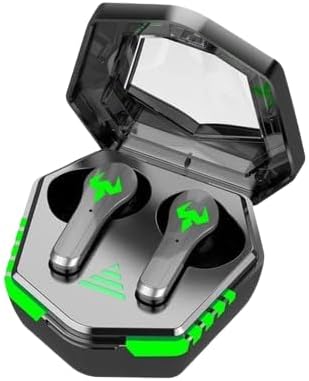
Figure 4.1: N35 Earbuds and Charging Case. The earbuds feature a sleek design with green accents, housed within a transparent-lidded charging case that displays battery status.
4.1 ഇയർബഡുകൾ
- ടച്ച് കൺട്രോൾ ഏരിയ: For managing playback, calls, and modes.
- LED സൂചകം: Shows pairing status and battery level.
- മൈക്രോഫോൺ: For voice calls.
- ചാർജിംഗ് കോൺടാക്റ്റുകൾ: ചാർജിംഗ് കേസുമായി ബന്ധിപ്പിക്കുന്നു.
4.2 ചാർജിംഗ് കേസ്
- LED ഡിസ്പ്ലേ: Indicates charging status and battery level of the case and individual earbuds.
- ചാർജിംഗ് പോർട്ട്: USB port for charging the case.
- ഇയർബഡ് സ്ലോട്ടുകൾ: ഇയർബഡുകൾ സുരക്ഷിതമായി പിടിച്ച് ചാർജ് ചെയ്യുന്നു.
5. സജ്ജീകരണം
5.1 പ്രാരംഭ ചാർജിംഗ്
ആദ്യമായി ഉപയോഗിക്കുന്നതിന് മുമ്പ്, ഇയർബഡുകളും ചാർജിംഗ് കേസും പൂർണ്ണമായും ചാർജ് ചെയ്യുക.
- രണ്ട് ഇയർബഡുകളും ചാർജിംഗ് കേസിൽ വയ്ക്കുക.
- യുഎസ്ബി ചാർജിംഗ് കേബിൾ കേസിലെ ചാർജിംഗ് പോർട്ടിലേക്കും ഒരു പവർ സ്രോതസ്സിലേക്കും (ഉദാ: കമ്പ്യൂട്ടർ യുഎസ്ബി പോർട്ട്, വാൾ അഡാപ്റ്റർ) ബന്ധിപ്പിക്കുക.
- The LED display on the case will show the charging progress. A full charge typically takes 1-2 hours.
- Once fully charged, the LED display will indicate a full battery.

Figure 5.1: Charging the N35 Earbuds. The image suggests the earbuds' long battery life, suitable for extended use with devices like laptops and smartphones.
5.2 ഒരു ഉപകരണവുമായി ജോടിയാക്കൽ
The earbuds will automatically enter pairing mode when taken out of the case.
- ചാർജിംഗ് കെയ്സ് തുറന്ന് രണ്ട് ഇയർബഡുകളും നീക്കം ചെയ്യുക. അവ സ്വയമേവ ഓണാകുകയും പരസ്പരം ജോടിയാക്കാൻ ശ്രമിക്കുകയും ചെയ്യും.
- നിങ്ങളുടെ ഉപകരണത്തിൽ (സ്മാർട്ട്ഫോൺ, ടാബ്ലെറ്റ്, കമ്പ്യൂട്ടർ), ബ്ലൂടൂത്ത് പ്രവർത്തനക്ഷമമാക്കുക.
- ഇതിനായി തിരയുക available Bluetooth devices. You should see "N35" or a similar name in the list.
- Select "N35" to connect. Once connected, the earbud LED indicators will turn off or flash slowly, and you may hear a confirmation tone.
- ജോടിയാക്കൽ പരാജയപ്പെട്ടാൽ, ഇയർബഡുകൾ വീണ്ടും കേസിൽ വയ്ക്കുക, ലിഡ് അടയ്ക്കുക, കുറച്ച് നിമിഷങ്ങൾ കാത്തിരിക്കുക, തുടർന്ന് ഘട്ടങ്ങൾ ആവർത്തിക്കുക.
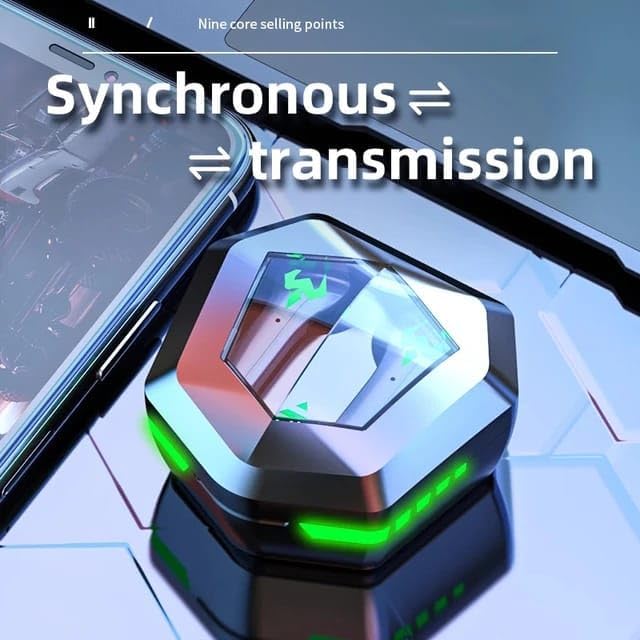
Figure 5.2: Synchronous Transmission. The closed case indicates the earbuds are ready for seamless connection and audio transmission.
6. പ്രവർത്തന നിർദ്ദേശങ്ങൾ
6.1 ടച്ച് നിയന്ത്രണങ്ങൾ
The N35 earbuds feature intuitive touch controls on each earbud. The functions may vary slightly depending on the specific model variant.
| ആക്ഷൻ | ഫംഗ്ഷൻ |
|---|---|
| സിംഗിൾ ടാപ്പ് (ഇടത്/വാതിൽ) | സംഗീതം പ്ലേ ചെയ്യുക/താൽക്കാലികമായി നിർത്തുക, കോൾ സ്വീകരിക്കുക/അവസാനിപ്പിക്കുക |
| ഡബിൾ ടാപ്പ് (ഇടത്) | മുമ്പത്തെ ട്രാക്ക് |
| ഡബിൾ ടാപ്പ് (R) | അടുത്ത ട്രാക്ക് |
| ട്രിപ്പിൾ ടാപ്പ് (ഇടത്/വാതിൽ) | വോയ്സ് അസിസ്റ്റൻ്റ് സജീവമാക്കുക |
| ലോംഗ് പ്രസ്സ് (2 സെക്കൻഡ്) (L/R) | കോൾ നിരസിക്കുക |
| ലോംഗ് പ്രസ്സ് (3 സെക്കൻഡ്) (L/R) | ഗെയിമിംഗ്/സംഗീത മോഡ് മാറ്റുക |
6.2 Music/Game Dual Mode
The N35 earbuds support a dual mode for optimized audio experience, switching between music and gaming modes.

Figure 6.1: Music/Game Dual Mode. This image emphasizes the low latency and high sound quality for both music listening and gaming.
- സംഗീത മോഡ്: Provides balanced audio for general listening.
- ഗെയിമിംഗ് മോഡ്: Reduces audio latency for a more synchronized gaming experience.
- To switch modes, perform a long press (3 seconds) on either earbud's touch control area. You will hear an audible prompt indicating the mode change.

Figure 6.2: Bluetooth 5.2 Chip. This image showcases the advanced Bluetooth technology within the earbud, contributing to its low latency performance.
7. പരിപാലനം
7.1 വൃത്തിയാക്കൽ
- Regularly clean the earbuds and charging case to ensure optimal performance and hygiene.
- Use a soft, dry, lint-free cloth to wipe the surfaces of the earbuds and case.
- For earwax or debris in the earbud tips, use a small, soft brush or cotton swab. Do not use sharp objects.
- അബ്രാസീവ് ക്ലീനറുകൾ, ആൽക്കഹോൾ, കെമിക്കൽ ലായകങ്ങൾ എന്നിവ ഉപയോഗിക്കരുത്.
7.2 സംഭരണം
- ഉപയോഗത്തിലില്ലാത്തപ്പോൾ, ഇയർബഡുകൾ സംരക്ഷിക്കുന്നതിനും ചാർജ്ജ് ചെയ്ത നിലയിൽ നിലനിർത്തുന്നതിനും അവ ചാർജിംഗ് കേസിൽ സൂക്ഷിക്കുക.
- ഉപകരണം തണുത്തതും വരണ്ടതുമായ സ്ഥലത്ത് സൂക്ഷിക്കുക, നേരിട്ടുള്ള സൂര്യപ്രകാശത്തിൽ നിന്നും തീവ്രമായ താപനിലയിൽ നിന്നും അകറ്റി നിർത്തുക.
8. പ്രശ്നപരിഹാരം
| പ്രശ്നം | സാധ്യമായ പരിഹാരം |
|---|---|
| ഇയർബഡുകൾ ഉപകരണവുമായി ജോടിയാക്കുന്നില്ല | Ensure Bluetooth is enabled on your device. Place earbuds back in case, close lid, then reopen and try pairing again. Forget "N35" from your device's Bluetooth list and re-pair. |
| ഒരു ഇയർബഡ് മാത്രമേ പ്രവർത്തിക്കൂ | Ensure both earbuds are charged. Place both earbuds back in the case, close the lid, then reopen. This often re-syncs them. |
| ശബ്ദമോ കുറഞ്ഞ വോളിയമോ ഇല്ല | Check volume levels on both the earbuds and your connected device. Ensure earbuds are properly seated in your ears. Clean earbud tips if necessary. |
| ചാർജിംഗ് കേസ് ചാർജുചെയ്യുന്നില്ല | Check the USB cable and power adapter. Ensure the charging cable is securely connected to both the case and the power source. |
| ടച്ച് നിയന്ത്രണങ്ങൾ പ്രതികരിക്കുന്നില്ല | നിങ്ങളുടെ വിരലുകൾ വൃത്തിയുള്ളതും വരണ്ടതുമാണെന്ന് ഉറപ്പാക്കുക. ഇയർബഡുകൾ കേസിൽ വച്ച ശേഷം വീണ്ടും പുറത്തെടുത്ത് പുനരാരംഭിക്കാൻ ശ്രമിക്കുക. |

Figure 8.1: Clear Call Performance. The image highlights the earbuds' capability for clear communication, even in potentially noisy environments.
9 സ്പെസിഫിക്കേഷനുകൾ
| ഫീച്ചർ | വിശദാംശങ്ങൾ |
|---|---|
| മോഡലിൻ്റെ പേര് | N35 |
| കണക്റ്റിവിറ്റി ടെക്നോളജി | വയർലെസ്സ് (ബ്ലൂടൂത്ത് 5.3) |
| ശബ്ദ നിയന്ത്രണം | സജീവ നോയ്സ് റദ്ദാക്കൽ |
| ചെവി പ്ലേസ്മെൻ്റ് | ചെവിയിൽ |
| നിയന്ത്രണ രീതി | സ്പർശിക്കുക |
| മെറ്റീരിയൽ | പ്ലാസ്റ്റിക് |
| ജല പ്രതിരോധ നില | വാട്ടർപ്രൂഫ് |
| പ്രതിരോധം | 8 ഓം |
| നിറം | കറുപ്പ് |
10. വാറൻ്റിയും പിന്തുണയും
For warranty information and technical support, please refer to the contact details provided with your purchase or visit the manufacturer's official webസൈറ്റ്.
വാറൻ്റി ക്ലെയിമുകൾക്കായി നിങ്ങളുടെ വാങ്ങിയതിൻ്റെ തെളിവ് സൂക്ഷിക്കുക.


