
ആമുഖം
Thank you for choosing the Visual Land Soundwave A1 Active Noise Cancelling Earbuds. These earbuds are designed to provide a high-quality audio experience with advanced features such as active noise cancellation, long battery life, and a water-resistant design. This manual provides detailed instructions on how to set up, operate, and maintain your Soundwave A1 earbuds.
പാക്കേജ് ഉള്ളടക്കം
പാക്കേജിൽ ഇനിപ്പറയുന്ന ഇനങ്ങൾ ഉണ്ടോ എന്ന് പരിശോധിക്കുക:
- Visual Land Soundwave A1 Earbuds (Left and Right)
- ചാർജിംഗ് കേസ്
- USB-C ചാർജിംഗ് കേബിൾ
- Additional Ear Tip Sizes (Small, Medium, Large)
- ഉപയോക്തൃ മാനുവൽ (ഈ പ്രമാണം)
ഉൽപ്പന്നം കഴിഞ്ഞുview
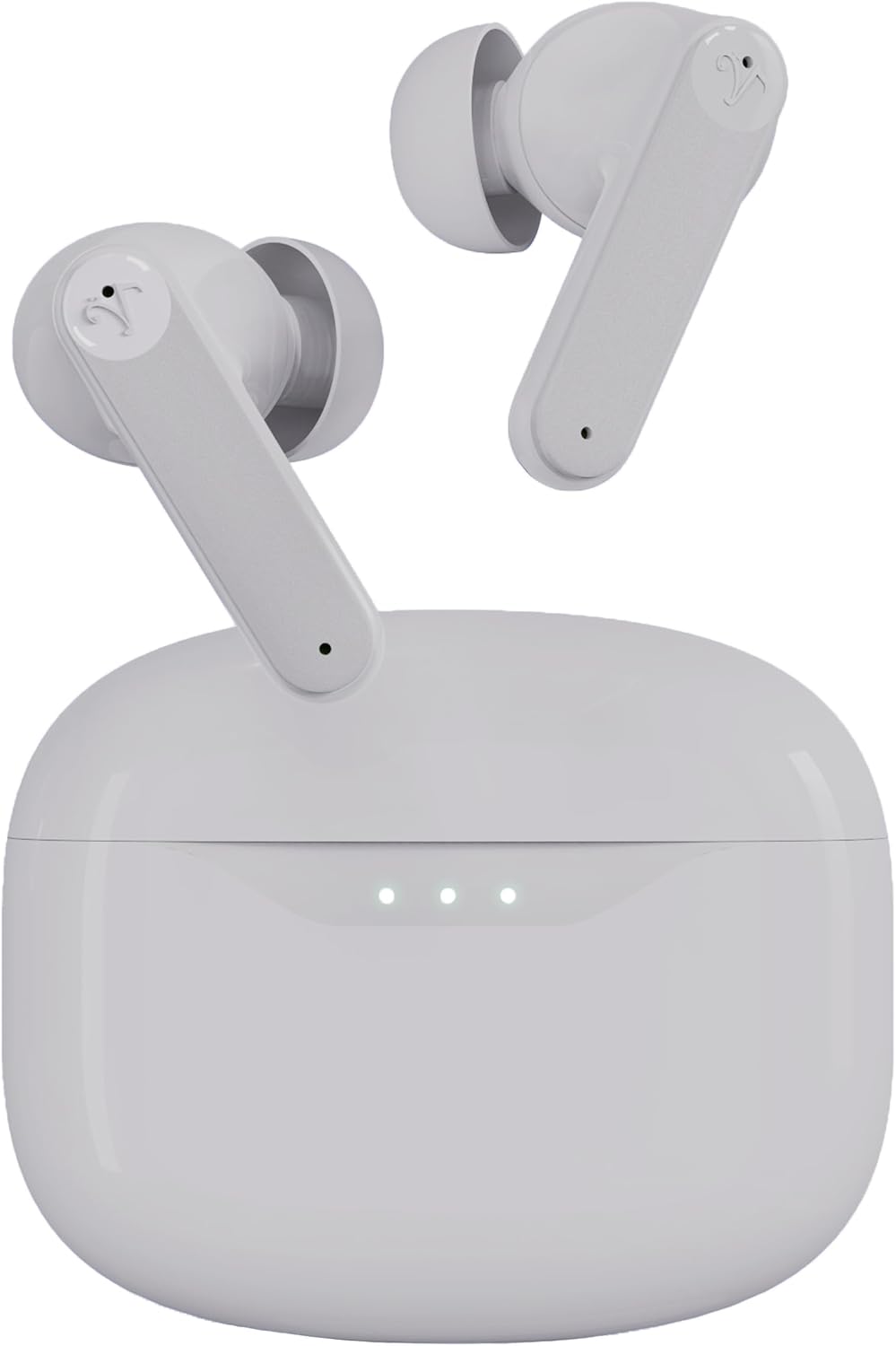


സജ്ജമാക്കുക
1. ഇയർബഡുകളും കേസും ചാർജ് ചെയ്യുന്നു
Before first use, fully charge the earbuds and charging case. Place the earbuds into the charging case and close the lid. Connect the USB-C charging cable to the charging port on the case and plug the other end into a USB power adapter (not included).
- ചാർജിംഗ് കേസിലെ ഇൻഡിക്കേറ്റർ ലൈറ്റുകൾ ചാർജിംഗ് നില കാണിക്കും.
- A full charge takes approximately 1.5 hours for the case and earbuds.
- ഫാസ്റ്റ് ചാർജിംഗ്: 15 മിനിറ്റ് ചാർജ് ചെയ്താൽ 5 മണിക്കൂർ വരെ പ്ലേടൈം ലഭിക്കും.
- Total playtime with the charging case is up to 40 hours.
2. ചെവി നുറുങ്ങുകൾ തിരഞ്ഞെടുക്കൽ
The Soundwave A1 earbuds come with three sizes of ear tips (Small, Medium, Large). Choose the size that provides the most secure and comfortable fit for optimal sound quality and noise cancellation performance.
- മുൻകൂട്ടി ഇൻസ്റ്റാൾ ചെയ്ത ചെവിയുടെ നുറുങ്ങുകൾ സൌമ്യമായി ഊരിയെടുക്കുക.
- Select a new pair of ear tips and push them onto the earbud nozzle until they are securely attached.
3. ബ്ലൂടൂത്ത് ഉപകരണവുമായി ജോടിയാക്കുന്നു
The earbuds will automatically enter pairing mode when first removed from the charging case.
- Open the charging case. The earbuds will power on and enter pairing mode (indicator lights will flash).
- നിങ്ങളുടെ ഉപകരണത്തിൽ (സ്മാർട്ട്ഫോൺ, ടാബ്ലെറ്റ് മുതലായവ), ബ്ലൂടൂത്ത് ക്രമീകരണങ്ങളിലേക്ക് പോകുക.
- ഇതിനായി തിരയുക available devices and select "Visual Land Soundwave A1".
- കണക്റ്റ് ചെയ്തുകഴിഞ്ഞാൽ, ഇയർബഡ് ഇൻഡിക്കേറ്റർ ലൈറ്റുകൾ മിന്നുന്നത് നിർത്തും, നിങ്ങൾ ഒരു സ്ഥിരീകരണ ടോൺ കേൾക്കും.
- തുടർന്നുള്ള ഉപയോഗത്തിനായി, കേസിൽ നിന്ന് നീക്കം ചെയ്യുമ്പോൾ ഇയർബഡുകൾ അവസാനം ജോടിയാക്കിയ ഉപകരണത്തിലേക്ക് യാന്ത്രികമായി കണക്റ്റ് ചെയ്യും.
പ്രവർത്തന നിർദ്ദേശങ്ങൾ
പവർ ഓൺ/ഓഫ്
- പവർ ഓൺ: ചാർജിംഗ് കേസ് തുറക്കുക, അല്ലെങ്കിൽ രണ്ട് ഇയർബഡുകളിലെയും ടച്ച് കൺട്രോൾ ഏരിയ 3 സെക്കൻഡ് ദീർഘനേരം അമർത്തുക.
- പവർ ഓഫ്: ഇയർബഡുകൾ ചാർജിംഗ് കെയ്സിലേക്ക് തിരികെ വയ്ക്കുക, ലിഡ് അടയ്ക്കുക, അല്ലെങ്കിൽ രണ്ട് ഇയർബഡുകളിലെയും ടച്ച് കൺട്രോൾ ഏരിയ 5 സെക്കൻഡ് ദീർഘനേരം അമർത്തുക.
ആക്ടീവ് നോയ്സ് റദ്ദാക്കൽ (ANC) മോഡുകൾ
The Soundwave A1 features 6-microphone Active Noise Cancellation with multiple modes:
- ANC ഓൺ: ആഴത്തിലുള്ള ശ്രവണ അനുഭവത്തിനായി ആംബിയന്റ് നോയ്സ് കുറയ്ക്കുന്നു.
- സുതാര്യത മോഡ്: Allows you to hear your surroundings while still enjoying your audio, enhancing awareness.
- ANC ഓഫാണ്: നോയ്സ് റദ്ദാക്കലോ സുതാര്യതയോ ഇല്ലാത്ത സ്റ്റാൻഡേർഡ് ഓഡിയോ മോഡ്.
മോഡുകൾ മാറാൻ: Tap and hold the touch control area on either earbud for 2 seconds to cycle through ANC On, Transparency Mode, and ANC Off.
ടച്ച് നിയന്ത്രണങ്ങൾ
The touch-sensitive area on each earbud allows for easy control of music and calls.
| ഫംഗ്ഷൻ | ആക്ഷൻ |
|---|---|
| സംഗീതം പ്ലേ ചെയ്യുക/താൽക്കാലികമായി നിർത്തുക | ഏതെങ്കിലും ഇയർബഡിൽ ഒറ്റ ടാപ്പ് ചെയ്യുക |
| അടുത്ത ട്രാക്ക് | വലതുവശത്തെ ഇയർബഡിൽ രണ്ടുതവണ ടാപ്പ് ചെയ്യുക |
| മുമ്പത്തെ ട്രാക്ക് | ഇടതുവശത്തെ ഇയർബഡിൽ രണ്ടുതവണ ടാപ്പ് ചെയ്യുക |
| വോളിയം കൂട്ടുക | വലത് ഇയർബഡിൽ മൂന്ന് തവണ ടാപ്പ് ചെയ്യുക |
| വോളിയം ഡൗൺ | ഇടത് ഇയർബഡിൽ മൂന്ന് തവണ ടാപ്പ് ചെയ്യുക |
| ഉത്തരം / കോൾ അവസാനിപ്പിക്കുക | ഏതെങ്കിലും ഇയർബഡിൽ ഒറ്റ ടാപ്പ് ചെയ്യുക |
| കോൾ നിരസിക്കുക | Tap and hold on either earbud for 2 seconds |
| വോയ്സ് അസിസ്റ്റൻ്റ് സജീവമാക്കുക | Tap and hold on either earbud for 3 seconds (when not on a call) |
| ANC മോഡുകൾ മാറുക | Tap and hold on either earbud for 2 seconds |
മെയിൻ്റനൻസ്
- വൃത്തിയാക്കൽ: ഇയർബഡുകളും ചാർജിംഗ് കെയ്സും മൃദുവായതും ഉണങ്ങിയതും ലിന്റ് രഹിതവുമായ തുണി ഉപയോഗിച്ച് പതിവായി വൃത്തിയാക്കുക. കഠിനമായ രാസവസ്തുക്കളോ ഉരച്ചിലുകളോ ഉള്ള വസ്തുക്കൾ ഉപയോഗിക്കരുത്.
- ചെവി ടിപ്പുകൾ: ചെവിയുടെ അറ്റം നീക്കം ചെയ്ത് ആവശ്യമെങ്കിൽ വെള്ളവും നേരിയ സോപ്പും ഉപയോഗിച്ച് വൃത്തിയാക്കുക. വീണ്ടും ഘടിപ്പിക്കുന്നതിന് മുമ്പ് അവ പൂർണ്ണമായും ഉണങ്ങിയെന്ന് ഉറപ്പാക്കുക.
- ചാർജിംഗ് കോൺടാക്റ്റുകൾ: ശരിയായ ചാർജിംഗ് ഉറപ്പാക്കാൻ, ഇയർബഡുകളിലെയും കേസിലെയും ചാർജിംഗ് കോൺടാക്റ്റുകൾ വൃത്തിയുള്ളതും അവശിഷ്ടങ്ങളില്ലാത്തതുമാണെന്ന് ഉറപ്പാക്കുക.
- ജല പ്രതിരോധം: The earbuds are IPX5 water-resistant, meaning they can withstand splashes and sweat. Do not submerge them in water or expose them to strong jets of water. Dry them thoroughly after exposure to moisture.
- സംഭരണം: ഉപയോഗത്തിലില്ലാത്തപ്പോൾ, ഇയർബഡുകൾ ചാർജിംഗ് കേസിൽ സൂക്ഷിക്കുക, അതുവഴി അവയെ സംരക്ഷിക്കുകയും ചാർജ്ജ് ആയി നിലനിർത്തുകയും ചെയ്യുക. ഉയർന്ന താപനിലയിൽ നിന്ന് മാറി തണുത്തതും വരണ്ടതുമായ സ്ഥലത്ത് സൂക്ഷിക്കുക.
ട്രബിൾഷൂട്ടിംഗ്
| പ്രശ്നം | സാധ്യമായ പരിഹാരം |
|---|---|
| ഇയർബഡുകൾ ജോടിയാക്കുന്നില്ല |
|
| ഒരു ഇയർബഡിൽ നിന്ന് ശബ്ദമില്ല |
|
| ചാർജിംഗ് കേസ് ചാർജുചെയ്യുന്നില്ല |
|
| Poor sound quality or weak ANC |
|
സ്പെസിഫിക്കേഷനുകൾ
| ഫീച്ചർ | വിശദാംശങ്ങൾ |
|---|---|
| മോഡലിൻ്റെ പേര് | സൗണ്ട്വേവ് A1 V2 |
| കണക്റ്റിവിറ്റി ടെക്നോളജി | ബ്ലൂടൂത്ത് 5.3, വയർലെസ് |
| ശബ്ദ നിയന്ത്രണം | സജീവ ശബ്ദ റദ്ദാക്കൽ (ANC) |
| മൈക്രോഫോണുകൾ | 6-mic system |
| ജല പ്രതിരോധ നില | IPX5 (വാട്ടർ റെസിസ്റ്റൻ്റ്) |
| ആകെ പ്ലേടൈം (കേസിനൊപ്പം) | 40 മണിക്കൂർ വരെ |
| ഫാസ്റ്റ് ചാർജിംഗ് | 15 മിനിറ്റ് ചാർജ് ചെയ്താൽ 5 മണിക്കൂർ വരെ പ്ലേ ടൈം ലഭിക്കും |
| നിയന്ത്രണ രീതി | ടച്ച് നിയന്ത്രണങ്ങൾ |
| ഇയർ ടിപ്പ് വലുപ്പങ്ങൾ | ചെറുത്, ഇടത്തരം, വലുത് |
| ചാർജിംഗ് പോർട്ട് | USB-C |
| കാരിയർ കെയ്സ് ബാറ്ററി കപ്പാസിറ്റി | 500 mAh |
| ഇനത്തിൻ്റെ ഭാരം | 2 ഔൺസ് (ആകെ) |
| മെറ്റീരിയൽ | പ്ലാസ്റ്റിക് |
| അനുയോജ്യമായ ഉപകരണങ്ങൾ | iOS and Android devices with Bluetooth support |
സുരക്ഷാ വിവരങ്ങൾ
Please read and follow these safety guidelines to ensure safe operation and prolong the lifespan of your earbuds:
- Do not expose earbuds to extreme temperatures, humidity, or corrosive environments.
- ഉപകരണം താഴെയിടുകയോ, അടിക്കുകയോ, വേർപെടുത്തുകയോ ചെയ്യുന്നത് ഒഴിവാക്കുക.
- Do not use unauthorized chargers or cables.
- കേൾവിക്ക് കേടുപാടുകൾ സംഭവിക്കുന്നത് തടയാൻ ദീർഘനേരം ഉയർന്ന ശബ്ദത്തിൽ കേൾക്കുന്നത് ഒഴിവാക്കുക.
- Use caution when using earbuds in situations requiring awareness of your surroundings (e.g., driving, cycling).
- കുട്ടികൾക്കും വളർത്തുമൃഗങ്ങൾക്കും ലഭ്യമാകാതെ സൂക്ഷിക്കുക.
വാറൻ്റിയും പിന്തുണയും
Visual Land products are designed for reliability and performance. For warranty information, technical support, or customer service inquiries, please refer to the official Visual Land webസൈറ്റിൽ ബന്ധപ്പെടുകയോ അവരുടെ ഉപഭോക്തൃ പിന്തുണയുമായി നേരിട്ട് ബന്ധപ്പെടുകയോ ചെയ്യുക. വാറന്റി ക്ലെയിമുകൾക്കായി നിങ്ങളുടെ വാങ്ങിയതിന്റെ തെളിവ് സൂക്ഷിക്കുക.
കൂടുതൽ സഹായത്തിന്, സന്ദർശിക്കുക: ആമസോണിലെ വിഷ്വൽ ലാൻഡ് സ്റ്റോർ