
FosPower FOSPWB-2436PP
FosPower Emergency Weather Radio (Model D8)
ഇൻസ്ട്രക്ഷൻ മാനുവൽ
ആമുഖം
Thank you for choosing the FosPower Emergency Weather Radio (Model D8). This multi-functional device is designed to provide reliable communication, power, and illumination during emergencies, power outages, or outdoor activities. With its robust features and multiple charging methods, it ensures you stay connected and prepared.

Image: The FosPower Emergency Weather Radio (Model D8) in orange and black, shown charging a smartphone via its USB port. The radio features a digital display, a flashlight on one end, and a compass on its strap.
ഉൽപ്പന്നം കഴിഞ്ഞുview
Familiarize yourself with the key components of your FosPower Emergency Weather Radio:
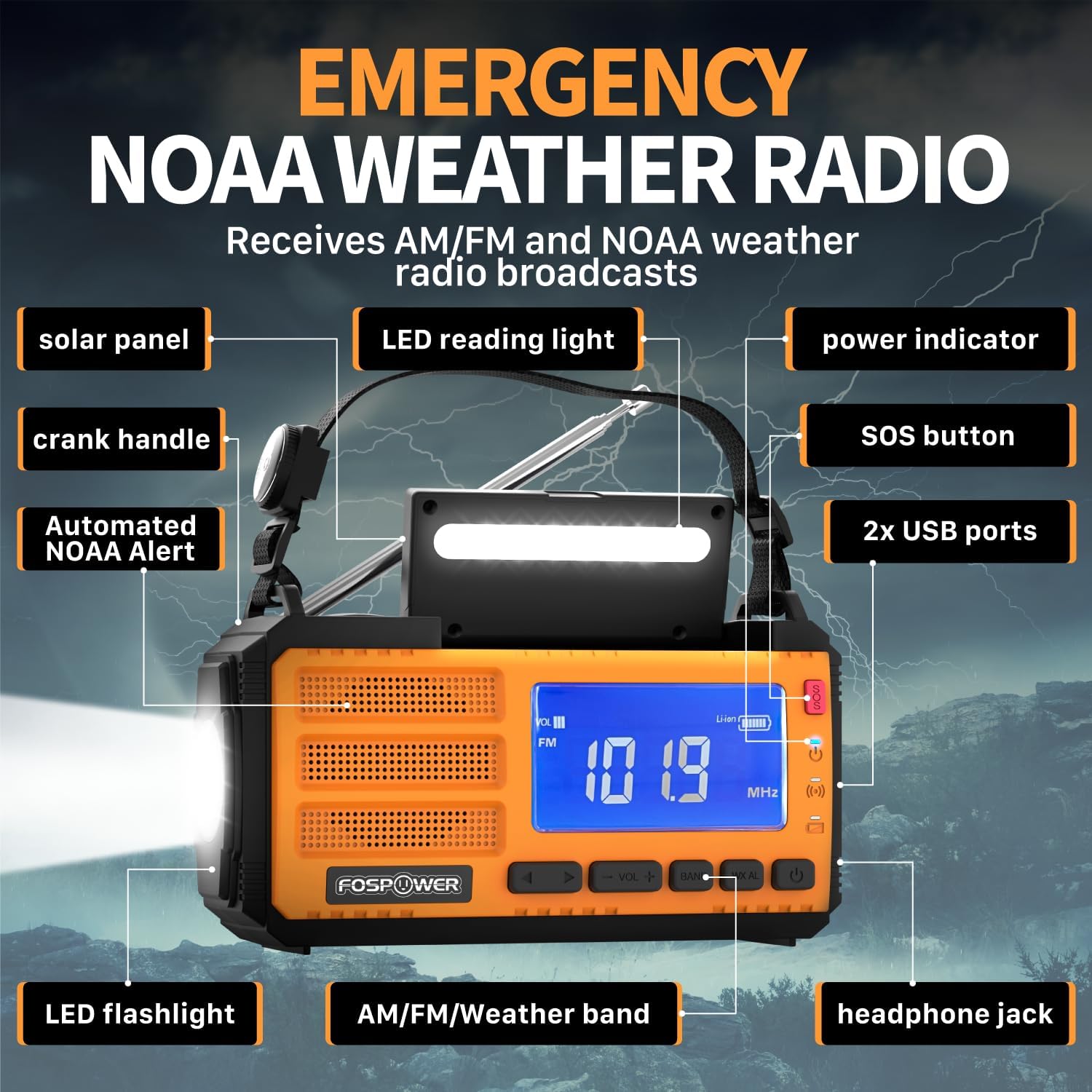
Image: A detailed diagram highlighting the various components of the FosPower Emergency Weather Radio, including the solar panel, LED reading light, power indicator, SOS button, USB ports, LED flashlight, AM/FM/Weather band controls, headphone jack, and crank handle.
- സോളാർ പാനൽ: Located on top for solar charging.
- ക്രാങ്ക് ഹാൻഡിൽ: Foldable handle for manual power generation.
- LED ഫ്ലാഷ്ലൈറ്റ്: Integrated on one end for directional lighting.
- LED Reading Light: Located under the solar panel for ambient light.
- USB പോർട്ടുകൾ: For charging external devices and recharging the radio.
- SOS ബട്ടൺ: Activates a loud siren and flashing light for emergencies.
- പവർ സൂചകം: നിലവിലെ ബാറ്ററി ലെവൽ പ്രദർശിപ്പിക്കുന്നു.
- AM/FM/Weather Band Controls: Buttons for radio tuning and volume.
- ഹെഡ്ഫോൺ ജാക്ക്: സ്വകാര്യ ശ്രവണത്തിനായി 3.5mm പോർട്ട്.
- Automated NOAA Alert: Feature to monitor local NOAA channels.
- Holding Strap with Compass: For portability and navigation.
സജ്ജമാക്കുക
പ്രാരംഭ ചാർജിംഗ്
Before first use, it is recommended to fully charge the radio using the USB-C charging cable. Connect the USB-C end to the radio's input port and the USB-A end to a compatible USB power adapter (not included) or computer USB port. The power indicator lights will show charging progress.
ഉൾപ്പെടുത്തിയ ഘടകങ്ങൾ
- FosPower Emergency Weather Radio (Model D8)
- Holding Strap with Compass
- USB-A മുതൽ USB-C വരെ ചാർജിംഗ് കേബിൾ
പ്രവർത്തന നിർദ്ദേശങ്ങൾ
റേഡിയോ ഓപ്പറേഷൻ
- പവർ ഓൺ/ഓഫ്: റേഡിയോ ഓണാക്കാനോ ഓഫാക്കാനോ പവർ ബട്ടൺ അമർത്തുക.
- ബാൻഡ് തിരഞ്ഞെടുക്കൽ: Press the 'BAND' button to cycle through AM, FM, and NOAA Weather Band (WB) frequencies.
- ട്യൂണിംഗ്: Use the 'TUNE +/-' buttons to manually adjust the frequency. For automatic scanning, press and hold the 'TUNE +/-' button.
- വോളിയം നിയന്ത്രണം: Use the 'VOL +/-' buttons to increase or decrease the volume.
- ആൻ്റിന: Extend the telescopic antenna fully for optimal FM and Weather Band reception. For AM, rotate the radio for best signal.
ലൈറ്റ് ഫംഗ്ഷനുകൾ

Image: The FosPower Emergency Weather Radio demonstrating its flashlight function on one end and its reading light function, which is located beneath the solar panel.
- ഫ്ലാഷ്ലൈറ്റ്: Press the dedicated flashlight button to turn it on. Some models may have multiple brightness settings or a strobe function, which can be cycled by pressing the button repeatedly.
- വായന വെളിച്ചം: Lift the solar panel to reveal the LED reading light. Press the reading light button to turn it on.
SOS അലാറം
In an emergency, press and hold the 'SOS' button. This will activate a loud siren and a flashing light to attract attention. Press the button again to deactivate the alarm.

Image: The FosPower Emergency Weather Radio with a red pulsating light indicating the SOS alarm is active, set against a backdrop of a stormy sky with lightning.
ചാർജിംഗ് ഓപ്ഷനുകൾ
The FosPower Emergency Weather Radio offers three versatile charging methods to ensure power availability in any situation:

Image: Three close-up views of the FosPower Emergency Weather Radio demonstrating its multiple power sources: USB charging port, solar panel, and hand-crank.
- USB-C ചാർജിംഗ്: For the fastest and most efficient charge, use the provided USB-C cable to connect the radio to a USB power source.
- സോളാർ ചാർജിംഗ്: Place the radio with the solar panel facing direct sunlight. This method is ideal for maintaining charge or for slow charging in outdoor environments.
- ഹാൻഡ്-ക്രാങ്ക് ചാർജിംഗ്: Extend the hand crank and rotate it clockwise or counter-clockwise at a steady pace. This method provides power for short bursts of use or to generate enough charge for other charging methods.
പവർ ബാങ്ക് പ്രവർത്തനം
The radio features a 37000mWh (10000mAh) power bank, allowing you to charge your USB-powered devices, such as smartphones, during emergencies or when off-grid. Connect your device to the radio's USB output port using your device's charging cable.

Image: The FosPower Emergency Weather Radio set against a natural background, highlighting its "37000mWh INTERNAL BATTERIES" and stating "High-capacity batteries support all day use."
മെയിൻ്റനൻസ്
- വൃത്തിയാക്കൽ: മൃദുവായതും ഉണങ്ങിയതുമായ തുണി ഉപയോഗിച്ച് റേഡിയോ തുടയ്ക്കുക. അബ്രാസീവ് ക്ലീനറുകളോ ലായകങ്ങളോ ഉപയോഗിക്കരുത്.
- സംഭരണം: നേരിട്ടുള്ള സൂര്യപ്രകാശത്തിൽ നിന്നും കടുത്ത താപനിലയിൽ നിന്നും അകലെ തണുത്തതും വരണ്ടതുമായ സ്ഥലത്ത് റേഡിയോ സൂക്ഷിക്കുക.
- ബാറ്ററി കെയർ: For optimal battery life, fully charge the radio at least once every three months if not in regular use.
ട്രബിൾഷൂട്ടിംഗ്
| പ്രശ്നം | സാധ്യമായ കാരണം | പരിഹാരം |
|---|---|---|
| റേഡിയോ ഓൺ ആകുന്നില്ല. | കുറഞ്ഞതോ തീർന്നതോ ആയ ബാറ്ററി. | Charge the radio using USB-C, solar, or hand-crank methods. |
| മോശം റേഡിയോ സ്വീകരണം. | ആന്റിന വികസിതമല്ല അല്ലെങ്കിൽ മോശം സിഗ്നൽ ഏരിയ. | Fully extend the telescopic antenna. Try repositioning the radio or moving to an open area. For AM, rotate the radio. |
| ബാഹ്യ ഉപകരണം ചാർജ് ചെയ്യുന്നില്ല. | റേഡിയോ ബാറ്ററി വളരെ കുറവാണ് അല്ലെങ്കിൽ കേബിൾ തെറ്റാണ്. | റേഡിയോയ്ക്ക് മതിയായ ചാർജ് ഉണ്ടെന്ന് ഉറപ്പാക്കുക. നിങ്ങളുടെ ഉപകരണത്തിന് അനുയോജ്യമായ ഒരു USB ചാർജിംഗ് കേബിൾ ഉപയോഗിക്കുക. |
| Flashlight/Reading light not working. | ബാറ്ററി ചാർജ് കുറവായതിനാലോ ലൈറ്റ് ബട്ടൺ ശരിയായി അമർത്താത്തതിനാലോ. | Charge the radio. Ensure the light button is pressed firmly. |
സ്പെസിഫിക്കേഷനുകൾ
- ഉൽപ്പന്ന അളവുകൾ: 6.89 x 3.15 x 3.86 ഇഞ്ച്
- ഇനത്തിൻ്റെ ഭാരം: 1.43 പൗണ്ട്
- മോഡൽ നമ്പർ: FOSPWB-2436PP
- ബാറ്ററി: 1 ലിഥിയം പോളിമർ ബാറ്ററി (ഉൾപ്പെടുത്തിയിരിക്കുന്നു)
- ഊർജ്ജ സ്രോതസ്സ്: Solar, Battery, Handcrank
- പിന്തുണയ്ക്കുന്ന റേഡിയോ ബാൻഡുകൾ: AM, FM, WB (Weather Band)
- പ്രത്യേക സവിശേഷത: Built-In Flashlight, SOS Alarm, Power Bank
- കണക്റ്റിവിറ്റി ടെക്നോളജി: USB
വാറൻ്റിയും പിന്തുണയും
FosPower offers a പരിമിതമായ ആജീവനാന്ത വാറൻ്റി for this product. For any inquiries or support needs, please contact FosPower customer service. Details regarding the warranty and how to reach support can typically be found on the manufacturer's official webസൈറ്റ് അല്ലെങ്കിൽ നിങ്ങളുടെ വാങ്ങൽ പ്ലാറ്റ്ഫോം വഴി.
Join millions of satisfied customers with our limited lifetime warranty, backed by our experienced and dedicated USA based customer service.
Ask a question about this manual
Ask about setup, troubleshooting, compatibility, parts, safety, or missing instructions. Manuals+ will review the question and use this page’s manual context to help answer it.