
ആമുഖം
Thank you for choosing the Music Hero TWS Rash Wireless Earbuds. These earbuds are designed for ultimate convenience and freedom, offering a completely wireless audio experience. Featuring True Wireless Stereo (TWS) technology, they provide a stable connection up to 10 meters from your device. The integrated touch controls allow for easy management of music, calls, and voice assistant functions without needing to access your connected smartphone, tablet, or laptop. The compact charging case ensures your earbuds are always ready for use.
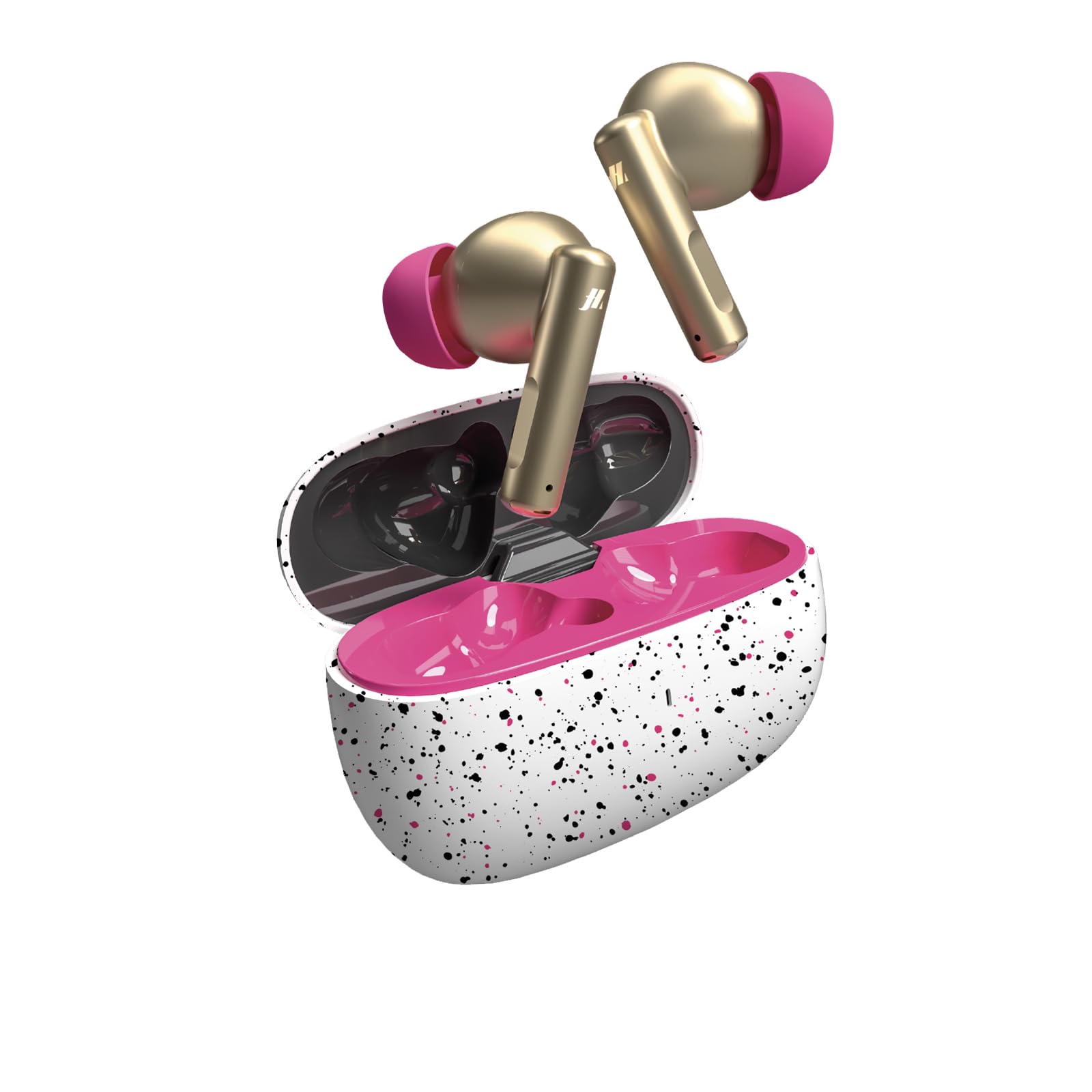
Image: Music Hero TWS Rash Wireless Earbuds in their charging case.
ബോക്സിൽ എന്താണുള്ളത്
നിങ്ങളുടെ പാക്കേജിലെ ഉള്ളടക്കങ്ങൾ പരിശോധിക്കുക. ഏതെങ്കിലും ഇനങ്ങൾ നഷ്ടപ്പെട്ടിട്ടുണ്ടെങ്കിലോ കേടായിട്ടുണ്ടെങ്കിലോ, നിങ്ങളുടെ റീട്ടെയിലറെ ബന്ധപ്പെടുക.
- Music Hero TWS Rash Wireless Earbuds
- Charging Case (200 mAh)
- USB-A മുതൽ USB-C വരെ ചാർജിംഗ് കേബിൾ
- ഉപയോക്തൃ മാനുവൽ
സജ്ജമാക്കുക
1. പ്രാരംഭ ചാർജിംഗ്
ആദ്യമായി ഉപയോഗിക്കുന്നതിന് മുമ്പ്, ഇയർബഡുകളും ചാർജിംഗ് കേസും പൂർണ്ണമായും ചാർജ് ചെയ്യുക.
- രണ്ട് ഇയർബഡുകളും ചാർജിംഗ് കേസിൽ വയ്ക്കുക.
- Connect the USB-A to USB-C cable to the charging port on the case and to a compatible USB power source (e.g., computer, wall adapter).
- The charging indicator on the case will show the charging status. A full charge for the earbuds takes approximately 1 hour.
- പൂർണ്ണമായി ചാർജ് ചെയ്തുകഴിഞ്ഞാൽ, ചാർജിംഗ് കേബിൾ വിച്ഛേദിക്കുക.
2. നിങ്ങളുടെ ഉപകരണവുമായി ജോടിയാക്കുന്നു
The earbuds use Bluetooth technology to connect wirelessly to your smartphone, tablet, or laptop.
- ഇയർബഡുകൾ ചാർജ് ചെയ്തിട്ടുണ്ടെന്നും ചാർജിംഗ് കെയ്സിനുള്ളിലാണെന്നും ഉറപ്പാക്കുക.
- ചാർജിംഗ് കേസ് തുറക്കുക. ഇയർബഡുകൾ സ്വയമേവ ജോടിയാക്കൽ മോഡിലേക്ക് പ്രവേശിക്കും (ഇയർബഡുകളിൽ മിന്നുന്ന ലൈറ്റുകൾ സൂചിപ്പിക്കുന്നത്).
- നിങ്ങളുടെ ഉപകരണത്തിൽ (സ്മാർട്ട്ഫോൺ, ടാബ്ലെറ്റ് മുതലായവ), ബ്ലൂടൂത്ത് ക്രമീകരണങ്ങളിലേക്ക് പോകുക.
- ബ്ലൂടൂത്ത് ഓണാക്കി ലഭ്യമായ ഉപകരണങ്ങൾക്കായി തിരയുക.
- "തിരഞ്ഞെടുക്കുക"TWS RASHലഭ്യമായ ഉപകരണങ്ങളുടെ പട്ടികയിൽ നിന്ന് ".
- Once connected, you will hear a confirmation tone, and the earbud lights will stop flashing.
- ഉപകരണത്തിൽ ബ്ലൂടൂത്ത് പ്രവർത്തനക്ഷമമാക്കിയിട്ടുണ്ടെങ്കിൽ, കേസിൽ നിന്ന് പുറത്തെടുക്കുമ്പോൾ ഇയർബഡുകൾ അവസാനം ജോടിയാക്കിയ ഉപകരണവുമായി യാന്ത്രികമായി വീണ്ടും കണക്റ്റുചെയ്യും.
പ്രവർത്തന നിർദ്ദേശങ്ങൾ
The Music Hero TWS Rash earbuds feature intuitive touch controls on each earbud.
സംഗീത പ്ലേബാക്ക്
- പ്ലേ/താൽക്കാലികമായി നിർത്തുക: ഇയർബഡുകളിൽ ഏതെങ്കിലുമൊന്നിൽ ഒറ്റ ടാപ്പ് ചെയ്യുക.
- അടുത്ത ട്രാക്ക്: വലതുവശത്തെ ഇയർബഡിൽ രണ്ടുതവണ ടാപ്പ് ചെയ്യുക.
- മുമ്പത്തെ ട്രാക്ക്: ഇടതുവശത്തെ ഇയർബഡിൽ രണ്ടുതവണ ടാപ്പ് ചെയ്യുക.
- വോളിയം കൂട്ടുക: വലതുവശത്തെ ഇയർബഡിൽ മൂന്ന് തവണ ടാപ്പ് ചെയ്യുക.
- വോളിയം താഴേക്ക്: ഇടതുവശത്തെ ഇയർബഡിൽ മൂന്ന് തവണ ടാപ്പ് ചെയ്യുക.
കോൾ മാനേജുമെന്റ്
- ഉത്തരം/അവസാന കോൾ: ഇയർബഡുകളിൽ ഏതെങ്കിലുമൊന്നിൽ ഒറ്റ ടാപ്പ് ചെയ്യുക.
- കോൾ നിരസിക്കുക: ഏതെങ്കിലും ഇയർബഡിൽ 2 സെക്കൻഡ് അമർത്തിപ്പിടിക്കുക.
വോയ്സ് അസിസ്റ്റൻ്റ്
- വോയ്സ് അസിസ്റ്റന്റിനെ സജീവമാക്കുക: ഏതെങ്കിലും ഇയർബഡിൽ 3 സെക്കൻഡ് അമർത്തിപ്പിടിക്കുക.
പവർ ഓൺ/ഓഫ്
- പവർ ഓൺ: ചാർജിംഗ് കെയ്സിൽ നിന്ന് ഇയർബഡുകൾ എടുക്കുക.
- പവർ ഓഫ്: ചാർജിംഗ് കെയ്സിലേക്ക് ഇയർബഡുകൾ തിരികെ വയ്ക്കുക, ലിഡ് അടയ്ക്കുക.
മെയിൻ്റനൻസ്
Proper care will extend the life of your Music Hero TWS Rash earbuds.
- വൃത്തിയാക്കൽ: മൃദുവായതും ഉണങ്ങിയതും ലിന്റ് രഹിതവുമായ തുണി ഉപയോഗിച്ച് ഇയർബഡുകളും ചാർജിംഗ് കെയ്സും സൌമ്യമായി തുടയ്ക്കുക. കഠിനമായ രാസവസ്തുക്കളോ ഉരച്ചിലുകളോ ഉള്ള വസ്തുക്കൾ ഉപയോഗിക്കരുത്.
- സംഭരണം: ഉപയോഗത്തിലില്ലാത്തപ്പോൾ, ഇയർബഡുകൾ സംരക്ഷിക്കുന്നതിനും ചാർജ്ജ് ചെയ്ത നിലയിൽ നിലനിർത്തുന്നതിനും എല്ലായ്പ്പോഴും ചാർജിംഗ് കേസിൽ സൂക്ഷിക്കുക.
- ചാർജിംഗ്: Charge the case regularly, even if not using the earbuds frequently, to maintain battery health.
- ജല പ്രതിരോധം: The earbuds are described as "Impermeabile" (Waterproof). However, avoid submerging them in water or exposing them to heavy rain for extended periods. Dry them thoroughly if they get wet.
ട്രബിൾഷൂട്ടിംഗ്
| പ്രശ്നം | പരിഹാരം |
|---|---|
| ഇയർബഡുകൾ ഉപകരണവുമായി ജോടിയാക്കുന്നില്ല. |
|
| ഒരു ഇയർബഡ് മാത്രമാണ് പ്രവർത്തിക്കുന്നത്. |
|
| ഇയർബഡുകൾ ചാർജ് ചെയ്യുന്നില്ല. |
|
| മോശം ശബ്ദ നിലവാരം അല്ലെങ്കിൽ വിച്ഛേദങ്ങൾ. |
|
സ്പെസിഫിക്കേഷനുകൾ
| ബ്രാൻഡ് | സംഗീത നായകൻ |
| മോഡലിൻ്റെ പേര് | TWS RASH |
| മോഡൽ നമ്പർ | 8018417464225 |
| കണക്റ്റിവിറ്റി ടെക്നോളജി | വയർലെസ് |
| വയർലെസ് കമ്മ്യൂണിക്കേഷൻ ടെക്നോളജി | ബ്ലൂടൂത്ത് |
| ബ്ലൂടൂത്ത് പതിപ്പ് | 5.0 |
| ബ്ലൂടൂത്ത് ശ്രേണി | 10 മീറ്റർ |
| Earbud Placement | ചെവിയിൽ |
| ഫോം ഫാക്ടർ | യഥാർത്ഥ വയർലെസ് |
| നിയന്ത്രണ തരം | ടച്ച് നിയന്ത്രണങ്ങൾ |
| മൈക്രോഫോൺ | സംയോജിപ്പിച്ചത് |
| ചാർജിംഗ് കേസ് കപ്പാസിറ്റി | 200 mAh |
| Earbud Average Battery Life | 3 മണിക്കൂർ |
| ബാറ്ററി ചാർജിംഗ് സമയം | 1 മണിക്കൂർ |
| ഫ്രീക്വൻസി റേഞ്ച് | 20 ഹെർട്സ് - 20,000 ഹെർട്സ് |
| ജല പ്രതിരോധ നില | വാട്ടർപ്രൂഫ് |
| ഇനത്തിൻ്റെ ഭാരം | 95 ഗ്രാം |
| അനുയോജ്യമായ ഉപകരണങ്ങൾ | All devices with wireless connection |
വാറൻ്റിയും പിന്തുണയും
വാറൻ്റി വിവരങ്ങൾ
The Music Hero TWS Rash Wireless Earbuds come with a 2 വർഷത്തെ നിർമ്മാതാവിന്റെ വാറന്റി വാങ്ങിയ തീയതി മുതൽ. സാധാരണ ഉപയോഗത്തിലുള്ള മെറ്റീരിയലുകളിലെയും നിർമ്മാണത്തിലെയും വൈകല്യങ്ങൾ ഈ വാറന്റി ഉൾക്കൊള്ളുന്നു. ദുരുപയോഗം, അപകടങ്ങൾ, അനധികൃത പരിഷ്കാരങ്ങൾ, അല്ലെങ്കിൽ സാധാരണ തേയ്മാനം എന്നിവ മൂലമുണ്ടാകുന്ന നാശനഷ്ടങ്ങൾക്ക് ഇത് പരിരക്ഷ നൽകുന്നില്ല. വാറന്റി ക്ലെയിമുകൾക്കായി നിങ്ങളുടെ വാങ്ങലിന്റെ തെളിവ് സൂക്ഷിക്കുക.
ഉപഭോക്തൃ പിന്തുണ
For technical assistance, troubleshooting, or warranty claims, please contact your retailer or the manufacturer directly. Refer to the packaging or the official Music Hero webബന്ധപ്പെടാനുള്ള വിശദാംശങ്ങൾക്കുള്ള സൈറ്റ്.


