
ആമുഖം
Thank you for choosing the RISEBASS Portable Wireless Bluetooth Speaker. This speaker is designed to provide high-quality audio with convenient portability, featuring Bluetooth connectivity, True Wireless Stereo (TWS) functionality, and dynamic party lights. This manual provides essential information for setting up, operating, maintaining, and troubleshooting your speaker to ensure optimal performance and longevity.
ഉൽപ്പന്നം ഉപയോഗിക്കുന്നതിന് മുമ്പ് ദയവായി ഈ മാനുവൽ നന്നായി വായിക്കുകയും ഭാവി റഫറൻസിനായി സൂക്ഷിക്കുകയും ചെയ്യുക.
സുരക്ഷാ വിവരങ്ങൾ
സുരക്ഷിതമായ പ്രവർത്തനം ഉറപ്പാക്കുന്നതിനും കേടുപാടുകൾ തടയുന്നതിനും, ദയവായി ഇനിപ്പറയുന്ന മുൻകരുതലുകൾ പാലിക്കുക:
- സ്പീക്കറിൽ വെള്ളം കയറുകയോ അമിതമായ ഈർപ്പം കയറുകയോ ചെയ്യരുത്. ഈ ഉൽപ്പന്നം വാട്ടർപ്രൂഫ് അല്ല.
- തീവ്രമായ താപനില, നേരിട്ടുള്ള സൂര്യപ്രകാശം, പൊടി നിറഞ്ഞ ചുറ്റുപാടുകൾ എന്നിവ ഒഴിവാക്കുക.
- Do not disassemble, repair, or modify the speaker. Refer all servicing to qualified personnel.
- നൽകിയിരിക്കുന്ന ചാർജിംഗ് കേബിളോ സാക്ഷ്യപ്പെടുത്തിയ തത്തുല്യമായതോ മാത്രം ഉപയോഗിക്കുക.
- സ്പീക്കർ താപ സ്രോതസ്സുകളിൽ നിന്നും തുറന്ന തീജ്വാലകളിൽ നിന്നും അകറ്റി നിർത്തുക.
- വെന്റിലേഷൻ തുറക്കൽ തടയരുത്.
പാക്കേജ് ഉള്ളടക്കം
നിങ്ങളുടെ പാക്കേജിൽ എല്ലാ ഇനങ്ങളും ഉണ്ടെന്ന് ഉറപ്പാക്കുക:
- RISEBASS Portable Wireless Bluetooth Speaker
- Charging Cable (Mini USB)

Image: RISEBASS Portable Wireless Bluetooth Speaker shown alongside its Mini USB charging cable, illustrating the product's compact dimensions (4"W x 7"H).
ഉൽപ്പന്നം കഴിഞ്ഞുview
Familiarize yourself with the main components and controls of your RISEBASS speaker.

Image: An illustration of the RISEBASS speaker with callouts indicating its core features: Bluetooth wireless connection, 400 Watts output, built-in rechargeable battery, TWS function, USB/TF card input, and FM radio capability.
നിയന്ത്രണങ്ങളും തുറമുഖങ്ങളും:
- MODE/TWS Button: Switches between input modes (Bluetooth, FM, USB/TF) and initiates True Wireless Stereo pairing.
- Previous Track/Volume Down Button (-): മുമ്പത്തെ ട്രാക്കിനായി ഹ്രസ്വമായി അമർത്തുക, ശബ്ദം കുറയ്ക്കാൻ ദീർഘനേരം അമർത്തുക.
- Play/Pause/Scan Button: Controls playback, answers/ends calls, and initiates FM radio scan.
- Next Track/Volume Up Button (+): അടുത്ത ട്രാക്കിനായി ഷോർട്ട് പ്രസ്സ് ചെയ്യുക, വോളിയം കൂട്ടാൻ ദീർഘനേരം അമർത്തുക.
- USB പോർട്ട്: യുഎസ്ബി ഡ്രൈവ് പ്ലേബാക്കിനായി.
- ടിഎഫ് കാർഡ് സ്ലോട്ട്: TF (മൈക്രോ എസ്ഡി) കാർഡ് പ്ലേബാക്കിനായി.
- ചാർജിംഗ് പോർട്ട്: Mini USB port for charging the speaker.
- വൈദ്യുതി സ്വിച്ച്: സ്പീക്കർ ഓണാക്കുകയോ ഓഫാക്കുകയോ ചെയ്യുന്നു.
സജ്ജമാക്കുക
1. സ്പീക്കറിൽ നിന്ന് നിരക്ക് ഈടാക്കുന്നു
Before first use, fully charge the speaker. Connect the provided Mini USB charging cable to the speaker's charging port and the other end to a USB power source (e.g., computer USB port, USB wall adapter). The charging indicator light will illuminate. Once fully charged (approximately 20 hours of battery life), the indicator light may change or turn off.
2. പവർ ഓൺ/ഓഫ്
Locate the Power Switch on the speaker. Slide the switch to the "ON" position to power on the speaker. You will hear an audible prompt indicating it's ready for Bluetooth pairing. To power off, slide the switch to the "OFF" position.
പ്രവർത്തന നിർദ്ദേശങ്ങൾ
ബ്ലൂടൂത്ത് ജോടിയാക്കൽ
The speaker automatically enters Bluetooth pairing mode when powered on. Follow these steps to connect your device:
- Ensure the speaker is powered on and within 10 meters (33 feet) of your device.
- Enable Bluetooth on your smartphone, tablet, laptop, or other compatible device.
- ഇതിനായി തിരയുക available Bluetooth devices. You should see "RISEBASS" or "RB-1547" in the list.
- Select "RISEBASS" or "RB-1547" to connect. A confirmation tone will sound upon successful pairing.

Image: Two individuals relaxing on a beach, each holding a smartphone, demonstrating the ease of connecting to the RISEBASS speaker via Bluetooth with a single click.
യഥാർത്ഥ വയർലെസ് സ്റ്റീരിയോ (TWS) പ്രവർത്തനം
The TWS function allows you to pair two RISEBASS speakers together for a definitive stereo sound experience. This feature is available when you have two identical RISEBASS speakers.
- രണ്ട് സ്പീക്കറുകളും ഓണാണെന്നും ബ്ലൂടൂത്ത് മോഡിൽ ആണെന്നും ഉറപ്പാക്കുക.
- സ്പീക്കറുകളിലൊന്നിൽ (ഇത് നിങ്ങളുടെ പ്രാഥമിക സ്പീക്കറായിരിക്കും), അമർത്തിപ്പിടിക്കുക മോഡ്/TWS button for 3 seconds. You will hear an indication that it is searching for another speaker.
- The two speakers will automatically connect to each other. A confirmation tone will sound once TWS pairing is successful.
- ഇനി, "Bluetooth Pairing" വിഭാഗത്തിൽ വിവരിച്ചിരിക്കുന്നതുപോലെ Bluetooth വഴി നിങ്ങളുടെ ഉപകരണം പ്രാഥമിക സ്പീക്കറുമായി ബന്ധിപ്പിക്കുക. സ്റ്റീരിയോയിൽ രണ്ട് സ്പീക്കറുകളിലൂടെയും ഓഡിയോ പ്ലേ ചെയ്യും.
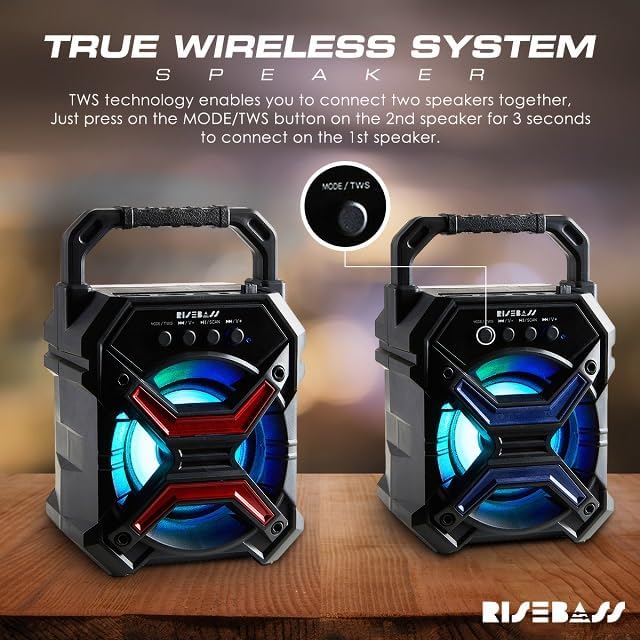
Image: A visual guide demonstrating the True Wireless System (TWS) feature, showing two speakers and an arrow pointing to the MODE/TWS button, indicating that pressing it for 3 seconds on one speaker will connect it to a second speaker for stereo sound.
Playing Music from USB Drive or TF Card
Insert a USB drive or TF (MicroSD) card into the respective port on the speaker. The speaker will automatically switch to USB/TF mode and begin playing audio files. Use the Previous/Next Track buttons to navigate and the Play/Pause button to control playback.

Image: A family enjoying music and dancing in a living room, with the RISEBASS speaker prominently displayed, symbolizing the "USB Symphony in Stereo" feature for playing music directly from a USB device.
എഫ്എം റേഡിയോ പ്രവർത്തനം
എഫ്എം റേഡിയോ ഉപയോഗിക്കുന്നതിന്:
- അമർത്തുക മോഡ്/TWS button repeatedly until you hear the FM radio mode activated.
- അമർത്തുക പ്ലേ/താൽക്കാലികമായി നിർത്തുക/സ്കാൻ ചെയ്യുക button once to automatically scan and save available FM stations.
- Use the Previous/Next Track buttons to switch between saved stations.
പാർട്ടി വിളക്കുകൾ
The speaker features built-in colorful LED lights that enhance the listening experience. These lights activate automatically when the speaker is powered on. There is no specific control to turn off or change the light patterns independently.

Image: A group of people celebrating at a party, with the RISEBASS speaker in the foreground emitting colorful glowing lights, illustrating how the fun lighting effects add to the party atmosphere.
മെയിൻ്റനൻസ്
Proper care will extend the life of your speaker:
- വൃത്തിയാക്കൽ: സ്പീക്കറിന്റെ പ്രതലം തുടയ്ക്കാൻ മൃദുവായതും ഉണങ്ങിയതുമായ തുണി ഉപയോഗിക്കുക. അബ്രാസീവ് ക്ലീനറുകൾ, വാക്സുകൾ, ലായകങ്ങൾ എന്നിവ ഉപയോഗിക്കരുത്.
- സംഭരണം: ദീർഘനേരം ഉപയോഗിക്കാത്തപ്പോൾ, സ്പീക്കർ തണുത്തതും വരണ്ടതുമായ സ്ഥലത്ത് സൂക്ഷിക്കുക, നേരിട്ടുള്ള സൂര്യപ്രകാശത്തിൽ നിന്നും കടുത്ത താപനിലയിൽ നിന്നും അകറ്റി നിർത്തുക.
- ബാറ്ററി കെയർ: ബാറ്ററിയുടെ ആരോഗ്യം നിലനിർത്താൻ, ബാറ്ററി ഇടയ്ക്കിടെ പൂർണ്ണമായും ഡിസ്ചാർജ് ചെയ്യുന്നത് ഒഴിവാക്കുക. തുടർച്ചയായി ഉപയോഗിക്കുന്നില്ലെങ്കിൽ പോലും, സ്പീക്കർ പതിവായി റീചാർജ് ചെയ്യുക.
ട്രബിൾഷൂട്ടിംഗ്
നിങ്ങളുടെ സ്പീക്കറിൽ പ്രശ്നങ്ങൾ നേരിടുകയാണെങ്കിൽ, ഇനിപ്പറയുന്ന പൊതുവായ പ്രശ്നങ്ങളും പരിഹാരങ്ങളും പരിശോധിക്കുക:
| പ്രശ്നം | സാധ്യമായ കാരണം | പരിഹാരം |
|---|---|---|
| സ്പീക്കർ പവർ ഓൺ ചെയ്യുന്നില്ല. | കുറഞ്ഞ ബാറ്ററി. | നൽകിയിരിക്കുന്ന USB കേബിൾ ഉപയോഗിച്ച് സ്പീക്കർ പൂർണ്ണമായും ചാർജ് ചെയ്യുക. |
| ബ്ലൂടൂത്ത് വഴി ജോടിയാക്കാൻ കഴിയില്ല. | ഉപകരണത്തിൽ Bluetooth പ്രവർത്തനക്ഷമമാക്കിയിട്ടില്ല; സ്പീക്കർ ജോടിയാക്കൽ മോഡിൽ ഇല്ല; ഉപകരണത്തിൽ നിന്ന് വളരെ അകലെയാണ്. | Ensure Bluetooth is on your device. Power cycle the speaker to re-enter pairing mode. Move speaker closer to device (within 10m). |
| ശബ്ദമില്ല അല്ലെങ്കിൽ കുറഞ്ഞ ശബ്ദമില്ല. | Volume too low on speaker or connected device; incorrect input mode. | Increase volume on both speaker and connected device. Press MODE/TWS button to select correct input mode (Bluetooth, USB, TF, FM). |
| TWS ജോടിയാക്കൽ പരാജയപ്പെടുന്നു. | Speakers too far apart; incorrect TWS pairing procedure. | Ensure both speakers are identical RISEBASS models and close to each other. Follow TWS pairing steps precisely (press and hold MODE/TWS on one speaker). |
| ചാർജിംഗ് പ്രശ്നങ്ങൾ. | Faulty cable or power source; charging port damage. | Try a different USB cable and power adapter. Ensure the charging port is clean and undamaged. If issues persist, contact support. |
സ്പെസിഫിക്കേഷനുകൾ
| ഫീച്ചർ | വിശദാംശങ്ങൾ |
|---|---|
| ബ്രാൻഡ് | റിസബാസ് |
| മോഡലിൻ്റെ പേര് | RB-1547 |
| ഉൽപ്പന്ന അളവുകൾ | 3"D x 4"W x 7"H |
| സ്പീക്കർ തരം | ഔട്ട്ഡോർ ഇൻഡോർ |
| കണക്റ്റിവിറ്റി ടെക്നോളജി | ബ്ലൂടൂത്ത് |
| വയർലെസ് കമ്മ്യൂണിക്കേഷൻ ടെക്നോളജി | ബ്ലൂടൂത്ത് |
| ബ്ലൂടൂത്ത് ശ്രേണി | 10 മീറ്റർ |
| പവർ ഉറവിടം | ബാറ്ററി പവർ |
| ബാറ്ററി ലൈഫ് | 20 മണിക്കൂർ വരെ |
| സ്പീക്കർ പരമാവധി ഔട്ട്പുട്ട് പവർ | 400 വാട്ട്സ് |
| ഓഡിയോ put ട്ട്പുട്ട് മോഡ് | സ്റ്റീരിയോ (TWS ഉള്ളത്) |
| നിയന്ത്രണ രീതി | ബട്ടൺ |
| പ്രത്യേക ഫീച്ചർ | LED Light, Lightweight |
| മെറ്റീരിയൽ | പ്ലാസ്റ്റിക് |
| വാട്ടർപ്രൂഫ് ആണ് | ഇല്ല |
| ഉൾപ്പെടുത്തിയ ഘടകങ്ങൾ | Speaker with Charging Cable |
വാറൻ്റിയും പിന്തുണയും
The RISEBASS Portable Wireless Bluetooth Speaker comes with a limited warranty. For specific warranty terms and conditions, please refer to the documentation included with your purchase or contact RISEBASS customer support.
If you require further assistance or have questions not covered in this manual, please visit the official RISEBASS store on Amazon or contact their customer service directly. You can find contact information on the product packaging or the brand's official webസൈറ്റ്.
ഓൺലൈൻ പിന്തുണ: RISEBASS Amazon Store