
ആമുഖം
This manual provides detailed instructions for the installation, operation, and maintenance of your NAPCAT 5MP Solar Wireless Security Camera Outdoor System. This system is designed to provide reliable outdoor surveillance with features such as solar power, high-definition video, advanced motion detection, and flexible storage options. Please read this manual thoroughly before using the product to ensure proper setup and optimal performance.

ചിത്രം 1: ഓവർview of the NAPCAT 5MP Solar Wireless Security Camera Outdoor System.
ബോക്സിൽ എന്താണുള്ളത്
ഇൻസ്റ്റാളേഷനുമായി മുന്നോട്ടുപോകുന്നതിനുമുമ്പ് എല്ലാ ഘടകങ്ങളും പാക്കേജിൽ ഉണ്ടെന്ന് ഉറപ്പാക്കുക.

ചിത്രം 2: പാക്കേജ് ഉള്ളടക്കങ്ങൾ.
- Wireless NVR (1 unit)
- Wireless Security Cameras (4 units)
- പവർ അഡാപ്റ്റർ (1 യൂണിറ്റ്)
- HDMI കേബിൾ (1 യൂണിറ്റ്)
- 1 മി. നെറ്റ്വർക്ക് കേബിൾ (1 യൂണിറ്റ്)
- 10ft (3m) USB-C Extension Cord (4 units)
- സോളാർ പാനലുകൾ (4 യൂണിറ്റുകൾ)
- Solar Panel Mounting Bracket (4 units)
- യുഎസ്ബി മൗസ് (1 യൂണിറ്റ്)
- Camera Holding Bracket (2 units)
- Pack of Screws (4 packs)
- Reset Needle Pin (1 unit)
- Surveillance Poster (1 unit)
- ക്വിക്ക് സ്റ്റാർട്ട് ഗൈഡ് (1 യൂണിറ്റ്)
- Screw Positioning Stickers (4 units)
സജ്ജമാക്കുക
1. NVR Initial Setup
- NVR കണക്റ്റുചെയ്യുക:
- നൽകിയിരിക്കുന്ന HDMI കേബിൾ ഉപയോഗിച്ച് NVR ഒരു മോണിറ്ററുമായി ബന്ധിപ്പിക്കുക.
- Connect the NVR to your router using the provided network cable for internet access.
- Connect the power adapter to the NVR and plug it into a power outlet. The NVR will power on automatically.
- പ്രാരംഭ കോൺഫിഗറേഷൻ: Follow the on-screen prompts to complete the initial setup, including language selection, time zone, and creating an administrator password.

Figure 3: NVR Connection Setup.
2. Camera and Solar Panel Installation
The cameras are designed for outdoor use and are IP66 weatherproof. The solar panels provide continuous power to the cameras, eliminating the need for frequent battery charging.
- ചാർജ് ക്യാമറകൾ: Ensure cameras are sufficiently charged before installation. While solar panels provide continuous power, an initial charge may be beneficial.
- ഇൻസ്റ്റലേഷൻ ലൊക്കേഷൻ തിരഞ്ഞെടുക്കുക: Select a location that provides optimal camera view and sufficient sunlight exposure for the solar panel. Ensure the camera is within range of the NVR's Wi-Fi signal.
- Mounting Options for Solar Panel:
- Option 1: Separate Installation: Mount the solar panel in a location with maximum sunlight exposure, and connect it to the camera using the provided USB-C extension cord. This allows for flexible placement of both the camera and the solar panel.
- Option 2: Integrated Installation: Mount the solar panel directly onto the camera bracket, ideal for locations where both can receive adequate sunlight.
- സുരക്ഷിത മൗണ്ടിംഗ്: Use the provided screws and mounting brackets to securely attach the cameras and solar panels to a wall or eave. Use the screw positioning stickers for accurate drilling.
- Connect Solar Panel to Camera: Plug the USB-C cable from the solar panel into the camera's charging port.

Figure 4: Solar Panel Installation Options.

Figure 5: Solar Power for Continuous Operation.
3. ആപ്പ് ഇൻസ്റ്റാളേഷനും ജോടിയാക്കലും
To access your camera system remotely and manage settings, download the "Napcat Life" app.
- ആപ്പ് ഡൗൺലോഡ് ചെയ്യുക: ഇതിനായി തിരയുക "Napcat Life" on the Google Play Store (for Android) or Apple App Store (for iOS) and install it on your smartphone or tablet.
- അക്കൗണ്ട് സൃഷ്ടിക്കുക: Open the app and follow the instructions to create a new account.
- ഉപകരണം ചേർക്കുക:
- On the NVR interface, navigate to the device pairing section.
- In the Napcat Life app, tap "Add Device" and scan the QR code displayed on the NVR monitor.
- ജോടിയാക്കൽ പ്രക്രിയ പൂർത്തിയാക്കാൻ ആപ്പിലെ ഓൺ-സ്ക്രീൻ നിർദ്ദേശങ്ങൾ പാലിക്കുക.

Figure 6: Napcat Life App Interface.
സിസ്റ്റം പ്രവർത്തിപ്പിക്കുന്നു
1. Viewഓപ്ഷനുകൾ
Your NAPCAT system offers multiple ways to view തത്സമയംtage and recordings:
- Local Monitor (HDMI): Connect a monitor directly to the NVR via HDMI for local viewing without internet access. Use the included USB mouse for navigation.
- Smartphone App ("Napcat Life"): View live feeds, playback recordings, and manage settings remotely from your smartphone or tablet.
- പിസി ക്ലയന്റ്: Install the NAPCAT PC client software on your computer for remote viewഇംഗും മാനേജ്മെന്റും.
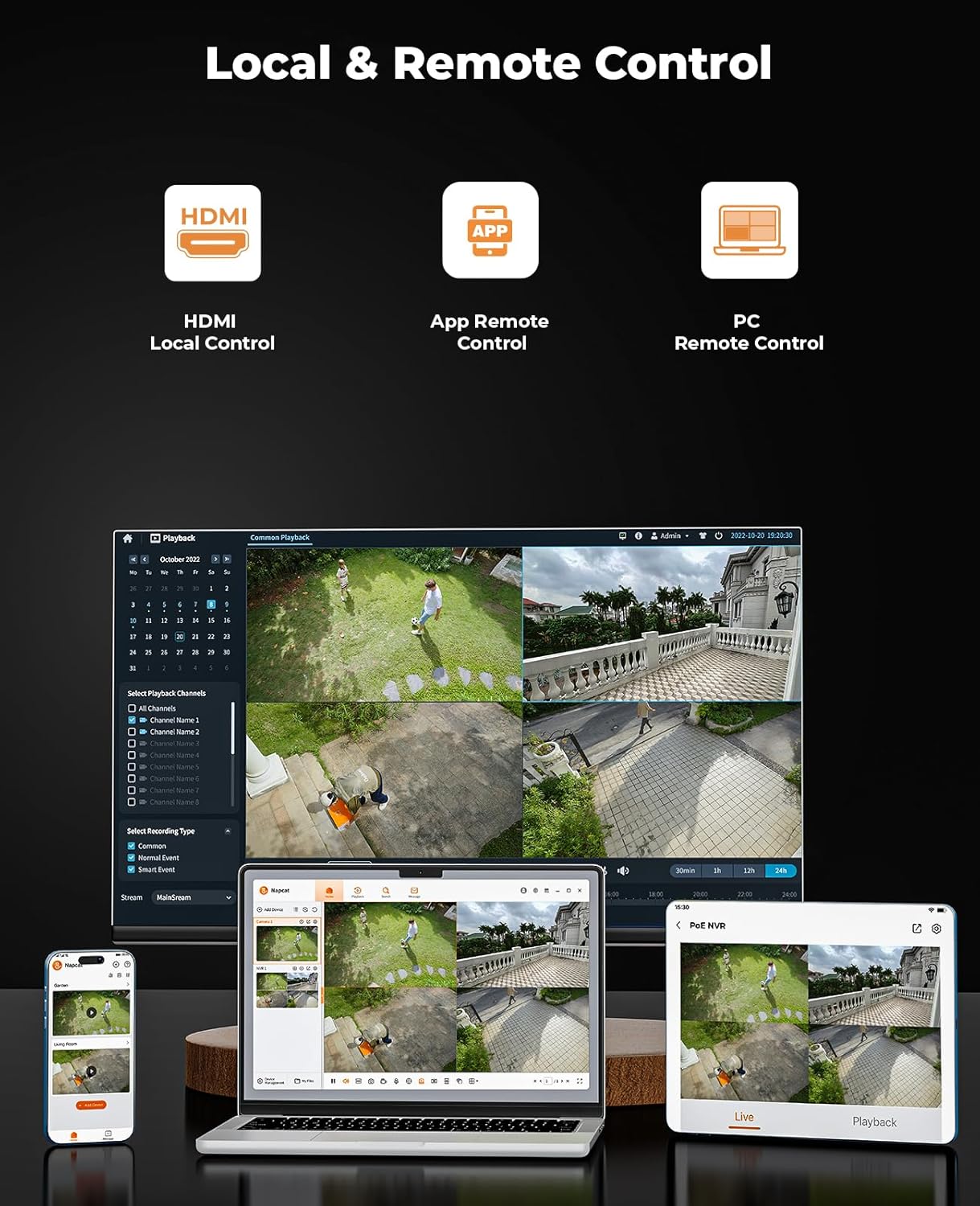
Figure 7: Local and Remote Control Options.

Figure 8: Multi-Device Viewing.
2. Video Quality and Night Vision
The cameras provide 5MP Super HD resolution, offering clearer images than traditional 1080p systems. They also feature advanced night vision capabilities.
- 5MP Super HD: Enjoy detailed and sharp video footage.
- കളർ നൈറ്റ് വിഷൻ: The system can capture full-color video even in low-light conditions, providing more informative footage than black-and-white night vision.
- 135° വീതി Viewഇൻ ആംഗിൾ: Minimizes blind spots and provides extensive coverage.

Figure 9: 5MP Super HD Lens Technology.

Figure 10: Day and Color Night Vision Comparison.
3. മോഷൻ ഡിറ്റക്ഷനും അലേർട്ടുകളും
The system is equipped with advanced detection features to minimize false alarms and provide timely notifications.
- പിഐആർ സെൻസർ: Passive Infrared sensor detects heat signatures for accurate motion detection.
- മനുഷ്യ/വാഹന കണ്ടെത്തൽ: Advanced AI algorithms differentiate between humans, vehicles, and other moving objects, reducing irrelevant alerts.
- Strobe Lights and Siren Alarms: When motion is detected, the cameras can activate built-in strobe lights and a siren to deter intruders.
- Customizable Activity Zones: ക്യാമറയ്ക്കുള്ളിലെ നിർദ്ദിഷ്ട മേഖലകൾ നിർവചിക്കുക view മറ്റ് മേഖലകളെ അവഗണിച്ച് ചലന കണ്ടെത്തൽ സജീവമായിരിക്കേണ്ടയിടത്ത്.
- തൽക്ഷണ അലേർട്ടുകൾ: ചലനം കണ്ടെത്തുമ്പോൾ നിങ്ങളുടെ സ്മാർട്ട്ഫോണിൽ പുഷ് അറിയിപ്പുകൾ സ്വീകരിക്കുക.

Figure 11: AI Human and Vehicle Detection.

Figure 12: Smart Deterrence with Strobe and Siren.

Figure 13: Customizable Activity Zones.
4. ടു-വേ ഓഡിയോ
Each camera is equipped with a built-in microphone and speaker, enabling two-way communication.
- Communicate Remotely: Speak to visitors or deter unwanted guests directly through the camera using the Napcat Life app.

ചിത്രം 14: ടു-വേ ഓഡിയോ കമ്മ്യൂണിക്കേഷൻ.
5. Storage Options (No Monthly Fee)
The system offers flexible and expandable local storage solutions without recurring subscription fees.
- 32GB മൈക്രോ എസ്ഡി കാർഡ് ഉൾപ്പെടുത്തിയിരിക്കുന്നു: The NVR comes with a 32GB microSD card for immediate local storage.
- Expandable HDD: The system supports expandable local storage up to 16TB via an external Hard Disk Drive (HDD), which is not included.

Figure 15: Dual Storage Options.
6. കണക്റ്റിവിറ്റി
The NVR supports robust connectivity options for stable and versatile placement.
- ഇഥർനെറ്റ് കേബിൾ: For a stable and reliable wired connection to your home network.
- 2.4/5GHz Dual-Band WiFi: Provides flexibility in NVR placement and ensures strong wireless connection to cameras.

ചിത്രം 16: കണക്റ്റിവിറ്റി ഓപ്ഷനുകൾ.
മെയിൻ്റനൻസ്
- വൃത്തിയാക്കൽ: ക്യാമറ ലെൻസുകളും സോളാർ പാനലുകളും പതിവായി മൃദുവായ, ഡി-ടച്ച് ഉപയോഗിച്ച് തുടയ്ക്കുക.amp വ്യക്തമായ കാഴ്ചയും കാര്യക്ഷമമായ സോളാർ ചാർജിംഗും ഉറപ്പാക്കാൻ തുണി ഉപയോഗിക്കുക. അബ്രസിവ് ക്ലീനറുകൾ ഒഴിവാക്കുക.
- ബാറ്ററി ആരോഗ്യം: While solar-powered, extreme weather or prolonged periods of low sunlight may affect battery levels. Monitor battery status via the app and ensure solar panels are free from obstructions.
- ഫേംവെയർ അപ്ഡേറ്റുകൾ: Periodically check for firmware updates through the Napcat Life app or NVR interface. Updates often include performance improvements and security enhancements.
ട്രബിൾഷൂട്ടിംഗ്
| പ്രശ്നം | സാധ്യമായ കാരണം | പരിഹാരം |
|---|---|---|
| Camera not connecting to NVR. | Out of Wi-Fi range; low camera battery; interference. | Move camera closer to NVR; ensure solar panel is charging effectively or manually charge; reduce Wi-Fi interference. |
| വീഡിയോ ഫീഡ് ഇല്ല. | Camera powered off; NVR not powered; network issue. | Check camera power/battery; ensure NVR is plugged in; verify NVR network connection. |
| പതിവ് തെറ്റായ ചലന മുന്നറിയിപ്പുകൾ. | Sensitivity too high; objects like trees/pets triggering. | Adjust motion detection sensitivity in app; set up activity zones to exclude irrelevant areas; enable human/vehicle detection. |
| മോശം രാത്രി കാഴ്ച നിലവാരം. | Dirty lens; insufficient ambient light for color night vision. | Clean camera lens; ensure there's some ambient light for optimal color night vision, or rely on IR black-and-white mode. |
| Cannot access system remotely. | NVR not connected to internet; app issues; firewall settings. | Check NVR's internet connection; restart app/phone; ensure router firewall isn't blocking NVR access (consult router manual if needed). |
സ്പെസിഫിക്കേഷനുകൾ
| ഫീച്ചർ | വിശദാംശങ്ങൾ |
|---|---|
| മോഡൽ നമ്പർ | N1S24 |
| വീഡിയോ ക്യാപ്ചർ റെസല്യൂഷൻ | 5എംപി സൂപ്പർ എച്ച്ഡി |
| Viewing ആംഗിൾ | 135 ഡിഗ്രി |
| നൈറ്റ് വിഷൻ റേഞ്ച് | 15 മീറ്റർ |
| കണക്റ്റിവിറ്റി ടെക്നോളജി | 2.4/5GHz Dual-Band WiFi |
| പവർ ഉറവിടം | സോളാർ പവർ, ബാറ്ററി പവർ (1 ലിഥിയം അയൺ ബാറ്ററി ഉൾപ്പെടെ) |
| ഉൾപ്പെടുത്തിയ ഘടകങ്ങൾ | Power Adapter, Quick Start Guide, Solar Panels, WiFi NVR, Wireless Security Cameras |
| ചാനലുകളുടെ എണ്ണം | 8 |
| പ്രത്യേക സവിശേഷതകൾ | Non-stop Solar Power, Wire-Free Installation, Expandable Local Storage, AI Detection, Spotlight Color Night Vision, Two-Way Audio, IP66 Weatherproof, Smart Deterrence |
| സംഭരണം | 32GB MicroSD card included, expandable up to 16TB HDD (not included) |
| ഇനത്തിന്റെ അളവുകൾ (L x W x H) | 30.5 x 25.4 x 20.3 Centimetres (Package) |
| ഇനത്തിൻ്റെ ഭാരം | 4.35 കി.ഗ്രാം |
| നിർമ്മാതാവ് | NAPCAT |
വാറൻ്റിയും പിന്തുണയും
For warranty information, technical support, or any inquiries regarding your NAPCAT security camera system, please contact NAPCAT customer support.
- നിർമ്മാതാവ്: NAPCAT
- പിന്തുണ ഇമെയിൽ: support@napcat.net
- നിർദ്ദിഷ്ട വാറന്റി നിബന്ധനകൾക്കും വ്യവസ്ഥകൾക്കും നിങ്ങളുടെ വാങ്ങൽ ഡോക്യുമെന്റേഷൻ പരിശോധിക്കുക.