
1. ആമുഖം
Thank you for choosing the AWEI T29 Wireless Earbuds. These earbuds feature Bluetooth 5.2 technology for stable connectivity, Active Noise Cancellation (ANC) for an immersive audio experience, and IPX6 water resistance for durability. This manual provides detailed instructions on how to set up, operate, and maintain your earbuds to ensure optimal performance.
2. പാക്കേജ് ഉള്ളടക്കം
നിങ്ങളുടെ പാക്കേജിൽ എല്ലാ ഇനങ്ങളും ഉണ്ടെന്ന് ദയവായി പരിശോധിക്കുക:
- Wireless Bluetooth Headset (Earbuds)
- Wireless Bluetooth Headset Charging Case
- USB-C ചാർജിംഗ് കേബിൾ
- User Instructions (This Manual)
3. ഉൽപ്പന്നം കഴിഞ്ഞുview
The AWEI T29 earbuds are designed for comfort and high-quality audio. The compact charging case protects and recharges your earbuds on the go.

Image: AWEI T29 Wireless Earbuds and Charging Case. This image displays the two earbuds placed within their open charging case, showcasinഅവരുടെ മിനുസമാർന്ന ഡിസൈൻ.
4. സജ്ജീകരണം
4.1 ഇയർബഡുകളും കേസും ചാർജ് ചെയ്യുന്നു
ആദ്യമായി ഉപയോഗിക്കുന്നതിന് മുമ്പ്, ഇയർബഡുകളും ചാർജിംഗ് കേസും പൂർണ്ണമായും ചാർജ് ചെയ്യുക.
- നൽകിയിരിക്കുന്ന USB-C ചാർജിംഗ് കേബിൾ കേസിലെ ചാർജിംഗ് പോർട്ടിലേക്കും ഒരു പവർ സ്രോതസ്സിലേക്കും ബന്ധിപ്പിക്കുക.
- Place the earbuds into the charging case. Ensure they are properly seated; indicator lights on the earbuds will confirm charging status.
- The charging case takes approximately 1 hour to fully charge.

Image: AWEI T29 Earbuds Charging Indicator. This image illustrates the charging case with earbuds inside, showing a visual representation of battery life and charging time.
4.2 ഒരു ഉപകരണവുമായുള്ള പ്രാരംഭ ജോടിയാക്കൽ
ചാർജിംഗ് കേസിൽ നിന്ന് നീക്കം ചെയ്യുമ്പോൾ ഇയർബഡുകൾ യാന്ത്രികമായി ജോടിയാക്കൽ മോഡിലേക്ക് പ്രവേശിക്കും.
- Open the charging case. The earbuds will power on automatically.
- നിങ്ങളുടെ സ്മാർട്ട്ഫോണിലോ, ടാബ്ലെറ്റിലോ, അല്ലെങ്കിൽ മറ്റ് ബ്ലൂടൂത്ത് പ്രവർത്തനക്ഷമമാക്കിയ ഉപകരണത്തിലോ, ബ്ലൂടൂത്ത് ക്രമീകരണങ്ങളിലേക്ക് നാവിഗേറ്റ് ചെയ്യുക.
- ബ്ലൂടൂത്ത് ഓണാക്കി ലഭ്യമായ ഉപകരണങ്ങൾക്കായി തിരയുക.
- Select "AWEI T29" from the list of devices to connect.
- Once connected, the earbuds will automatically reconnect to the last paired device when removed from the case.
5. പ്രവർത്തന നിർദ്ദേശങ്ങൾ
5.1 പവർ ഓൺ/ഓഫ്
- പവർ ഓൺ: ചാർജിംഗ് കെയ്സ് തുറക്കുക, ഇയർബഡുകൾ സ്വയമേവ ഓണാകും.
- പവർ ഓഫ്: ഇയർബഡുകൾ ചാർജിംഗ് കെയ്സിലേക്ക് തിരികെ വയ്ക്കുക, ലിഡ് അടയ്ക്കുക. അവ സ്വയമേവ ഓഫാകും.
5.2 സ്മാർട്ട് ടച്ച് നിയന്ത്രണങ്ങൾ
The AWEI T29 earbuds feature intuitive touch controls on each earbud:
- പ്ലേ/താൽക്കാലികമായി നിർത്തുക: ഇയർബഡുകളിലൊന്നിൽ ഒറ്റത്തവണ ടാപ്പ് ചെയ്യുക.
- അടുത്ത ഗാനം: വലത് ഇയർബഡിൽ രണ്ടുതവണ ടാപ്പ് ചെയ്യുക.
- മുൻ ഗാനം: ഇടത് ഇയർബഡിൽ രണ്ടുതവണ ടാപ്പ് ചെയ്യുക.
- വോളിയം കൂട്ടുക: വലത് ഇയർബഡിൽ മൂന്ന് തവണ ടാപ്പ് ചെയ്യുക.
- വോളിയം താഴേക്ക്: ഇടത് ഇയർബഡിൽ മൂന്ന് തവണ ടാപ്പ് ചെയ്യുക.
- ഉത്തരം/അവസാന കോൾ: Single tap either earbud during an incoming call.
- കോൾ നിരസിക്കുക: ഇൻകമിംഗ് കോൾ വരുമ്പോൾ ഇയർബഡുകളിലൊന്നിൽ ദീർഘനേരം അമർത്തുക.
- വോയ്സ് അസിസ്റ്റന്റിനെ സജീവമാക്കുക: ഇടതുവശത്തെ ഇയർബഡ് ദീർഘനേരം അമർത്തുക.
- ANC Mode Cycle (ANC On/Off/Transparency): വലത് ഇയർബഡ് ദീർഘനേരം അമർത്തുക.
5.3 സജീവ ശബ്ദം റദ്ദാക്കൽ (ANC)
The built-in intelligent chip with ANC effectively reduces ambient noise, providing a clearer listening experience for music and calls.

Image: Person wearing AWEI T29 Earbuds with Active Noise Cancellation. This image shows a person wearing the earbuds, illustrating the noise cancellation feature in action.

Image: ANC Effectiveness Graph for AWEI T29 Earbuds. This graph visually represents the reduction of ambient noise before and after activating the Active Noise Cancellation feature.
5.4 Hi-Fi Sound Quality
The AWEI T29 earbuds are equipped with a 13mm speaker, Nano Titanium Diaphragms for clearer treble, and a Pure Copper Voice Coil for vigorous bass, delivering an immersive sound experience.
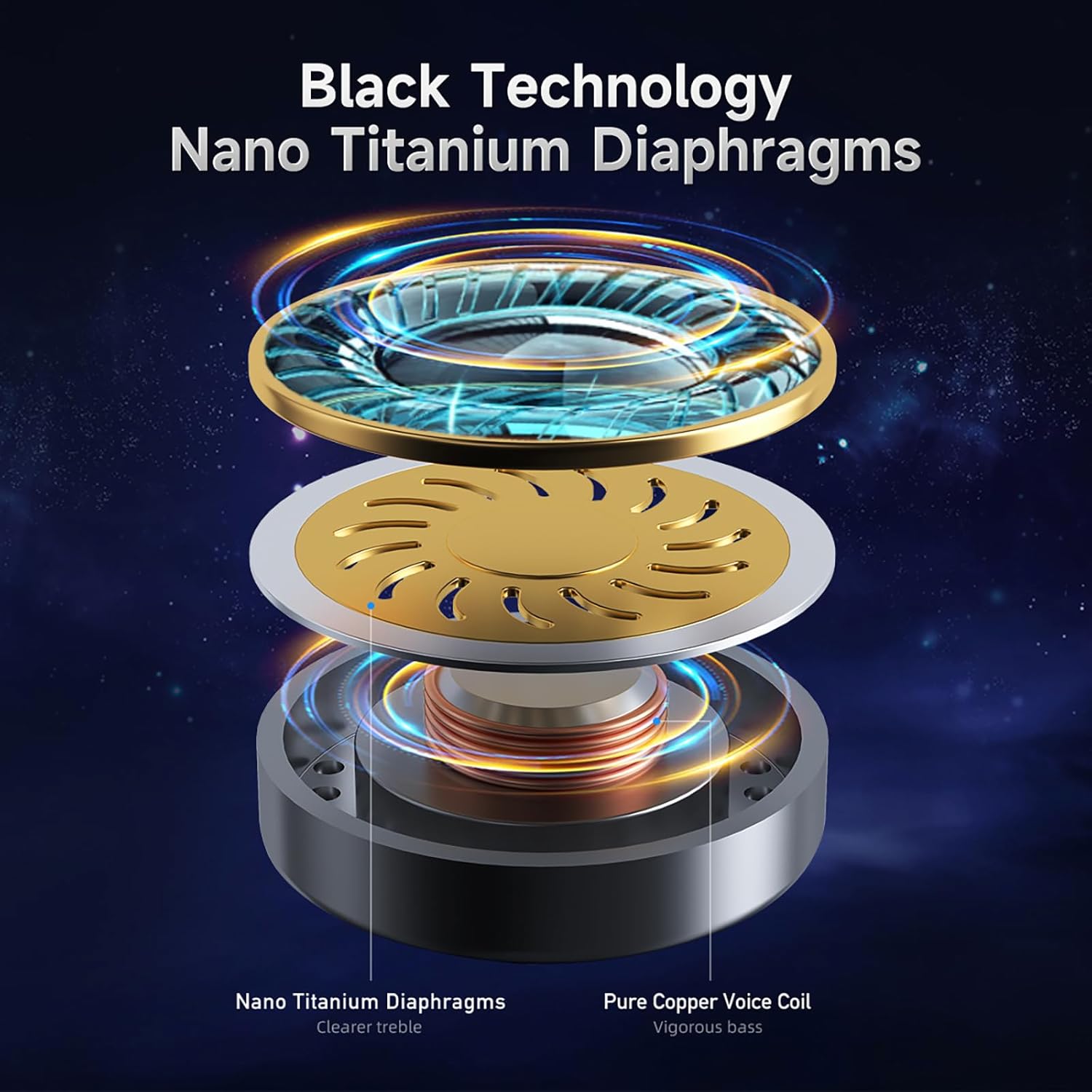
Image: AWEI T29 Earbud Internal Components Diagram. This diagram illustrates the internal structure of the earbud, highlighting the Nano Titanium Diaphragms and Pure Copper Voice Coil.
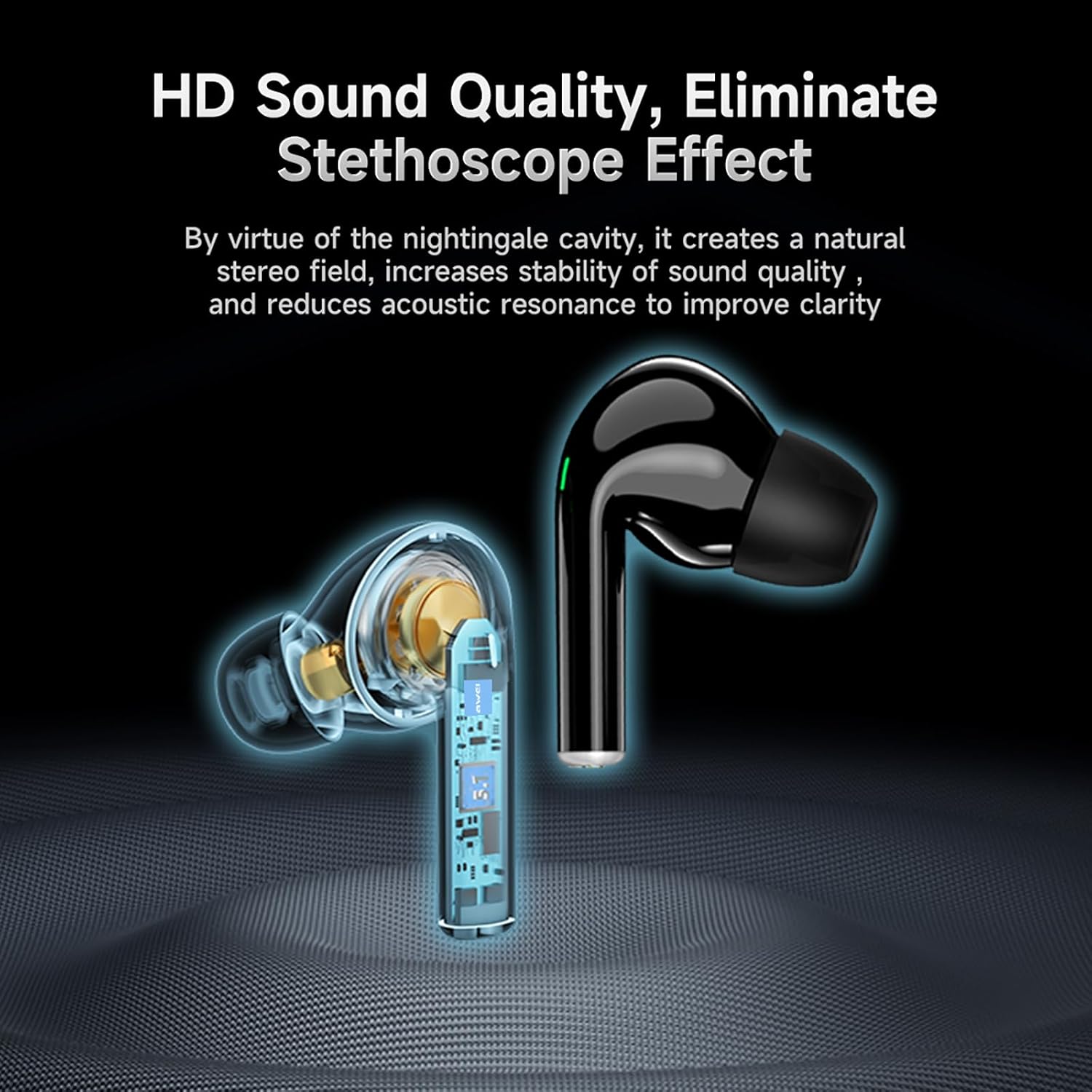
Image: AWEI T29 Earbud Sound Quality Features. This image shows a cutaway view of an earbud, emphasizing its internal design for high-definition sound quality and reduction of the stethoscope effect.
6. പരിപാലനം
6.1 വൃത്തിയാക്കൽ
മികച്ച പ്രകടനവും ശുചിത്വവും നിലനിർത്തുന്നതിന്:
- മൃദുവായതും ഉണങ്ങിയതും ലിന്റ് രഹിതവുമായ ഒരു തുണി ഉപയോഗിച്ച് ഇയർബഡുകളും ചാർജിംഗ് കെയ്സും സൌമ്യമായി തുടയ്ക്കുക.
- അബ്രാസീവ് ക്ലീനറുകൾ, ലായകങ്ങൾ, കഠിനമായ രാസവസ്തുക്കൾ എന്നിവ ഉപയോഗിക്കരുത്.
- ചാർജിംഗ് കോൺടാക്റ്റുകൾ വൃത്തിയുള്ളതും അവശിഷ്ടങ്ങൾ ഇല്ലാത്തതുമാണെന്ന് ഉറപ്പാക്കുക.
6.2 ജല പ്രതിരോധം
The AWEI T29 earbuds are rated IPX6 waterproof, meaning they are resistant to strong jets of water. This makes them suitable for workouts and light rain. However, they are not designed for submersion in water or for use during swimming.
7. പ്രശ്നപരിഹാരം
If you encounter issues with your AWEI T29 earbuds, please refer to the following common solutions:
- ഇയർബഡുകൾ ജോടിയാക്കുന്നില്ല: Ensure both earbuds are charged, Bluetooth is enabled on your device, and the earbuds are in pairing mode. Try resetting the earbuds by placing them back in the case and then removing them.
- ഒന്നോ രണ്ടോ ഇയർബഡുകളിൽ നിന്ന് ശബ്ദമില്ല: Check the volume level on your device and ensure the earbuds are properly connected. Try re-pairing the earbuds.
- ചാർജിംഗ് പ്രശ്നങ്ങൾ: Verify that the USB-C cable is securely connected to both the charging case and the power source. Ensure the charging contacts on the earbuds and inside the case are clean.
- മോശം ശബ്ദ നിലവാരം: Ensure the earbuds are properly seated in your ears for a good seal. Clean any debris from the earbud nozzles.
- ഇടവിട്ടുള്ള കണക്ഷൻ: Ensure your device is within the 10-meter Bluetooth range and there are no significant obstructions between the earbuds and your device.
8 സ്പെസിഫിക്കേഷനുകൾ
Key technical specifications for the AWEI T29 Wireless Earbuds:
| ഫീച്ചർ | സ്പെസിഫിക്കേഷൻ |
|---|---|
| മോഡൽ | T29 |
| ബ്ലൂടൂത്ത് പതിപ്പ് | 5.2 |
| സ്പീക്കർ വലിപ്പം | 13 മി.മീ |
| വാട്ടർ റെസിസ്റ്റൻസ് റേറ്റിംഗ് | IPX6 |
| ഇയർബഡ് പ്ലേടൈം (സിംഗിൾ ചാർജ്) | 9 മണിക്കൂർ വരെ |
| ആകെ പ്ലേടൈം (ചാർജിംഗ് കേസിനൊപ്പം) | Up to 30 hours (dual-ear mode), 60 hours (single-ear mode) |
| ചാർജിംഗ് സമയം (കേസ്) | ഏകദേശം 1 മണിക്കൂർ |
| നിയന്ത്രണ തരം | ടച്ച് നിയന്ത്രണം |
| ശബ്ദ നിയന്ത്രണം | സജീവ നോയ്സ് റദ്ദാക്കൽ |
| അനുയോജ്യമായ ഉപകരണങ്ങൾ | Smartphones, PCs, Tablets, Laptops, TVs |
| ഇനത്തിൻ്റെ ഭാരം | 150 ഗ്രാം (ആകെ പാക്കേജ് ഭാരം) |
9. വാറൻ്റിയും പിന്തുണയും
For warranty information or technical assistance, please refer to the warranty card included in your package or contact Awei customer support through the retailer where you purchased the product. Please have your product model (T29) and purchase details ready when contacting support.