
1. ഉൽപ്പന്നം കഴിഞ്ഞുview
The TOZO USB-C to USB-A Charging and Data Cable is designed for efficient power delivery and high-speed data transfer between compatible devices. This cable features a durable construction and universal compatibility, making it suitable for a wide range of electronics.
പ്രധാന സവിശേഷതകൾ:
- സാർവത്രിക അനുയോജ്യത: Connects to various USB-C devices including smartphones, tablets, laptops, and TOZO audio products.
- ഫാസ്റ്റ് ചാർജിംഗ്: Supports up to 15W (5V/3A) power delivery for quick device charging.
- ഹൈ-സ്പീഡ് ഡാറ്റ ട്രാൻസ്ഫർ: 480Mbps (USB 2.0 സ്റ്റാൻഡേർഡ്) വരെ ഡാറ്റാ ട്രാൻസ്ഫർ വേഗത കൈവരിക്കുന്നു.
- നീണ്ടുനിൽക്കുന്ന നിർമ്മാണം: Made with soft silicone material and a thickened braided cable for enhanced resistance to wear, tear, and tangling.
- കുരുക്കില്ലാത്ത ഡിസൈൻ: Features a round shape and includes adjustable silicone straps for easy storage and management.
2. സജ്ജീകരണവും കണക്ഷനും
This section provides instructions for connecting your TOZO USB-C to USB-A cable to your devices for charging and data transfer.
ചാർജ് ചെയ്യുന്നതിനായി കണക്റ്റുചെയ്യുന്നു:
- Identify the USB-A port on your power adapter, computer, or other charging source.
- തിരുകുക യുഎസ്ബി-എ കണക്റ്റർ of the TOZO cable into the USB-A port of the charging source.
- Identify the USB-C port on your device (e.g., smartphone, tablet, laptop).
- തിരുകുക USB-C കണക്റ്റർ of the TOZO cable into the USB-C port of your device.
- Ensure both connections are secure. Your device should begin charging.

Image 2.1: Illustration of the USB-A (input) and USB-C (output) connectors of the cable.
ഡാറ്റാ കൈമാറ്റത്തിനായി കണക്റ്റുചെയ്യുന്നു:
- ബന്ധിപ്പിക്കുക യുഎസ്ബി-എ കണക്റ്റർ to a USB-A port on your computer or host device.
- ബന്ധിപ്പിക്കുക USB-C കണക്റ്റർ to the USB-C port on your target device (e.g., smartphone, external hard drive).
- കണക്റ്റുചെയ്തുകഴിഞ്ഞാൽ, നിങ്ങളുടെ കമ്പ്യൂട്ടർ ഉപകരണം തിരിച്ചറിയണം, അത് നിങ്ങളെ കൈമാറാൻ അനുവദിക്കുന്നു files. Follow your device's operating system prompts for data transfer options.
3. പ്രവർത്തന നിർദ്ദേശങ്ങൾ
The TOZO USB-C to USB-A cable facilitates both power delivery and data exchange. Understanding its capabilities ensures optimal performance.
ചാർജിംഗ് പ്രവർത്തനം:
The cable supports fast charging up to 15W (5V/3A). For optimal fast charging, ensure your power adapter and connected device also support these specifications. The cable provides stable output, contributing to faster charging and lower heat generation.

Image 3.1: Visual representation of 15W fast charging (3A) and 480Mbps data transfer speed.
Data Transfer Functionality:
With a data transfer speed of up to 480Mbps, the cable allows for quick and efficient transfer of photos, videos, documents, and other files. This speed is consistent with the USB 2.0 standard. Ensure your devices are configured for data transfer when connected.
സാർവത്രിക അനുയോജ്യത:
The TOZO USB-C to USB-A cable is designed for broad compatibility with a variety of devices. This includes, but is not limited to:
- സ്മാർട്ട്ഫോണുകൾ: iPhone 15, 16, 17 Pro Max; Samsung Galaxy S8/S8+/S9/S9+/S10/S10+/Note 8/Note 9; LG V20/V30/G5/G6/G7; Nexus 5X/6P; Google Pixel/Pixel XL/3XL, and other USB-C enabled phones.
- ഗുളികകൾ: Various USB-C enabled tablets.
- ലാപ്ടോപ്പുകൾ: USB-C enabled laptops and desktops.
- TOZO Devices: Compatible with all TOZO USB-C products such as earbuds, wireless chargers, and portable speakers.
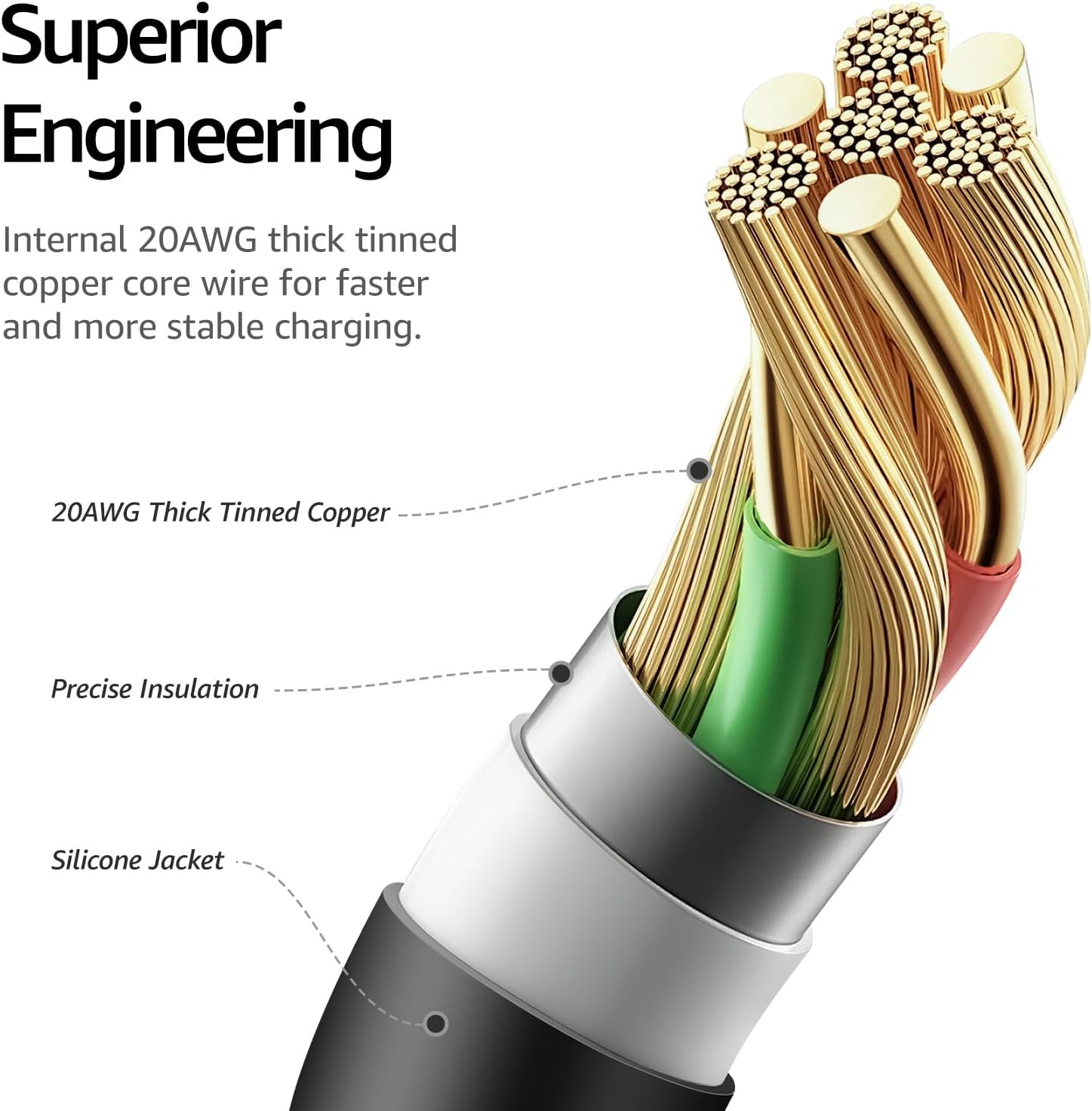
Image 3.2: Visual guide to the cable's universal compatibility with chargers, earbuds, speakers, wireless chargers, desktops, laptops, phones, and tablets.
ഉൽപ്പന്നം കഴിഞ്ഞുview വീഡിയോ:
Video 3.1: An official TOZO video demonstrating the universal compatibility, fast charging, and durable build of the USB-C cable.
4. പരിചരണവും പരിപാലനവും
Proper care extends the lifespan of your TOZO USB-C to USB-A cable. Follow these guidelines for maintenance.
ഈട് സവിശേഷതകൾ:
- Thickened Weave: The high-density thickened braided cable resists pulling, bending, and tangling.
- സോഫ്റ്റ് സിലിക്കൺ മെറ്റീരിയൽ: The silicone coating provides exceptional resistance to wear and tear from frequent use.
- ബെൻഡ് ആയുസ്സ്: Designed to withstand over 10,000 bends, ensuring long-term reliability.
- Solid Build: Robust construction allows the cable to endure heavy usage.

Image 4.1: The cable's rugged and durable design, highlighting a bend lifespan exceeding 10,000 cycles.

Image 4.2: Demonstration of the cable's solid build, passing a lifting test with 39.5 Newtons of force.
പൊതു പരിചരണം:
- സംഭരണം: Use the included adjustable silicone cable ties to secure the cable length and prevent tangling when not in use. This helps maintain its shape and prevents damage.
- വൃത്തിയാക്കൽ: പൊടിയോ അഴുക്കോ നീക്കം ചെയ്യാൻ മൃദുവായതും ഉണങ്ങിയതുമായ തുണി ഉപയോഗിച്ച് കേബിൾ തുടയ്ക്കുക. കഠിനമായ രാസവസ്തുക്കളോ ഉരച്ചിലുകളോ ഉള്ള വസ്തുക്കൾ ഉപയോഗിക്കുന്നത് ഒഴിവാക്കുക.
- കൈകാര്യം ചെയ്യൽ: Avoid excessive force when plugging or unplugging the cable. Always grip the connector head, not the cable itself, to prevent strain on the connection points.
- പരിസ്ഥിതി: തീവ്രമായ താപനിലയിൽ നിന്നും നേരിട്ടുള്ള സൂര്യപ്രകാശത്തിൽ നിന്നും മാറി തണുത്തതും വരണ്ടതുമായ സ്ഥലത്ത് കേബിൾ സൂക്ഷിക്കുക.
5. പ്രശ്നപരിഹാരം
If you encounter issues with your TOZO USB-C to USB-A cable, refer to the following common troubleshooting steps:
- ഉപകരണം ചാർജ് ചെയ്യുന്നില്ല:
- Ensure both ends of the cable are securely connected to the power source and your device.
- പവർ അഡാപ്റ്റർ ശരിയായി പ്രവർത്തിക്കുന്നുണ്ടെന്നും ഒരു ലൈവ് ഔട്ട്ലെറ്റിൽ പ്ലഗ് ചെയ്തിട്ടുണ്ടെന്നും പരിശോധിക്കുക.
- നിങ്ങളുടെ ഉപകരണത്തിന്റെ ചാർജിംഗ് പോർട്ട് വൃത്തിയുള്ളതാണോയെന്നും അവശിഷ്ടങ്ങളില്ലാത്തതാണോയെന്നും പരിശോധിക്കുക.
- Try using a different power adapter or a different USB-C device to isolate the issue.
- സ്ലോ ചാർജിംഗ്:
- Confirm that your power adapter supports fast charging (e.g., 5V/3A or 15W). Lower wattagഇ അഡാപ്റ്ററുകൾ ചാർജിംഗ് മന്ദഗതിയിലാക്കും.
- Ensure your device is not running power-intensive applications in the background while charging.
- ഡാറ്റ കൈമാറ്റ പ്രശ്നങ്ങൾ:
- Ensure the cable is connected to a computer or host device that supports data transfer.
- Check your device's settings to ensure it is configured for data transfer (e.g., "File Transfer" mode on Android devices).
- നിങ്ങളുടെ കമ്പ്യൂട്ടറിലെ മറ്റൊരു യുഎസ്ബി പോർട്ടിലേക്ക് കണക്റ്റുചെയ്യാൻ ശ്രമിക്കുക.
- Restart both your computer and the connected device.
- കേബിൾ കേടുപാടുകൾ:
- Inspect the cable for any visible signs of damage, suchs as fraying, cuts, or bent connectors. A damaged cable should be replaced.
6 സ്പെസിഫിക്കേഷനുകൾ
| ഫീച്ചർ | സ്പെസിഫിക്കേഷൻ |
|---|---|
| ഉൽപ്പന്നത്തിൻ്റെ പേര് | TOZO USB-C to USB-A Charging and Data Cable |
| മോഡൽ | യുഎസ്ബി-സി മുതൽ യുഎസ്ബി-എ ചാർജിംഗ് കേബിൾ വരെ |
| കണക്റ്റർ തരം | USB-A മുതൽ USB-C വരെ |
| ചാർജിംഗ് പവർ | 15W വരെ (5V / 3A) |
| ഡാറ്റ ട്രാൻസ്ഫർ വേഗത | 480Mbps വരെ (USB 2.0) |
| കേബിൾ നീളം | 1 Meter (approximately 3.3 feet) |
| മെറ്റീരിയൽ | Soft Silicone, Thickened Braided Cable |
| നിറം | കറുപ്പ് |
7. വാറൻ്റിയും പിന്തുണയും
TOZO products are designed for reliability and performance. For specific warranty information and customer support, please refer to the official TOZO webസൈറ്റ് അല്ലെങ്കിൽ അവരുടെ ഉപഭോക്തൃ സേവനവുമായി നേരിട്ട് ബന്ധപ്പെടുക.
- വാറൻ്റി: Please check the product packaging or the official TOZO webഏറ്റവും പുതിയ വാറന്റി നയത്തിനായുള്ള സൈറ്റ്.
- ഉപഭോക്തൃ പിന്തുണ: For technical assistance, troubleshooting, or other inquiries, visit the ആമസോണിലെ TOZO സ്റ്റോർ or the official TOZO support channels.