
RFF2-AUD
Real-fit F2 Wireless Earbuds User Manual
Model: RFF2-AUD
1. ആമുഖം
Thank you for choosing the Real-fit F2 Wireless Earbuds. This manual provides essential information on how to set up, operate, and maintain your earbuds to ensure optimal performance and longevity. Please read this manual thoroughly before using the product.
പാക്കേജ് ഉള്ളടക്കം
- Real-fit F2 Wireless Earbuds (Left and Right)
- ചാർജിംഗ് കേസ്
- യുഎസ്ബി ടൈപ്പ്-സി ചാർജിംഗ് കേബിൾ
- ഉപയോക്തൃ മാനുവൽ
- ഒന്നിലധികം വലുപ്പത്തിലുള്ള സിലിക്കൺ ഇയർ ടിപ്പുകൾ
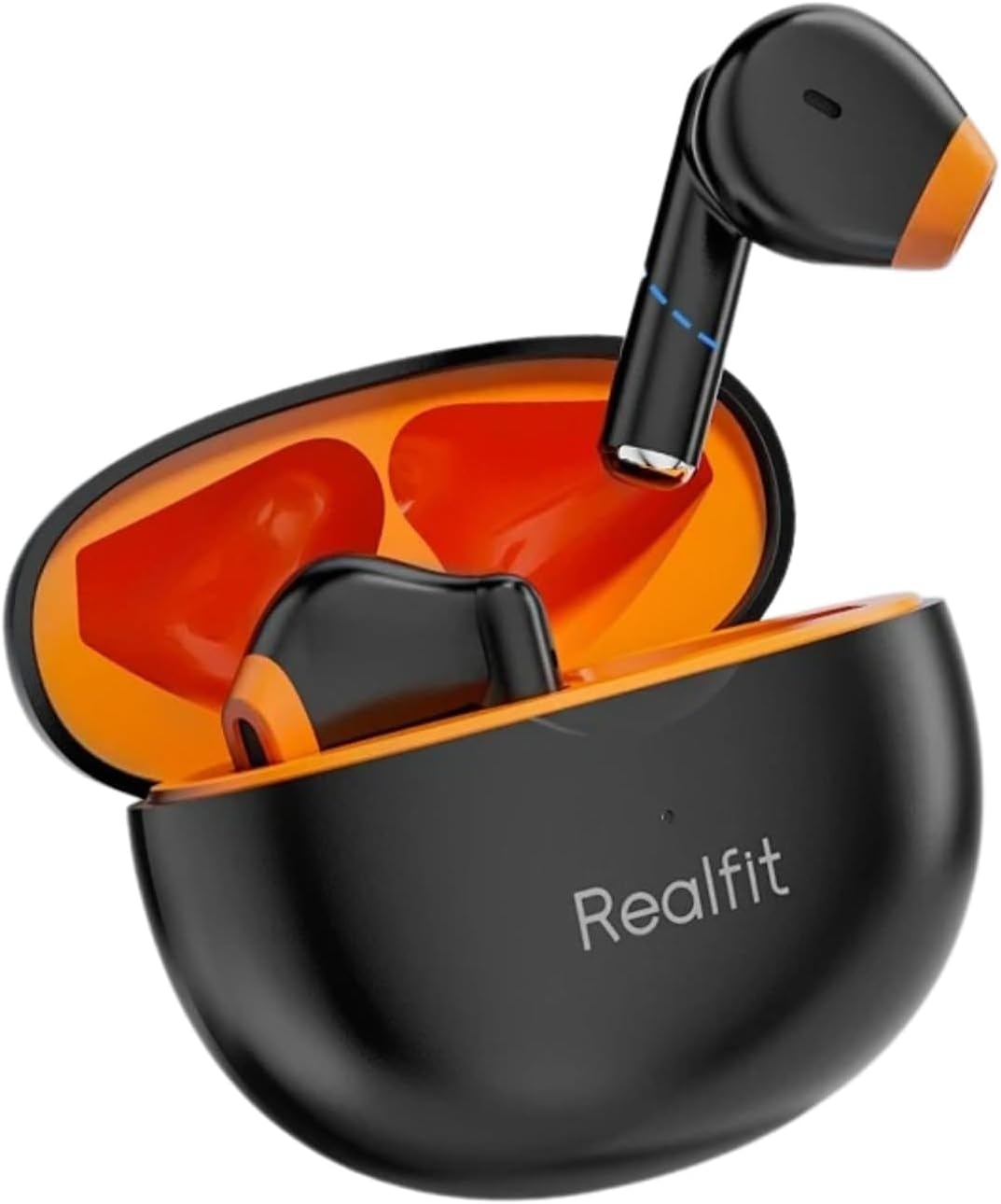
Image: The Real-fit F2 Wireless Earbuds, black in color, are shown resting inside their matching black charging case with an orange interior. The case is open, revealing both earbuds. This image illustrates the primary components included in the package.
2. ഉൽപ്പന്നം കഴിഞ്ഞുview
The Real-fit F2 earbuds are designed for a superior audio experience with advanced features. Below are key aspects of the product design and functionality.
രൂപകൽപ്പനയും ആശ്വാസവും
The earbuds feature a semi-in-ear design with skin-friendly liquid silicone ear caps, ensuring a comfortable and secure fit for extended wear. The ergonomic design conforms to the contours of the ear, providing fidelity sound quality without discomfort.

Image: A close-up illustration of a single Real-fit F2 earbud, highlighting its semi-in-ear form factor and the liquid silicone ear cap. A dashed circle indicates the area of the earbud that fits into the ear, emphasizing its comfortable design.
ഓഡിയോ ടെക്നോളജി
Equipped with 13mm titanium-plated composite dome diaphragms, the earbuds deliver rich, clear audio. They support 360° Spatial Audio, allowing for precise sound localization, which is particularly beneficial for gaming. Advanced Active Noise Cancellation (ANC) provides up to 35dB of noise reduction, creating an immersive listening environment.
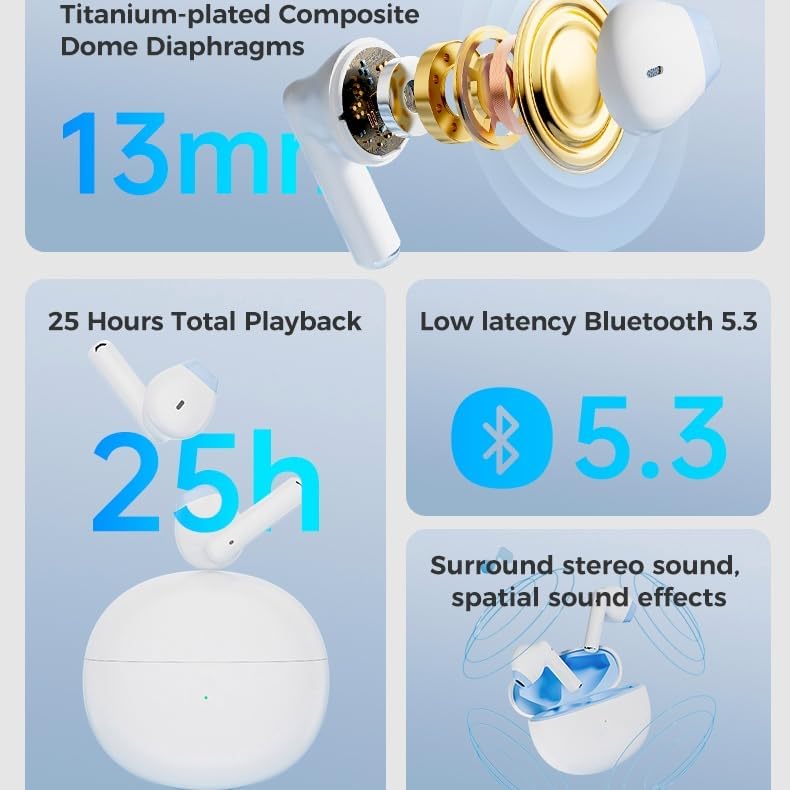
Image: A composite image illustrating key audio features. It shows a disassembled earbud revealing a 13mm titanium-plated composite dome diaphragm, icons for Bluetooth 5.3 connectivity, and a visual representation of surround stereo sound with spatial effects.
3. സജ്ജീകരണം
ഇയർബഡുകളും കേസും ചാർജ് ചെയ്യുന്നു
Before first use, fully charge the earbuds and the charging case. Place the earbuds into the charging case and connect the USB Type-C cable to the charging port on the case and to a power source. The indicator light on the case will show charging status.
- A full charge provides approximately 5 hours of playback for the earbuds.
- The charging case provides multiple additional charges, extending total playback time up to 28 hours.
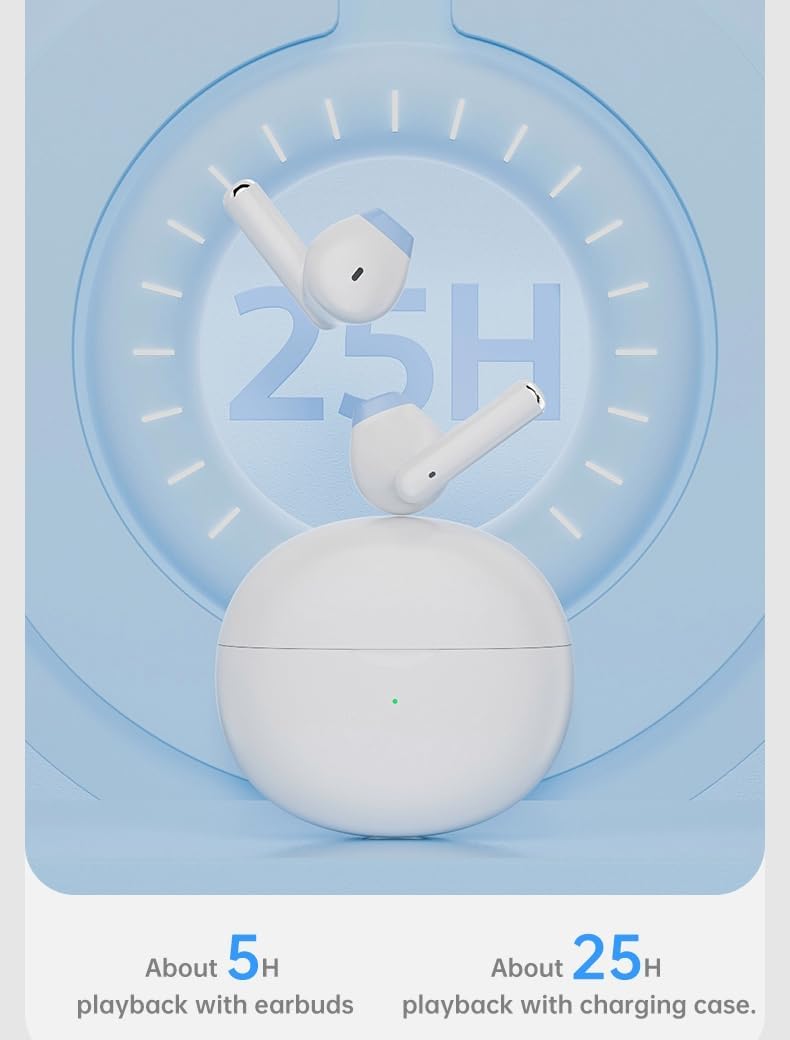
Image: An illustration depicting the battery life of the Real-fit F2 earbuds. It shows the earbuds and charging case with a large '25H' in the background, indicating approximately 25 hours of total playback time with the charging case, and about 5 hours for the earbuds alone.
പ്രാരംഭ ജോടിയാക്കൽ
- ഇയർബഡുകൾ ചാർജ്ജ് ചെയ്തിട്ടുണ്ടെന്ന് ഉറപ്പാക്കുക.
- ചാർജിംഗ് കേസ് തുറക്കുക. ഇയർബഡുകൾ സ്വയമേവ ജോടിയാക്കൽ മോഡിലേക്ക് പ്രവേശിക്കും.
- നിങ്ങളുടെ ഉപകരണത്തിൽ (സ്മാർട്ട്ഫോൺ, ടാബ്ലെറ്റ് മുതലായവ), ബ്ലൂടൂത്ത് പ്രവർത്തനക്ഷമമാക്കുക.
- ഇതിനായി തിരയുക "Real-fit F2" in the list of available Bluetooth devices.
- Select "Real-fit F2" to connect. Once connected, a voice prompt will confirm successful pairing.
വീണ്ടും ബന്ധിപ്പിക്കുന്നു
The earbuds will automatically reconnect to the last paired device when taken out of the charging case and Bluetooth is enabled on the device.
4. പ്രവർത്തന നിർദ്ദേശങ്ങൾ
ടച്ച് നിയന്ത്രണങ്ങൾ
The Real-fit F2 earbuds feature intuitive touch controls for easy management of audio playback, calls, and modes.
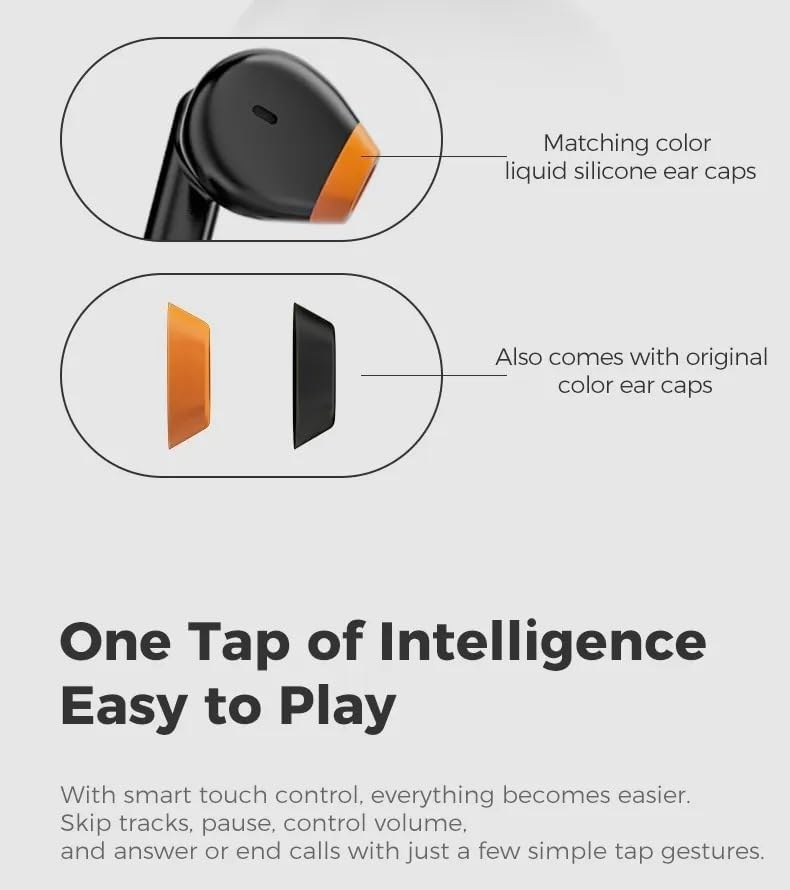
Image: A diagram illustrating the touch control area on the Real-fit F2 earbuds. It also shows interchangeable ear caps, emphasizing the customizable comfort and ease of use with simple tap gestures.
| ആക്ഷൻ | നിയന്ത്രണം |
|---|---|
| പ്ലേ/താൽക്കാലികമായി നിർത്തുക | ഏതെങ്കിലും ഇയർബഡിൽ ഒറ്റ ടാപ്പ് ചെയ്യുക |
| അടുത്ത ട്രാക്ക് | വലതുവശത്തെ ഇയർബഡിൽ രണ്ടുതവണ ടാപ്പ് ചെയ്യുക |
| മുമ്പത്തെ ട്രാക്ക് | ഇടതുവശത്തെ ഇയർബഡിൽ രണ്ടുതവണ ടാപ്പ് ചെയ്യുക |
| വോളിയം കൂട്ടുക | വലത് ഇയർബഡിൽ മൂന്ന് തവണ ടാപ്പ് ചെയ്യുക |
| വോളിയം ഡൗൺ | ഇടത് ഇയർബഡിൽ മൂന്ന് തവണ ടാപ്പ് ചെയ്യുക |
| ഉത്തരം / കോൾ അവസാനിപ്പിക്കുക | ഏതെങ്കിലും ഇയർബഡിൽ ഒറ്റ ടാപ്പ് ചെയ്യുക |
| കോൾ നിരസിക്കുക | ഏതെങ്കിലും ഇയർബഡിൽ 2 സെക്കൻഡ് അമർത്തിപ്പിടിക്കുക |
| വോയ്സ് അസിസ്റ്റൻ്റ് സജീവമാക്കുക | ഏതെങ്കിലും ഇയർബഡിൽ 3 സെക്കൻഡ് അമർത്തിപ്പിടിക്കുക |
| Switch ANC/Transparency/Game Mode | Long press (e.g., 2 seconds) on either earbud (configurable via app if available) |
കോൾ പ്രവർത്തനങ്ങൾ
The earbuds feature 4 microphones with AI ENC (Environmental Noise Cancellation) technology, ensuring clear calls by accurately identifying human voices and eliminating background noise, even in noisy environments.

Image: A visual representation of the AI ENC (Environmental Noise Cancellation) feature for calls. It shows a smartphone screen with an active call interface, indicating how the technology helps eliminate background noise for clear communication.
Personalized Modes
The earbuds offer personalized modes to adapt to your listening environment:
- Noise Reduction (ANC): Actively cancels external noise for an immersive audio experience.
- സുതാര്യത മോഡ്: നിങ്ങളുടെ ഓഡിയോ ആസ്വദിച്ചുകൊണ്ട് തന്നെ ചുറ്റുപാടുകൾ കേൾക്കാൻ നിങ്ങളെ അനുവദിക്കുന്നു, അവബോധത്തിന് ഉപയോഗപ്രദമാണ്.
- ഗെയിം മോഡ്: കൂടുതൽ സമന്വയിപ്പിച്ച ഗെയിമിംഗ് അനുഭവത്തിനായി ഓഡിയോ ലേറ്റൻസി കുറയ്ക്കുന്നു.
Switch between these modes using the touch controls as described in the table above, or potentially via a dedicated app if available.
5. പരിപാലനം
വൃത്തിയാക്കൽ
- ഇയർബഡുകളും ചാർജിംഗ് കെയ്സും മൃദുവായതും ഉണങ്ങിയതും ലിന്റ് രഹിതവുമായ തുണി ഉപയോഗിച്ച് പതിവായി വൃത്തിയാക്കുക.
- അബ്രാസീവ് ക്ലീനറുകൾ, ആൽക്കഹോൾ, കെമിക്കൽ ലായകങ്ങൾ എന്നിവ ഉപയോഗിക്കരുത്.
- ചെവിയുടെ അഗ്രഭാഗത്തും സ്പീക്കർ മെഷിലും ഉള്ള ഏതെങ്കിലും ഇയർവാക്സ് അല്ലെങ്കിൽ അവശിഷ്ടങ്ങൾ ഒരു ചെറിയ, വൃത്തിയുള്ള ബ്രഷ് അല്ലെങ്കിൽ കോട്ടൺ സ്വാബ് ഉപയോഗിച്ച് സൌമ്യമായി നീക്കം ചെയ്യുക.
- ഇയർബഡുകളിലെയും കെയ്സിലെയും ചാർജിംഗ് കോൺടാക്റ്റുകൾ വൃത്തിയുള്ളതും വരണ്ടതുമാണെന്ന് ഉറപ്പാക്കുക.
സംഭരണം
- ഇയർബഡുകൾ ഉപയോഗിക്കാത്തപ്പോൾ അവ സംരക്ഷിക്കാനും ചാർജ്ജ് ചെയ്ത് നിലനിർത്താനും എപ്പോഴും ചാർജിംഗ് കേസിൽ തന്നെ സൂക്ഷിക്കുക.
- ഉൽപ്പന്നം തണുത്തതും വരണ്ടതുമായ സ്ഥലത്ത് സൂക്ഷിക്കുക, തീവ്രമായ താപനിലയിൽ നിന്നും നേരിട്ടുള്ള സൂര്യപ്രകാശത്തിൽ നിന്നും അകറ്റി നിർത്തുക.
- Avoid exposing the earbuds or case to water or excessive moisture.
6. പ്രശ്നപരിഹാരം
If you encounter any issues with your Real-fit F2 earbuds, please refer to the following common problems and solutions:
- ശബ്ദമില്ല:
- Ensure earbuds are charged.
- Check if earbuds are properly connected to your device via Bluetooth.
- Adjust volume on both the earbuds and your device.
- Try re-pairing the earbuds with your device. - ഇയർബഡുകൾ ചാർജ് ചെയ്യുന്നില്ല:
- ചാർജിംഗ് കേബിൾ കെയ്സിലേക്കും പവർ സ്രോതസ്സിലേക്കും സുരക്ഷിതമായി ബന്ധിപ്പിച്ചിട്ടുണ്ടെന്ന് ഉറപ്പാക്കുക.
- Check if the charging contacts on the earbuds and inside the case are clean and free of debris.
- വ്യത്യസ്തമായ ഒരു ചാർജിംഗ് കേബിളോ പവർ അഡാപ്റ്ററോ പരീക്ഷിക്കുക. - Cannot Pair Earbuds:
- നിങ്ങളുടെ ഉപകരണത്തിൽ ബ്ലൂടൂത്ത് പ്രവർത്തനക്ഷമമാക്കിയിട്ടുണ്ടെന്ന് ഉറപ്പാക്കുക.
- Make sure the earbuds are in pairing mode (open the case).
- Turn off Bluetooth on other nearby devices that might be trying to connect.
- Move closer to your device.
- Try resetting the earbuds (refer to product support for specific reset instructions if needed). - Sound Interruption/Poor Quality:
- Move closer to your device and ensure no obstacles are between them.
- Avoid strong electromagnetic interference (e.g., from Wi-Fi routers, microwaves).
- Try disconnecting and reconnecting the Bluetooth connection.
- Ensure earbuds are clean and free of debris. - മൈക്രോഫോൺ പ്രവർത്തിക്കുന്നില്ല:
- Ensure the earbuds are properly connected during a call.
- Check microphone settings on your device to ensure the earbuds are selected as the input device.
- Clean the microphone ports on the earbuds.
7 സ്പെസിഫിക്കേഷനുകൾ
Detailed technical specifications for the Real-fit F2 Wireless Earbuds:
| ഫീച്ചർ | വിശദാംശങ്ങൾ |
|---|---|
| മോഡലിൻ്റെ പേര് | RFF2-AUD |
| കണക്റ്റിവിറ്റി ടെക്നോളജി | വയർലെസ്സ് (ബ്ലൂടൂത്ത് 5.3) |
| ചെവി പ്ലേസ്മെൻ്റ് | ചെവിയിൽ |
| ഫോം ഫാക്ടർ | ചെവിയിൽ |
| ശബ്ദ നിയന്ത്രണം | സജീവ ശബ്ദ റദ്ദാക്കൽ (ANC) |
| ഡ്രൈവർ വലിപ്പം | 13mm Titanium-plated Composite Dome Diaphragms |
| മൈക്രോഫോണുകൾ | 4-Mic with AI ENC |
| സ്പേഷ്യൽ ഓഡിയോ | 360° സ്പേഷ്യൽ ഓഡിയോ |
| ബാറ്ററി ലൈഫ് (ഇയർബഡുകൾ) | ഏകദേശം 5 മണിക്കൂർ |
| ആകെ പ്ലേബാക്ക് സമയം (കേസോടുകൂടി) | 28 മണിക്കൂർ വരെ |
| ചാർജിംഗ് പോർട്ട് | യുഎസ്ബി ടൈപ്പ്-സി |
| ഉൽപ്പന്ന അളവുകൾ | 5 x 5 x 5 സെ.മീ |
| ഇനത്തിൻ്റെ ഭാരം | 1.05 കി.ഗ്രാം |
| ഉൾപ്പെടുത്തിയ ഘടകങ്ങൾ | Earbuds, Charging Case, USB Cable, User Manual |
8. വാറൻ്റിയും പിന്തുണയും
വാറൻ്റി വിവരങ്ങൾ
This product comes with a standard manufacturer's warranty. Please refer to the specific warranty terms provided at the time of purchase or contact your retailer for details regarding warranty coverage and duration.
ഉപഭോക്തൃ പിന്തുണ
For any questions, technical assistance, or warranty claims, please contact the retailer or manufacturer's customer support. Keep your purchase receipt or proof of purchase handy as it may be required for support services.
Ask a question about this manual
Ask about setup, troubleshooting, compatibility, parts, safety, or missing instructions. Manuals+ will review the question and use this page’s manual context to help answer it.