
Bestron ACM1000SAT
Bestron ACM1000SAT Filter Coffee Machine User Manual
Model: ACM1000SAT
1. ആമുഖം
Thank you for choosing the Bestron ACM1000SAT Filter Coffee Machine. This appliance is designed to brew delicious filter coffee efficiently. Please read this manual carefully before first use to ensure safe operation, optimal performance, and to extend the lifespan of your coffee machine. Keep this manual for future reference.
2. സുരക്ഷാ നിർദ്ദേശങ്ങൾ
വൈദ്യുത ഉപകരണങ്ങൾ ഉപയോഗിക്കുമ്പോൾ ഇനിപ്പറയുന്ന സുരക്ഷാ മുൻകരുതലുകൾ എല്ലായ്പ്പോഴും പാലിക്കുക:
- വോളിയം ഉറപ്പാക്കുകtagഉപകരണത്തിൽ സൂചിപ്പിച്ചിരിക്കുന്ന e നിങ്ങളുടെ ലോക്കൽ മെയിൻസ് വോള്യവുമായി പൊരുത്തപ്പെടുന്നുtagബന്ധിപ്പിക്കുന്നതിന് മുമ്പ് ഇ.
- ഉപകരണമോ പവർ കോർഡോ വെള്ളത്തിലോ മറ്റേതെങ്കിലും ദ്രാവകത്തിലോ മുക്കരുത്.
- ശാരീരികമോ ഇന്ദ്രിയപരമോ മാനസികമോ ആയ കഴിവുകൾ കുറവുള്ള വ്യക്തികൾ (കുട്ടികൾ ഉൾപ്പെടെ) അല്ലെങ്കിൽ അവരുടെ സുരക്ഷയ്ക്ക് ഉത്തരവാദിയായ ഒരു വ്യക്തി ഉപകരണത്തിൻ്റെ ഉപയോഗത്തെ സംബന്ധിച്ച മേൽനോട്ടമോ നിർദ്ദേശമോ നൽകിയിട്ടില്ലെങ്കിൽ, ഈ ഉപകരണം ഉപയോഗിക്കാൻ ഉദ്ദേശിച്ചുള്ളതല്ല. .
- കുട്ടികൾ ഉപകരണം ഉപയോഗിച്ച് കളിക്കുന്നില്ലെന്ന് ഉറപ്പാക്കാൻ മേൽനോട്ടം വഹിക്കണം.
- Unplug the appliance from the outlet when not in use and before cleaning. Allow it to cool before putting on or taking off parts, and before cleaning the appliance.
- കേടായ ചരടോ പ്ലഗോ ഉപയോഗിച്ച് ഒരു ഉപകരണവും പ്രവർത്തിപ്പിക്കരുത്, അല്ലെങ്കിൽ ഉപകരണം തകരാറിലായതിനുശേഷം അല്ലെങ്കിൽ ഏതെങ്കിലും വിധത്തിൽ കേടുപാടുകൾ സംഭവിച്ചതിനുശേഷം. പരിശോധന, നന്നാക്കൽ അല്ലെങ്കിൽ ക്രമീകരണം എന്നിവയ്ക്കായി ഉപഭോക്തൃ സേവനവുമായി ബന്ധപ്പെടുക.
- വെളിയിൽ ഉപയോഗിക്കരുത്.
- ചരട് ഒരു മേശയുടെയോ കൗണ്ടറിൻ്റെയോ അരികിൽ തൂങ്ങിക്കിടക്കാനോ ചൂടുള്ള പ്രതലങ്ങളിൽ തൊടാനോ അനുവദിക്കരുത്.
- ചൂടുള്ള വാതകത്തിലോ ഇലക്ട്രിക് ബർണറിലോ ചൂടാക്കിയ അടുപ്പിലോ വയ്ക്കരുത്.
- ആദ്യം എപ്പോഴും പ്ലഗ് ഉപകരണത്തിൽ ഘടിപ്പിക്കുക, തുടർന്ന് വയർ വാൾ ഔട്ട്ലെറ്റിൽ കോർഡ് പ്ലഗ് ചെയ്യുക. വിച്ഛേദിക്കാൻ, ഏതെങ്കിലും നിയന്ത്രണം 'ഓഫ്' ആക്കുക, തുടർന്ന് വാൾ ഔട്ട്ലെറ്റിൽ നിന്ന് പ്ലഗ് നീക്കം ചെയ്യുക.
- ഉദ്ദേശിച്ച ഉപയോഗത്തിനല്ലാതെ ഉപകരണം ഉപയോഗിക്കരുത്.
- ചൂടുള്ള നീരാവി നീക്കം ചെയ്യുമ്പോൾ അതീവ ജാഗ്രത പാലിക്കുക.
- The thermos is designed to keep coffee warm. Do not use it to heat other liquids or food.
3. ഉൽപ്പന്ന ഘടകങ്ങൾ
Familiarize yourself with the parts of your Bestron ACM1000SAT coffee machine:
- Water Tank with transparent level indicator (1000 ml capacity).
- Swiveling Filter Holder.
- Removable Permanent Filter (also compatible with 1x4 paper filters).
- Drip-Stop Mechanism.
- Double-Walled Thermos Jug with aroma-preserving lid.
- Start Button with indicator light.
- Power Cord with practical winding system.
- വഴുതിപ്പോകാത്ത അടി.
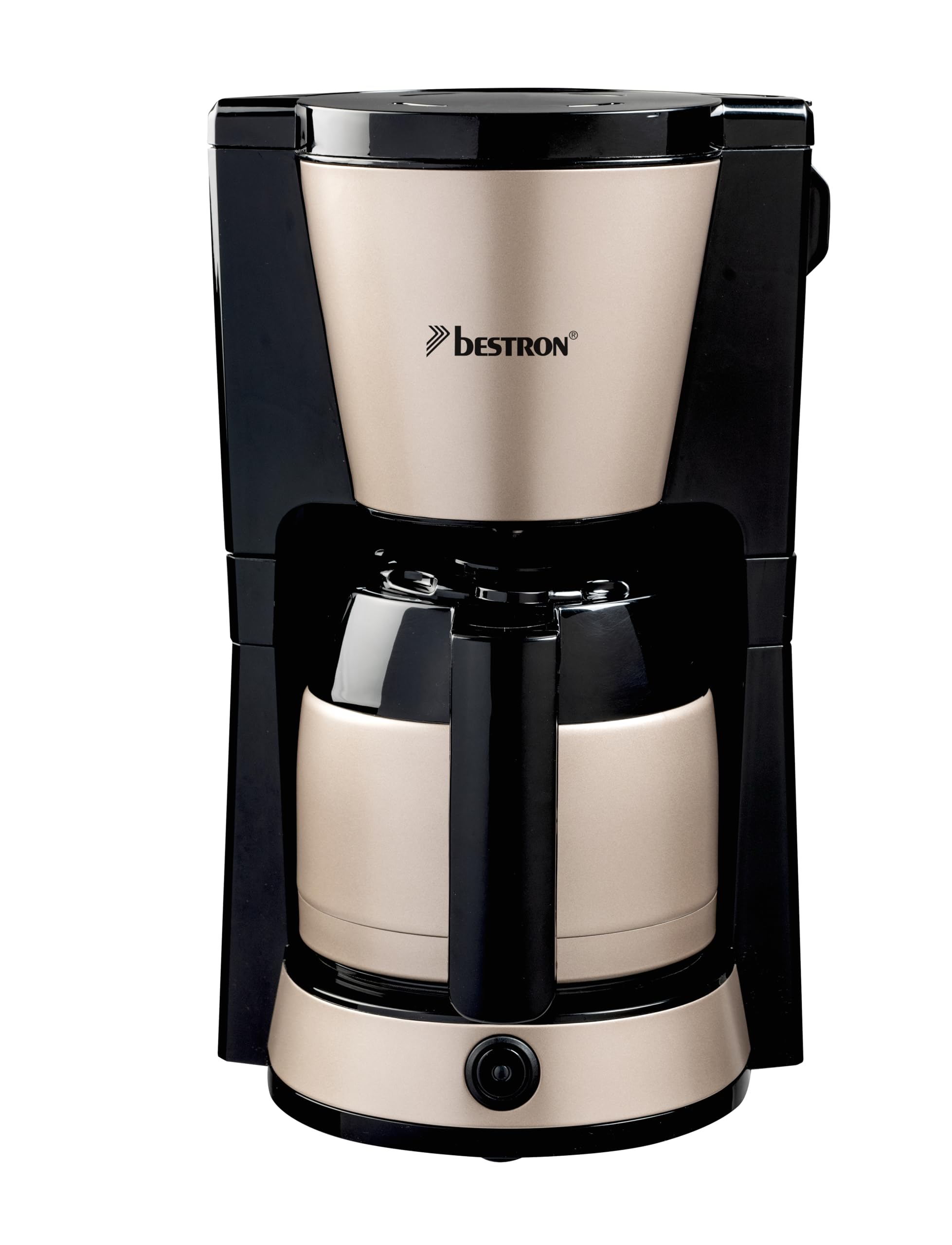
Image: Bestron ACM1000SAT Filter Coffee Machine. This image displays the main unit, including the water tank, filter holder, and thermos jug.
4. സജ്ജീകരണവും ആദ്യ ഉപയോഗവും
Before using your coffee machine for the first time, follow these steps:
- അൺപാക്ക്: Carefully remove the coffee machine and all accessories from its packaging. Retain packaging for future transport or storage.
- വൃത്തിയാക്കുക: Wash the thermos jug, its lid, and the permanent filter in warm soapy water. Rinse thoroughly and dry. The permanent filter and thermos are dishwasher-safe.
- സ്ഥാനം: ജലസ്രോതസ്സുകളിൽ നിന്നും ചൂടിൽ നിന്നും അകറ്റി, സ്ഥിരതയുള്ളതും പരന്നതും ചൂടിനെ പ്രതിരോധിക്കുന്നതുമായ ഒരു പ്രതലത്തിൽ കോഫി മെഷീൻ സ്ഥാപിക്കുക. ആവശ്യത്തിന് വായുസഞ്ചാരം ഉറപ്പാക്കുക.
- ആദ്യ കഴുകൽ ചക്രം: Fill the water tank with cold water up to the 'MAX' mark (1000 ml). Place the empty permanent filter (or a paper filter) in the filter holder and close it. Place the empty thermos jug with its lid on the warming plate. Plug the appliance into a grounded wall outlet. Press the Start button to begin a brewing cycle without coffee. This cleans the internal components. Discard the water after the cycle. Repeat this process once or twice.

Image: Bestron ACM1000SAT Filter Coffee Machine positioned on a kitchen counter, ready for use.
5. പ്രവർത്തന നിർദ്ദേശങ്ങൾ
കോഫി ഉണ്ടാക്കാൻ ഈ ഘട്ടങ്ങൾ പാലിക്കുക:
- വാട്ടർ ടാങ്ക് നിറയ്ക്കുക: Open the lid of the water tank and fill it with fresh, cold water up to the desired level, indicated by the transparent water level indicator. The maximum capacity is 1000 ml (approximately 8 cups).
- കോഫി ചേർക്കുക: Swivel out the filter holder. Place the permanent filter inside, or insert a 1x4 paper filter. Add the desired amount of ground coffee into the filter. A general guideline is one level tablespoon of coffee per cup, but adjust to your taste. Swivel the filter holder back into place until it clicks.
- Position Thermos: Ensure the thermos jug, with its lid securely in place, is correctly positioned on the warming plate. The lid helps preserve aroma and activates the drip-stop mechanism.
- ബ്രൂവിംഗ് ആരംഭിക്കുക: Plug the power cord into a grounded wall outlet. Press the Start button. The indicator light will illuminate, signifying that the brewing process has begun.
- യാന്ത്രിക ഷട്ട്-ഓഫ്: The coffee machine will automatically shut off once the brewing cycle is complete and the water tank is empty. The indicator light will turn off.
- സേവിക്കുക: Carefully remove the thermos jug from the warming plate. Pour and enjoy your freshly brewed coffee. The double-walled thermos will keep your coffee warm for an extended period.
പ്രധാനപ്പെട്ടത്: Do not open the filter holder during the brewing process, as hot water and steam may escape and cause injury.
6. വൃത്തിയാക്കലും പരിപാലനവും
പതിവായി വൃത്തിയാക്കുന്നത് മികച്ച പ്രകടനവും ശുചിത്വവും ഉറപ്പാക്കുന്നു.
- പ്രതിദിന ശുചീകരണം: After each use, unplug the appliance and allow it to cool completely. Remove the thermos jug and permanent filter. Wash the thermos jug, its lid, and the permanent filter in warm soapy water or place them in the dishwasher. Wipe the exterior of the coffee machine with a damp തുണി. ഉരച്ചിലുകളുള്ള ക്ലീനറുകളോ സ്കോററുകളോ ഉപയോഗിക്കരുത്.
- നിരസിക്കൽ: Depending on water hardness and frequency of use, descaling is recommended every 2-4 months. Mineral deposits can affect performance and taste. To descale, mix a descaling solution (e.g., white vinegar or a commercial descaler) with water according to the product instructions. Fill the water tank with the solution and run a brewing cycle without coffee. After the cycle, run 2-3 cycles with fresh, clean water to rinse thoroughly.
- സംഭരണം: If the appliance will not be used for an extended period, clean it thoroughly, ensure all parts are dry, and store it in its original packaging in a dry, safe place.
7. പ്രശ്നപരിഹാരം
If you encounter issues with your coffee machine, refer to the following table:
| പ്രശ്നം | സാധ്യമായ കാരണം | പരിഹാരം |
|---|---|---|
| കാപ്പി ഉണ്ടാക്കുന്നില്ല. | ഉപകരണം പ്ലഗ് ഇൻ ചെയ്തിട്ടില്ല; പവർ ഓഫാണ്tage; water tank empty; Start button not pressed. | Check power connection; ensure water tank is filled; press Start button. |
| കാപ്പിയുടെ രുചി ദുർബലമാണ് അല്ലെങ്കിൽ വളരെ ശക്തമാണ്. | കാപ്പിയും വെള്ളവും തമ്മിലുള്ള അനുപാതം തെറ്റാണ്; കാപ്പി വളരെ നേർത്തതായി/കട്ടിയായി പൊടിച്ചത്. | Adjust coffee amount; use appropriate grind for filter coffee. |
| ഫിൽട്ടർ ഹോൾഡറിൽ നിന്ന് വെള്ളം ഒഴുകുന്നു. | Filter holder not properly closed; filter clogged; thermos jug not correctly placed. | Ensure filter holder is securely closed; clean filter; ensure thermos jug is correctly positioned. |
| ബ്രൂവിംഗ് പ്രക്രിയ മന്ദഗതിയിലാണ്. | Mineral deposits (limescale) in the appliance. | Descale the coffee machine as per cleaning instructions. |
8 സ്പെസിഫിക്കേഷനുകൾ
- മോഡൽ: ACM1000SAT
- ബ്രാൻഡ്: ബെസ്ട്രോൺ
- ശക്തി: 900 വാട്ട്സ്
- വാല്യംtage: 240 വോൾട്ട്
- ശേഷി: 1 ലിറ്റർ (ഏകദേശം 8 കപ്പ്)
- മെറ്റീരിയൽ: മെറ്റൽ, പ്ലാസ്റ്റിക്
- അളവുകൾ (L x W x H): 24 x 26 x 38.8 സെ.മീ
- ഭാരം: 2 കിലോഗ്രാം
- ഫീച്ചറുകൾ: Permanent filter, Thermos jug, Automatic shut-off, Drip-stop
9. വാറൻ്റിയും പിന്തുണയും
Bestron products are manufactured to high quality standards. In the unlikely event of a defect, please contact your retailer or Bestron customer service for assistance. Keep your purchase receipt as proof of purchase for warranty claims. Information regarding specific warranty periods and conditions can typically be found on the manufacturer's website or provided with the product packaging.
Ask a question about this manual
Ask about setup, troubleshooting, compatibility, parts, safety, or missing instructions. Manuals+ will review the question and use this page’s manual context to help answer it.