
LEAUDIO D50 III
Topping D50 III Desktop HiFi DAC User Manual
Model: D50 III
1. ആമുഖം
Thank you for choosing the Topping D50 III Desktop HiFi DAC. This device is designed to provide high-fidelity audio conversion, featuring dual ES9039Q2M DAC chips for superior sound quality, LDAC wireless connectivity, and flexible output options. This manual will guide you through the setup, operation, and maintenance of your D50 III.
The D50 III is engineered for audiophiles and enthusiasts seeking pristine audio reproduction from various digital sources. Its robust design and advanced circuitry ensure a premium listening experience.
2. ബോക്സിൽ എന്താണുള്ളത്?
എല്ലാ ഇനങ്ങളും ഉണ്ടെന്ന് ഉറപ്പാക്കാൻ നിങ്ങളുടെ പാക്കേജിന്റെ ഉള്ളടക്കങ്ങൾ പരിശോധിക്കുക:
- Topping D50 III DAC Unit
- റിമോട്ട് കൺട്രോൾ
- യുഎസ്ബി എസി കേബിൾ
- USB CC കേബിൾ
- ബ്ലൂടൂത്ത് ആൻ്റിന
- ഉൽപ്പന്ന വിവര കാർഡ്
- Guide for Bluetooth Remote

Image: Diagram showing the Topping D50 III unit, remote control, USB A-C cable, USB C-C cable, Bluetooth antenna, product information card, and Bluetooth remote guide.
3. ഉൽപ്പന്നം കഴിഞ്ഞുview
The Topping D50 III features a sleek, compact design with intuitive controls and comprehensive connectivity options.
ഫ്രണ്ട് പാനൽ

ചിത്രം: മുൻഭാഗം view of the Topping D50 III, showing the power button, display screen, and navigation/volume buttons.
- പവർ ബട്ടൺ: Press to turn on/off, short press to cycle through inputs.
- ഡിസ്പ്ലേ സ്ക്രീൻ: നിലവിലെ ഇൻപുട്ട് കാണിക്കുന്നു, sample rate, and volume level.
- Navigation/Volume Buttons: Used for menu navigation and volume adjustment.
പിൻ പാനൽ

ചിത്രം: പിൻഭാഗം view of the Topping D50 III, displaying various input and output ports including RCA, Optical, Coaxial, USB-C, Bluetooth antenna connector, 12V Trigger, and Power input.
- RCA Outputs (L/R): Unbalanced analog audio output.
- TRS Outputs (L/R): Balanced analog audio output.
- ഏകോപന ഇൻപുട്ട്: ഡിജിറ്റൽ ഓഡിയോ ഇൻപുട്ട്.
- ഒപ്റ്റിക്കൽ ഇൻപുട്ട്: ഡിജിറ്റൽ ഓഡിയോ ഇൻപുട്ട്.
- യുഎസ്ബി-സി ഇൻപുട്ട്: Digital audio input for PC, Mac, Linux, iOS/Android devices.
- BT (Bluetooth) Antenna Connector: വയർലെസ് ഓഡിയോ റിസപ്ഷനായി.
- 12V ട്രിഗർ: Allows synchronous power on/off with compatible devices.
- പവർ ഇൻപുട്ട്: ഡിസി പവർ ഇൻപുട്ട്.
പ്രധാന സവിശേഷതകൾ
- Dual ES9039Q2M DACs: Utilizes two ES9039Q2M chips for improved SNR, dynamic range, and lower distortion.
- New I/V Conversion Circuit: Designed for enhanced audio reproduction with lower distortion and noise.
- LDAC Wireless: Equipped with QCC5125 and Bluetooth 5.1, supporting LDAC/aptX-Adaptive/aptX-HD/AAC/SBC up to 96kHz/24bit.
- യുഎസ്ബി പ്ലഗ് ആൻഡ് പ്ലേ ചെയ്യുക: Compatible with Windows 10/11, MAC, Linux, iOS/Android. Supports PCM768kHz/32bit and DSD512.
- വൈവിധ്യമാർന്ന ഔട്ട്പുട്ട് മോഡുകൾ: Features RCA and TRS balanced outputs with selectable 4V/2V or 5V/2.5V modes.
- പ്രീampലൈഫയർ പ്രവർത്തനം: Can operate in DAC mode or Preamp mode, allowing volume control for active speakers or power ampജീവപര്യന്തം.
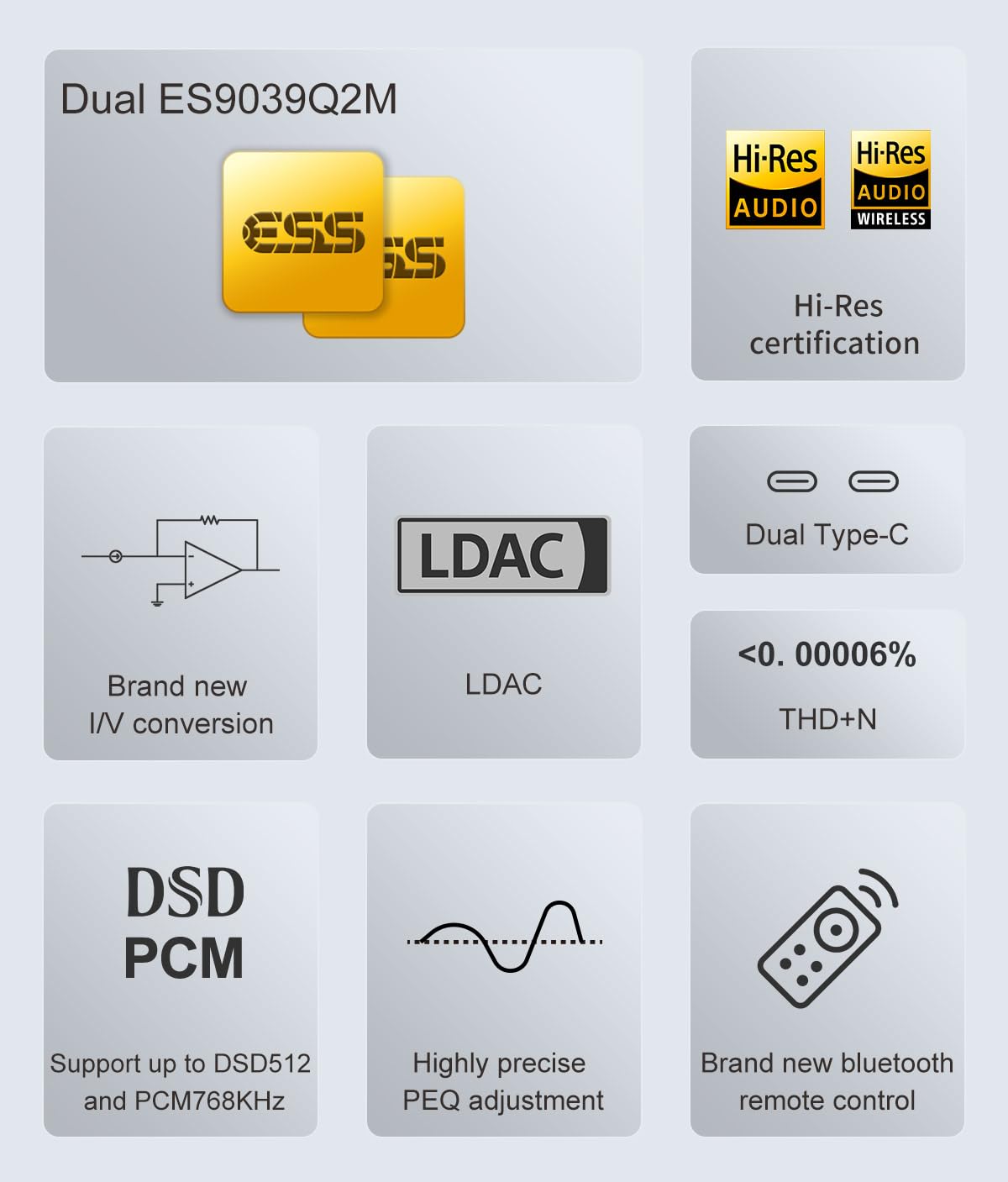
Image: Infographic highlighting key features such as Dual ES9039Q2M, Hi-Res Audio certification, LDAC support, new I/V conversion, Dual Type-C, low THD+N, DSD/PCM support, precise PEQ adjustment, and a new Bluetooth remote control.

Image: Detailed diagram illustrating the dual ES9039Q2M DAC chip architecture within the D50 III, emphasizing the separate chips for left and right channels.
4. സജ്ജീകരണം
Follow these steps to set up your Topping D50 III DAC:
- പവർ ബന്ധിപ്പിക്കുക: Connect the provided power adapter to the D50 III's power input and then to a wall outlet.
- ഓഡിയോ put ട്ട്പുട്ട് കണക്റ്റുചെയ്യുക: Choose your preferred output method:
- ആർസിഎ: Connect RCA cables from the D50 III's RCA outputs to your ampലൈഫയർ അല്ലെങ്കിൽ സജീവ സ്പീക്കറുകൾ.
- ടിആർഎസ് (സന്തുലിതമായത്): Connect TRS cables from the D50 III's TRS outputs to your balanced ampലൈഫയർ അല്ലെങ്കിൽ സജീവ സ്പീക്കറുകൾ.
- ഓഡിയോ ഇൻപുട്ട് ബന്ധിപ്പിക്കുക: Choose your desired digital audio input:
- USB: Connect a USB cable (A-C or C-C) from your computer, smartphone, or tablet to the D50 III's USB-C input. For Windows, you may need to install the Thesycon driver from the Topping webസൈറ്റ്.
- ഒപ്റ്റിക്കൽ/കോക്ഷ്യൽ: Connect an optical or coaxial cable from your digital audio source (e.g., CD player, TV) to the corresponding input on the D50 III.
- ബ്ലൂടൂത്ത്: Screw the Bluetooth antenna onto the BT connector on the rear panel.
- പവർ ഓൺ: Press the power button on the front panel or the remote control to turn on the D50 III.
- 12V ട്രിഗർ (ഓപ്ഷണൽ): If you have a compatible device (like the Topping A50 III) that supports 12V Trigger, connect a 12V trigger cable between the D50 III and the other device for synchronized power control.
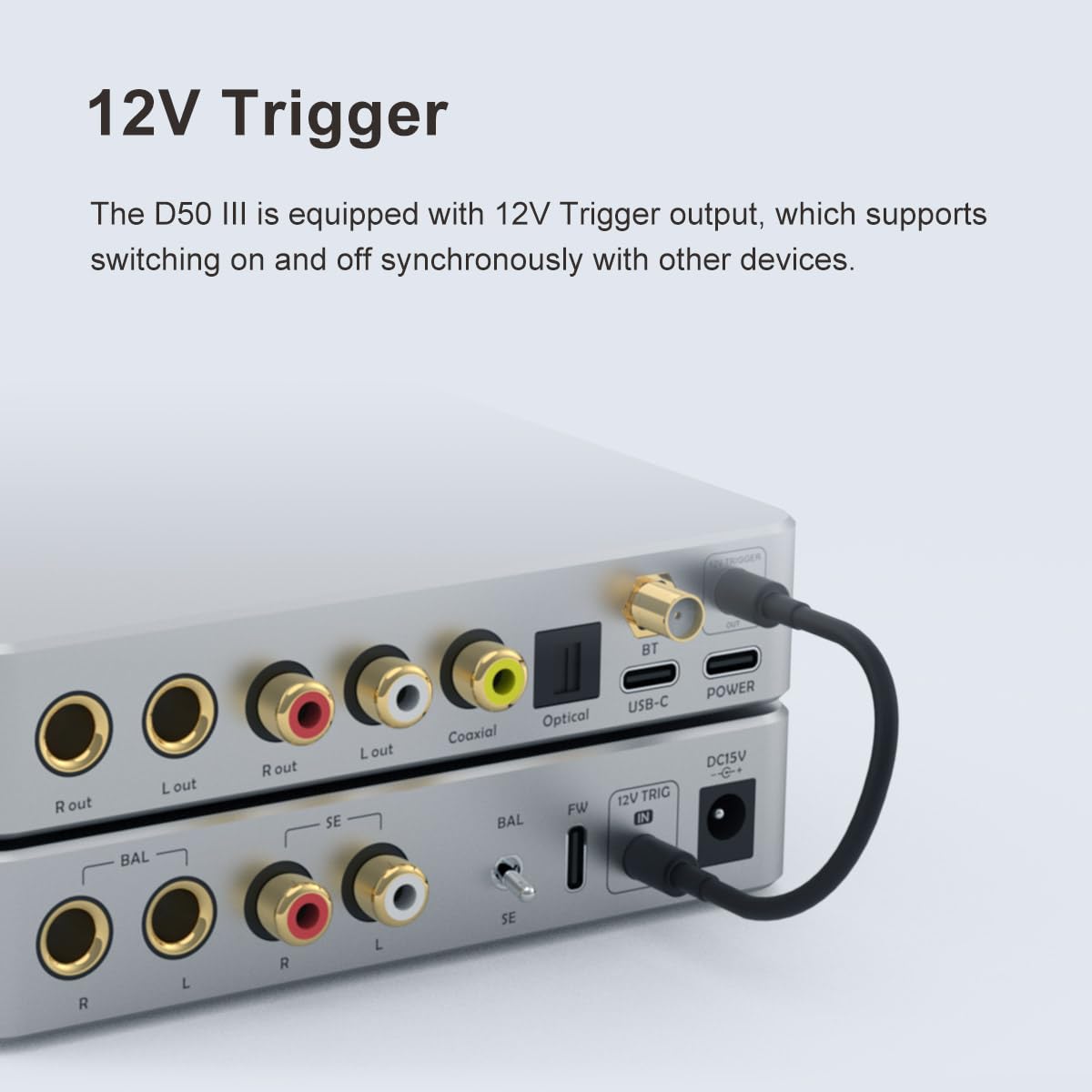
ചിത്രം: ക്ലോസ്-അപ്പ് view of the rear panel of the D50 III, showing the 12V Trigger port with a cable connected, illustrating its use for synchronized power control with other devices.
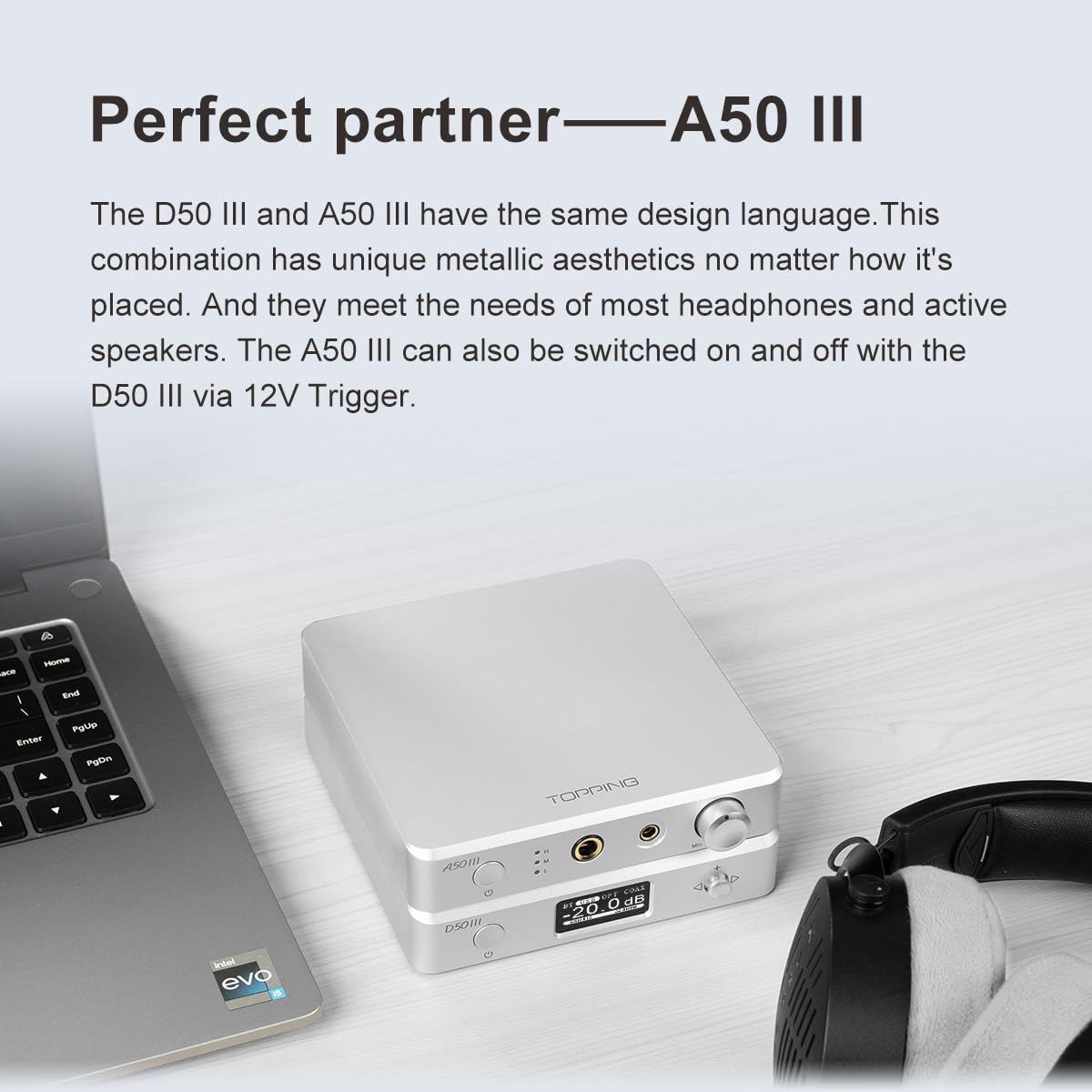
Image: The Topping D50 III stacked with a Topping A50 III amplifier on a desk next to a laptop and headphones, demonstrating a typical setup where both devices are used together.
5. പ്രവർത്തന നിർദ്ദേശങ്ങൾ
അടിസ്ഥാന പ്രവർത്തനം
- പവർ ഓൺ/ഓഫ്: Press the power button on the front panel or the remote.
- ഇൻപുട്ട് തിരഞ്ഞെടുക്കൽ: Short press the power button on the front panel to cycle through USB, Optical, Coaxial, and Bluetooth inputs. Alternatively, use the input selection buttons on the remote.
- വോളിയം നിയന്ത്രണം: Use the '+' and '-' buttons on the front panel or the remote to adjust the volume.
- നിശബ്ദമാക്കുക: Press the mute button on the remote control to mute/unmute the audio output.
മെനു ക്രമീകരണങ്ങൾ
The D50 III offers various settings accessible via the menu. Use the navigation buttons on the front panel or remote to enter and navigate the menu.
- ഔട്ട്പുട്ട് മോഡ്: Select between 4V/2V (standard) and 5V/2.5V (high output) modes for RCA and TRS outputs.
- DAC/Preamp മോഡ്: Choose between pure DAC mode (fixed output) or Preamp mode (variable output with volume control).
- ബ്ലൂടൂത്ത് ജോടിയാക്കൽ: Enter the Bluetooth menu to pair with new devices.
- പ്രദർശന തെളിച്ചം: Adjust the brightness of the display screen.
- ഫിൽട്ടർ ക്രമീകരണങ്ങൾ: Select different digital filter modes (if available) to fine-tune the sound.
6 സ്പെസിഫിക്കേഷനുകൾ
The following table details the technical specifications of the Topping D50 III DAC:
| പരാമീറ്റർ | ആർസിഎ | ടി.ആർ.എസ് |
|---|---|---|
| THD+N @1kHz (A-wt) | <0.00008% @1kHz | <0.00006% @1kHz |
| THD @20-20kHz (90kBW) | <0.0004 % @20-20kHz | <0.0002% @20-20kHz |
| SNR @MAX OUT 1kHz (A-wt) | 127dB @1kHz | 132dB @1kHz |
| ഡൈനാമിക് റേഞ്ച് @1kHz (A-wt) | 127dB @1kHz | 132dB @1kHz |
| ഫ്രീക്വൻസി പ്രതികരണം | 20Hz-20kHz (0.1dB), 20Hz-40kHz (0.3dB) | 20Hz-20kHz (0.1dB), 20Hz-40kHz (0.3dB) |
| ഔട്ട്പുട്ട് ലെവൽ | 2.0Vrms @0dBFS (4V Mode), 2.5Vrms @0dBFS (5V Mode) | 4.0Vrms @0dBFS (4V Mode), 5.0Vrms @0dBFS (5V Mode) |
| ശബ്ദം (A-wt) | <1.1uVrms | <1.3uVrms |
| ചാനൽ ക്രോസ്സ്റ്റോക്ക് | -136dB@1kHz | -147dB @1kHz |
| ചാനൽ ബാലൻസ് | 0.3dB | 0.3 ഡി.ബി |
| ഔട്ട്പുട്ട് ഇംപെഡൻസ് | 50Ω | 100Ω |
Note: The above data is the result obtained from TOPPING lab test under AC220V 50Hz and D50 III set to 5V output mode.
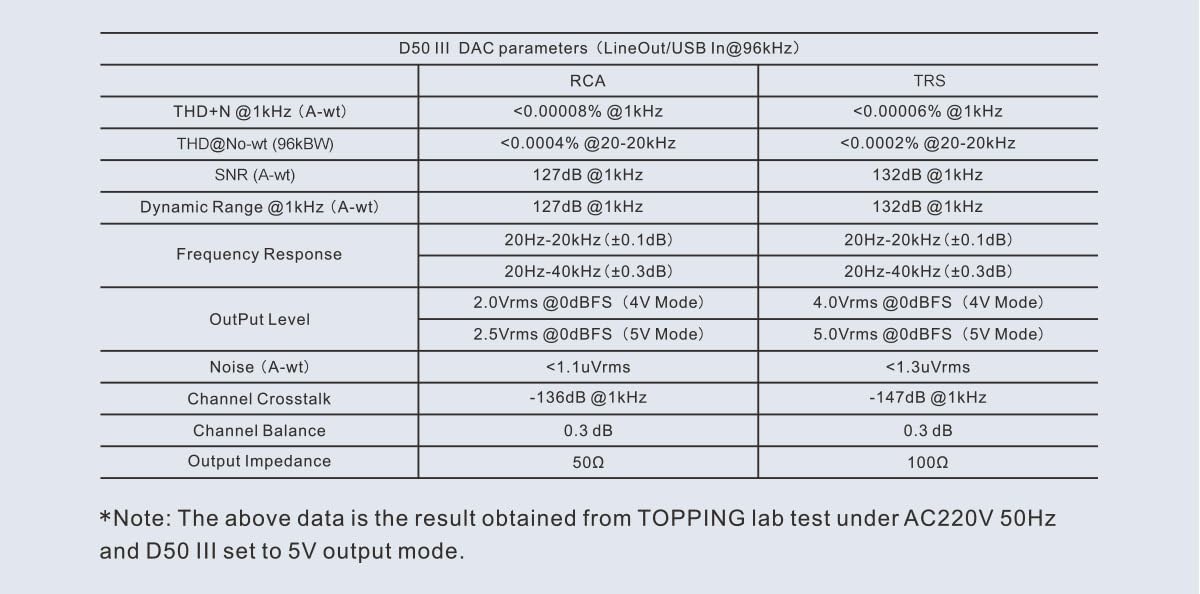
Image: A table displaying detailed technical specifications for the Topping D50 III DAC, including THD+N, SNR, Dynamic Range, Frequency Response, Output Level, Noise, Channel Crosstalk, Channel Balance, and Output Impedance for both RCA and TRS outputs.
പൊതു സവിശേഷതകൾ
- ഉൽപ്പന്ന അളവുകൾ: 4.92 x 3.94 x 0.1 ഇഞ്ച്
- ഭാരം: 2.05 പൗണ്ട്
- മൗണ്ടിംഗ് തരം: ഡെസ്ക് മ .ണ്ട്
- പരമാവധി സപ്ലൈ വോളിയംtage: 5 വോൾട്ട്
- മിനിമം സപ്ലൈ വോളിയംtage: 5 വോൾട്ട്
- മാതൃരാജ്യം: ചൈന
7. പരിപാലനം
To ensure the longevity and optimal performance of your Topping D50 III, please follow these maintenance guidelines:
- വൃത്തിയാക്കൽ: Use a soft, dry cloth to wipe the exterior of the unit. Avoid using abrasive cleaners, solvents, or chemical sprays, as they may damage the finish or internal components.
- പ്ലേസ്മെൻ്റ്: Place the D50 III on a stable, flat surface away from direct sunlight, heat sources, and excessive moisture. Ensure adequate ventilation around the unit.
- കണക്ഷനുകൾ: Periodically check all cable connections to ensure they are secure and free from dust or corrosion.
- സംഭരണം: യൂണിറ്റ് ദീർഘനേരം സൂക്ഷിക്കുകയാണെങ്കിൽ, അത് വൈദ്യുതിയിൽ നിന്ന് വിച്ഛേദിച്ച് തണുത്തതും വരണ്ടതുമായ സ്ഥലത്ത് സൂക്ഷിക്കുക.
8. പ്രശ്നപരിഹാരം
If you encounter issues with your D50 III, refer to the following common problems and solutions:
- സൗണ്ട് ഔട്ട്പുട്ട് ഇല്ല:
- Ensure the D50 III is powered on.
- Verify that the correct input source is selected on the D50 III.
- Check all audio cable connections between the D50 III and your ampലൈഫയർ/സ്പീക്കർമാർ.
- നിങ്ങളുടെ ഉറപ്പാക്കുക amplifier/speakers are powered on and set to the correct input.
- Check the volume level on the D50 III and your amplifier/speakers; ensure it is not muted.
- If using USB, ensure the correct audio output device is selected in your computer's sound settings and that the necessary drivers are installed for Windows.
- വികലമായ ശബ്ദം:
- Check if the input source's volume is too high, causing clipping.
- കേബിളുകൾ സുരക്ഷിതമായി ബന്ധിപ്പിച്ചിട്ടുണ്ടെന്നും കേടുപാടുകൾ സംഭവിച്ചിട്ടില്ലെന്നും ഉറപ്പാക്കുക.
- എസ് എന്ന് പരിശോധിക്കുകample rate and bit depth settings on your source device are compatible with the D50 III.
- മറ്റൊരു ഓഡിയോ പരീക്ഷിച്ചു നോക്കൂ file or source to rule out source-related issues.
- ബ്ലൂടൂത്ത് കണക്ഷൻ പ്രശ്നങ്ങൾ:
- ബ്ലൂടൂത്ത് ആന്റിന സുരക്ഷിതമായി ഘടിപ്പിച്ചിട്ടുണ്ടെന്ന് ഉറപ്പാക്കുക.
- Make sure the D50 III is in Bluetooth input mode.
- Unpair and re-pair the D50 III with your Bluetooth device.
- മറ്റ് ഉപകരണങ്ങളൊന്നും ബ്ലൂടൂത്ത് സിഗ്നലിനെ തടസ്സപ്പെടുത്തുന്നില്ലെന്ന് ഉറപ്പാക്കുക.
- Try moving your Bluetooth device closer to the D50 III.
- റിമോട്ട് കൺട്രോൾ പ്രവർത്തിക്കുന്നില്ല:
- റിമോട്ട് കൺട്രോളിലെ ബാറ്ററി പരിശോധിച്ച് ആവശ്യമെങ്കിൽ മാറ്റിസ്ഥാപിക്കുക.
- Ensure there are no obstructions between the remote and the D50 III.
- Point the remote directly at the D50 III's front panel.
ഈ പരിഹാരങ്ങൾ പരീക്ഷിച്ചതിന് ശേഷവും പ്രശ്നം നിലനിൽക്കുകയാണെങ്കിൽ, ദയവായി ഉപഭോക്തൃ പിന്തുണയുമായി ബന്ധപ്പെടുക.
9. വാറൻ്റിയും പിന്തുണയും
For information regarding the product warranty, please refer to the warranty card included in your product packaging or visit the official LEAUDIO/Topping webസൈറ്റ്. വാറന്റി നിബന്ധനകളും വ്യവസ്ഥകളും പ്രദേശത്തിനും റീട്ടെയിലർക്കും അനുസരിച്ച് വ്യത്യാസപ്പെടാം.
For technical support, troubleshooting assistance beyond this manual, or service inquiries, please contact the retailer where you purchased the product or visit the official LEAUDIO/Topping support website. Please have your product model and serial number ready when contacting support.
നിർമ്മാതാവ്: LEAUDIO
Ask a question about this manual
Ask about setup, troubleshooting, compatibility, parts, safety, or missing instructions. Manuals+ will review the question and use this page’s manual context to help answer it.