പ്രധാനപ്പെട്ട സുരക്ഷാ വിവരങ്ങൾ
Please read all safety instructions carefully before installing or operating this power supply unit. Failure to follow these instructions may result in electric shock, fire, or damage to the product and connected components.
- യോഗ്യതയുള്ള ഉദ്യോഗസ്ഥർ മാത്രം: Installation and servicing should only be performed by qualified technicians.
- വൈദ്യുതി വിച്ഛേദിക്കൽ: Always disconnect the power cord from the wall outlet before installing, removing, or servicing the power supply.
- വെൻ്റിലേഷൻ: Ensure adequate ventilation around the power supply. Do not block any ventilation openings.
- ഈർപ്പവും ദ്രാവകവും: Do not expose the power supply to moisture, rain, or any liquids.
- പ്രവർത്തന പരിസ്ഥിതി: Operate the power supply within the specified temperature and humidity ranges.
- ഗ്രൗണ്ടിംഗ്: Ensure the power supply and the computer system are properly grounded.
- ഉയർന്ന വോളിയംtage: The power supply contains high voltagഇ ഘടകങ്ങൾ. പവർ സപ്ലൈ തുറക്കരുത് casing. ഉള്ളിൽ ഉപയോക്തൃ-സേവനയോഗ്യമായ ഭാഗങ്ങളൊന്നുമില്ല.
ഉൽപ്പന്നം കഴിഞ്ഞുview
This document provides instructions for the Generic FSP 80 Plus Bronze 350W Switching Power Supply, designed to provide stable and efficient power to your computer system. It is compatible with various FSP models including FSP350-60PFG, FSP350-70PFL, FSP350-60GLC, and FSP350-60GLN.
The power supply features 80 Plus Bronze certification, indicating high power efficiency, which reduces heat generation and operating costs. With a 350W output, it is suitable for systems requiring reliable power delivery.

Figure 1: Generic FSP 350W Power Supply Unit, showing the model number FSP350-60PFG and 350W rating.
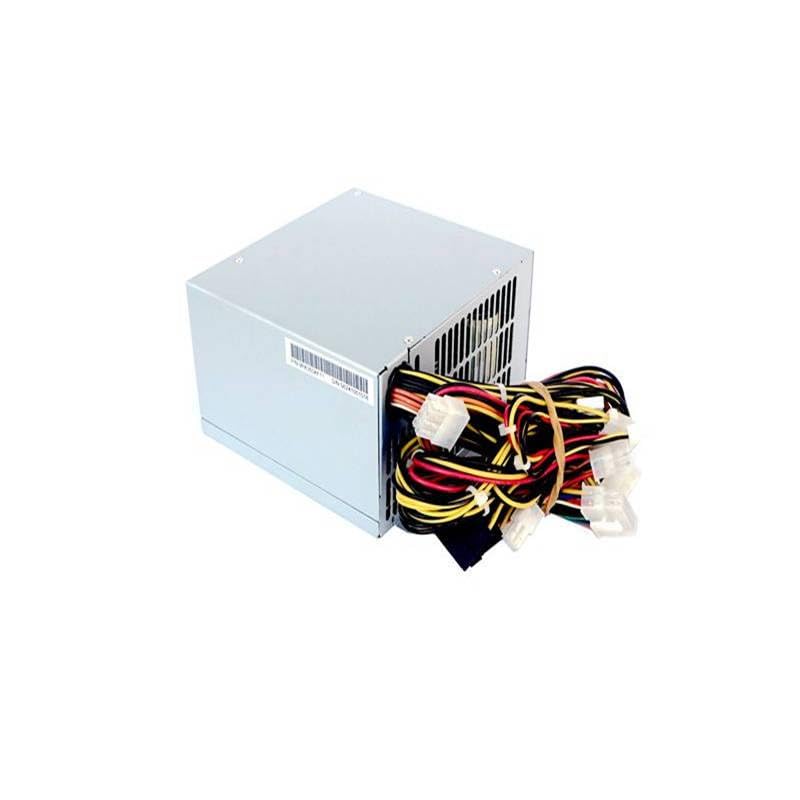
ചിത്രം 2: പിൻഭാഗം view of the power supply unit, featuring the cooling fan, AC power inlet, and power switch.
സ്പെസിഫിക്കേഷനുകൾ
The following table details the electrical specifications of the FSP350-60PFG model, which is representative of the series. Please refer to the specific label on your unit for exact details if different.

Figure 3: Specification label for FSP350-60PFG Power Supply, detailing input and output electrical characteristics.
Electrical Specifications (FSP350-60PFG)
| സ്വഭാവം | മൂല്യം |
|---|---|
| മോഡൽ നമ്പർ. | FSP350-60PFG |
| എസി ഇൻപുട്ട് | 100-240V~, 8-3A, 60-50Hz |
| DC Output +3.3V | 21.0എ |
| DC Output +5V | 20.0എ |
| DC Output +12V1 | 16.0എ |
| DC Output +12V2 | 16.0എ |
| DC Output +5Vsb | 3.0എ |
| DC Output -12V | 0.5എ |
| DC Output -5V | 0.3എ |
| മാക്സ് വാട്ട്tage (+3.3V & +5V) | 130W പരമാവധി |
| മൊത്തം ഔട്ട്പുട്ട് പവർ | 350W |
| കാര്യക്ഷമത | 80 പ്ലസ് വെങ്കലം സാക്ഷ്യപ്പെടുത്തി |
| തണുപ്പിക്കൽ | Ball Bearing Fan |
| PFC | സജീവമായ PFC |
പൊതുവായ ഉൽപ്പന്ന സവിശേഷതകൾ
- ബ്രാൻഡ്: ജനറിക്
- ഔട്ട്പുട്ട് വാട്ട്tage: 350 വാട്ട്സ്
- നിർമ്മാതാവിൻ്റെ ഭാഗം നമ്പർ: ZZlH_DNC_18497
- Compatible FSP Models: FSP350-60PFG, FSP350-70PFL, FSP350-60GLC, FSP350-60GLN
ഇൻസ്റ്റാളേഷൻ (സജ്ജീകരണം)
Before beginning installation, ensure your computer is completely powered off and unplugged from the wall outlet. It is recommended to wear an anti-static wrist strap to prevent electrostatic discharge (ESD) damage to components.
- നിങ്ങളുടെ സിസ്റ്റം തയ്യാറാക്കുക: Open your computer case. If replacing an existing power supply, disconnect all cables from the old PSU and remove it from the chassis.
- PSU മൌണ്ട് ചെയ്യുക: Carefully slide the new FSP 350W power supply into the designated PSU bay in your computer case. Secure it with screws (typically four) from the rear of the case.
- മദർബോർഡ് പവർ ബന്ധിപ്പിക്കുക: Connect the main 20+4 pin ATX power connector to your motherboard. Ensure it clicks securely into place.
- സിപിയു പവർ ബന്ധിപ്പിക്കുക: Connect the 4-pin or 4+4 pin EPS/ATX 12V connector to the CPU power socket on your motherboard.
- പെരിഫറലുകൾ ബന്ധിപ്പിക്കുക: Connect SATA power connectors to your hard drives, SSDs, and optical drives. Connect Molex connectors to any other peripherals that require them (e.g., case fans, older drives).
- Connect Graphics Card (if applicable): If your graphics card requires additional power, connect the appropriate PCIe power connectors (e.g., 6-pin, 8-pin) from the PSU to the graphics card.
- കേബിൾ മാനേജുമെന്റ്: വായുപ്രവാഹവും സൗന്ദര്യവും മെച്ചപ്പെടുത്തുന്നതിന് കേബിളുകൾ വൃത്തിയായി റൂട്ട് ചെയ്യുക.
- കേസ് അടച്ച് പവർ ബന്ധിപ്പിക്കുക: Close your computer case. Connect the AC power cord to the power supply's inlet and then to a grounded wall outlet or surge protector.
ഓപ്പറേഷൻ
Operating the FSP 350W power supply is straightforward once installed correctly.
- പവർ ഓൺ: Ensure the power switch on the rear of the power supply (next to the AC inlet) is in the 'I' (On) position. Then, press the power button on your computer case.
- പവർ ഓഫ്: To turn off your computer, use the operating system's shutdown procedure. For a complete power cycle, you can switch the PSU's rear switch to the 'O' (Off) position after the system has shut down.
- സാധാരണ പ്രവർത്തനം: The power supply fan will operate to cool the unit. The fan speed may vary depending on the load and temperature.
മെയിൻ്റനൻസ്
Proper maintenance ensures the longevity and stable operation of your power supply.
- പൊടി വൃത്തിയാക്കൽ: Periodically (e.g., every 6-12 months), power off and unplug your computer. Open the case and use compressed air to gently clean dust from the power supply's fan and ventilation grilles. പൊതുമേഖലാ സ്ഥാപനം തുറക്കരുത് casing.
- വെൻ്റിലേഷൻ: Ensure that the computer case has good airflow and that the power supply's intake and exhaust vents are not obstructed.
- പരിസ്ഥിതി വ്യവസ്ഥകൾ: Keep the computer in a cool, dry, and well-ventilated area, away from direct sunlight, heat sources, and excessive humidity.
ട്രബിൾഷൂട്ടിംഗ്
If you encounter issues with your power supply, refer to the following troubleshooting steps:
- ശക്തിയില്ല:
- Check if the AC power cord is securely plugged into both the wall outlet and the power supply.
- Ensure the power switch on the rear of the PSU is in the 'I' (On) position.
- മറ്റൊരു ഉപകരണം പ്ലഗ് ഇൻ ചെയ്ത് വാൾ ഔട്ട്ലെറ്റ് പ്രവർത്തനക്ഷമമാണെന്ന് ഉറപ്പാക്കുക.
- Check all internal power connections (20+4 pin ATX, 4/8 pin CPU, PCIe, SATA) to ensure they are firmly seated.
- സിസ്റ്റം അസ്ഥിരത/റാൻഡം ഷട്ട്ഡൗണുകൾ:
- This could indicate an overloaded or failing power supply. Ensure your system's power requirements do not exceed 350W.
- ശരിയായ വായുസഞ്ചാരം പരിശോധിക്കുകയും PSU ഫാൻ കറങ്ങുന്നുണ്ടെന്ന് ഉറപ്പാക്കുകയും ചെയ്യുക. അമിതമായി ചൂടാകുന്നത് അസ്ഥിരതയ്ക്ക് കാരണമാകും.
- If possible, test the power supply with a known working system or use a PSU tester.
- Loud Noise from PSU:
- A loud fan might indicate dust buildup. Refer to the Maintenance section for cleaning instructions.
- If the noise is a grinding or rattling sound, the fan bearing might be failing. In this case, the PSU may need replacement.
If these steps do not resolve the issue, contact your retailer or a qualified technician for further assistance.
വാറൻ്റിയും പിന്തുണയും
As a Generic branded product, warranty and support are typically provided by the retailer or seller from whom the product was purchased. Please retain your proof of purchase for any warranty claims.
- വാറൻ്റി കാലയളവ്: Refer to the terms and conditions provided by your retailer at the time of purchase.
- സാങ്കേതിക സഹായം: For technical assistance, contact the seller or a qualified computer technician.
- റിട്ടേണുകൾ: For return policies, please consult the retailer's return guidelines.
Note: Opening the power supply casing will void any existing warranty.


