
ആമുഖം
This manual provides detailed instructions for the installation, operation, and maintenance of your DELLA 6000 BTU Window Air Conditioner. Please read this manual thoroughly before using the appliance and retain it for future reference.
സുരക്ഷാ വിവരങ്ങൾ
തീപിടുത്തം, വൈദ്യുതാഘാതം, വ്യക്തികൾക്ക് പരിക്കേൽക്കൽ എന്നിവ കുറയ്ക്കുന്നതിന് വൈദ്യുത ഉപകരണങ്ങൾ ഉപയോഗിക്കുമ്പോൾ എല്ലായ്പ്പോഴും അടിസ്ഥാന സുരക്ഷാ മുൻകരുതലുകൾ പാലിക്കുക.
- യൂണിറ്റ് ശരിയായ നിലയിലാണെന്ന് ഉറപ്പാക്കുക.
- കേടായ ചരടോ പ്ലഗോ ഉപയോഗിച്ച് യൂണിറ്റ് പ്രവർത്തിപ്പിക്കരുത്.
- എയർ ഇൻലെറ്റ്/ഔട്ട്ലെറ്റിൽ വിരലുകളോ വിദേശ വസ്തുക്കളോ തിരുകരുത്.
- വൃത്തിയാക്കുന്നതിനോ അറ്റകുറ്റപ്പണികൾ നടത്തുന്നതിനോ മുമ്പ് യൂണിറ്റ് അൺപ്ലഗ് ചെയ്യുക.
- തീപിടിക്കുന്ന വസ്തുക്കൾ യൂണിറ്റിൽ നിന്ന് അകറ്റി നിർത്തുക.
ഉൽപ്പന്നം കഴിഞ്ഞുview
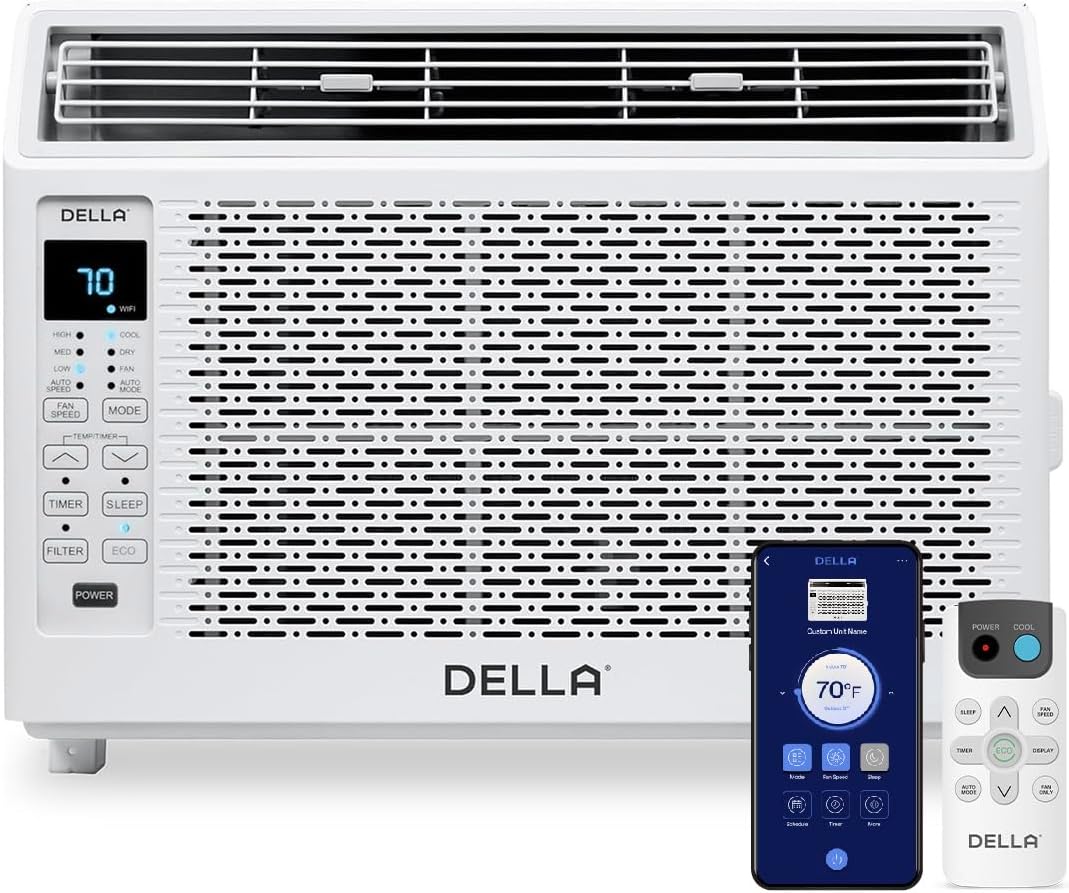
Figure 1: DELLA 6000 BTU Window Air Conditioner Unit, Remote Control, and Smartphone App Interface.
നിയന്ത്രണ പാനൽ
The unit features an intuitive control panel with various buttons and indicator lights for easy operation.
- പവർ ബട്ടൺ: യൂണിറ്റ് ഓണാക്കുകയോ ഓഫാക്കുകയോ ചെയ്യുന്നു.
- മോഡ് ബട്ടൺ: Cycles through Cool, Dry (Dehumidifier), Fan, Auto Mode, and ECO Mode.
- ഫാൻ സ്പീഡ് ബട്ടൺ: Adjusts fan speed (High, Med, Low, Auto Speed).
- Temp/Timer Buttons: Adjusts temperature settings or sets timer.
- സ്ലീപ്പ് ബട്ടൺ: രാത്രിയിൽ നിശബ്ദവും ഊർജ്ജക്ഷമതയുള്ളതുമായ പ്രവർത്തനത്തിനായി സ്ലീപ്പ് മോഡ് സജീവമാക്കുന്നു.
- ഫിൽട്ടർ ബട്ടൺ: Indicates when the filter needs cleaning.
- വൈഫൈ സൂചകം: Shows Wi-Fi connectivity status.
റിമോട്ട് കൺട്രോൾ

Figure 2: Remote Control for the DELLA Air Conditioner.
The remote control allows for convenient operation of all unit functions from a distance. Ensure batteries are correctly installed.
ഇൻസ്റ്റലേഷൻ
The DELLA 6000 BTU Window Air Conditioner features a T-design for simplified installation.
ഇൻസ്റ്റലേഷൻ ഘട്ടങ്ങൾ

Figure 3: T-design installation allows for flexible window opening.

Figure 4: Simplified 3-step installation process.
- Step 1: Secure into window frame. Place the unit into the window opening, ensuring it is securely seated.
- Step 2: Mount with four screws. Fasten the unit to the window frame using the provided screws for stability.
- Step 3: Extend side panels into wall. Extend the accordion side panels to fill the gap between the unit and the window frame, providing insulation and reducing air leaks.
ഇൻസ്റ്റലേഷൻ കിറ്റ് ഘടകങ്ങൾ

Figure 5: Included installation kit components.
The installation kit includes filler panels, insulation strips, lock frame & sash lock, screws, window sash seal, and a top mounting rail to ensure a secure and efficient installation.
ഉൽപ്പന്ന അളവുകൾ

Figure 6: Unit dimensions and recommended window opening.
The unit dimensions are approximately 15.94"D x 16.02"W x 12.05"H. It is designed for window widths between 23"-34" and requires at least 14.5" vertical clearance.
പ്രവർത്തന നിർദ്ദേശങ്ങൾ
Modes and Fan Speeds

Figure 7: Available operating modes and fan speeds.
The unit offers 5 operating modes (Cool, Auto, Dehumidify, Fan Only, ECO Mode) and 4 fan speeds (Auto, Low, Mid, High) to suit various comfort needs. Use the 'Mode' and 'Fan Speed' buttons on the control panel or remote to select your desired settings.
താപനില നിയന്ത്രണം
Use the up and down arrow buttons on the control panel or remote to set your desired temperature. The digital display will show the current setting.
Smart Features (Wi-Fi Control)

Figure 8: Control your unit wirelessly with the Della+ APP.

Figure 9: Della+ app supports Google Assistant and Alexa for voice control.
Download the free Della+ app to control your unit from anywhere. The app allows for remote control, scheduling, and integration with smart home systems like Google Assistant and Alexa.
Geo Location Function

Figure 10: Smart Geo Location feature for automatic operation.
The Geo Location feature allows the unit to automatically turn on or off based on your proximity to your home. This feature can be configured via the Della+ app.
Video 1: Demonstration of the Geo Location Function setup and customization within the Della+ app.
സ്ലീപ്പ് മോഡ്

Figure 11: Intelligent sleep mode adjusts temperature for optimal comfort.
Intelligent sleep mode automatically adjusts the temperature overnight to maintain comfort and save energy. Activate it using the 'Sleep' button.
ടൈമർ പ്രവർത്തനം
The 24-hour auto on/off timer allows you to program the unit to turn on or off at specific times, enhancing convenience and energy efficiency.
മെയിൻ്റനൻസ്
വീണ്ടും ഉപയോഗിക്കാവുന്ന ഫിൽട്ടർ ക്ലീനിംഗ്

Figure 12: The unit features a washable and reusable filter.
The unit is equipped with a washable and reusable filter. A clean filter helps maintain optimal cooling performance and air quality. When the 'Filter' indicator light illuminates, it's time to clean the filter.
- എയർകണ്ടീഷണർ ഓഫാക്കി അൺപ്ലഗ് ചെയ്യുക.
- Remove the front panel and slide out the air filter.
- ഫിൽട്ടർ ചൂടുള്ള സോപ്പ് വെള്ളത്തിൽ കഴുകുക. നന്നായി കഴുകുക.
- ഫിൽട്ടർ വീണ്ടും ചേർക്കുന്നതിന് മുമ്പ് പൂർണ്ണമായും ഉണങ്ങാൻ അനുവദിക്കുക.
- ഫ്രണ്ട് പാനൽ മാറ്റിസ്ഥാപിക്കുക.
ജനറൽ കെയർ
- ഒരു സോഫ്റ്റ്, ഡി ഉപയോഗിച്ച് യൂണിറ്റിൻ്റെ പുറംഭാഗം വൃത്തിയാക്കുകamp തുണി.
- കഠിനമായ രാസവസ്തുക്കളോ ഉരച്ചിലുകൾ ഉപയോഗിക്കരുത്.
- Ensure the drainage area is clear of obstructions.
ട്രബിൾഷൂട്ടിംഗ്
If you experience issues with your air conditioner, refer to the following common problems and solutions:
| പ്രശ്നം | സാധ്യമായ കാരണം | പരിഹാരം |
|---|---|---|
| യൂണിറ്റ് ഓണാക്കുന്നില്ല | വൈദ്യുതിയില്ല; സർക്യൂട്ട് ബ്രേക്കർ ട്രിപ്പ് ചെയ്തു; യൂണിറ്റ് പ്ലഗ് ഊരി. | Check power supply; reset circuit breaker; ensure plug is fully inserted. |
| യൂണിറ്റ് ഫലപ്രദമായി തണുപ്പിക്കുന്നില്ല. | Dirty air filter; blocked air intake/outlet; room too large; windows/doors open. | Clean air filter; clear obstructions; ensure unit is sized correctly for room; close windows/doors. |
| ശബ്ദായമാനമായ പ്രവർത്തനം | അയഞ്ഞ ഭാഗങ്ങൾ; യൂണിറ്റ് നിരപ്പല്ല; ഫാൻ തടസ്സം. | Check for loose components; ensure unit is level; remove any fan obstructions. |
| പുറത്ത് ഒലിച്ചിറങ്ങുന്ന വെള്ളം | സാധാരണ പ്രവർത്തനം (കണ്ടൻസേഷൻ). | This is normal during cooling. Ensure proper drainage. |
സ്പെസിഫിക്കേഷനുകൾ
| ഫീച്ചർ | വിശദാംശങ്ങൾ |
|---|---|
| ബ്രാൻഡ് നാമം | ഡെല്ല |
| മോഡൽ വിവരം | 048-TL-W6KWD |
| ഉൽപ്പന്ന അളവുകൾ | 15.94 x 16.02 x 12.05 ഇഞ്ച് |
| ഇനത്തിൻ്റെ മോഡൽ നമ്പർ | 048-TL-W6KWD |
| കാര്യക്ഷമത | എനർജി എഫിഷ്യൻ്റ് |
| ശേഷി | 0.5 ടൺ |
| ശബ്ദം | 51 ഡി.ബി |
| ഇൻസ്റ്റലേഷൻ തരം | ജാലകം |
| ഭാഗം നമ്പർ | 048-TL-W6KW_2 |
| ഫോം ഫാക്ടർ | വിൻഡോ എയർ കണ്ടീഷണർ |
| പ്രത്യേക സവിശേഷതകൾ | വിദൂര നിയന്ത്രണം |
| വാല്യംtage | 115 വോൾട്ട് (എസി) |
| വാട്ട്tage | 517.5 വാട്ട്സ് |
| ബാറ്ററികൾ ഉൾപ്പെടുത്തിയിട്ടുണ്ടോ? | ഇല്ല |
| ഫ്ലോർ ഏരിയ | 250 ചതുരശ്ര അടി |
| കൂളിംഗ് പവർ | 6000 ബ്രിട്ടീഷ് തെർമൽ യൂണിറ്റുകൾ |
| BEE സ്റ്റാർ റേറ്റിംഗ് | അതെ |
| സീസണൽ എനർജി എഫിഷ്യൻസി റേഷ്യോ (SEER) | 11 |
| പവർ ഉറവിടം | കോർഡഡ് ഇലക്ട്രിക് |
വാറൻ്റിയും പിന്തുണയും
Your DELLA 6000 BTU Window Air Conditioner comes with a 1 വർഷത്തെ വാറൻ്റി. For any inquiries or technical assistance, Della provides 24/7 ഉപഭോക്തൃ പിന്തുണ.
ദയവായി സന്ദർശിക്കുക Della Store on Amazon കൂടുതൽ വിവരങ്ങൾക്ക് അല്ലെങ്കിൽ പിന്തുണയുമായി ബന്ധപ്പെടുക.