
1. സജ്ജീകരണം
This section guides you through the initial setup of your DOOGEE U10 tablet.
1.1 പാക്കേജ് ഉള്ളടക്കം
ബോക്സിൽ എല്ലാ ഇനങ്ങളും ഉണ്ടെന്ന് ഉറപ്പാക്കുക:
- DOOGEE U10 Tablet
- യുഎസ്ബി ടൈപ്പ്-സി കേബിൾ
- പവർ അഡാപ്റ്റർ
- സിം എജക്റ്റ് ടൂൾ (ബാധകമെങ്കിൽ)
- ദ്രുത ആരംഭ ഗൈഡ്
- വാറൻ്റി കാർഡ്
1.2 ഉപകരണ ലേayട്ട്
Familiarize yourself with the physical features of your tablet.
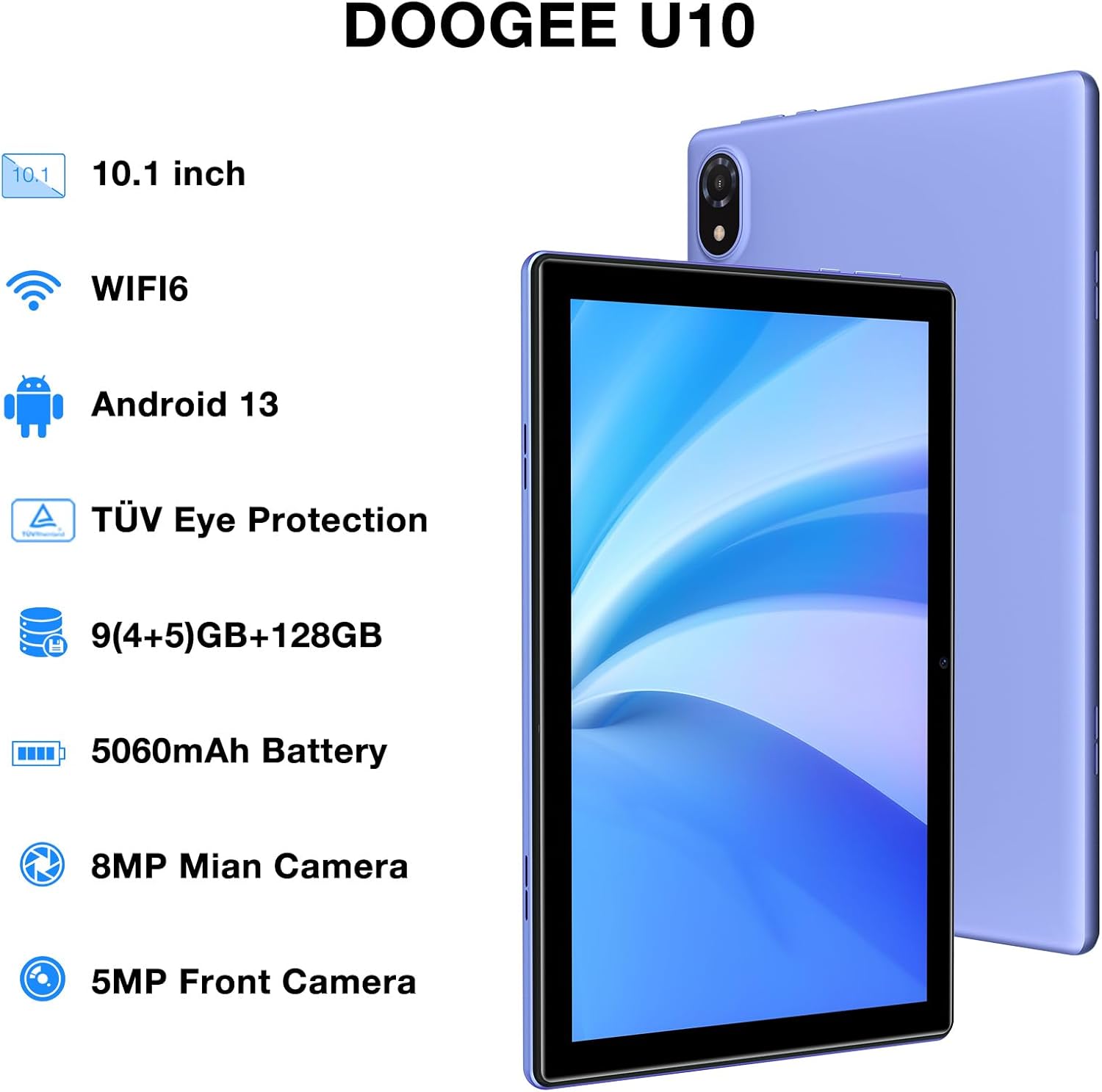
Figure 1: DOOGEE U10 Tablet Overview. This image highlights the tablet's 10.1-inch display, WiFi 6 capability, Android 13 operating system, TÜV Eye Protection, 9GB RAM, 128GB ROM, 5060mAh battery, 8MP main camera, and 5MP front camera.
- പവർ ബട്ടൺ: Located on the side, press and hold to power on/off or restart.
- വോളിയം ബട്ടണുകൾ: Adjust media volume and notification sounds.
- യുഎസ്ബി ടൈപ്പ്-സി പോർട്ട്: ചാർജിംഗിനും ഡാറ്റ കൈമാറ്റത്തിനും.
- 3.5 എംഎം ഹെഡ്ഫോൺ ജാക്ക്: വയർഡ് ഹെഡ്ഫോണുകൾ ബന്ധിപ്പിക്കുക.
- മുൻ ക്യാമറ: വീഡിയോ കോളുകൾക്കും സെൽഫികൾക്കും.
- പിൻ ക്യാമറ: ഫോട്ടോകളും വീഡിയോകളും എടുക്കുന്നതിന്.
- സ്പീക്കറുകൾ: Dual stereo speakers for audio output.
1.3 പ്രാരംഭ പവർ ഓണും ചാർജിംഗും
Before first use, fully charge your tablet. Connect the USB Type-C cable to the tablet and the power adapter to a wall outlet. The battery indicator will show charging status.
- Press and hold the Power Button until the DOOGEE logo appears.
- നിങ്ങളുടെ ഭാഷ തിരഞ്ഞെടുക്കുന്നതിനും, വൈഫൈയിലേക്ക് കണക്റ്റുചെയ്യുന്നതിനും, നിങ്ങളുടെ Google അക്കൗണ്ട് സജ്ജീകരിക്കുന്നതിനും ഓൺ-സ്ക്രീൻ നിർദ്ദേശങ്ങൾ പാലിക്കുക.
2. നിങ്ങളുടെ ടാബ്ലെറ്റ് പ്രവർത്തിപ്പിക്കൽ
Learn how to navigate and use the core features of your DOOGEE U10 tablet.
2.1 ഡിസ്പ്ലേയും നാവിഗേഷനും
The DOOGEE U10 features a 10.1-inch IPS HD display with a resolution of 1280x800 pixels, providing clear visuals for various tasks.

Figure 2: Vivid IPS HD Display. This image illustrates the tablet's 10.1-inch screen with 800x1280 HD+ resolution, ideal for media consumption.
- സ്പർശന ആംഗ്യങ്ങൾ: തിരഞ്ഞെടുക്കാൻ ടാപ്പ് ചെയ്യുക, സ്ക്രോൾ ചെയ്യാൻ സ്വൈപ്പ് ചെയ്യുക, സൂം ചെയ്യാൻ പിഞ്ച് ചെയ്യുക.
- ഹോം സ്ക്രീൻ: വിജറ്റുകളും ആപ്പ് കുറുക്കുവഴികളും ഉപയോഗിച്ച് ഇഷ്ടാനുസൃതമാക്കുക.
- അറിയിപ്പുകൾ: അറിയിപ്പുകളും ദ്രുത ക്രമീകരണങ്ങളും ആക്സസ് ചെയ്യാൻ മുകളിൽ നിന്ന് താഴേക്ക് സ്വൈപ്പ് ചെയ്യുക.
- മുഖം തിരിച്ചറിയൽ: Unlock your tablet using facial recognition for convenience.
2.2 പ്രകടനവും സംഭരണവും
The tablet is powered by a Quad-Core RK3562 processor clocked at up to 2.0GHz, ensuring smooth performance. It comes with 9GB RAM (5GB physical + 4GB expansion) and 128GB internal storage, expandable up to 1TB via a microSD card.

Figure 3: Powerful Processor and Memory. This image details the tablet's Rockchip RK3562 Quad-Core processor, 9GB RAM, 128GB ROM, and support for 1TB TF card expansion.
2.3 കണക്റ്റിവിറ്റി
- Wi-Fi 6: Connect to high-speed Wi-Fi networks for faster browsing and streaming. Go to Settings > Network & internet > Wi-Fi.
- ബ്ലൂടൂത്ത് 5.0: Pair with wireless headphones, speakers, or other Bluetooth devices. Go to Settings > Connected devices > Bluetooth.
- OTG (ഓൺ-ദി-ഗോ): Connect USB peripherals like flash drives or keyboards using an OTG adapter (sold separately).
2.4 ക്യാമറ പ്രവർത്തനങ്ങൾ
The tablet is equipped with an 8MP main camera and a 5MP front camera for photos and video calls.

Figure 4: Dual Camera System. This image showcases the tablet's 8MP main camera and 5MP front camera, suitable for capturing moments and video conferencing.
- ഹോം സ്ക്രീനിൽ നിന്നോ ആപ്പ് ഡ്രോയറിൽ നിന്നോ ക്യാമറ ആപ്പ് തുറക്കുക.
- ഒരു ഫോട്ടോ എടുക്കാൻ ഷട്ടർ ബട്ടൺ ടാപ്പ് ചെയ്യുക.
- ക്യാമറ ഐക്കൺ ഉപയോഗിച്ച് മുൻ ക്യാമറയും പിൻ ക്യാമറയും തമ്മിൽ മാറുക.
2.5 ബാറ്ററി മാനേജ്മെൻ്റ്
The 5060mAh battery provides extended usage. To optimize battery life, adjust screen brightness, close unused apps, and enable power-saving modes.

Figure 5: Large Capacity Battery. This image highlights the 5060mAh battery, Type-C charging, 5V2A fast charging, and 3.5mm headphone jack, along with estimated usage times for gaming, movies, and music.
2.6 മൾട്ടിമീഡിയ അനുഭവം
Enjoy an immersive audio experience with dual stereo speakers. The tablet supports Widevine L1, allowing for high-quality streaming from various video platforms.

Figure 6: Immersive Audio and DRM L1. This image illustrates the tablet's support for WiFi 6, Bluetooth 5.0, dual speakers, and DRM L1 for enhanced multimedia playback.
2.7 Eye Protection Mode
The DOOGEE U10 is TÜV SÜD blue light certified, reducing harmful blue light emissions to protect your eyes during prolonged use.

Figure 7: TÜV Certified Eye Protection. This image shows the TÜV Rheinland certification, indicating the tablet's low blue light feature for eye comfort.
2.8 ഔദ്യോഗിക ഉൽപ്പന്ന വീഡിയോകൾ
DOOGEE U10 Tablet Showcase
ഈ വീഡിയോ ഒരു പൊതു വിശദീകരണം നൽകുന്നുview and showcase of the DOOGEE U10 tablet's features and design.
DOOGEE U10 Fantastic Experience for Kids
This video demonstrates how the DOOGEE U10 tablet can be used by children, highlighting its suitability for educational and entertainment purposes for younger users.
3. പരിപാലനം
ശരിയായ പരിചരണം നിങ്ങളുടെ ടാബ്ലെറ്റിന്റെ ദീർഘായുസ്സും മികച്ച പ്രകടനവും ഉറപ്പാക്കുന്നു.
3.1 നിങ്ങളുടെ ടാബ്ലെറ്റ് വൃത്തിയാക്കൽ
- സ്ക്രീനും ബോഡിയും വൃത്തിയാക്കാൻ മൃദുവായ, ലിന്റ് രഹിത തുണി ഉപയോഗിക്കുക.
- കഠിനമായ രാസവസ്തുക്കൾ, അബ്രസീവ് ക്ലീനറുകൾ, അല്ലെങ്കിൽ എയറോസോൾ സ്പ്രേകൾ എന്നിവ ഉപയോഗിക്കുന്നത് ഒഴിവാക്കുക.
- കഠിനമായ പാടുകൾക്ക്, ചെറുതായി dampഇലക്ട്രോണിക് ഉപകരണങ്ങൾക്കായി രൂപകൽപ്പന ചെയ്ത വെള്ളമുള്ള തുണി അല്ലെങ്കിൽ സ്ക്രീൻ ക്ലീനർ.
3.2 സോഫ്റ്റ്വെയർ അപ്ഡേറ്റുകൾ
Regularly check for and install software updates to enhance performance, security, and add new features.
- ക്രമീകരണങ്ങൾ > സിസ്റ്റം > സിസ്റ്റം അപ്ഡേറ്റ് എന്നതിലേക്ക് പോകുക.
- അപ്ഡേറ്റുകൾ ഡൗൺലോഡ് ചെയ്യുന്നതിന് മുമ്പ് ഒരു സ്ഥിരതയുള്ള വൈഫൈ നെറ്റ്വർക്കിലേക്ക് കണക്റ്റുചെയ്യുക.
4. പ്രശ്നപരിഹാരം
This section addresses common issues you might encounter with your DOOGEE U10 tablet.
4.1 ഉപകരണം ഓണാക്കുന്നില്ല
- Ensure the battery is charged. Connect the tablet to the charger for at least 30 minutes.
- റീസ്റ്റാർട്ട് ചെയ്യാൻ പവർ ബട്ടൺ 10-15 സെക്കൻഡ് അമർത്തിപ്പിടിക്കുക.
4.2 കണക്റ്റിവിറ്റി പ്രശ്നങ്ങൾ (വൈ-ഫൈ/ബ്ലൂടൂത്ത്)
- Toggle Wi-Fi or Bluetooth off and on in Quick Settings or Settings menu.
- Restart your tablet and the router/Bluetooth device.
- നെറ്റ്വർക്ക്/ഉപകരണം മറന്ന് വീണ്ടും കണക്റ്റുചെയ്യുക.
4.3 ആപ്പുകൾ ക്രാഷാകുകയോ മരവിപ്പിക്കുകയോ ചെയ്യുന്നു
- പ്രശ്നമുള്ള ആപ്പ് അടച്ച് വീണ്ടും തുറക്കുക.
- Clear the app's cache: Settings > Apps > [App Name] > Storage & cache > Clear cache.
- ആപ്പ് അതിന്റെ ഏറ്റവും പുതിയ പതിപ്പിലേക്ക് അപ്ഡേറ്റ് ചെയ്തിട്ടുണ്ടെന്ന് ഉറപ്പാക്കുക.
- പ്രശ്നം നിലനിൽക്കുകയാണെങ്കിൽ, ആപ്പ് അൺഇൻസ്റ്റാൾ ചെയ്ത് വീണ്ടും ഇൻസ്റ്റാൾ ചെയ്യുന്നത് പരിഗണിക്കുക.
5 സാങ്കേതിക സവിശേഷതകൾ
Key technical details of the DOOGEE U10 tablet.
| ഫീച്ചർ | സ്പെസിഫിക്കേഷൻ |
|---|---|
| മോഡലിൻ്റെ പേര് | U10 |
| ഓപ്പറേറ്റിംഗ് സിസ്റ്റം | ആൻഡ്രോയിഡ് 13 |
| സ്ക്രീൻ വലിപ്പം | 10.1 ഇഞ്ച് |
| സ്ക്രീൻ റെസല്യൂഷൻ | 1280 x 800 പിക്സലുകൾ (HD+) |
| പ്രോസസ്സർ | Quad-Core (Rockchip RK3562, up to 2.0GHz) |
| റാം | 9GB (5GB physical + 4GB expansion) |
| ആന്തരിക സംഭരണം | 128 ജിബി |
| വികസിപ്പിക്കാവുന്ന സംഭരണം | Up to 1TB (microSD/TF card) |
| പ്രധാന ക്യാമറ | 8എംപി |
| മുൻ ക്യാമറ | 5എംപി |
| ബാറ്ററി ശേഷി | 5060mAh |
| കണക്റ്റിവിറ്റി | Wi-Fi 6, Bluetooth 5.0, OTG |
| അളവുകൾ (LxWxH) | 9.6 x 6.4 x 0.4 ഇഞ്ച് |
| ഭാരം | ഏകദേശം 1.13 പൗണ്ട് (427 ഗ്രാം) |
| നേത്ര സംരക്ഷണം | TÜV SÜD Low Bluelight Certified |
| DRM പിന്തുണ | വൈഡ്വൈൻ എൽ1 |
6. വാറൻ്റിയും പിന്തുണയും
Information regarding your product's warranty and how to obtain support.
6.1 ലിമിറ്റഡ് വാറൻ്റി
The DOOGEE U10 tablet typically comes with a 2-year limited warranty. This warranty covers manufacturing defects and workmanship under normal use. Please refer to the warranty card included in your package for specific terms and conditions, including coverage details and exclusions.
വാറൻ്റി ക്ലെയിമുകൾക്കായി നിങ്ങളുടെ വാങ്ങിയതിൻ്റെ തെളിവ് സൂക്ഷിക്കുക.
6.2 ഉപഭോക്തൃ പിന്തുണ
If you encounter any issues not covered in the troubleshooting section or require further assistance, please contact DOOGEE customer support.
- ഓൺലൈൻ പിന്തുണ: Visit the official DOOGEE webപതിവുചോദ്യങ്ങൾ, പിന്തുണാ ഉറവിടങ്ങൾ, ബന്ധപ്പെടാനുള്ള ഓപ്ഷനുകൾ എന്നിവയ്ക്കുള്ള സൈറ്റ്.
- ഇമെയിൽ പിന്തുണ: Refer to your warranty card or quick start guide for specific email addresses.
- സേവന കേന്ദ്രങ്ങൾ: Information on authorized service centers may be available on the DOOGEE webസൈറ്റ്.
When contacting support, please have your tablet's model number (U10) and purchase information ready.