
1. ആമുഖം
വാങ്ങിയതിന് നന്ദി.asing the Technical Pro 1500 Watts Portable Bluetooth Speaker, model TPAPLIT12. This manual provides essential information for the safe and efficient operation of your device. Please read it thoroughly before use and retain it for future reference.
This portable loudspeaker features 1500 watts of peak power, Bluetooth connectivity, USB and SD card inputs, a 1/4'' microphone input, and integrated LED visual effects. It is designed for both indoor and outdoor use.
2. സുരക്ഷാ നിർദ്ദേശങ്ങൾ
- സ്പീക്കർ പ്രവർത്തിപ്പിക്കുന്നതിന് മുമ്പ് എല്ലാ നിർദ്ദേശങ്ങളും വായിക്കുക.
- വൈദ്യുതാഘാതം തടയാൻ സ്പീക്കർ വെള്ളത്തിൽ നിന്നോ ഈർപ്പത്തിൽ നിന്നോ അകറ്റി നിർത്തുക.
- വെൻ്റിലേഷൻ ഓപ്പണിംഗുകളൊന്നും തടയരുത്.
- Do not place the speaker near heat sources such as radiators, heat registers, stoves, or other apparatus that produce heat.
- നിർമ്മാതാവ് വ്യക്തമാക്കിയ അറ്റാച്ച്മെൻ്റുകൾ/ആക്സസറികൾ മാത്രം ഉപയോഗിക്കുക.
- ഇടിമിന്നൽ ഉണ്ടാകുമ്പോഴോ ദീർഘനേരം ഉപയോഗിക്കാതിരിക്കുമ്പോഴോ സ്പീക്കർ പ്ലഗ് ഊരിയിടുക.
- യോഗ്യതയുള്ള സേവന ഉദ്യോഗസ്ഥർക്ക് എല്ലാ സേവനങ്ങളും റഫർ ചെയ്യുക. ഉപകരണം ഏതെങ്കിലും വിധത്തിൽ കേടുവരുമ്പോൾ സർവീസ് ആവശ്യമാണ്.
- This product is not waterproof. Avoid exposure to rain or splashing water.
3. പാക്കേജ് ഉള്ളടക്കം
പാക്കേജിൽ എല്ലാ ഇനങ്ങളും ഉണ്ടെന്ന് ഉറപ്പാക്കുക:
- Technical Pro Portable Bluetooth Speaker (TPAPLIT12)
- റിമോട്ട് കൺട്രോൾ
- പവർ കേബിൾ
- ഉപയോക്തൃ മാനുവൽ (ഈ പ്രമാണം)

ചിത്രം 3.1: മുൻഭാഗം view of the Technical Pro TPAPLIT12 Portable Bluetooth Speaker with included remote control.
4. ഉൽപ്പന്നം കഴിഞ്ഞുview
4.1 മുൻവശവും വശവും View
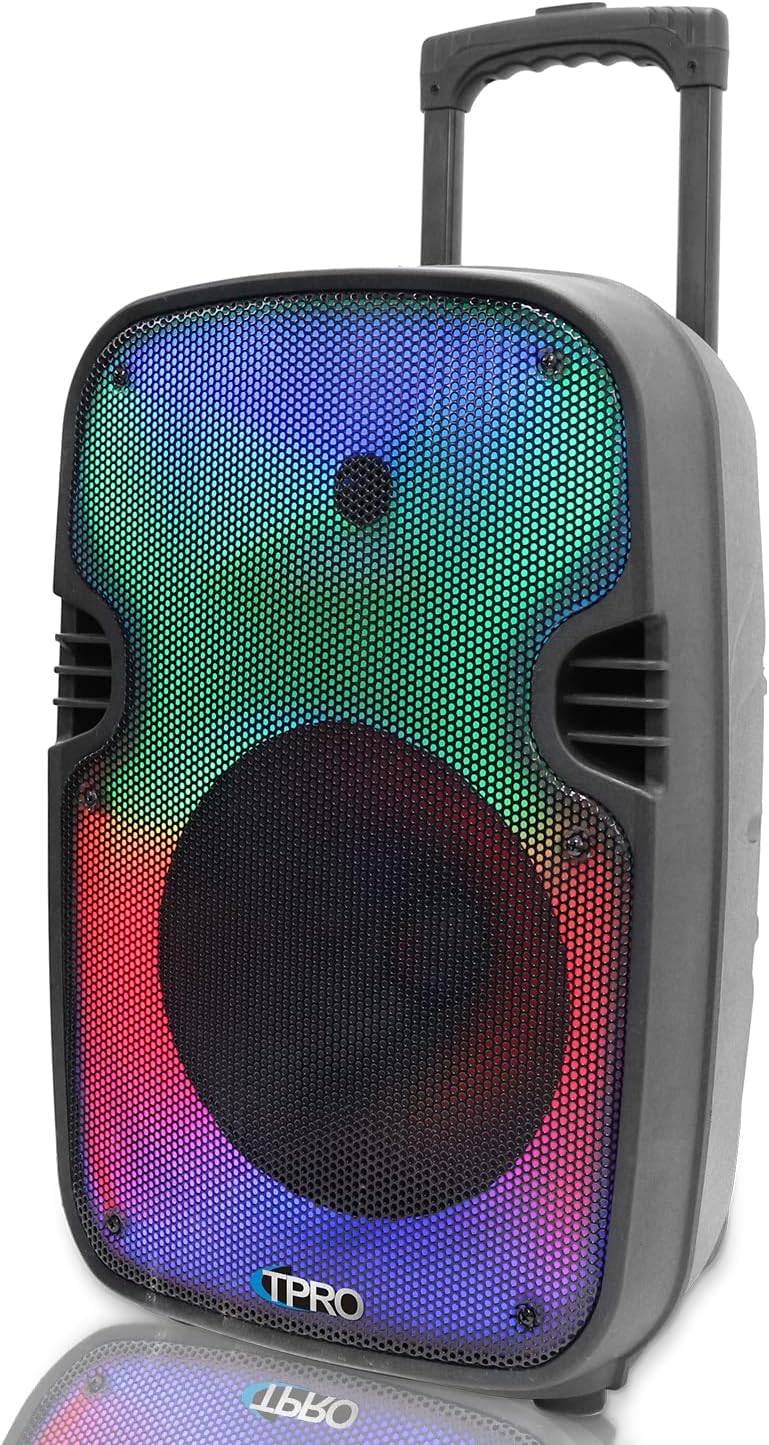
ചിത്രം 4.1: വശം view of the speaker, showing the integrated pull-up trolley handle and wheels for portability.
4.2 Rear Control Panel
The rear panel houses all input connections and control knobs. Familiarize yourself with these controls before operation.

ചിത്രം 4.2: വിശദമായി view of the rear control panel, including power switch, input ports, and volume controls.
4.3 Key Features Diagram

Figure 4.3: Visual representation of the speaker's main features, including microphone input, USB/TF card inputs, LED power switch, LED mode button, 12-inch LED woofer, Bluetooth, wheels, and telescoping handle.
4.4 അളവുകൾ
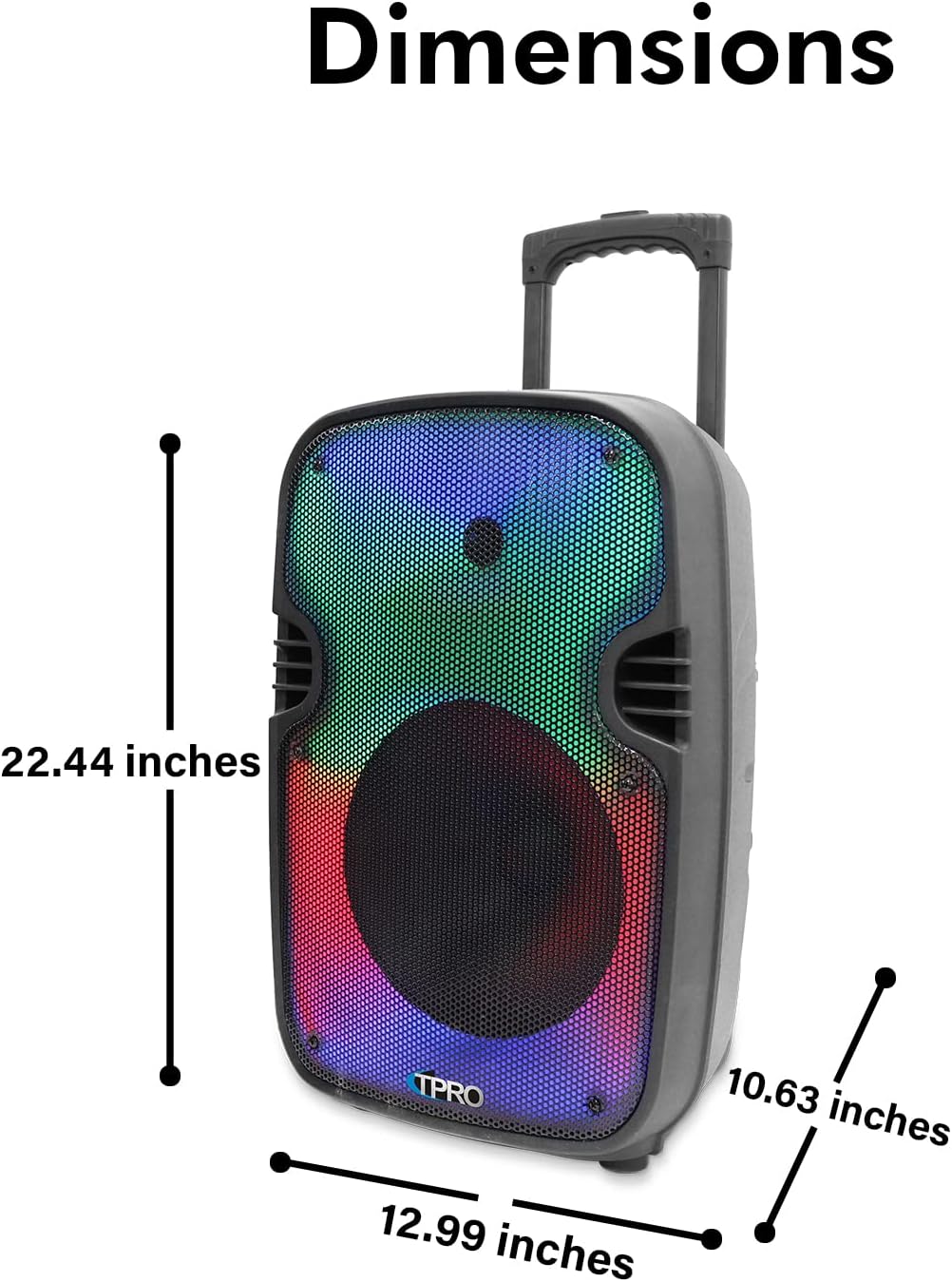
Figure 4.4: Speaker dimensions: 22.44 inches (height), 12.99 inches (depth), and 10.63 inches (width).
4.5 Feature Icons

Figure 4.5: Icons illustrating key functionalities: Bluetooth, LED Fade & Blending, LED Fire Wall, LED Woofer, Playback Controls, Rechargeable Battery, Running LED Ring, TF/USB Inputs, TWS Stereo Sound, and Wheels.
5. സജ്ജീകരണവും പ്രാരംഭ ഉപയോഗവും
5.1 സ്പീക്കർ ചാർജ് ചെയ്യുന്നു
Before first use, fully charge the speaker's built-in rechargeable battery. Connect the provided power cable to the speaker's power input and then to a standard electrical outlet. The charging indicator will illuminate. Once fully charged, disconnect the power cable.
5.2 പവർ ഓൺ/ഓഫ്
Locate the power switch on the rear control panel. Flip the switch to the "ON" position to power on the speaker. Flip it to "OFF" to power off the speaker.
5.3 ബ്ലൂടൂത്ത് ജോടിയാക്കൽ
- Power on the speaker. It will automatically enter Bluetooth pairing mode, indicated by an audible prompt or flashing LED.
- On your Bluetooth-enabled device (e.g., smartphone), navigate to the Bluetooth settings.
- ഇതിനായി തിരയുക available devices. The speaker will appear as "TPRO PLIT12" (refer to the "BT Pairing Name" on the rear panel).
- Select "TPRO PLIT12" to connect. Once paired, you will hear a confirmation sound.
- ബ്ലൂടൂത്ത് ശ്രേണി ഏകദേശം 30 അടി (9 മീറ്റർ) ആണ്.
5.4 ട്രൂ വയർലെസ് സ്റ്റീരിയോ (TWS) ജോടിയാക്കൽ
To achieve True Wireless Stereo sound, you can connect two TPAPLIT12 speakers wirelessly:
- രണ്ട് സ്പീക്കറുകളും ഓണാക്കിയിട്ടുണ്ടെന്നും മറ്റ് ബ്ലൂടൂത്ത് ഉപകരണങ്ങളുമായി ബന്ധിപ്പിച്ചിട്ടില്ലെന്നും ഉറപ്പാക്കുക.
- Press and hold the TWS button on one of the speakers (this will be your primary speaker).
- The speakers will attempt to pair with each other. A confirmation sound will indicate successful TWS pairing.
- Once TWS is established, connect your Bluetooth device to the primary speaker as described in Section 5.3. Audio will now play through both speakers in stereo.
6. ഓപ്പറേഷൻ
6.1 ഇൻപുട്ട് മോഡുകൾ
The speaker supports multiple input modes:
- ബ്ലൂടൂത്ത്: അനുയോജ്യമായ ഉപകരണങ്ങളിൽ നിന്നുള്ള വയർലെസ് ഓഡിയോ സ്ട്രീമിംഗിനായി.
- USB/SD കാർഡ്: Insert a USB flash drive or SD card (up to 64GB) into the respective slot on the rear panel. The speaker will automatically detect and play .mp3 files. Use the playback controls on the speaker or remote to manage tracks.
- AUX ഇൻപുട്ട്: Connect an external audio device using a 3.5mm AUX cable (not included) to the AUX input port.
- എഫ്എം റേഡിയോ: Switch to FM mode. The speaker will automatically scan and store available radio stations.
- 1/4'' Microphone Input: Connect a wired microphone (not included) to the 1/4'' input for vocal amplification. Adjust microphone volume using the dedicated knob on the rear panel.
6.2 പ്ലേബാക്ക് നിയന്ത്രണങ്ങൾ
Use the controls on the speaker's LCD playback hub or the remote control for media management:
- മോഡ് ബട്ടൺ: Cycles through input modes (Bluetooth, USB, SD, FM, AUX).
- പ്ലേ/താൽക്കാലികമായി നിർത്തുക: പ്ലേബാക്ക് ആരംഭിക്കുകയോ താൽക്കാലികമായി നിർത്തുകയോ ചെയ്യുന്നു.
- മുമ്പത്തെ/അടുത്ത ട്രാക്ക്: മുമ്പത്തെ ട്രാക്കിലേക്കോ അടുത്ത ട്രാക്കിലേക്കോ പോകുന്നു.
- വോളിയം നിയന്ത്രണം: Adjusts the overall speaker volume.
- ആവർത്തന പ്രവർത്തനം: Available for USB/SD card inputs.
6.3 LED Visual Effects
The speaker features an LED Glow Wall with various lighting modes, including a burning mode and a running LED ring. Use the dedicated LED Mode Button on the speaker or remote control to cycle through the available visual effects.
7. പരിപാലനം
- വൃത്തിയാക്കൽ: സ്പീക്കറിന്റെ പുറംഭാഗം വൃത്തിയാക്കാൻ മൃദുവായതും ഉണങ്ങിയതുമായ തുണി ഉപയോഗിക്കുക. അബ്രസീവ് ക്ലീനറുകളോ ലായകങ്ങളോ ഉപയോഗിക്കരുത്.
- സംഭരണം: ദീർഘനേരം ഉപയോഗിക്കാത്തപ്പോൾ, സ്പീക്കർ തണുത്തതും വരണ്ടതുമായ സ്ഥലത്ത് സൂക്ഷിക്കുക.
- ബാറ്ററി കെയർ: To prolong battery life, avoid fully discharging the battery frequently. Recharge the speaker regularly, even if not in active use.
8. പ്രശ്നപരിഹാരം
| പ്രശ്നം | സാധ്യമായ കാരണം | പരിഹാരം |
|---|---|---|
| ശക്തിയില്ല | Battery is discharged; Power switch is off. | Charge the speaker; Ensure power switch is in the "ON" position. |
| ശബ്ദമില്ല | ശബ്ദം വളരെ കുറവാണ്; തെറ്റായ ഇൻപുട്ട് മോഡ് തിരഞ്ഞെടുത്തു; ഉപകരണം ജോടിയാക്കിയിട്ടില്ല (ബ്ലൂടൂത്ത്). | Increase volume; Press the Mode button to select the correct input; Re-pair Bluetooth device. |
| ബ്ലൂടൂത്ത് കണക്റ്റ് ചെയ്യുന്നില്ല | Speaker is too far from device; Speaker is already connected to another device; Device's Bluetooth is off. | ഉപകരണം സ്പീക്കറിന് അടുത്തേക്ക് നീക്കുക; മറ്റ് ഉപകരണങ്ങളിൽ നിന്ന് വിച്ഛേദിക്കുക; നിങ്ങളുടെ ഉപകരണത്തിൽ ബ്ലൂടൂത്ത് പ്രവർത്തനക്ഷമമാക്കി വീണ്ടും ജോടിയാക്കുക. |
| USB/SD കാർഡ് പ്ലേ ചെയ്യുന്നില്ല | പിന്തുണയ്ക്കുന്നില്ല file format; Card/drive not inserted correctly; Card/drive is corrupted or empty. | ഉറപ്പാക്കുക files are .mp3 format; Reinsert card/drive; Try a different card/drive. |
9 സ്പെസിഫിക്കേഷനുകൾ
| ഫീച്ചർ | വിശദാംശങ്ങൾ |
|---|---|
| മോഡൽ നമ്പർ | TPAPLIT12 |
| പീക്ക് പവർ ഔട്ട്പുട്ട് | 1500 വാട്ട്സ് |
| വൂഫർ വലിപ്പം | 12 Inches (LED Woofer) |
| കണക്റ്റിവിറ്റി | Bluetooth, USB, SD Card, AUX, 1/4'' Microphone Input |
| ബ്ലൂടൂത്ത് ശ്രേണി | 30 അടി (ഏകദേശം 9 മീറ്റർ) |
| USB/SD Card Max Size | 64 ജിബി |
| പിന്തുണയ്ക്കുന്ന ഓഡിയോ Files | .mp3 |
| ഫ്രീക്വൻസി പ്രതികരണം | 80Hz - 18KHz |
| സംവേദനക്ഷമത | 80 ±2dB (1W@1M) |
| പ്രതിരോധം | 3 ഓം |
| പവർ ഉറവിടം | ബാറ്ററി പവർ (റീചാർജ് ചെയ്യാവുന്നത്) |
| നിയന്ത്രണ രീതി | മാനുവൽ, റിമോട്ട് കൺട്രോൾ |
| ഉൽപ്പന്ന അളവുകൾ (L x W x H) | 12.99" x 10.63" x 22.44" |
| ഇനത്തിൻ്റെ ഭാരം | 6.5 പൗണ്ട് |
| പ്രത്യേക സവിശേഷതകൾ | LED Visual Effects (Glow Wall, Running Ring), TWS Function, Integrated Trolley & Wheels, LCD Playback Hub |
| വാട്ടർപ്രൂഫ് | ഇല്ല |
10. വാറൻ്റിയും പിന്തുണയും
This Technical Pro product comes with a Limited Warranty. For specific terms and conditions, please refer to the warranty information provided with your purchase or contact Technical Pro customer support.
For further assistance, troubleshooting, or to inquire about warranty service, please visit the official Technical Pro store or contact their customer support channels.