
ഉൽപ്പന്നം കഴിഞ്ഞുview
The Populife Smart Key Lock Box K2 is a robust and intelligent solution for secure key management. Designed for both indoor and outdoor use, it offers multiple access methods and remote management capabilities via the Populife App. Its durable alloy steel construction and IP66 waterproof rating ensure reliable performance in various environments.
- Smart Bluetooth Key Lock Box: Unlock via Bluetooth or password. Remote access granting is available without Wi-Fi.
- രണ്ട് ഇൻസ്റ്റലേഷൻ രീതികൾ: Can be wall-mounted with screws or hung by its shackle. All necessary accessories are included (batteries not included).
- Solid Alloy Steel & IP66 Waterproof: Constructed from alloy steel and waterproof materials to protect keys from theft and environmental elements.
- റിമോട്ട് ആക്സസ് മാനേജ്മെന്റ്: Generate PIN codes and Bluetooth keys remotely using the Populife App, even when away from the lock box.
- നവീകരിച്ച സവിശേഷതകൾ: Includes gateway compatibility for enhanced online functions (gateway sold separately), reduced power consumption for longer battery life, and an upgraded Type-C emergency power port.

ഈ ചിത്രം സമഗ്രമായ ഒരു view of the Populife Smart Key Lock Box K2, highlighting its digital keypad, the Populife logo, and various features such as app control, PIN code access, and battery backup. An additional view shows the interior of the lock box, capable of holding multiple keys.

This infographic visually summarizes the main advantages of the Populife Smart Key Lock Box K2, emphasizing its remote access capabilities, emergency power option, robust IP66 waterproof and dustproof design, and strong alloy steel build.
സജ്ജീകരണ ഗൈഡ്
Follow these steps to set up your Populife Smart Key Lock Box K2.
1. അൺബോക്സിംഗും പ്രാരംഭ പരിശോധനയും
Carefully remove all components from the packaging. Ensure all accessories are present as listed in the product manual.
The image displays the Populife Smart Key Lock Box K2 along with its various components, including the main lock box unit, a rubber mat, self-tapping screws, expansion screws, waterproof rubber rings, nylon rubber stoppers, a screwdriver, battery cover screws, and a user guide. This visual confirms all parts are available for installation.
2. ബാറ്ററി ഇൻസ്റ്റാളേഷൻ
Open the battery compartment and insert four AAA batteries, ensuring correct polarity. Batteries are not included and must be purchased separately.
This image illustrates the open battery compartment of the lock box, with four AAA batteries inserted. It is crucial to ensure the batteries are placed with the correct positive and negative orientation for proper device function.
3. Initial Password Check
Before closing the battery cover, test the default password (usually 1234) to ensure the lock box is operational. Do not close the lockbox while checking the password.
Video: This video demonstrates the assembly process of the Populife Smart Key Lock Box K2, including how to install batteries and perform an initial password check. It highlights the importance of correct battery orientation and testing the default password before final assembly.
4. Mounting the Lock Box
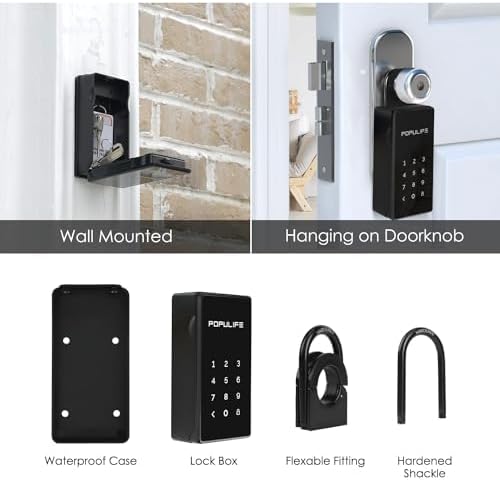
Choose between wall-mounting or hanging the lock box on a doorknob. Use the provided accessories for secure installation. If wall-mounting outdoors, use the waterproof cover.

The image shows the lock box installed in two ways: wall-mounted with screws and hanging on a doorknob using the shackle. This demonstrates the flexibility of installation options to suit different needs.
പ്രവർത്തന നിർദ്ദേശങ്ങൾ
The Populife Smart Key Lock Box K2 offers multiple ways to access your keys.
1. Unlocking with PIN Code
Enter your pre-set PIN code on the keypad. The keypad lights up for easy night-time entry. The lock box will open upon correct entry.

The image demonstrates both Bluetooth and password unlock methods. The keypad is shown illuminated, indicating its night mode feature for enhanced visibility in low-light conditions.
2. Unlocking with Populife App (Bluetooth)
Ensure Bluetooth is enabled on your smartphone and within the Populife App permissions. Open the app, select your device, and tap to unlock. The app also allows for remote PIN code generation and digital key sharing.
Video: This video showcases the various functions of the Populife Smart Lock Box K2, including unlocking via the app, generating different types of PIN codes (one-time, time-limited, permanent), and sharing digital keys. It highlights the remote access capabilities and user-friendly interface.
The Populife App allows you to generate PIN codes and digital keys remotely. You can set permanent, time-limited, or one-time access for family, guests, or service providers. This feature is particularly useful for Airbnb hosts or real estate agents.

3. Auto-Relock Feature
If the lock box is unlocked but remains unopened for 60 seconds, it will automatically re-lock to maintain security.
മെയിൻ്റനൻസ്
To ensure optimal performance and longevity of your Populife Smart Key Lock Box K2, regular maintenance is recommended.
- ബാറ്ററി മാറ്റിസ്ഥാപിക്കൽ: The lock box will emit a beeping alert when the battery level drops below 20%. Replace all four AAA batteries promptly to avoid interruption of service.
- വൃത്തിയാക്കൽ: Wipe the keypad and exterior with a soft, damp തുണി. ഫിനിഷിനോ ഇലക്ട്രോണിക് ഘടകങ്ങൾക്കോ കേടുവരുത്തുന്ന അബ്രാസീവ് ക്ലീനറുകളോ ലായകങ്ങളോ ഉപയോഗിക്കുന്നത് ഒഴിവാക്കുക.
- പരിശോധന: Periodically check the shackle and mounting points for any signs of wear or damage. Ensure all screws are tight if wall-mounted.
ട്രബിൾഷൂട്ടിംഗ്
If you encounter issues with your Populife Smart Key Lock Box K2, refer to the following common solutions.
- ലോക്ക് ബോക്സ് പ്രതികരിക്കുന്നില്ല: Check battery levels and replace if necessary. If batteries are completely drained, use the Type-C emergency power port at the bottom of the lock box to temporarily power it.
- Incorrect Password Entry: If an incorrect PIN code is entered five times, the lock box will enter a security lockout mode for 5 minutes. Wait for the lockout period to end before attempting to enter the correct code again.
- ബ്ലൂടൂത്ത് കണക്ഷൻ പ്രശ്നങ്ങൾ: Ensure Bluetooth is enabled on your phone and that the Populife App has Bluetooth permissions. Make sure the lock box is within 5 meters of your phone during pairing or unlocking.
- പാസ്വേഡ് പുനഃസജ്ജമാക്കൽ: If the password is incorrect and you need to reset it, long-press the reset button inside the battery compartment until you hear two short beeps.
Video: This video provides guidance on troubleshooting Bluetooth connection issues with the Populife Smart Key Lock Box K2, specifically addressing scenarios where Bluetooth is unable to connect or the device cannot be found. It offers practical steps to resolve connectivity problems.
സ്പെസിഫിക്കേഷനുകൾ
| ബ്രാൻഡ് | പോപ്പുലൈഫ് |
| മോഡലിൻ്റെ പേര് | K2 |
| മെറ്റീരിയൽ | അലോയ് സ്റ്റീൽ |
| ലോക്ക് തരം | ഇലക്ട്രോണിക് കോമ്പിനേഷൻ ലോക്ക് |
| പ്രത്യേക സവിശേഷതകൾ | Alarm System, Anti-Theft, Portable, Sensor Light, Waterproof (IP66) |
| ഇനത്തിന്റെ അളവുകൾ (L x W x H) | 1.65 x 2.6 x 7.68 ഇഞ്ച് |
| ഇനത്തിൻ്റെ ഭാരം | 2.31 പൗണ്ട് |
| കണക്റ്റിവിറ്റി പ്രോട്ടോക്കോൾ | ബ്ലൂടൂത്ത് |
| നിയന്ത്രണ രീതി | ആപ്പ് |
| ബാറ്ററികൾ ആവശ്യമാണ് | അതെ (4x AAA, ഉൾപ്പെടുത്തിയിട്ടില്ല) |
| എമർജൻസി പവർ | ടൈപ്പ്-സി പോർട്ട് |
വാറൻ്റിയും പിന്തുണയും
For warranty information, technical support, or further assistance, please refer to the official Populife webസൈറ്റിൽ ബന്ധപ്പെടുക അല്ലെങ്കിൽ അവരുടെ ഉപഭോക്തൃ സേവനവുമായി നേരിട്ട് ബന്ധപ്പെടുക. വാറന്റി ക്ലെയിമുകൾക്കായി നിങ്ങളുടെ വാങ്ങൽ രസീത് സൂക്ഷിക്കുക.
ഉദ്യോഗസ്ഥൻ Webസൈറ്റ്: www.populife.co