
1. ആമുഖം
The ATTACK SHARK AK680 is a compact 60% wired mechanical gaming keyboard designed for both gaming and office use. It features a 68-key layout, hot-swappable switches, RGB rainbow backlighting, UV printed keycaps, and EVA sound control for an enhanced user experience. This manual provides detailed instructions for setting up, operating, and maintaining your AK680 keyboard.
2. പാക്കേജ് ഉള്ളടക്കം
പാക്കേജ് തുറക്കുമ്പോൾ, ഇനിപ്പറയുന്ന എല്ലാ ഇനങ്ങളും ഉൾപ്പെടുത്തിയിട്ടുണ്ടെന്ന് ദയവായി ഉറപ്പാക്കുക:
- ATTACK SHARK AK680 Mechanical Keyboard
- Detachable Type-C to USB-A Cable
- ഉപയോക്തൃ മാനുവൽ
- കീക്യാപ് പുള്ളർ
- സ്വിച്ച് പുള്ളർ
- Extra Brown Switches (x2)

Figure 2.1: Contents included in the AK680 keyboard package.
3. ഉൽപ്പന്നം കഴിഞ്ഞുview
The AK680 features a compact 60% layout with 68 keys, optimizing desk space while retaining essential functionalities. The keyboard is constructed with high-quality ABS injection molding and features stylish ball-shaped keycaps with UV printing for durability.

ചിത്രം 3.1: മുൻഭാഗം view of the AK680 keyboard.
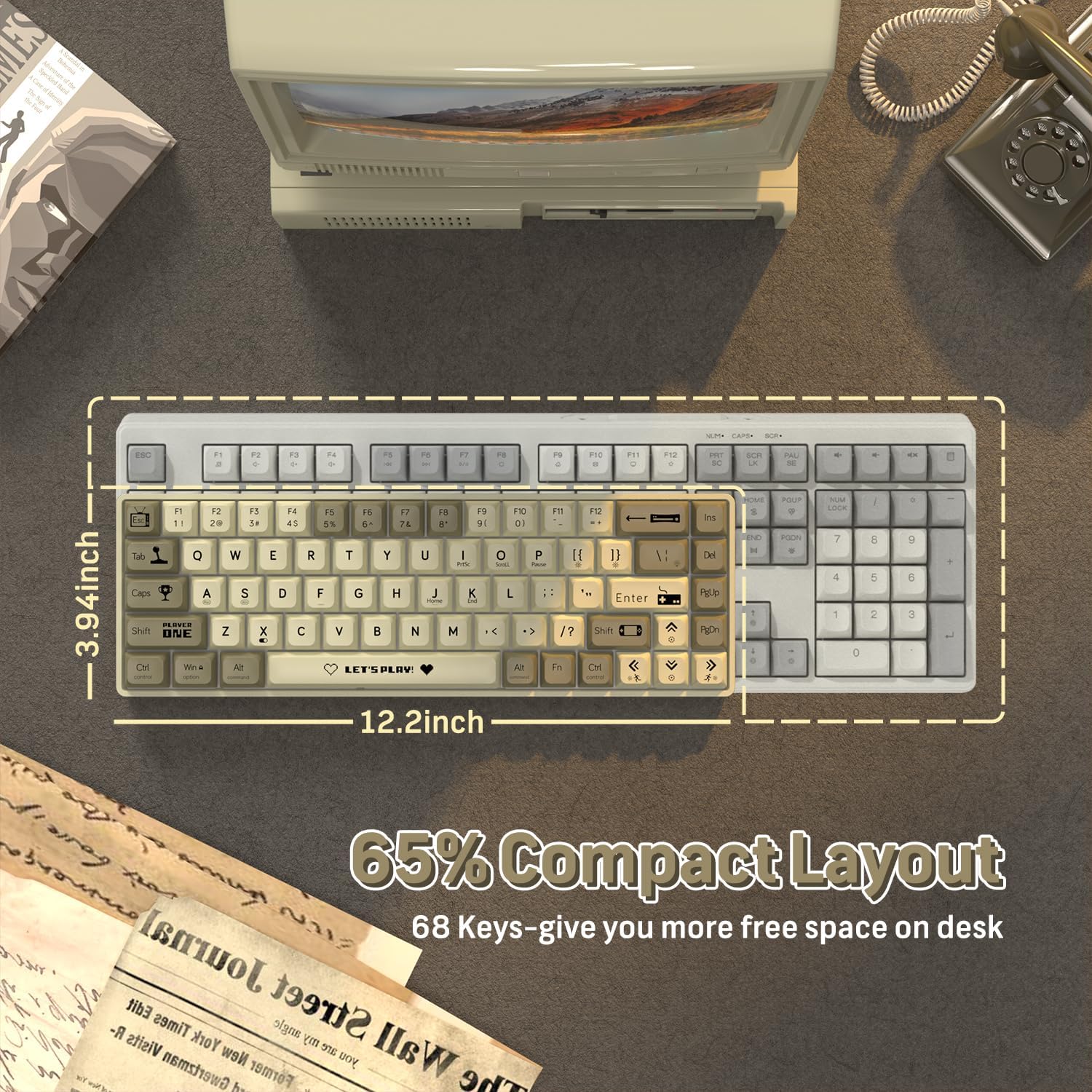
Figure 3.2: Compact 65% layout of the AK680 keyboard.

Figure 3.3: Available color variations of the AK680 keyboard.
4. സജ്ജീകരണം
The AK680 keyboard is designed for plug-and-play functionality, requiring no complex driver installations.
- Locate the detachable Type-C to USB-A cable included in the package.
- Connect the Type-C end of the cable to the port on the AK680 keyboard.
- Connect the USB-A end of the cable to an available USB port on your computer (Windows, Mac, or Linux).
- നിങ്ങളുടെ ഓപ്പറേറ്റിംഗ് സിസ്റ്റം കീബോർഡ് യാന്ത്രികമായി തിരിച്ചറിയുകയും ഉപയോഗത്തിന് തയ്യാറാകുകയും ചെയ്യും.

Figure 4.1: Connecting the AK680 keyboard via Type-C cable.
5. പ്രവർത്തന നിർദ്ദേശങ്ങൾ
The AK680 keyboard offers full anti-ghosting capabilities, ensuring that all key presses are registered accurately, even during rapid typing or complex gaming commands. This feature prevents missed keystrokes and provides reliable performance.

Figure 5.1: Full Anti-Ghosting functionality.
6. Customization and Features
6.1 ഹോട്ട്-സ്വാപ്പബിൾ സ്വിച്ചുകൾ
The AK680 keyboard features hot-swappable sockets, allowing users to change 3-pin mechanical switches without soldering. This provides flexibility for customizing the typing feel and sound to personal preference.

Figure 6.1: Hot-swappable mechanical switches.

Figure 6.2: 3-pin hot-swappable switch compatibility.
6.2 RGB Rainbow Backlighting
The keyboard features 19 dynamic RGB rainbow light effects. Users can easily switch between effects and adjust brightness and speed using FN+ combination keys to personalize their experience.

Figure 6.3: Customized RGB backlighting and programmable features.
6.3 Programmable Functionality
The AK680 offers extensive customization through user-friendly software, allowing for macro creation and key rebindings to tailor the keyboard to specific user needs and preferences.
6.4 EVA Sound Control
Equipped with professional EVA sandwich sound control foam, the keyboard effectively reduces the sound of keystrokes, contributing to a quieter working and gaming environment.

Figure 6.4: Innovative multi-layer design with EVA sound control.

Figure 6.5: XDA Height Design for comfortable keystrokes.

Figure 6.6: XDA Keycap Profile.

Figure 6.7: Brown Switch specifications.
7. പരിപാലനം
Regular maintenance helps ensure the longevity and optimal performance of your AK680 keyboard.
- വൃത്തിയാക്കൽ: Use a soft, dry cloth to wipe down the keycaps and keyboard surface. For deeper cleaning, use a can of compressed air to remove dust and debris from between the keys.
- കീക്യാപ്പ് നീക്കംചെയ്യൽ: Use the included keycap puller to carefully remove keycaps for cleaning or replacement. Gently pull straight up on the keycap.
- സ്വിച്ച് മാറ്റിസ്ഥാപിക്കൽ: As the keyboard is hot-swappable, you can replace individual switches. Use the included switch puller to gently grasp the switch and pull it straight out. When inserting a new switch, align the pins carefully with the sockets and press down firmly until it clicks into place. Ensure the switch is a 3-pin mechanical switch.
8. പ്രശ്നപരിഹാരം
If you encounter issues with your AK680 keyboard, consider the following common solutions:
- കീബോർഡ് പ്രതികരിക്കുന്നില്ല:
- Ensure the Type-C cable is securely connected to both the keyboard and the computer's USB port.
- നിങ്ങളുടെ കമ്പ്യൂട്ടറിലെ മറ്റൊരു USB പോർട്ടിലേക്ക് കീബോർഡ് ബന്ധിപ്പിക്കാൻ ശ്രമിക്കുക.
- പ്രശ്നം കീബോർഡിലാണോ അതോ കമ്പ്യൂട്ടറിലാണോ എന്ന് നിർണ്ണയിക്കാൻ മറ്റൊരു കമ്പ്യൂട്ടറിൽ കീബോർഡ് പരിശോധിക്കുക.
- കീകൾ രജിസ്റ്റർ ചെയ്യുന്നില്ല / ഇരട്ട ടൈപ്പിംഗ്:
- Check if any debris is lodged under the affected keycap or switch.
- If the keyboard is hot-swappable, try removing and re-inserting the switch for the problematic key. If the issue persists, consider replacing the switch with one of the included spares.
- ബാക്ക്ലൈറ്റ് പ്രശ്നങ്ങൾ:
- Ensure the keyboard is properly powered.
- Use the FN+ combination keys to cycle through backlight modes and adjust brightness. Refer to the quick guide for specific key combinations.
For further assistance, please refer to the official ATTACK SHARK support channels.
9 സ്പെസിഫിക്കേഷനുകൾ
| ഫീച്ചർ | വിശദാംശങ്ങൾ |
|---|---|
| മോഡൽ | എകെ 680 |
| ലേഔട്ട് | 60% (68-കീ) |
| കണക്റ്റിവിറ്റി | Wired (Detachable Type-C USB Cable) |
| സ്വിച്ച് തരം | Brown Mechanical Switches (Hot-Swappable 3-pin) |
| കീക്യാപ് മെറ്റീരിയൽ | ABS with UV Printing |
| ബാക്ക്ലൈറ്റ് | RGB Rainbow Backlit (19 dynamic effects) |
| ആൻ്റി-ഗോസ്റ്റിംഗ് | പൂർണ്ണ കീ ആന്റി-ഗോസ്റ്റിംഗ് |
| ശബ്ദ നിയന്ത്രണം | EVA Sandwich Sound Control Foam |
| അനുയോജ്യമായ സിസ്റ്റങ്ങൾ | വിൻഡോസ്, മാക്, ലിനക്സ് |
| അളവുകൾ | 12.99 x 5.51 x 1.57 ഇഞ്ച് |
| ഇനത്തിൻ്റെ ഭാരം | 1.25 പൗണ്ട് |
| നിർമ്മാതാവ് | അറ്റാക്ക് സ്രാവ് |
| മാതൃരാജ്യം | ചൈന |
10. ഔദ്യോഗിക ഉൽപ്പന്ന വീഡിയോ
വീഡിയോ 10.1: ഒരു ഓവർview of the ATTACK SHARK AK680 60% Wired Mechanical Gaming Keyboard, demonstrating its features and design. This video showcases the keyboard in use, highlighting its compact size and aesthetic appeal.
11. വാറൻ്റിയും പിന്തുണയും
ATTACK SHARK products are designed for reliability and performance. For warranty information, technical support, or any inquiries regarding your AK680 keyboard, please visit the official ATTACK SHARK webസൈറ്റിൽ ബന്ധപ്പെടുക അല്ലെങ്കിൽ അവരുടെ ഉപഭോക്തൃ സേവനവുമായി ബന്ധപ്പെടുക. വാറന്റി ക്ലെയിമുകൾക്കായി നിങ്ങളുടെ വാങ്ങൽ രസീത് സൂക്ഷിക്കുക.
കൂടുതൽ വിവരങ്ങൾക്ക്, സന്ദർശിക്കുക ആമസോണിലെ അറ്റാക്ക് ഷാർക്ക് സ്റ്റോർ.