
ആമുഖം
The TIMEMORE Basic 2.0 Coffee Scale is an electronic espresso scale designed for precise measurements in coffee preparation, baking, and cooking. It features high-precision sensors, a water flow rate function, and a timer. This manual provides detailed instructions for its setup, operation, and maintenance.

Figure 1: TIMEMORE Basic 2.0 Coffee Scale (White)
സജ്ജമാക്കുക
1. പ്രാരംഭ ചാർജിംഗ്
Before first use, ensure the scale is fully charged. Connect the provided USB-C cable to the charging port located on the side of the scale. The charging port features a closable design to prevent liquid ingress. A full charge provides up to 10 hours of battery life.

ചിത്രം 2: USB-C ചാർജിംഗ് പോർട്ട്
2. Silicone Insulation Pad
Place the included silicone insulation waterproof pad on the weighing surface. This pad protects the scale from high temperatures and heat, and provides a non-slip surface for your brewing equipment.

Figure 3: Silicone Insulation Pad in place
പ്രവർത്തന നിർദ്ദേശങ്ങൾ
1. പവർ ഓൺ/ഓഫ്
Press the power button (usually indicated by a circle with a vertical line) to turn the scale on. The LCD screen will light up. The scale will automatically shut down after 3 minutes of inactivity (no change in measurement value) to conserve battery.
2. ടെയർ ഫംഗ്ഷൻ
To weigh ingredients accurately, use the tare function. Place your container (e.g., coffee mug, bowl) on the scale, then quick press the tare button (often indicated by 'T' or a circle with a horizontal line) to reset the display to zero. This subtracts the weight of the container, allowing you to measure only the contents.
3. ടൈമർ ഫംഗ്ഷൻ
The scale includes an automatic timer function, particularly useful for coffee brewing. To activate the automatic timer, press the timer button 5 times. The timer will start automatically when weight is added to the scale. To manually start or pause the timer, quick press the timer button. To reset the timer, press and hold the timer button for 2.5 seconds.

Figure 4: Scale displaying timer and weight during pour-over brewing.
4. യൂണിറ്റ് സ്വിച്ചിംഗ്
The scale supports free switching between grams (g) and ounces (oz). To change the unit, press the unit button (often indicated by 'UNIT' or 'g/oz').
5. Water Flow Rate Function
This scale features a water flow rate test function, which can assist in achieving consistent brewing. The flow rate is displayed on the screen during pouring.
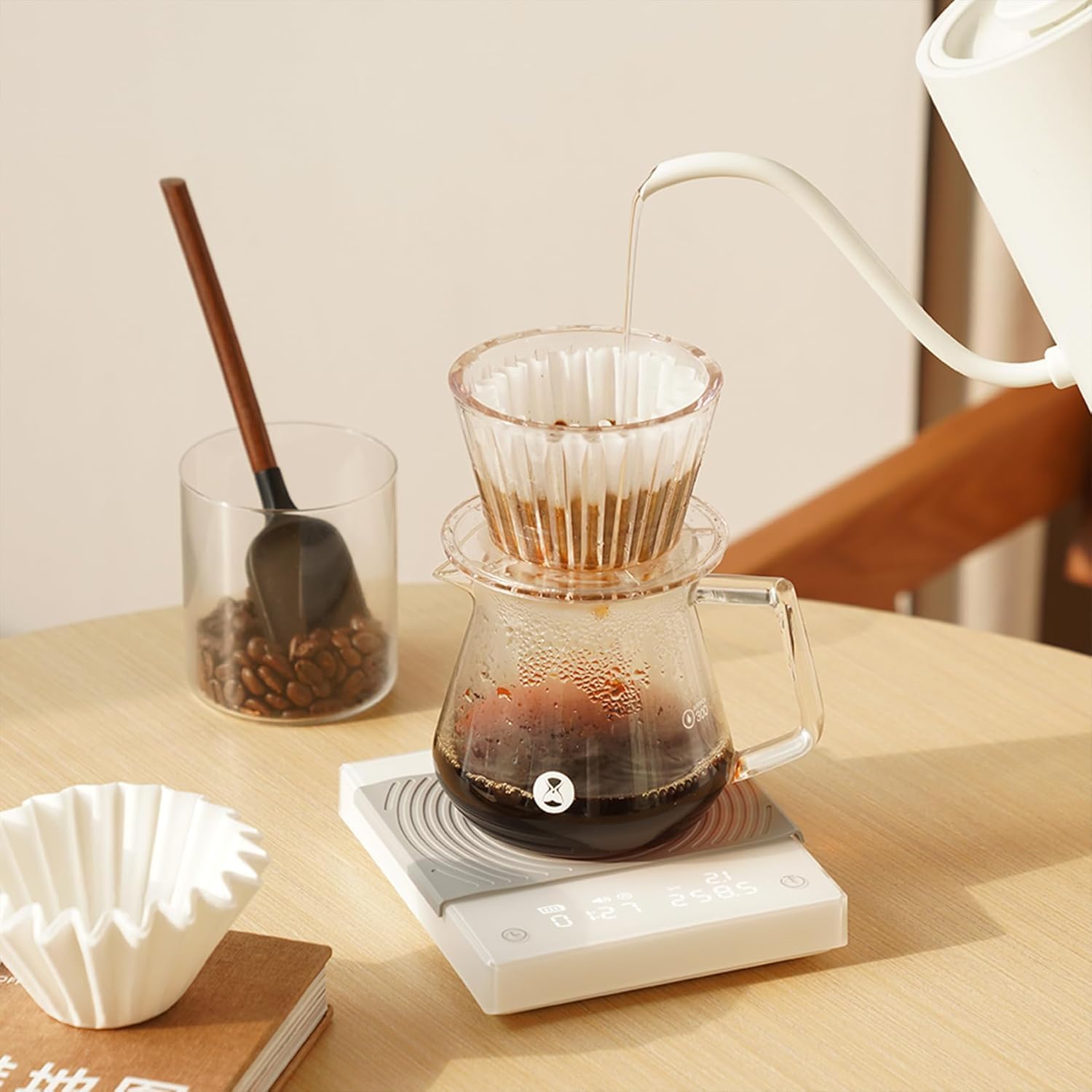
Figure 5: Scale displaying real-time water flow rate.
6. പ്രവർത്തനം പുനഃസജ്ജമാക്കുക
In case of a sudden failure or unexpected behavior, a RESET button is located at the bottom of the scale. Use a small pin or paperclip to press this button to restore the program.
മെയിൻ്റനൻസ്
1. വൃത്തിയാക്കൽ
The dial surface of the scale is waterproof. For cleaning, wipe the surface with a damp cloth. Avoid submerging the entire scale in water. Ensure the charging port cover is securely closed to prevent liquid from entering.
2. Heat Protection
Always use the silicone insulation pad when placing hot items on the scale. Prolonged exposure to high temperatures may cause cracking of the acrylic surface.
ട്രബിൾഷൂട്ടിംഗ്
1. Inaccurate Readings or Drifting Weight
- സ്കെയിൽ പരന്നതും സുസ്ഥിരവുമായ പ്രതലത്തിൽ സ്ഥാപിച്ചിട്ടുണ്ടെന്ന് ഉറപ്പാക്കുക.
- Avoid placing the scale near vibrating equipment or in drafty areas.
- Make sure no objects are touching the scale or the weighing platform from the sides.
- Perform a reset using the button on the bottom of the scale.
2. Scale Not Turning On or Responding
- Check the battery level. Recharge the scale if the battery indicator is low.
- Ensure the power switch is in the 'on' position.
- Try performing a hard reset using the reset button on the bottom.
3. Touch Buttons Unresponsive
- Ensure the surface of the scale is dry and clean. Moisture or debris can affect touch sensitivity.
- If issues persist, try resetting the device.
സ്പെസിഫിക്കേഷനുകൾ
| ബ്രാൻഡ് | കൂടുതൽ സമയം |
| മോഡൽ നമ്പർ | അടിസ്ഥാന 2.0 |
| നിറം | വെള്ള |
| മെറ്റീരിയൽ | Plastic (Acrylic surface) |
| ഭാര പരിധി | 2 കിലോഗ്രാം (4.4 പൗണ്ട്) |
| വായനാ കൃത്യത | 0.1g (Initial minimum weight 0.5g) |
| ഡിസ്പ്ലേ തരം | ബാക്ക്ലൈറ്റുള്ള എൽസിഡി |
| ബാറ്ററി | ബിൽറ്റ്-ഇൻ 1600mAh റീചാർജ് ചെയ്യാവുന്ന ലിഥിയം ബാറ്ററി |
| ബാറ്ററി ലൈഫ് | 10 മണിക്കൂർ വരെ |
| യാന്ത്രിക-ഓഫ് | After 3 minutes of standby (no measurement change) |
| ഉൽപ്പന്ന അളവുകൾ | 5.1 x 1 x 0.9 ഇഞ്ച് |
| ഇനത്തിൻ്റെ ഭാരം | 1.12 പൗണ്ട് |
ഔദ്യോഗിക ഉൽപ്പന്ന വീഡിയോ
വീഡിയോ 1: കഴിഞ്ഞുview of TIMEMORE Coffee Scale features, including pour-over, cooking, espresso use, waterproofing, and charging.
വാറൻ്റിയും പിന്തുണയും
For warranty information, technical support, or service inquiries, please refer to the contact details provided with your product packaging or visit the official TIMEMORE webസൈറ്റ്. വാറൻ്റി ക്ലെയിമുകൾക്കായി നിങ്ങളുടെ വാങ്ങൽ രസീത് സൂക്ഷിക്കുക.