
1. ആമുഖം
Thank you for choosing the AWEI Y669 Portable Bluetooth Speaker. This manual provides essential information for setting up, operating, and maintaining your speaker. Please read it carefully before use to ensure optimal performance and longevity of your device.
2 സുരക്ഷാ വിവരങ്ങൾ
- തീവ്രമായ താപനിലയിലോ നേരിട്ടുള്ള സൂര്യപ്രകാശത്തിലോ സ്പീക്കറിനെ ദീർഘനേരം തുറന്നുകാട്ടരുത്.
- സ്പീക്കറെ ശക്തമായ ആഘാതങ്ങൾക്ക് വിധേയമാക്കുകയോ താഴെയിടുകയോ ചെയ്യുന്നത് ഒഴിവാക്കുക.
- സ്പീക്കറിൽ കാന്തങ്ങൾ അടങ്ങിയിരിക്കുന്നതിനാൽ അത് മെഡിക്കൽ ഉപകരണങ്ങളിൽ നിന്ന് അകറ്റി നിർത്തുക.
- സ്പീക്കർ സ്വയം ഡിസ്അസംബ്ലിംഗ് ചെയ്യാനോ നന്നാക്കാനോ പരിഷ്ക്കരിക്കാനോ ശ്രമിക്കരുത്. അംഗീകൃത സേവന ഉദ്യോഗസ്ഥരെ ബന്ധപ്പെടുക.
- IPX7 വാട്ടർപ്രൂഫ് റേറ്റിംഗ് നിലനിർത്താൻ, വെള്ളത്തിനടുത്ത് സ്പീക്കർ ഉപയോഗിക്കുമ്പോൾ ചാർജിംഗ് പോർട്ട് കവർ സുരക്ഷിതമായി അടച്ചിട്ടുണ്ടെന്ന് ഉറപ്പാക്കുക.
- നൽകിയിരിക്കുന്ന ടൈപ്പ്-സി ചാർജിംഗ് കേബിളോ സാക്ഷ്യപ്പെടുത്തിയ തത്തുല്യമായതോ മാത്രം ഉപയോഗിക്കുക.
3. പാക്കേജ് ഉള്ളടക്കം
പാക്കേജിൽ ഇനിപ്പറയുന്ന ഇനങ്ങൾ ഉണ്ടോ എന്ന് പരിശോധിക്കുക:
- 1 x AWEI Y669 Portable Bluetooth Speaker
- 1 x ടൈപ്പ്-സി ചാർജിംഗ് കേബിൾ
- 1 x Quick Start Guide (This Manual)
4. ഉൽപ്പന്നം കഴിഞ്ഞുview
The AWEI Y669 is a portable Bluetooth speaker designed for high-quality audio playback in various environments. It features intuitive controls for power, volume, playback, and call management. The speaker's robust design includes an IPX7 waterproof rating, making it suitable for outdoor use.
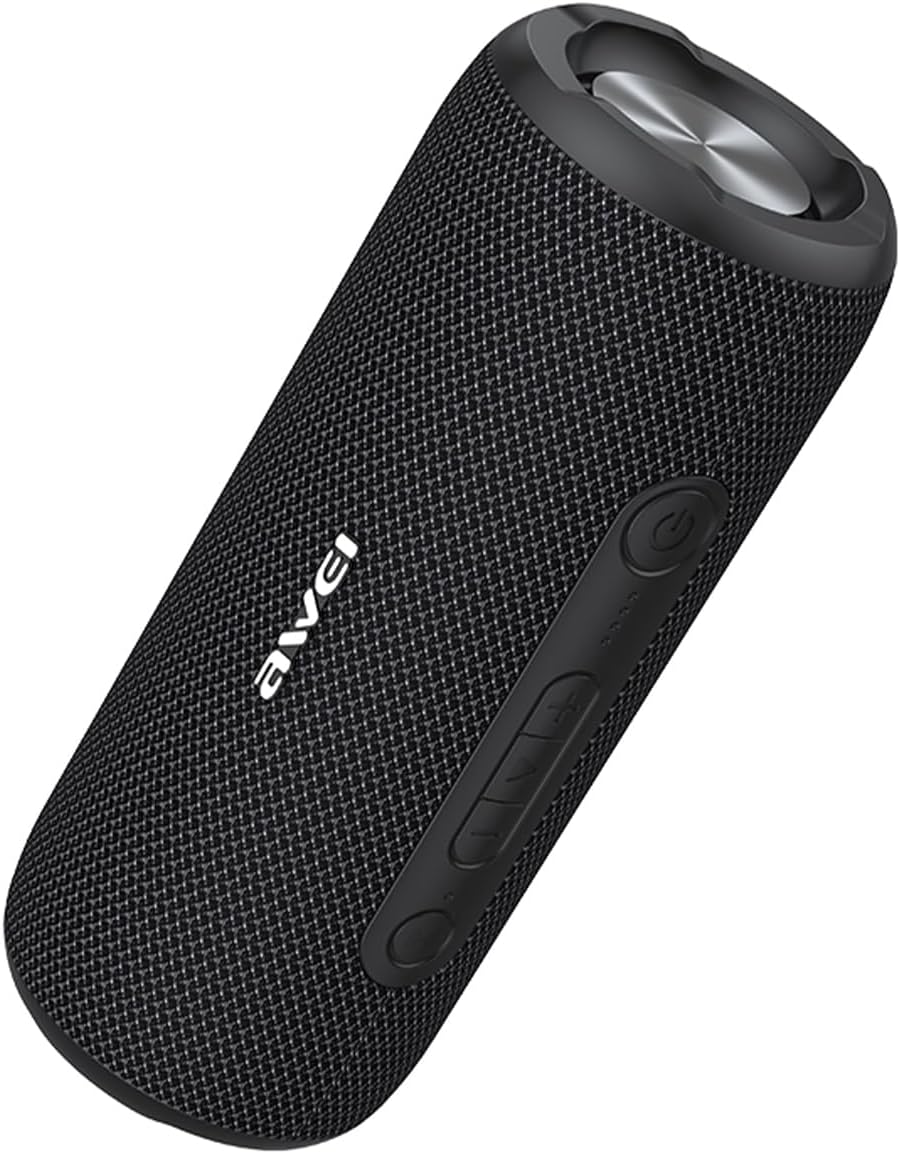
Image: The AWEI Y669 Portable Bluetooth Speaker in black, showcasing അതിന്റെ സിലിണ്ടർ രൂപകൽപ്പനയും നിയന്ത്രണ പാനലും.
Control Panel (General Layout)
While specific button labels may vary, typical controls include:
- പവർ ബട്ടൺ: ഓൺ/ഓഫ് ചെയ്യാൻ അമർത്തിപ്പിടിക്കുക.
- വോളിയം കൂട്ടുക/അടുത്ത ട്രാക്ക്: വോളിയം കൂട്ടാൻ ഷോർട്ട് പ്രസ്സ് ചെയ്യുക, അടുത്ത ട്രാക്കിനായി ദീർഘനേരം പ്രസ്സ് ചെയ്യുക.
- വോളിയം ഡൗൺ/മുൻ ട്രാക്ക്: വോളിയം കുറയ്ക്കാൻ ഷോർട്ട് പ്രസ്സ് ചെയ്യുക, മുമ്പത്തെ ട്രാക്കിനായി ദീർഘനേരം അമർത്തുക.
- പ്ലേ/താൽക്കാലികമായി നിർത്തുക/കോൾ ബട്ടൺ: Short press to play/pause music, answer/end calls. Long press to reject calls.
- ബ്ലൂടൂത്ത്/TWS ബട്ടൺ: Press to enter Bluetooth pairing mode or initiate TWS pairing.
5. സജ്ജീകരണം
5.1 സ്പീക്കർ ചാർജ് ചെയ്യുന്നു
ആദ്യ ഉപയോഗത്തിന് മുമ്പ്, സ്പീക്കർ പൂർണ്ണമായും ചാർജ് ചെയ്യുക.
- Open the protective cover on the side of the speaker to access the Type-C charging port.
- Connect the provided Type-C cable to the speaker's charging port and the other end to a USB power adapter (not included) or a computer's USB port.
- ചാർജിംഗ് ഇൻഡിക്കേറ്റർ ലൈറ്റ് പ്രകാശിക്കും. ചാർജിംഗ് പൂർത്തിയായിക്കഴിഞ്ഞാൽ അത് ഓഫാകും അല്ലെങ്കിൽ നിറം മാറും.
- Close the protective cover firmly after charging to maintain waterproof integrity.
5.2 പവർ ഓൺ/ഓഫ്
- പവർ ഓണാക്കാൻ: Press and hold the Power button for approximately 2-3 seconds until you hear an audible prompt and the indicator light turns on.
- പവർ ഓഫ് ചെയ്യാൻ: കേൾക്കാവുന്ന ഒരു പ്രോംപ്റ്റ് കേൾക്കുകയും ഇൻഡിക്കേറ്റർ ലൈറ്റ് ഓഫാകുകയും ചെയ്യുന്നതുവരെ ഏകദേശം 2-3 സെക്കൻഡ് പവർ ബട്ടൺ അമർത്തിപ്പിടിക്കുക.
5.3 ബ്ലൂടൂത്ത് ജോടിയാക്കൽ
Pair your speaker with a Bluetooth-enabled device to play audio wirelessly.
- സ്പീക്കർ ഓണാണെന്നും നിങ്ങളുടെ ഉപകരണത്തിന്റെ 33 അടി (10 മീറ്റർ) അകലത്തിനുള്ളിൽ ഉണ്ടെന്നും ഉറപ്പാക്കുക.
- മിന്നുന്ന നീല LED സൂചിപ്പിക്കുന്ന ബ്ലൂടൂത്ത് ജോടിയാക്കൽ മോഡിലേക്ക് സ്പീക്കർ സ്വയമേവ പ്രവേശിക്കും. ഇല്ലെങ്കിൽ, ബ്ലൂടൂത്ത് ബട്ടൺ അമർത്തുക.
- നിങ്ങളുടെ ഉപകരണത്തിൽ (സ്മാർട്ട്ഫോൺ, ടാബ്ലെറ്റ് മുതലായവ), ബ്ലൂടൂത്ത് ക്രമീകരണങ്ങളിലേക്ക് പോയി ബ്ലൂടൂത്ത് പ്രവർത്തനക്ഷമമാക്കുക.
- ഇതിനായി തിരയുക available devices and select "AWEI Y669" from the list.
- കണക്റ്റ് ചെയ്തുകഴിഞ്ഞാൽ, LED ഇൻഡിക്കേറ്റർ കടും നീലയായി മാറും, നിങ്ങൾ ഒരു സ്ഥിരീകരണ ശബ്ദം കേൾക്കും.
5.4 ട്രൂ വയർലെസ് സ്റ്റീരിയോ (TWS) ജോടിയാക്കൽ
Connect two AWEI Y669 speakers for an enhanced stereo sound experience.

Image: Two AWEI Y669 speakers wirelessly connected to a laptop, illustrating the TWS pairing feature for stereo sound.
- Ensure both AWEI Y669 speakers are powered on and not connected to any other Bluetooth device.
- On one speaker (this will be the primary speaker), press the Bluetooth/TWS button twice. It will enter TWS pairing mode.
- The primary speaker will automatically search for the secondary speaker. Once connected, you will hear a confirmation sound, and the LED indicators on both speakers will show a stable connection (e.g., solid blue on primary, flashing blue on secondary, or both solid).
- ഇനി, വിഭാഗം 5.3-ൽ വിവരിച്ചിരിക്കുന്നതുപോലെ ബ്ലൂടൂത്ത് വഴി നിങ്ങളുടെ ഉപകരണം പ്രാഥമിക സ്പീക്കറുമായി ബന്ധിപ്പിക്കുക. സ്റ്റീരിയോയിൽ രണ്ട് സ്പീക്കറുകളിലൂടെയും ഓഡിയോ പ്ലേ ചെയ്യും.
6. ഓപ്പറേഷൻ
6.1 മ്യൂസിക് പ്ലേബാക്ക്
- പ്ലേ/താൽക്കാലികമായി നിർത്തുക: പ്ലേ/പോസ് ബട്ടൺ ഹ്രസ്വമായി അമർത്തുക.
- വോളിയം കൂട്ടുക: വോളിയം അപ്പ് (+) ബട്ടൺ ചുരുക്കി അമർത്തുക.
- വോളിയം താഴേക്ക്: വോളിയം ഡൗൺ (-) ബട്ടൺ ചുരുക്കി അമർത്തുക.
- അടുത്ത ട്രാക്ക്: വോളിയം അപ്പ് (+) ബട്ടൺ ദീർഘനേരം അമർത്തുക.
- മുമ്പത്തെ ട്രാക്ക്: വോളിയം ഡൗൺ (-) ബട്ടൺ ദീർഘനേരം അമർത്തുക.
6.2 കോൾ മാനേജ്മെന്റ്
When connected to a smartphone, you can manage calls directly from the speaker.
- മറുപടി കോൾ: ഒരു ഇൻകമിംഗ് കോൾ റിംഗ് ചെയ്യുമ്പോൾ പ്ലേ/പോസ് ബട്ടൺ ഹ്രസ്വമായി അമർത്തുക.
- കോൾ അവസാനിപ്പിക്കുക: ഒരു കോൾ സമയത്ത് പ്ലേ/പോസ് ബട്ടൺ ഹ്രസ്വമായി അമർത്തുക.
- കോൾ നിരസിക്കുക: ഒരു ഇൻകമിംഗ് കോൾ റിംഗ് ചെയ്യുമ്പോൾ പ്ലേ/പോസ് ബട്ടൺ ദീർഘനേരം അമർത്തുക.
6.3 IPX7 Waterproof Feature
The AWEI Y669 speaker is rated IPX7, meaning it can be submerged in up to 1 meter (3 feet) of water for 30 minutes. This makes it ideal for use by the pool, at the beach, or in rainy conditions. Ensure the charging port cover is fully sealed before exposing the speaker to water.

Image: The AWEI Y669 speaker partially submerged in water, demonstrating its IPX7 water repellency.
7. പരിപാലനം
- വൃത്തിയാക്കൽ: മൃദുവായ സ്പീക്കർ തുടയ്ക്കുക, ഡിamp തുണി. ഉരച്ചിലുകളുള്ള ക്ലീനറുകളോ ലായകങ്ങളോ ഉപയോഗിക്കരുത്.
- സംഭരണം: നേരിട്ടുള്ള സൂര്യപ്രകാശത്തിൽ നിന്നും കടുത്ത താപനിലയിൽ നിന്നും മാറി തണുത്തതും വരണ്ടതുമായ സ്ഥലത്ത് സ്പീക്കർ സൂക്ഷിക്കുക.
- ബാറ്ററി കെയർ: To prolong battery life, charge the speaker at least once every three months if not used regularly.
8. പ്രശ്നപരിഹാരം
If you encounter issues with your speaker, refer to the following table:
| പ്രശ്നം | പരിഹാരം |
|---|---|
| സ്പീക്കർ ഓണാക്കുന്നില്ല. | സ്പീക്കർ ചാർജ് ചെയ്തിട്ടുണ്ടെന്ന് ഉറപ്പാക്കുക. ഒരു പവർ സ്രോതസ്സുമായി ബന്ധിപ്പിച്ച് വീണ്ടും ശ്രമിക്കുക. |
| ബ്ലൂടൂത്ത് ഉപകരണവുമായി ജോടിയാക്കാൻ കഴിയില്ല. | Ensure the speaker is in pairing mode (flashing blue LED). Turn off and on your device's Bluetooth. Forget previous connections on your device. |
| ശബ്ദമില്ല അല്ലെങ്കിൽ കുറഞ്ഞ ശബ്ദമില്ല. | Increase volume on both the speaker and your connected device. Ensure the speaker is not muted. Check if the speaker is properly connected. |
| TWS ജോടിയാക്കൽ പരാജയപ്പെടുന്നു. | Ensure both speakers are AWEI Y669 models and are not connected to any other Bluetooth device. Try resetting both speakers and repeating the TWS pairing steps. |
| ശബ്ദ വികൃതത. | Reduce the volume on both the speaker and your device. Ensure the speaker is within Bluetooth range and there are no obstructions. |
9 സ്പെസിഫിക്കേഷനുകൾ
| ഫീച്ചർ | സ്പെസിഫിക്കേഷൻ |
|---|---|
| മോഡൽ നമ്പർ | Y669 |
| ബ്രാൻഡ് | AWEI |
| കണക്റ്റിവിറ്റി ടെക്നോളജി | ബ്ലൂടൂത്ത് 5.0 |
| സ്പീക്കർ ഔട്ട്പുട്ട് പവർ | 31 Watts (2*8W mid-high frequency + 1*15W low frequency) |
| ജല പ്രതിരോധ നില | IPX7 |
| ബ്ലൂടൂത്ത് ശ്രേണി | 33 അടി വരെ (10 മീറ്റർ) |
| ഓഡിയോ put ട്ട്പുട്ട് മോഡ് | സ്റ്റീരിയോ |
| ഉൽപ്പന്ന അളവുകൾ | 4.4"D x 3.9"W x 9.4"H |
| ഇനത്തിൻ്റെ ഭാരം | 2.64 പൗണ്ട് (42.3 ഔൺസ്) |
| പവർ ഉറവിടം | ബാറ്ററി പവർ |
| അനുയോജ്യമായ ഉപകരണങ്ങൾ | Smartphone, Tablet, PC, etc. |
10. വാറൻ്റിയും പിന്തുണയും
The AWEI Y669 Portable Bluetooth Speaker comes with a 2 വർഷത്തെ വാറൻ്റി വാങ്ങിയ തീയതി മുതൽ. ഈ വാറന്റി നിർമ്മാണ വൈകല്യങ്ങൾ ഉൾക്കൊള്ളുന്നു, കൂടാതെ സാധാരണ ഉപയോഗത്തിൽ നിങ്ങളുടെ ഉൽപ്പന്നം മെറ്റീരിയൽ, വർക്ക്മാൻഷിപ്പ് വൈകല്യങ്ങളിൽ നിന്ന് മുക്തമാണെന്ന് ഉറപ്പാക്കുന്നു.
For warranty claims, technical support, or further inquiries, please contact AWEI customer service or visit the official AWEI store:
Visit the AWEI Store on Amazon
വാറന്റി സേവനത്തിനായി നിങ്ങളുടെ വാങ്ങിയതിന്റെ തെളിവ് സൂക്ഷിക്കുക.