
1. ആമുഖം
Thank you for choosing the QUMOX External CD/DVD Drive with 8-in-1 USB 3.0 Hub. This versatile device provides high-speed data transfer for reading and writing CDs and DVDs, along with expanded connectivity through its integrated USB hub and card readers. This manual will guide you through the setup, operation, and maintenance of your new device.
2 സുരക്ഷാ വിവരങ്ങൾ
- വെള്ളം, ഈർപ്പം, തീവ്രമായ താപനില എന്നിവയിൽ നിന്ന് ഉപകരണം അകറ്റി നിർത്തുക.
- ശക്തമായ ആഘാതങ്ങൾക്ക് ഉപകരണം ഇടുകയോ ഇടുകയോ ചെയ്യുന്നത് ഒഴിവാക്കുക.
- ഉപകരണം സ്വയം വേർപെടുത്താനോ നന്നാക്കാനോ ശ്രമിക്കരുത്. സേവനത്തിനായി യോഗ്യതയുള്ള ഉദ്യോഗസ്ഥരെ ബന്ധപ്പെടുക.
- Use only compatible discs and cables.
- അമിതമായി ചൂടാക്കുന്നത് തടയാൻ ശരിയായ വായുസഞ്ചാരം ഉറപ്പാക്കുക.
3. പാക്കേജ് ഉള്ളടക്കം
എല്ലാ ഇനങ്ങളും ഉണ്ടെന്ന് ഉറപ്പാക്കാൻ പാക്കേജ് ഉള്ളടക്കങ്ങൾ പരിശോധിക്കുക:
- QUMOX External CD/DVD Drive with 8-in-1 USB 3.0 Hub
- USB-A to USB-C Data Cable
- USB-A Data Cable
- ഉപയോക്തൃ മാനുവൽ (ഈ പ്രമാണം)
4. ഉൽപ്പന്നം കഴിഞ്ഞുview
The QUMOX External CD/DVD Drive combines an optical drive with a multi-functional hub, offering enhanced connectivity and media capabilities.
4.1 ഉപകരണ ലേayട്ട്
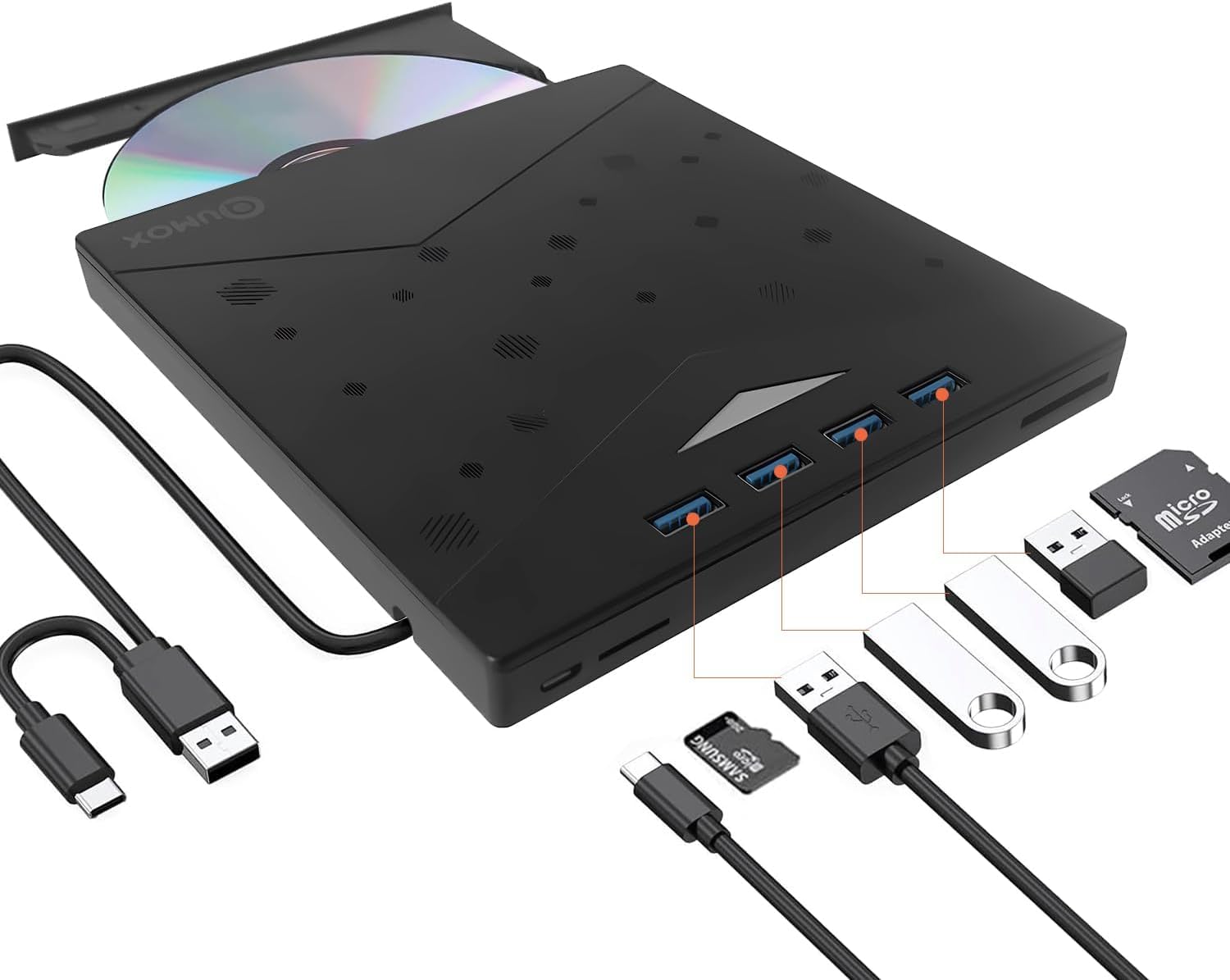
Figure 1: QUMOX External CD/DVD Drive with USB-A and USB-C cables.
The device features a sleek, ultra-slim design with an integrated cable for convenience. It includes multiple ports for various peripherals.
4.2 തുറമുഖങ്ങളും സൂചകങ്ങളും

Figure 2: Labeled ports and connections on the QUMOX External CD/DVD Drive.
- USB A 3.0 Ports (x4): For connecting USB devices such as flash drives, keyboards, mice, or external hard drives.
- TF സ്ലോട്ട്: മൈക്രോ എസ്ഡി (ടിഎഫ്) മെമ്മറി കാർഡുകൾക്ക്.
- SD സ്ലോട്ട്: സാധാരണ SD മെമ്മറി കാർഡുകൾക്ക്.
- USB C പോർട്ട്: For connecting the drive to a host device with a USB-C port.
- USB A Data Cable: Integrated cable for connecting to a host device with a USB-A port.
- Pop-up Button: To open the disc tray.
- Forced Ejection Hole: For manual disc ejection in case of power failure or malfunction.
- ഇൻഡിക്കേറ്റർ ലൈറ്റ്: Shows device status (e.g., power, activity).

Figure 3: Device dimensions and additional features.
5. സജ്ജീകരണവും ഇൻസ്റ്റാളേഷനും
The QUMOX External CD/DVD Drive is designed for plug-and-play functionality, requiring no additional drivers for most operating systems.
5.1 ഉപകരണം ബന്ധിപ്പിക്കുന്നു
- Connect the integrated USB-A data cable to an available USB 3.0 port on your computer. If your computer only has USB-C ports, use the provided USB-A to USB-C adapter cable.
- Ensure the connection is secure. The indicator light on the drive will illuminate, indicating it is powered on and ready for use.
- നിങ്ങളുടെ ഓപ്പറേറ്റിംഗ് സിസ്റ്റം ആവശ്യമായ ഡ്രൈവറുകൾ സ്വയമേവ കണ്ടെത്തി ഇൻസ്റ്റാൾ ചെയ്യണം. ഈ പ്രക്രിയയ്ക്ക് കുറച്ച് നിമിഷങ്ങൾ എടുത്തേക്കാം.

Figure 4: Plug and Play connection to a laptop.
കുറിപ്പ്: For optimal performance, connect the drive directly to a USB 3.0 port on your computer. Avoid using unpowered USB hubs or extension cables, as this may affect performance or power delivery.
6. പ്രവർത്തന നിർദ്ദേശങ്ങൾ
6.1 Using the CD/DVD Drive
- ഒരു ഡിസ്ക് ചേർക്കാൻ: Press the pop-up button on the front of the drive. The disc tray will eject. Carefully place a CD or DVD onto the tray, ensuring it is centered on the spindle. Gently push the tray back into the drive until it clicks into place.
- ഒരു ഡിസ്ക് എജക്റ്റ് ചെയ്യാൻ: Press the pop-up button. Alternatively, you can eject the disc through your operating system (e.g., right-click the drive icon and select "Eject").
- വായന ഡിസ്കുകൾ: ഒരു ഡിസ്ക് ഇട്ടുകഴിഞ്ഞാൽ, നിങ്ങളുടെ കമ്പ്യൂട്ടറിന്റെ ഓപ്പറേറ്റിംഗ് സിസ്റ്റം അത് യാന്ത്രികമായി കണ്ടെത്തും. തുടർന്ന് നിങ്ങൾക്ക് ഡിസ്കിന്റെ ഉള്ളടക്കങ്ങൾ ഇതിലൂടെ ആക്സസ് ചെയ്യാൻ കഴിയും File എക്സ്പ്ലോറർ (വിൻഡോസ്) അല്ലെങ്കിൽ ഫൈൻഡർ (മാകോസ്).
- Writing/Burning Discs: To burn data to a CD-R/RW or DVD±R/RW, you will need compatible burning software (not included). Follow the instructions provided with your chosen software.
The drive supports CD-R/RW, DVD±R/RW, DVD-RAM, and SVCD formats. It offers up to 8x DVD read/write speed and 24x CD read/write speed.
6.2 Using the 8-in-1 Hub
- USB 3.0 പോർട്ടുകൾ: Connect up to four USB devices to the available USB 3.0 ports for high-speed data transfer (up to 5 Gbps).
- SD/TF കാർഡ് റീഡറുകൾ: Insert your SD or Micro SD (TF) memory cards into the corresponding slots to access or transfer data. കുറിപ്പ്: The SD and TF card slots cannot be used simultaneously.
6.3 സിസ്റ്റം അനുയോജ്യത

ചിത്രം 5: വിവിധ ഓപ്പറേറ്റിംഗ് സിസ്റ്റങ്ങളുമായുള്ള വിശാലമായ അനുയോജ്യത.
This device is widely compatible with operating systems including Windows XP, Windows 7, Windows 8, Windows 10, Windows 11, macOS, and Linux. It is designed for use with PCs and laptops. പ്രധാനപ്പെട്ടത്: This device is not compatible with tablets, smartphones, or Blu-ray discs.
7. പരിപാലനം
- വൃത്തിയാക്കൽ: Use a soft, dry cloth to clean the exterior of the drive. Do not use liquid cleaners or abrasive materials. For the disc tray, use a specialized optical drive cleaning kit if necessary.
- സംഭരണം: When not in use, store the drive in a cool, dry place, away from direct sunlight and dust.
- കൈകാര്യം ചെയ്യൽ: വിരലടയാളങ്ങളും പോറലുകളും ഒഴിവാക്കാൻ ഡിസ്കുകൾ എല്ലായ്പ്പോഴും അവയുടെ അരികുകളിൽ തന്നെ കൈകാര്യം ചെയ്യുക.
8. പ്രശ്നപരിഹാരം
| പ്രശ്നം | സാധ്യമായ കാരണം | പരിഹാരം |
|---|---|---|
| കമ്പ്യൂട്ടർ ഡ്രൈവ് തിരിച്ചറിഞ്ഞില്ല. | Loose connection, insufficient power, driver issue. |
|
| ഡിസ്ക് വായിക്കുന്നില്ല അല്ലെങ്കിൽ കത്തുന്നില്ല. | Dirty/scratched disc, incorrect disc type, faulty disc. |
|
| USB hub or card readers not working. | Loose connection, power issue, incompatible card. |
|
| ഡിസ്ക് ട്രേ തുറക്കുന്നില്ല. | Power issue, mechanical jam. |
|
9 സ്പെസിഫിക്കേഷനുകൾ
| ഫീച്ചർ | വിവരണം |
|---|---|
| ബ്രാൻഡ് | ക്യുമോക്സ് |
| മോഡൽ നമ്പർ | Z311 |
| ഇൻ്റർഫേസ് | USB 3.0 (backward compatible with USB 2.0/1.1), USB 3.0 Type-A, USB 3.0 Type-C |
| ഒപ്റ്റിക്കൽ സ്റ്റോറേജ് റീഡ് സ്പീഡ് | Up to 8x for DVD, 24x for CD |
| ഒപ്റ്റിക്കൽ സ്റ്റോറേജ് റൈറ്റ് വേഗത | Up to 8x for DVD, 24x for CD |
| പിന്തുണയ്ക്കുന്ന ഡിസ്ക് തരങ്ങൾ | CD-R/RW, DVD±R/RW, DVD-RAM, SVCD |
| USB ഹബ് | 4 x USB 3.0 പോർട്ടുകൾ |
| കാർഡ് റീഡറുകൾ | SD Slot, TF (Micro SD) Slot (not simultaneous) |
| ഓപ്പറേറ്റിംഗ് സിസ്റ്റം അനുയോജ്യത | Windows XP/7/8/10/11, macOS, Linux |
| ഹാർഡ്വെയർ പ്ലാറ്റ്ഫോം | ലാപ്ടോപ്പ്, പി.സി |
| അളവുകൾ (L x W x H) | 19.4 x 16.1 x 2.7 സെ.മീ (ഏകദേശം 7.6 x 6.3 x 1.1 ഇഞ്ച്) |
| ഭാരം | 390 ഗ്രാം (ഏകദേശം 0.86 പൗണ്ട്) |
| പ്രത്യേക സവിശേഷതകൾ | Powered, DVD Burner, Portable, RGB lighting |
10. വാറൻ്റിയും പിന്തുണയും
QUMOX products are designed and manufactured to the highest quality standards. This product is covered by a standard manufacturer's warranty against defects in materials and workmanship.
For warranty claims, technical support, or any questions regarding your QUMOX External CD/DVD Drive, please contact your retailer or visit the official QUMOX webഉപഭോക്തൃ സേവന വിവരങ്ങൾക്കായുള്ള സൈറ്റ്.
വാറന്റി ആവശ്യങ്ങൾക്കായി നിങ്ങളുടെ വാങ്ങിയതിന്റെ തെളിവ് സൂക്ഷിക്കുക.