
CLY 60BP-DW21
CLY LED Security Light with Motion Sensor
Model: 60BP-DW21 | Brand: CLY
1. ആമുഖം
Thank you for choosing the CLY LED Security Light with Motion Sensor. This 60W, 5200LM outdoor flood light is designed to provide bright, energy-efficient illumination and enhanced security for your yard, porch, garage, and other outdoor areas. Featuring an upgraded smart motion sensor and IP66 waterproof rating, this light is built for reliable performance in various environmental conditions. This manual will guide you through the installation, operation, and maintenance of your new security light.

Image 1.1: The CLY LED Security Light with Motion Sensor, showing the main light unit, integrated motion sensor, and power cord with plug.
2 പ്രധാനപ്പെട്ട സുരക്ഷാ വിവരങ്ങൾ
Please read all safety instructions carefully before installation and operation. Failure to follow these instructions may result in electric shock, fire, or other hazards.
- ഇലക്ട്രിക്കൽ സുരക്ഷ: Ensure the power supply is disconnected before installation or maintenance. This product uses a standard plug; do not modify the plug or use it with an ungrounded outlet.
- ഇൻസ്റ്റലേഷൻ പരിസ്ഥിതി: Install the light in a stable location that can support its weight. Avoid installing near flammable materials or in areas with excessive vibration.
- വാട്ടർപ്രൂഫ് റേറ്റിംഗ്: The light unit has an IP66 waterproof rating, and the sensor head is IP65. While designed for outdoor use, ensure all connections are secure and protected from direct water ingress during installation.
- താപനില: നിശ്ചിത താപനില പരിധിക്ക് പുറത്ത് ലൈറ്റ് പ്രവർത്തിപ്പിക്കരുത്.
- പ്രകാശ സ്രോതസ്സ്: LED ലൈറ്റ് സ്രോതസ്സ് പ്രകാശിപ്പിക്കുമ്പോൾ അതിലേക്ക് നേരിട്ട് നോക്കരുത്, കാരണം ഇത് കണ്ണിന് ആയാസമോ കേടുപാടുകളോ ഉണ്ടാക്കാം.
- പരിപാലനം: Only perform maintenance when the light is cool and disconnected from power. Do not attempt to disassemble the light unit or sensor beyond what is described in this manual.
3. പാക്കേജ് ഉള്ളടക്കം
ഇൻസ്റ്റാളേഷനുമായി മുന്നോട്ടുപോകുന്നതിനുമുമ്പ് എല്ലാ ഘടകങ്ങളും നിലവിലുണ്ടെന്നും കേടുപാടുകൾ സംഭവിച്ചിട്ടില്ലെന്നും ഉറപ്പാക്കുക.
- CLY LED Security Light with Motion Sensor (1 unit)
- മൗണ്ടിംഗ് ബ്രാക്കറ്റ് (മുൻകൂട്ടി ഘടിപ്പിച്ചത്)
- Installation Screws and Wall Anchors (1 set)
- ഉപയോക്തൃ മാനുവൽ (ഈ പ്രമാണം)
4 സ്പെസിഫിക്കേഷനുകൾ
| ഫീച്ചർ | സ്പെസിഫിക്കേഷൻ |
|---|---|
| മോഡൽ നമ്പർ | 60BP-DW21 |
| വാട്ട്tage | 60W |
| ല്യൂമെൻ ഔട്ട്പുട്ട് | 5200LM |
| വർണ്ണ താപനില | 5000K (ഡേലൈറ്റ് വൈറ്റ്) |
| ബീം ആംഗിൾ | 120° |
| മോഷൻ സെൻസർ കണ്ടെത്തൽ ശ്രേണി | 0-12 മീറ്റർ |
| മോഷൻ സെൻസർ ഡിറ്റക്ഷൻ ആംഗിൾ | 180° |
| Adjustable Lighting Time | 10സെ / 45സെ / 120സെ / 600സെ |
| Waterproof Rating (Light) | IP66 |
| Waterproof Rating (Sensor) | IP65 |
| പവർ ഉറവിടം | Corded Electric (1.5M cable with plug) |
| മെറ്റീരിയൽ | പ്ലാസ്റ്റിക് പൊതിഞ്ഞ അലുമിനിയം |
| ഉൽപ്പന്ന അളവുകൾ | 58.42 x 41.91 x 19.05 cm (approx. 17L x 2W x 11H Centimetres for light head) |
| ഭാരം | 750 ഗ്രാം |
| ജീവിതകാലയളവ് | 50,000 മണിക്കൂർ |

Image 4.1: Detailed dimensions of the CLY LED Security Light.
5. സജ്ജീകരണവും ഇൻസ്റ്റാളേഷനും
Follow these steps to properly install your CLY LED Security Light.
- ഇൻസ്റ്റലേഷൻ ലൊക്കേഷൻ തിരഞ്ഞെടുക്കുക: Select a suitable outdoor location, such as a wall, eave, or pole, where the light can provide optimal coverage. The recommended installation height is 5-7 meters (approximately 16-23 feet) for best motion detection and light spread.
- ഡ്രില്ലിംഗ് പോയിന്റുകൾ അടയാളപ്പെടുത്തുക: Hold the pre-attached mounting bracket against the desired surface and mark the positions for drilling holes using a pencil.
- തുളകൾ: Use an appropriate drill bit to drill holes at the marked positions. Insert the wall anchors if installing on masonry or concrete.
- ബ്രാക്കറ്റ് മൌണ്ട് ചെയ്യുക: Align the mounting bracket with the drilled holes and secure it firmly using the provided screws.
- ലൈറ്റ് ആംഗിൾ ക്രമീകരിക്കുക: The light unit can be adjusted up to 180° on its bracket. Loosen the side screws, tilt the light to the desired angle, and then tighten the screws to secure it.
- Adjust Sensor Angle: The motion sensor head can rotate 360° horizontally and 180° vertically. Adjust its position to cover the desired detection area.
- പവർ ബന്ധിപ്പിക്കുക: Plug the 1.5-meter power cord into a standard outdoor electrical outlet. Ensure the outlet is weather-protected.

Image 5.1: Illustration of the 120° beam angle, 180° detection range, and ideal mounting height (5-7M) for optimal performance.

ചിത്രം 5.2: ഉദാamples of various mounting options including wall, ceiling, and ground installations.
6. പ്രവർത്തന നിർദ്ദേശങ്ങൾ
The CLY LED Security Light features an upgraded motion sensor with intuitive button controls for setting lighting duration and sensitivity.
6.1. സെൻസർ ക്രമീകരണങ്ങൾ
The sensor has two main settings controlled by buttons on the sensor unit:
- Lighting Time Setting (L Button): This button controls how long the light stays on after motion is detected and no further motion is sensed. Press the 'L' button to cycle through the available durations:
- 10സെ: Light stays on for 10 seconds.
- 45സെ: Light stays on for 45 seconds.
- 120സെ: Light stays on for 120 seconds (2 minutes).
- 600സെ: Light stays on for 600 seconds (10 minutes).
- Sensitivity Setting (M Button): This button controls when the motion sensor is active based on ambient light levels. Press the 'M' button to select:
- Moon Icon (Only Night): The motion sensor will only activate and turn on the light when it is dark (nighttime).
- Sun Icon (Day and Night): The motion sensor will activate and turn on the light regardless of ambient light conditions (works both day and night).

Image 6.1: Close-up of the motion sensor unit showing the 'L' button for lighting time and 'M' button for sensitivity settings.

Image 6.2: Visual comparison of the sensor's operation in 'Only Night' mode versus 'Day and Night' mode.
6.2. പ്രാരംഭ പ്രവർത്തനം
Once plugged in and settings are configured, the light will operate according to the chosen motion sensor settings. When motion is detected within the 0-12 meter, 180° sensing range, the light will illuminate for the set duration.
7. പരിപാലനം
Regular maintenance ensures the longevity and optimal performance of your CLY LED Security Light.
- വൃത്തിയാക്കൽ: Periodically clean the light fixture and sensor lens with a soft, damp cloth. Do not use abrasive cleaners or solvents, as they may damage the finish or sensor. Ensure the light is unplugged before cleaning.
- പരിശോധന: Regularly inspect the power cord for any signs of damage, fraying, or wear. Check the mounting screws to ensure they remain tight and secure.
- കാലാവസ്ഥ പ്രതിരോധം: The light is designed with IP66 waterproof technology and constructed from plastic-clad aluminum for good heat dissipation and corrosion resistance, ensuring durability in rain, snow, heat, and frost.
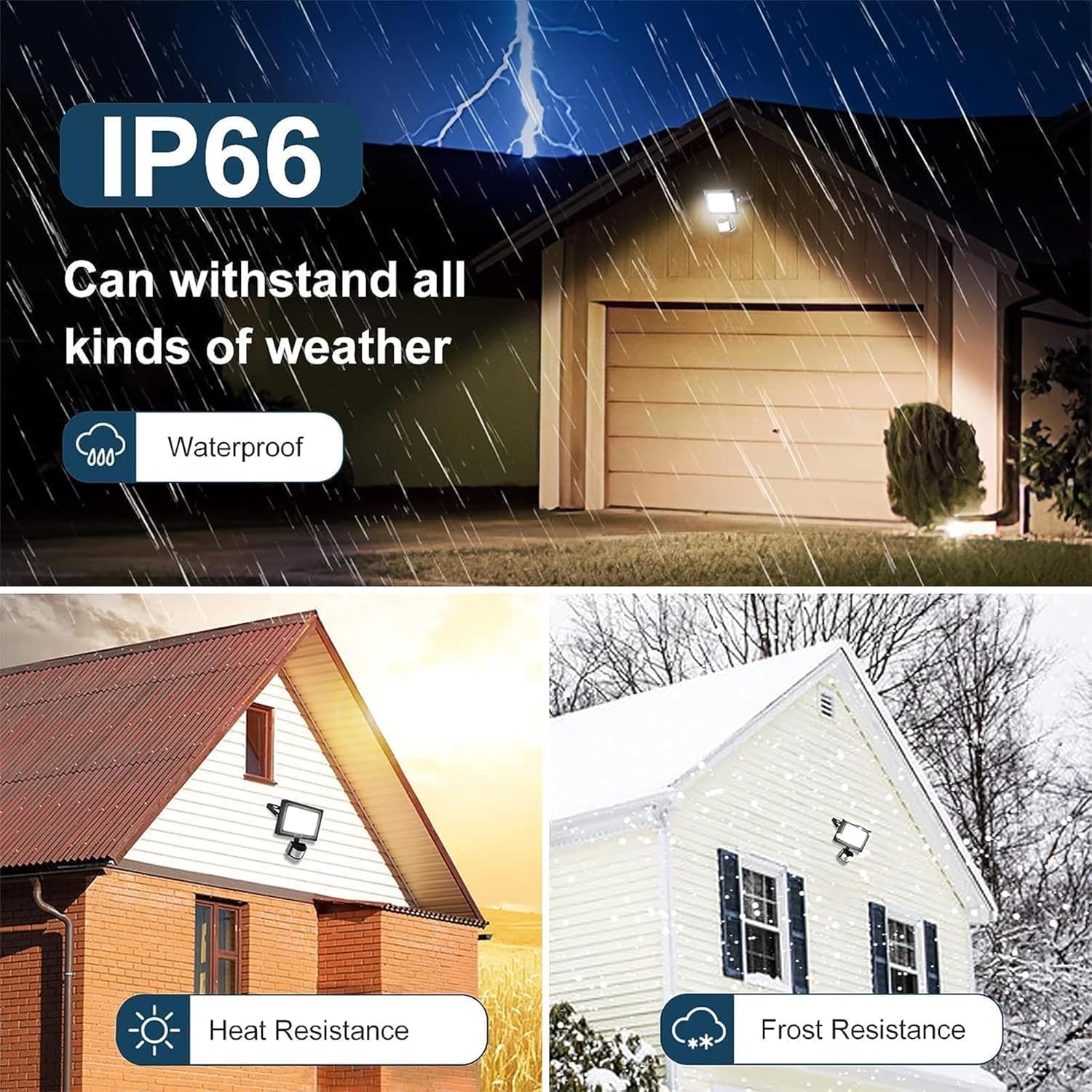
Image 7.1: Visual representation of the light's IP66 waterproof rating and resistance to various weather conditions like rain, heat, and snow.
8. പ്രശ്നപരിഹാരം
If you encounter issues with your CLY LED Security Light, refer to the following common problems and solutions:
| പ്രശ്നം | സാധ്യമായ കാരണം | പരിഹാരം |
|---|---|---|
| ചലനം കണ്ടെത്തുമ്പോൾ ലൈറ്റ് ഓണാകുന്നില്ല. | No power; Sensor sensitivity set to 'Moon' during daytime; Sensor obstructed; Motion outside detection range. | Check power connection; Change sensitivity to 'Sun' for day/night operation; Clear obstructions from sensor; Adjust sensor angle or light placement. |
| വെളിച്ചം തുടർച്ചയായി തുടരുന്നു. | Continuous motion in detection area; Sensor malfunction. | Ensure no constant motion (e.g., swaying branches, pets) is triggering the sensor; If problem persists, contact customer support. |
| Light turns on for too short/long a duration. | Incorrect lighting time setting. | Adjust the 'L' button setting on the sensor to the desired duration (10s, 45s, 120s, 600s). |
| വെളിച്ചം മിന്നിമറയുന്നു അല്ലെങ്കിൽ മങ്ങുന്നു. | Unstable power supply; Damaged light unit. | Check power source stability; If problem persists, contact customer support. |
| Sensor is too sensitive or not sensitive enough. | Sensor angle or placement. | Adjust the sensor head's angle to narrow or widen the detection area. Ensure it's not pointing at heat sources or reflective surfaces. |
9. വാറൻ്റിയും പിന്തുണയും
CLY is committed to providing high-quality products. While specific warranty details are not provided in this manual, if you encounter any problems with your CLY LED Security Light, please do not hesitate to contact our customer support team. We are dedicated to ensuring your satisfaction.
സഹായത്തിന്, ഉൽപ്പന്ന പാക്കേജിംഗിൽ നൽകിയിരിക്കുന്ന ബന്ധപ്പെടാനുള്ള വിവരങ്ങൾ അല്ലെങ്കിൽ റീട്ടെയിലറുടെ വിവരങ്ങൾ പരിശോധിക്കുക. webനിങ്ങൾ ഉൽപ്പന്നം വാങ്ങിയ സൈറ്റ്.
Ask a question about this manual
Ask about setup, troubleshooting, compatibility, parts, safety, or missing instructions. Manuals+ will review the question and use this page’s manual context to help answer it.