
ഓട്ടോൾ SVB302
AUTOOL Two-Way Articulating Borescope
മോഡൽ: SVB302
ഇൻസ്ട്രക്ഷൻ മാനുവൽ
1. ആമുഖം
The AUTOOL SVB302 Two-Way Articulating Borescope is a professional inspection camera designed for detailed visual inspection in hard-to-reach areas. It features a highly flexible probe with a two-way articulating lens, adjustable LED lighting, and compatibility with both Android and iOS devices for real-time viewing and recording. This manual provides essential information for the safe and effective use of your borescope.

The AUTOOL SVB302 borescope is widely used for auto inspection, mechanical maintenance, construction industry, power facilities, chemical pipelines, and security monitoring.
2 പ്രധാന സവിശേഷതകൾ
- Two-Way Articulating Lens: The camera probe offers 210° two-way articulation, allowing for comprehensive inspection of complex internal structures.
- ഹൈ-ഡെഫനിഷൻ ഇമേജിംഗ്: Captures clear images and videos with 1280*720 resolution and a 70° angle of view.
- ക്രമീകരിക്കാവുന്ന LED ഇല്യൂമിനേഷൻ: Equipped with 6 super bright LEDs with 3 adjustable brightness levels to ensure clear visibility in dark environments.
- IP67 വാട്ടർപ്രൂഫ് പ്രോബ്: The 1-meter flexible metal cable and camera are IP67 rated, making them suitable for use in wet or submerged conditions.
- വിശാലമായ അനുയോജ്യത: Supports both Android and iOS systems, connecting via USB 2.0 to your smartphone for real-time display.
- താപനില സംരക്ഷണം: Features smart protection that cuts video signals in extreme heat to prevent damage to the device.
- നീണ്ട ബാറ്ററി ലൈഫ്: Integrated 2000mAh rechargeable Lithium-ion battery provides 2-3 hours of continuous operating time.
- ബഹുഭാഷാ പിന്തുണ: User interface supports English, French, German, Italian, Spanish, Chinese, and Japanese.

വിശദമായി view of the 210° articulating camera, showing its 0.25-inch diameter, 1.18-3.94 inch depth of field, 70° angle of view, and 1.38-inch bending radius.

Illustration of the 6 high-intensity illumination lights and their three adjustable brightness levels (Level 1, Level 2, Level 3).
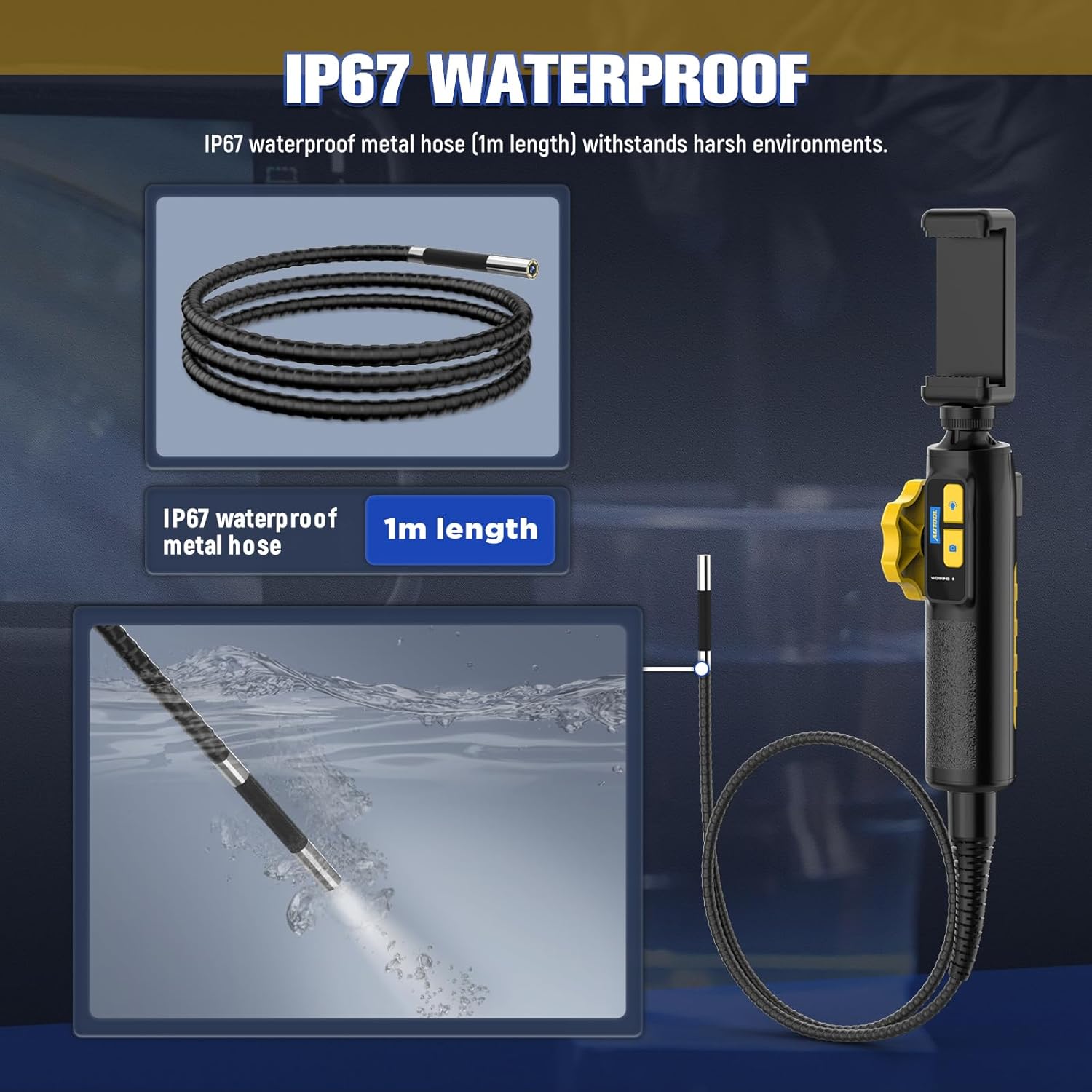
The IP67 waterproof metal hose (1m length) is designed to withstand harsh environments, as demonstrated by its submersion capability.

The borescope features a high-temperature alert system that protects the device by cutting video signals. It is powered by a 2000mAh rechargeable battery.

The device supports multilingual settings, including English, French, German, Italian, Spanish, Chinese, and Japanese.
3. ബോക്സിൽ എന്താണുള്ളത്?
പാക്കേജ് തുറക്കുമ്പോൾ, ഇനിപ്പറയുന്ന എല്ലാ ഘടകങ്ങളും ഉണ്ടെന്ന് ദയവായി ഉറപ്പാക്കുക:
- AUTOOL SVB302 Borescope Unit (Handle with integrated camera cable)
- പ്രൊട്ടക്റ്റീവ് കാരിയിംഗ് കേസ്
- യുഎസ്ബി ചാർജിംഗ് കേബിൾ
- ഉപയോക്തൃ മാനുവൽ (ഈ പ്രമാണം)

The AUTOOL SVB302 borescope, its protective carrying case, and included cables.
4. സജ്ജീകരണ ഗൈഡ്
- ആപ്പ് ഡൗൺലോഡ് ചെയ്യുക: Scan the QR code on the device or search for "JCAM Pro" or "JCAM" in your device's app store (iOS App Store for Apple, Google Play Store for Android) and install the application.
- നിങ്ങളുടെ ഫോൺ ഇൻസ്റ്റാൾ ചെയ്യുക: Securely place your smartphone into the adjustable phone holder on the borescope handle. The holder is designed to fit screens from 3.5 to 6.3 inches (5.5-10.5 cm / 2.1-4.1 inches).
- ഫോണിലേക്ക് ബന്ധിപ്പിക്കുക: Connect the borescope to your smartphone using the appropriate USB cable (Lightning for iOS, USB-C for Android).
- പവർ ഓൺ: Long press the power button on the borescope handle to turn on the device.
- ആപ്പ് തുറക്കുക: Launch the JCAM app on your smartphone. The live video feed from the borescope camera should appear automatically.

Instructions for downloading the JCAM app from the respective app stores for iOS and Android devices.

The phone holder's adjustable range, accommodating phones from 5.5cm (2.1 inches) to 10.5cm (4.1 inches).
Official product video demonstrating the setup process, including app download, phone installation, connection, power-on, and initial use of the borescope's articulating lens and features.
5. പ്രവർത്തന നിർദ്ദേശങ്ങൾ
5.1 Articulating the Camera
Use the rotation wheel on the handle to control the two-way articulation of the camera lens. This allows you to navigate bends and view the narrowed interior in all directions without needing to reposition the entire probe.
5.2 LED ലൈറ്റുകൾ ക്രമീകരിക്കൽ
Press the light control button on the handle to cycle through the three brightness levels of the LED lights. Select the appropriate brightness for optimal visibility in different inspection areas.
5.3 ഫോട്ടോകളും വീഡിയോകളും പകർത്തൽ
Press the photo/video button on the handle to capture still images or start/stop video recording directly through the app. Captured media will be saved to your connected smartphone.
5.4 Viewക്യാപ്ചർ ചെയ്ത മീഡിയയിൽ
Access the gallery or playback section within the JCAM app to review നിങ്ങളുടെ പകർത്തിയ ഫോട്ടോകളും വീഡിയോകളും.
6. പരിപാലനം
- വൃത്തിയാക്കൽ: After each use, especially in dirty or wet environments, gently wipe the camera probe and cable with a soft, damp cloth. For stubborn dirt, a mild, non-abrasive cleaner can be used. Ensure the probe is dry before storage.
- സംഭരണം: Store the borescope and its accessories in the provided protective carrying case in a cool, dry place, away from direct sunlight and extreme temperatures.
- ബാറ്ററി കെയർ: ബാറ്ററി ലൈഫ് വർദ്ധിപ്പിക്കുന്നതിന്, പതിവായി ഉപയോഗിക്കുന്നില്ലെങ്കിലും ഉപകരണം പതിവായി ചാർജ് ചെയ്യുക. ദീർഘനേരം ബാറ്ററി പൂർണ്ണമായും ഡിസ്ചാർജ് ചെയ്യുന്നത് ഒഴിവാക്കുക.
- താപനില സംരക്ഷണം: The device is equipped with a high-temperature alert system. If the operating temperature exceeds 80°C (176°F), the video signal may be cut to prevent damage. Allow the device to cool down before resuming operation.
7. പ്രശ്നപരിഹാരം
- സ്ക്രീനിൽ ചിത്രമില്ല:
- Ensure the borescope is properly connected to your smartphone.
- Verify the borescope is powered on (long press the power button).
- Check if the JCAM app is open and has necessary permissions.
- Try restarting both the borescope and the app. - മോശം ചിത്രത്തിന്റെ ഗുണനിലവാരം:
- Adjust the LED brightness using the light control button.
- Clean the camera lens if it appears smudged or dirty.
- Ensure the camera is within the optimal depth of field (1.18-3.94 inches). - ഉപകരണം അമിതമായി ചൂടാക്കൽ:
- If the high-temperature alert activates, immediately cease operation and allow the device to cool down in a well-ventilated area. Do not use until it has returned to a safe operating temperature. - ബാറ്ററി ചാർജുചെയ്യുന്നില്ല:
- Ensure the USB charging cable is securely connected to both the borescope and a power source.
- വ്യത്യസ്തമായ ഒരു USB പോർട്ട് അല്ലെങ്കിൽ പവർ അഡാപ്റ്റർ പരീക്ഷിക്കുക.
8. ഉൽപ്പന്ന സവിശേഷതകൾ
| ഫീച്ചർ | സ്പെസിഫിക്കേഷൻ |
|---|---|
| മോഡൽ നമ്പർ | എസ്വിബി302 |
| ക്യാമറ വ്യാസം | 0.25 ഇഞ്ച് (6.45 മിമി) |
| റെസലൂഷൻ | 1280*720 (720p HD) |
| ഫീൽഡിൻ്റെ ആഴം | 1.18 - 3.94 ഇഞ്ച് (30-100 മിമി) |
| ന്റെ ആംഗിൾ View | 70° |
| Articulating Angle | Max. 210° (Two-way) |
| വളയുന്ന ആരം | 1.38 ഇഞ്ച് (35 മിമി) |
| കേബിൾ നീളം | 1 മീറ്റർ |
| വാട്ടർപ്രൂഫ് ലെവൽ | IP67 |
| പ്രകാശ സ്രോതസ്സ് | 6 Highlight LEDs (3-stage adjustable brightness) |
| ബാറ്ററി ശേഷി | 2000mAh ലിഥിയം പോളിമർ |
| പ്രവർത്തന സമയം | 2-3 മണിക്കൂർ |
| യുഎസ്ബി ഇൻ്റർഫേസ് | USB 2.0 |
| പ്രവർത്തന പരിസ്ഥിതി | -10°C മുതൽ 80°C വരെ |
| ഈർപ്പം | 15-90% |
| ഉയർന്ന താപനില സംരക്ഷണം | Intelligent protection, automatic shutdown |
9. വാറൻ്റിയും പിന്തുണയും
9.1 വാറൻ്റി വിവരങ്ങൾ
The AUTOOL SVB302 Borescope comes with a 3 വർഷത്തെ വാറൻ്റി വാങ്ങിയ തീയതി മുതൽ, സാധാരണ ഉപയോഗത്തിലുള്ള നിർമ്മാണ വൈകല്യങ്ങളും തകരാറുകളും ഉൾക്കൊള്ളുന്നു. വാറന്റി ക്ലെയിമുകൾക്കായി നിങ്ങളുടെ വാങ്ങിയതിന്റെ തെളിവ് സൂക്ഷിക്കുക.
9.2 ഉപഭോക്തൃ പിന്തുണ
For technical assistance, troubleshooting, or warranty inquiries, please contact AUTOOL customer support through their official webസൈറ്റ് അല്ലെങ്കിൽ നിങ്ങളുടെ ഉൽപ്പന്ന പാക്കേജിംഗിനൊപ്പം നൽകിയിരിക്കുന്ന ബന്ധപ്പെടാനുള്ള വിവരങ്ങൾ. നിങ്ങൾക്ക് സന്ദർശിക്കാനും കഴിയും AUTOOL Store on Amazon കൂടുതൽ വിവരങ്ങൾക്ക്.
അനുബന്ധ രേഖകൾ - എസ്വിബി302
 |
AUTOOL SVB305 ആർട്ടിക്കുലേറ്റിംഗ് വീഡിയോ ബോറെസ്കോപ്പ് ഉപയോക്തൃ മാനുവൽ This user manual provides comprehensive instructions for the AUTOOL SVB305 Articulating Video Borescope. It covers safety precautions, product introduction, structure, operation, troubleshooting, maintenance, warranty, and return policies for automotive inspections. |
 |
AUTOOL SVB303 Four-way Articulating Borescope User Manual User manual for the AUTOOL SVB303 Four-way Articulating Borescope, detailing its features, operation, safety guidelines, maintenance, warranty, and return policies. Includes technical specifications and troubleshooting tips. |
 |
AUTOOL SVB405 Four-Way Articulating Borescope User Manual This user manual provides comprehensive details for the AUTOOL SVB405 Four-Way Articulating Borescope, covering its features, technical specifications, safety guidelines, operating procedures, troubleshooting, maintenance, warranty, and return policies. It is designed for automotive professionals and technicians. |
 |
AUTOOL SVB408 Four-Way Articulating Borescope User Manual User manual for the AUTOOL SVB408 Four-Way Articulating Borescope, detailing its features, operation, safety guidelines, maintenance, warranty, and technical specifications for automotive inspection. |
 |
AUTOOL SVB308 Four-way Articulating Borescope User Manual Comprehensive user manual for the AUTOOL SVB308 Four-way Articulating Borescope, covering safety, operation, troubleshooting, and maintenance. |
 |
AUTOOL 2024 Automotive Diagnostic and Maintenance Equipment Catalog Explore the AUTOOL 2024 Catalog, featuring a comprehensive range of automotive diagnostic and maintenance equipment. Discover advanced tools for engine pressure testing, oil analysis, battery testing, electrical circuit diagnostics, fuel injector cleaning, wheel alignment, and EV charging solutions from Shenzhen AUTOOL Technology Co.,Ltd. |
Ask a question about this manual
Ask about setup, troubleshooting, compatibility, parts, safety, or missing instructions. Manuals+ will review the question and use this page’s manual context to help answer it.