1. ആമുഖം
This manual provides detailed instructions for the setup, operation, and maintenance of the Generic RDA5807 Two-Channel Stereo FM Radio Module. This compact and versatile module is designed for integration into various electronic projects requiring FM radio reception within the 76.0MHz to 108.0MHz frequency range.

ചിത്രം 1: മുൻഭാഗം view of the RDA5807 FM Radio Module, showing the main components and buttons.
2. സവിശേഷതകൾ
- Wide frequency range: 76.0MHz to 108.0MHz, compatible with global FM bands.
- Two-channel stereo audio output.
- Integrated FM receiver board for easy project integration.
- Compact design suitable for portable and embedded applications.
- Simple control interface with push buttons for tuning and volume.
3 സ്പെസിഫിക്കേഷനുകൾ
| പരാമീറ്റർ | മൂല്യം |
|---|---|
| മോഡൽ | RDA5807 |
| ഫ്രീക്വൻസി റേഞ്ച് | 76.0MHz ~ 108.0MHz |
| ഓഡിയോ ഔട്ട്പുട്ട് | Stereo, Two-Channel |
| നിർമ്മാതാവ് | ജനറിക് |
| ASIN | B0D1LKLZGT |
| ആദ്യ തീയതി ലഭ്യമാണ് | ഏപ്രിൽ 12, 2024 |
4. സജ്ജീകരണ ഗൈഡ്
Before operating the RDA5807 module, ensure proper connections for power, antenna, and audio output. Refer to the block diagram and pinout for detailed wiring.
4.1. ബ്ലോക്ക് ഡയഗ്രം

Figure 2: Schematic block diagram illustrating the internal connections and external interfaces of the RDA5807 module, including power supply, MCU, Radio IC, buttons, earphone, and storage.
4.2. കണക്ഷനുകൾ
- വൈദ്യുതി വിതരണം: Connect a stable DC power source to the designated power input pins. Ensure the voltage is within the module's specified operating range (typically 3V-5V, refer to datasheet for exact values).
- ആൻ്റിന: Connect an appropriate FM antenna to the antenna input. A simple wire can often suffice for basic reception, but a dedicated FM antenna will improve signal quality.
- ഓഡിയോ ഔട്ട്പുട്ട്: Connect headphones or an amplifier to the audio output jack (typically a 3.5mm stereo jack). The module provides two-channel stereo audio.
- നിയന്ത്രണ ബട്ടണുകൾ: The module features integrated push buttons for control. These are typically for power, volume adjustment, and station tuning.

ചിത്രം 3: കോണാകൃതിയിലുള്ളത് view of the RDA5807 module, highlighting the push buttons and the 3.5mm audio output jack.
5. പ്രവർത്തന നിർദ്ദേശങ്ങൾ
The RDA5807 module is controlled via its onboard push buttons.
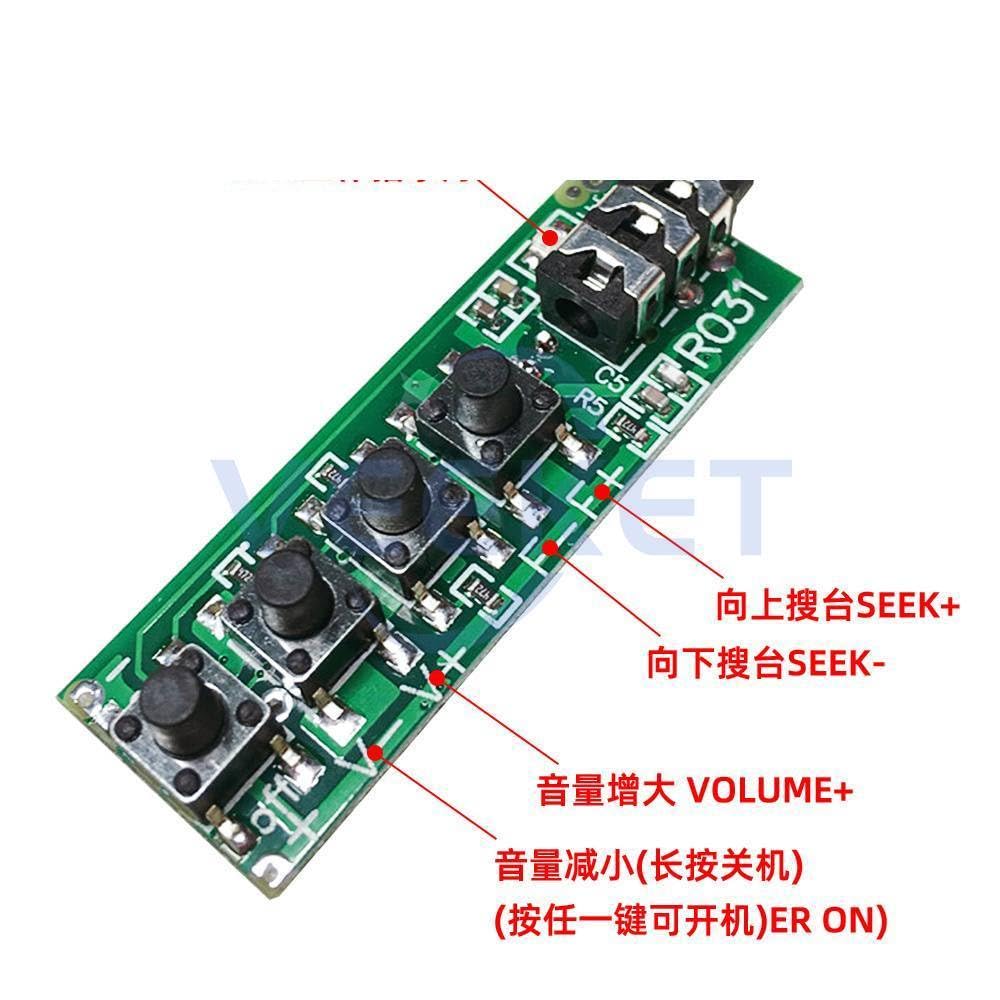
ചിത്രം 4: ക്ലോസപ്പ് view of the control buttons on the RDA5807 module, indicating their functions.
- പവർ ഓൺ/ഓഫ്:
- To power on, press any button (labeled "ER ON" in Figure 4).
- To power off, long-press the Volume Down button (labeled "长按关机" in Figure 4).
- വോളിയം ക്രമീകരണം:
- Press the "VOLUME+" button to increase volume.
- Press the "VOLUME-" button to decrease volume.
- Station Tuning (Seek):
- Press the "SEEK+" button to seek for the next available station upwards in frequency.
- Press the "SEEK-" button to seek for the next available station downwards in frequency.
6. പരിപാലനം
To ensure the longevity and optimal performance of your RDA5807 module, follow these maintenance guidelines:
- ഉണക്കി സൂക്ഷിക്കുക: Protect the module from moisture and liquids, as these can cause short circuits and damage components.
- ശ്രദ്ധയോടെ കൈകാര്യം ചെയ്യുക: Avoid dropping or subjecting the module to strong impacts, which can damage the circuit board or components.
- സൌമ്യമായി വൃത്തിയാക്കുക: If cleaning is necessary, use a soft, dry cloth. Do not use harsh chemicals or abrasive materials.
- ശരിയായ സംഭരണം: When not in use, store the module in a dry, dust-free environment, preferably in anti-static packaging.
7. പ്രശ്നപരിഹാരം
If you encounter issues with your RDA5807 module, refer to the following common problems and their solutions:
| പ്രശ്നം | സാധ്യമായ കാരണം | പരിഹാരം |
|---|---|---|
| No power / Module not turning on | തെറ്റായ വൈദ്യുതി വിതരണം വോള്യംtage or polarity; loose power connection. | വൈദ്യുതി വിതരണം വോളിയം പരിശോധിക്കുകtage and polarity. Ensure connections are secure. |
| ഓഡിയോ ഔട്ട്പുട്ട് ഇല്ല | Headphones/speakers not connected or faulty; volume too low; module not tuned to a station. | Check audio connections. Increase volume. Ensure module is tuned to an active FM station. Test with different audio output device. |
| മോശം സ്വീകരണം / സ്റ്റാറ്റിക് | Weak antenna signal; interference from other electronics; poor antenna connection. | Ensure antenna is properly connected and extended. Try repositioning the antenna or module. Move away from sources of electromagnetic interference. Consider a better antenna. |
| ബട്ടണുകൾ പ്രതികരിക്കുന്നില്ല | Module frozen; physical damage to buttons. | Try power cycling the module (disconnect and reconnect power). Inspect buttons for physical damage. |
8. വാറൻ്റിയും പിന്തുണയും
For warranty information or technical support regarding your RDA5807 Two-Channel Stereo FM Radio Module, please refer to the documentation provided by your retailer or contact the manufacturer directly. Keep your purchase receipt as proof of purchase.
നിർമ്മാതാവ്: ജനറിക്


