
ആമുഖം
This manual provides detailed instructions for the GAMFAMI TERIOS Wireless Controller. Please read this manual carefully before using the product to ensure proper operation and to maximize your gaming experience. This controller is designed for use with PlayStation 4, PS4 Pro, and PS4 Slim consoles.
ഉൽപ്പന്ന സവിശേഷതകൾ
- ഹാൾ ഇഫക്റ്റ് ജോയ്സ്റ്റിക്കുകൾ: Equipped with Hall joysticks to prevent drift and ensure a longer lifespan with smooth, precise control.
- മാക്രോ പ്രോഗ്രാമിംഗ്: Two programmable back buttons (M1, M2) allow mapping of various inputs (X, O, Triangle, Square, Up, Down, Left, Right, L3, R3, L1, R1, L2, R2) for enhanced gameplay.
- വയർലെസ് കണക്റ്റിവിറ്റി: Enjoy a seamless wireless gaming experience with Bluetooth technology.
- Dual Shock Vibration: Enhanced dual shock motors provide immersive haptic feedback for a realistic gaming experience.
- ടർബോ ഫംഗ്ഷൻ: Activate the Turbo feature for rapid, repeated button presses, offering a competitive advantage.
- ദീർഘകാല ബാറ്ററി: Features a 1000mAh rechargeable battery for extended play sessions.
- എർഗണോമിക് ഡിസൈൻ: Lightweight and durable ABS construction with textured grips for comfortable handling.
- Built-in Speaker & 3.5mm Audio Jack: Provides high-quality audio directly from the controller and supports headset connection.
പാക്കേജ് ഉള്ളടക്കം
അൺബോക്സിംഗ് ചെയ്യുമ്പോൾ പാക്കേജ് ഉള്ളടക്കങ്ങൾ പരിശോധിക്കുക:
- GAMFAMI TERIOS Wireless Controller
- യുഎസ്ബി ചാർജിംഗ് കേബിൾ
- ഇൻസ്ട്രക്ഷൻ മാനുവൽ
കൺട്രോളർ ലേഔട്ട്
Familiarize yourself with the buttons and features of your GAMFAMI TERIOS Wireless Controller.
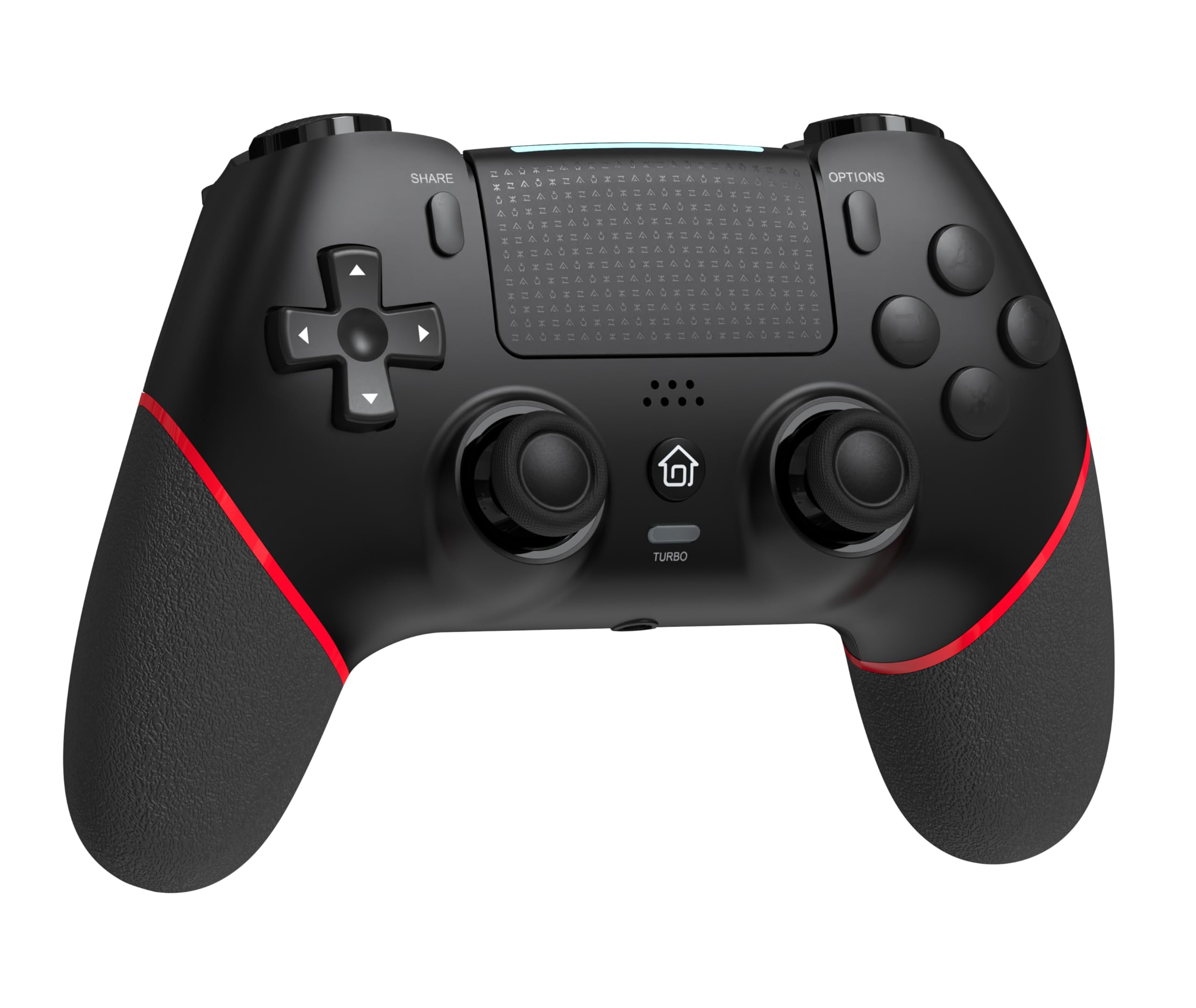
ഫ്രണ്ട് view of the GAMFAMI TERIOS Wireless Controller, showing the joysticks, D-pad, action buttons, Share, Options, Home, and Turbo buttons, and the touchpad.
- ദിശാസൂചന പാഡ് (ഡി-പാഡ്): ദിശാ ഇൻപുട്ടിനായി.
- ആക്ഷൻ ബട്ടണുകൾ (ത്രികോണം, വൃത്തം, കുരിശ്, ചതുരം): Standard PlayStation action buttons.
- ഇടത്/വലത് അനലോഗ് സ്റ്റിക്കുകൾ: For precise movement and camera control. Features Hall Effect technology.
- പങ്കിടുക ബട്ടൺ: For sharing gameplay content.
- ഓപ്ഷനുകൾ ബട്ടൺ: For in-game menus and options.
- PS Button (Home Button): To access the PS4 system menu.
- L1/R1 ബട്ടണുകൾ: തോളിലെ ബട്ടണുകൾ.
- L2/R2 ട്രിഗറുകൾ: അനലോഗ് ട്രിഗറുകൾ.
- ടച്ച്പാഡ്: Multi-touch input area.
- M1/M2 ബട്ടണുകൾ: പ്രോഗ്രാം ചെയ്യാവുന്ന ബാക്ക് ബട്ടണുകൾ.
- ടർബോ ബട്ടൺ: Activates/deactivates turbo function.
- 3.5എംഎം ഹെഡ്സെറ്റ് ജാക്ക്: For connecting a compatible headset.
- യുഎസ്ബി-സി പോർട്ട്: ചാർജിംഗിനും വയർ കണക്ഷനും.

തിരികെ view of the controller, highlighting the M1 and M2 programmable buttons and product information.
സജ്ജീകരണവും കണക്ഷനും
Pairing with PS4/PS4 Pro/PS4 Slim
- നിങ്ങളുടെ PS4 കൺസോൾ ഓണാക്കിയിട്ടുണ്ടെന്ന് ഉറപ്പാക്കുക.
- Connect the controller to your PS4 console using the included USB charging cable.
- Press the PS button on the controller. The light bar will flash, indicating it is pairing.
- Once the light bar turns solid, the controller is successfully paired and ready for use.
- You can now disconnect the USB cable for wireless play.
Reconnecting to PS4
After initial pairing, simply press the PS button on the controller to reconnect wirelessly to your PS4 console.
പ്രവർത്തന നിർദ്ദേശങ്ങൾ
ടർബോ ഫംഗ്ഷൻ ഉപയോഗിക്കുന്നു
- അമർത്തിപ്പിടിക്കുക ടർബോ ബട്ടൺ.
- പിടിക്കുമ്പോൾ ടർബോ, press the action button (e.g., Cross, Circle, Square, Triangle, L1, R1, L2, R2) you wish to apply the turbo function to.
- Release both buttons. The selected action button will now rapidly repeat its input when held down.
- ഒരു പ്രത്യേക ബട്ടണിനായി ടർബോ പ്രവർത്തനരഹിതമാക്കാൻ, പ്രക്രിയ ആവർത്തിക്കുക: അമർത്തിപ്പിടിക്കുക ടർബോ and press the turbo-enabled action button.
- To disable turbo for all buttons, press and hold the ടർബോ 5 സെക്കൻഡിനുള്ള ബട്ടൺ.
Macro Programming (M1/M2 Buttons)
The M1 and M2 buttons on the back of the controller can be programmed to replicate other button inputs.
- അമർത്തിപ്പിടിക്കുക ഷെയർ ചെയ്യുക ബട്ടൺ ഒപ്പം M1 or M2 button simultaneously for 3 seconds until the light bar flashes rapidly. This indicates macro programming mode.
- Press the button(s) you wish to map to M1 or M2 (e.g., X, O, Triangle, Square, Up, Down, Left, Right, L3, R3, L1, R1, L2, R2). You can map a single button or a sequence of buttons.
- അമർത്തുക M1 or M2 button again to save the macro. The light bar will stop flashing rapidly and return to its normal state.
- To clear a macro, repeat step 1, then press the M1 or M2 button twice without pressing any other buttons.

Illustration of the advanced buttons and their programming capabilities.
ചാർജിംഗും ബാറ്ററി മാനേജ്മെന്റും
കൺട്രോളറിൽ 1000mAh റീചാർജ് ചെയ്യാവുന്ന ബാറ്ററി സജ്ജീകരിച്ചിരിക്കുന്നു.
കൺട്രോളർ ചാർജ് ചെയ്യുന്നു
- Connect the included USB charging cable to the USB-C port on the controller.
- Connect the other end of the cable to a USB port on your PS4 console (when powered on or in rest mode) or a compatible USB wall adapter (5V/1A recommended).
- The light bar on the controller will slowly pulse orange while charging.
- Once fully charged, the light bar will turn off.
ബാറ്ററി ലെവൽ സൂചന
The controller's light bar will indicate battery status. A low battery will cause the light bar to flash red. It is recommended to charge the controller when this occurs.
മെയിൻ്റനൻസ്
- വൃത്തിയാക്കൽ: കൺട്രോളർ വൃത്തിയാക്കാൻ മൃദുവായതും ഉണങ്ങിയതുമായ തുണി ഉപയോഗിക്കുക. കഠിനമായ രാസവസ്തുക്കളോ ഉരച്ചിലുകളോ ഉള്ള വസ്തുക്കളോ ഉപയോഗിക്കരുത്.
- സംഭരണം: കൺട്രോളർ നേരിട്ട് സൂര്യപ്രകാശം ഏൽക്കാത്തതും തീവ്രമായ താപനില ഏൽക്കാത്തതുമായ ഒരു തണുത്ത വരണ്ട സ്ഥലത്ത് സൂക്ഷിക്കുക.
- തുള്ളികൾ ഒഴിവാക്കുക: ആന്തരിക ഘടകങ്ങളെ തകരാറിലാക്കുന്ന വീഴ്ചകളിൽ നിന്നും ആഘാതങ്ങളിൽ നിന്നും കൺട്രോളറെ സംരക്ഷിക്കുക.
ട്രബിൾഷൂട്ടിംഗ്
| പ്രശ്നം | പരിഹാരം |
|---|---|
| Controller does not connect/pair. |
|
| Controller experiences input lag or disconnection. |
|
| Joysticks exhibit drift. |

Illustration of Hall Effect joystick technology, designed to prevent drift. |
| Controller does not charge. |
|
സ്പെസിഫിക്കേഷനുകൾ
| മോഡലിൻ്റെ പേര് | ടെറിയോസ് |
| ബ്രാൻഡ് | GAMFAMI |
| അനുയോജ്യമായ ഉപകരണങ്ങൾ | PS4, PS4 Pro, PS4 Slim |
| കൺട്രോളർ തരം | ഗെയിംപാഡ് |
| കണക്റ്റിവിറ്റി ടെക്നോളജി | ബ്ലൂടൂത്ത് (വയർലെസ്) |
| പവർ ഉറവിടം | ബാറ്ററി പവർ |
| ബാറ്ററി ശേഷി | 1000mAh |
| ഇനത്തിൻ്റെ ഭാരം | 0.37 കിലോഗ്രാം |
| നിറം | കറുത്ത ചുവപ്പ് |
വാറൻ്റിയും പിന്തുണയും
For warranty information and technical support, please refer to the documentation included with your purchase or visit the official GAMFAMI webസൈറ്റ്. ഏതെങ്കിലും വാറന്റി ക്ലെയിമുകൾക്ക് വാങ്ങിയതിന്റെ തെളിവായി നിങ്ങളുടെ വാങ്ങൽ രസീത് സൂക്ഷിക്കുക.
For further assistance, please contact GAMFAMI customer service through their official channels.