
ആമുഖം
The Turtle Beach Vulcan II TKL Pro is a high-performance magnetic mechanical RGB PC gaming keyboard designed for competitive gameplay and extensive customization. It features analog Hall-Effect switches, adjustable actuation points, Rapid Trigger setting, and per-key AIMO RGB lighting, all within a compact tenkeyless design.

ചിത്രം 1: മുകളിൽ നിന്ന് താഴേക്ക് view of the Turtle Beach Vulcan II TKL Pro Gaming Keyboard.
പാക്കേജ് ഉള്ളടക്കം
പാക്കേജിൽ എല്ലാ ഇനങ്ങളും ഉണ്ടെന്ന് ഉറപ്പാക്കുക:
- Turtle Beach Vulcan II TKL Pro Keyboard
- USB-C മുതൽ USB-A കേബിൾ വരെ
- പാം റെസ്റ്റ്
- ദ്രുത ആരംഭ ഗൈഡ്

Figure 2: Included components: keyboard, USB cable, and palm rest.
സജ്ജമാക്കുക
- കീബോർഡ് ബന്ധിപ്പിക്കുക: Plug the USB-C end of the provided cable into the port on the keyboard and the USB-A end into an available USB port on your computer.
- Install Swarm II Software: For full customization and advanced features, download and install the Swarm II desktop software from the official Turtle Beach webസൈറ്റ്.
- പാം റെസ്റ്റ് ഘടിപ്പിക്കുക: Align the included soft palm rest with the front edge of the keyboard. It is designed to provide comfort during extended use.
- കിക്ക്സ്റ്റാൻഡുകൾ ക്രമീകരിക്കുക: The keyboard features a double kickstand design on the underside, allowing for two levels of height adjustment to suit your ergonomic preference.

Figure 3: The underside of the keyboard, highlighting the adjustable kickstands for ergonomic positioning.
പ്രവർത്തന നിർദ്ദേശങ്ങൾ
Analog Hall-Effect Magnetic Switches
The Vulcan II TKL Pro utilizes analog Hall-Effect magnetic switches, offering precise control and durability with a 150M click lifecycle.

Figure 4: Cross-section diagram illustrating the Analog Hall-Effect Magnetic Switch technology.
ക്രമീകരിക്കാവുന്ന ആക്ച്വേഷൻ
Customize the actuation point of each key from 0.1mm to 4mm. This allows for shorter key travel for faster response in games or longer travel for more deliberate control. Adjustments can be made for all keys simultaneously via the keyboard or individually using the Swarm II software.

Figure 5: Visual representation of the adjustable actuation points for individual keys.
Rapid Trigger Setting
The Rapid Trigger setting eliminates downtime between key presses, enabling continuous and rapid key input for enhanced movement control and faster aiming in competitive games.
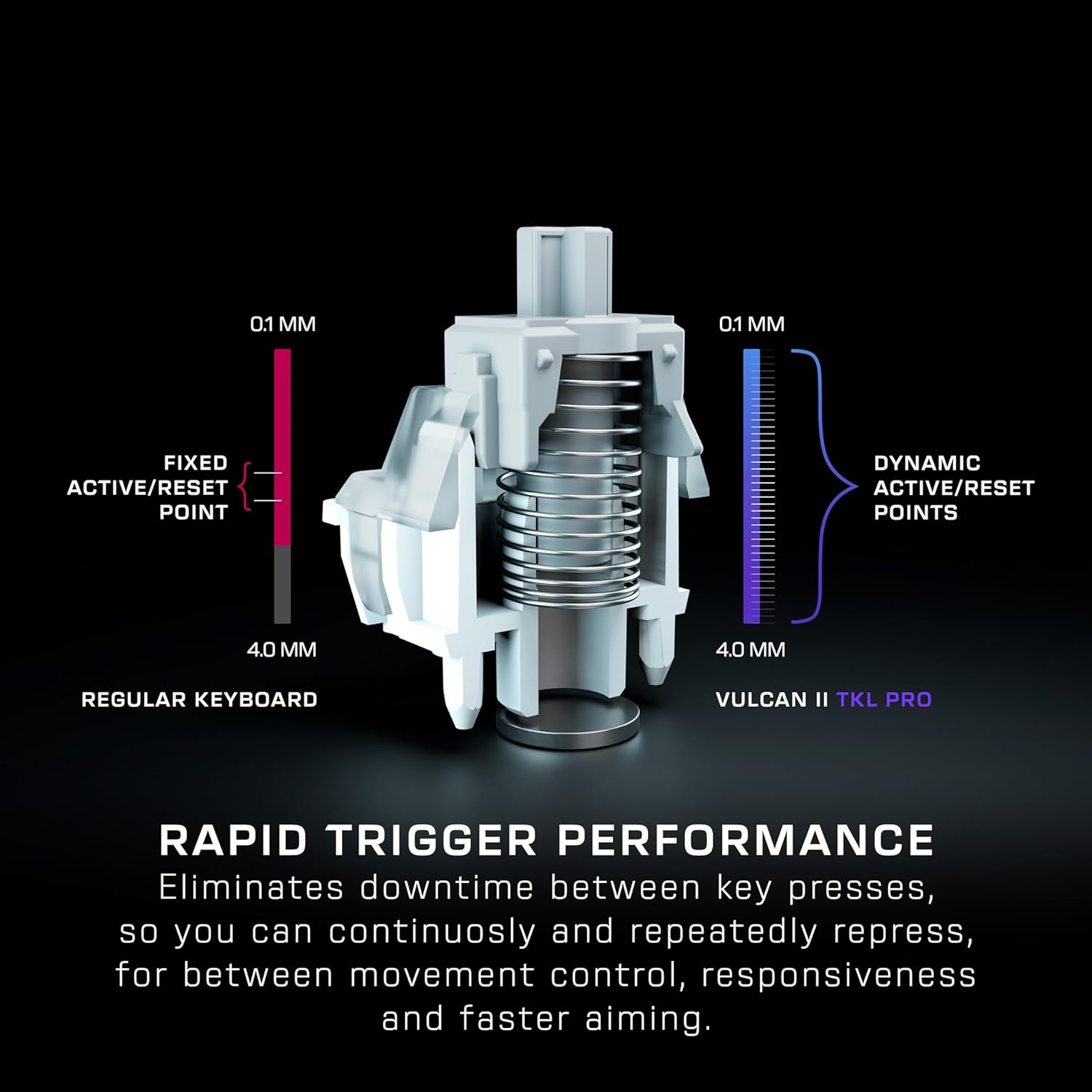
Figure 6: Comparison of fixed vs. dynamic active/reset points for Rapid Trigger performance.
AIMO Intelligent RGB Lighting
Experience smooth and vibrant RGB lighting effects with AIMO technology, which boasts double the refresh rate of standard gaming keyboards. Lighting can sync with other compatible AIMO-enabled products and is adjustable on a per-key basis. Five on-board profiles allow saving custom lighting and key reassignments.

Figure 7: The keyboard displaying its vibrant AIMO Intelligent RGB lighting, alongside a compatible mouse.
Advanced Customization with Swarm II Software
The Swarm II desktop software provides extensive customization options:
- Adjust AIMO RGB lighting.
- Assign up to three different inputs per key.
- Adjust key actuation points.
- Enable Rapid Trigger setting.
- Record and assign macro functions.
- Assign controller emulator features (e.g., left analog stick control for 360-degree movements, trigger control for racing games).

Figure 8: Screenshot of the Swarm II software interface, showing customization options for the keyboard.
Easy-Shift [+] Button Duplicator
This technology adds a secondary function to compatible keys, doubling command power instantly. It is fully customizable within the Swarm II software.
![Easy-Shift [+] Button Duplicator feature](https://m.media-amazon.com/images/I/81aXl8XgLQL._AC_SL1500_.jpg)
Figure 9: Illustration of the Easy-Shift [+] feature, highlighting a key with a secondary function.
വിപുലമായ ആന്റി-ഗോസ്റ്റിംഗ്
Optimized for gamers, Advanced Anti-Ghosting technology ensures reliable keystrokes even when multiple keys are pressed simultaneously.
Push-to-Mute Volume Wheel
Control master volume on the fly and quickly mute audio using the built-in dial located on the top right of the keyboard.
3rd Party Keycap Compatible
The Vulcan II TKL Pro is equipped with T-shaped ABS keycaps and is fully compatible with 3rd party keycaps for personalized layouts.
Tenkeyless Form Factor
The compact tenkeyless design allows for a more natural and comfortable playing position, providing more space for mouse movement and improving aiming accuracy.
മെയിൻ്റനൻസ്
- വൃത്തിയാക്കൽ: Use a soft, dry cloth to wipe down the keyboard surface. For deeper cleaning, gently remove keycaps and use compressed air to clear debris from beneath.
- കീക്യാപ്പ് പരിചരണം: While compatible with 3rd party keycaps, ensure proper installation and removal to avoid damage to the switches.
- കേബിൾ മാനേജുമെന്റ്: Keep the USB cable untangled and free from kinks to prolong its lifespan.
ട്രബിൾഷൂട്ടിംഗ്
- കീബോർഡ് പ്രതികരിക്കുന്നില്ല: USB കേബിൾ കീബോർഡിലേക്കും കമ്പ്യൂട്ടറിലേക്കും സുരക്ഷിതമായി ബന്ധിപ്പിച്ചിട്ടുണ്ടെന്ന് ഉറപ്പാക്കുക. മറ്റൊരു USB പോർട്ട് പരീക്ഷിക്കുക.
- RGB ലൈറ്റിംഗ് പ്രശ്നങ്ങൾ: Check Swarm II software settings for lighting profiles. Ensure the software is up to date. If issues persist, try resetting the keyboard to factory defaults (refer to Quick Start Guide for specific instructions).
- കീബോർഡ് കണ്ടെത്താത്ത സോഫ്റ്റ്വെയർ: Reinstall the Swarm II software. Ensure your operating system is up to date. Temporarily disable any antivirus or firewall software that might interfere with the installation.
- കീകൾ ശരിയായി രജിസ്റ്റർ ചെയ്യുന്നില്ല: Verify that no debris is lodged under the keycaps. If using custom actuation points, ensure settings in Swarm II are configured as desired.
സ്പെസിഫിക്കേഷനുകൾ
| ഫീച്ചർ | വിശദാംശങ്ങൾ |
|---|---|
| ബ്രാൻഡ് | ടർട്ടിൽ ബീച്ച് |
| മോഡൽ നമ്പർ | TBK-2002-11-US |
| ഇനത്തിൻ്റെ ഭാരം | 1.38 പൗണ്ട് |
| ഉൽപ്പന്ന അളവുകൾ (LxWxH) | 1.26 x 14.41 x 8.58 ഇഞ്ച് |
| നിറം | വെള്ള |
| പവർ ഉറവിടം | USB പവർ |
| കണക്റ്റിവിറ്റി ടെക്നോളജി | USB-A |
| കീബോർഡ് വിവരണം | ഗെയിമിംഗ് |
| കീകളുടെ എണ്ണം | 84 |
| കീബോർഡ് ബാക്ക്ലൈറ്റിംഗ് | RGB (AIMO Intelligent) |
| സ്വിച്ച് തരം | Analog Hall-Effect Magnetic Switches |
വാറൻ്റിയും പിന്തുണയും
For warranty information, technical support, and additional resources, please visit the official Turtle Beach webസൈറ്റിൽ ബന്ധപ്പെടുക അല്ലെങ്കിൽ അവരുടെ ഉപഭോക്തൃ സേവനവുമായി ബന്ധപ്പെടുക. വാറന്റി ക്ലെയിമുകൾക്കായി നിങ്ങളുടെ വാങ്ങിയതിന്റെ തെളിവ് സൂക്ഷിക്കുക.