
1. ഉൽപ്പന്നം കഴിഞ്ഞുview
This manual provides instructions for the assembly, operation, and maintenance of your Bestier L Shaped Desk. This desk features a spacious L-shaped design, integrated storage solutions, and a removable monitor stand, designed for home office environments.

Image 1.1: The Bestier L Shaped Desk, showcasing ഓഫീസ് പരിതസ്ഥിതിയിൽ അതിന്റെ രൂപകൽപ്പനയും പ്രവർത്തനവും.
2 സുരക്ഷാ വിവരങ്ങൾ
WARNING: Always assemble this desk with two people to ensure stability. Once assembled, secure the desk to the wall using appropriate hardware to prevent tipping.
- അസംബ്ലി ചെയ്യുന്നതിനുമുമ്പ് എല്ലാ ഘടകങ്ങളും ഉണ്ടെന്നും കേടുപാടുകൾ സംഭവിച്ചിട്ടില്ലെന്നും ഉറപ്പാക്കുക.
- മെറ്റീരിയലിന് കേടുപാടുകൾ സംഭവിക്കാതിരിക്കാൻ അസംബ്ലി സമയത്ത് സ്ക്രൂകൾ അമിതമായി മുറുക്കരുത്.
- അസംബ്ലി സമയത്ത് കുട്ടികളിൽ നിന്ന് ചെറിയ ഭാഗങ്ങൾ സൂക്ഷിക്കുക.
- മേശ ഇളകാതിരിക്കാൻ ഒരു നിരപ്പായ പ്രതലത്തിൽ വയ്ക്കുക.
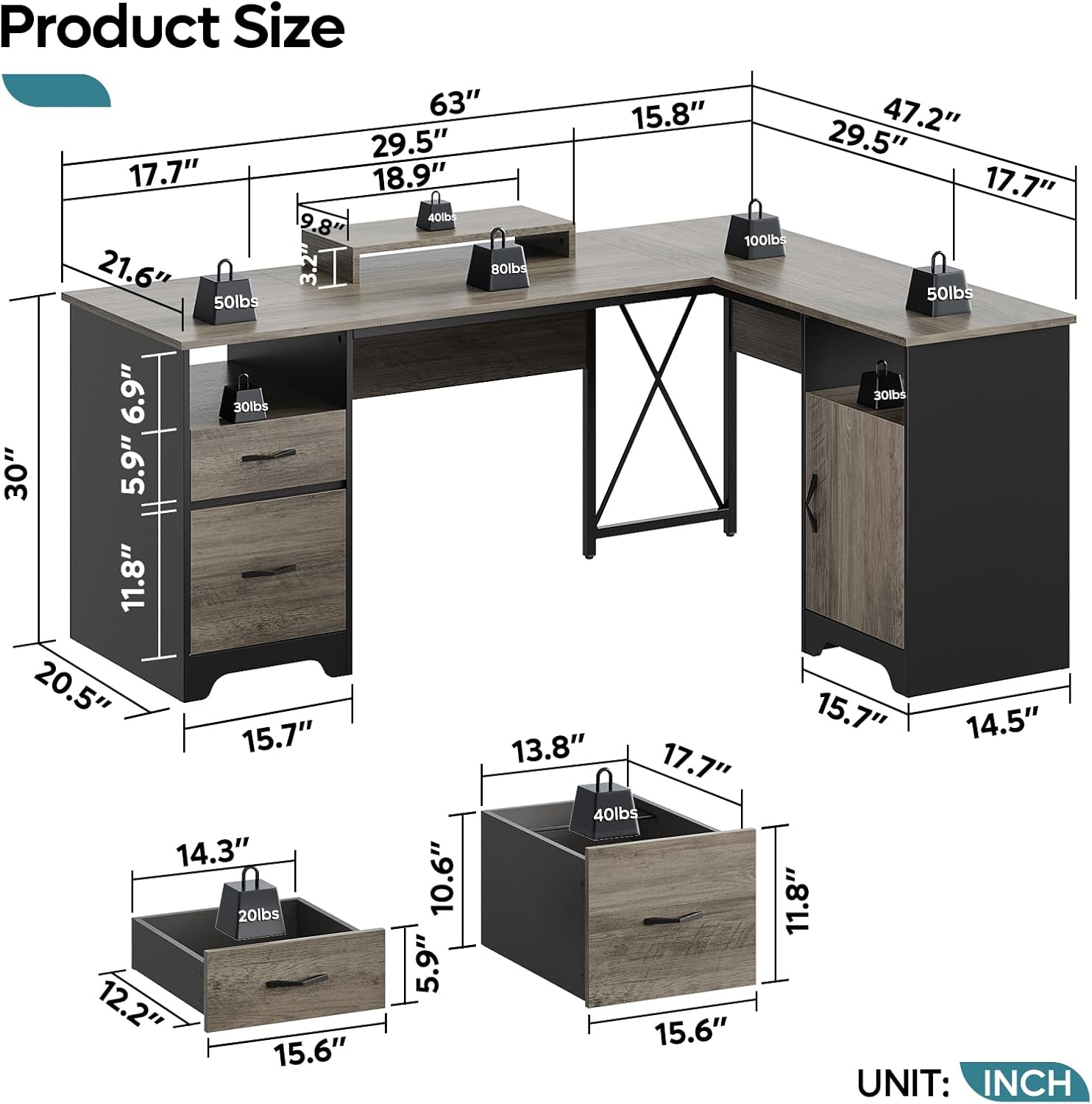
- Do not exceed the maximum weight capacities for the tabletop (280 lbs), storage drawer (20 lbs), and file drawer (40 lbs).
3. പാക്കേജ് ഉള്ളടക്കം
Verify that all parts and hardware listed in the assembly guide are included in your package. If any items are missing or damaged, please contact Bestier customer support.
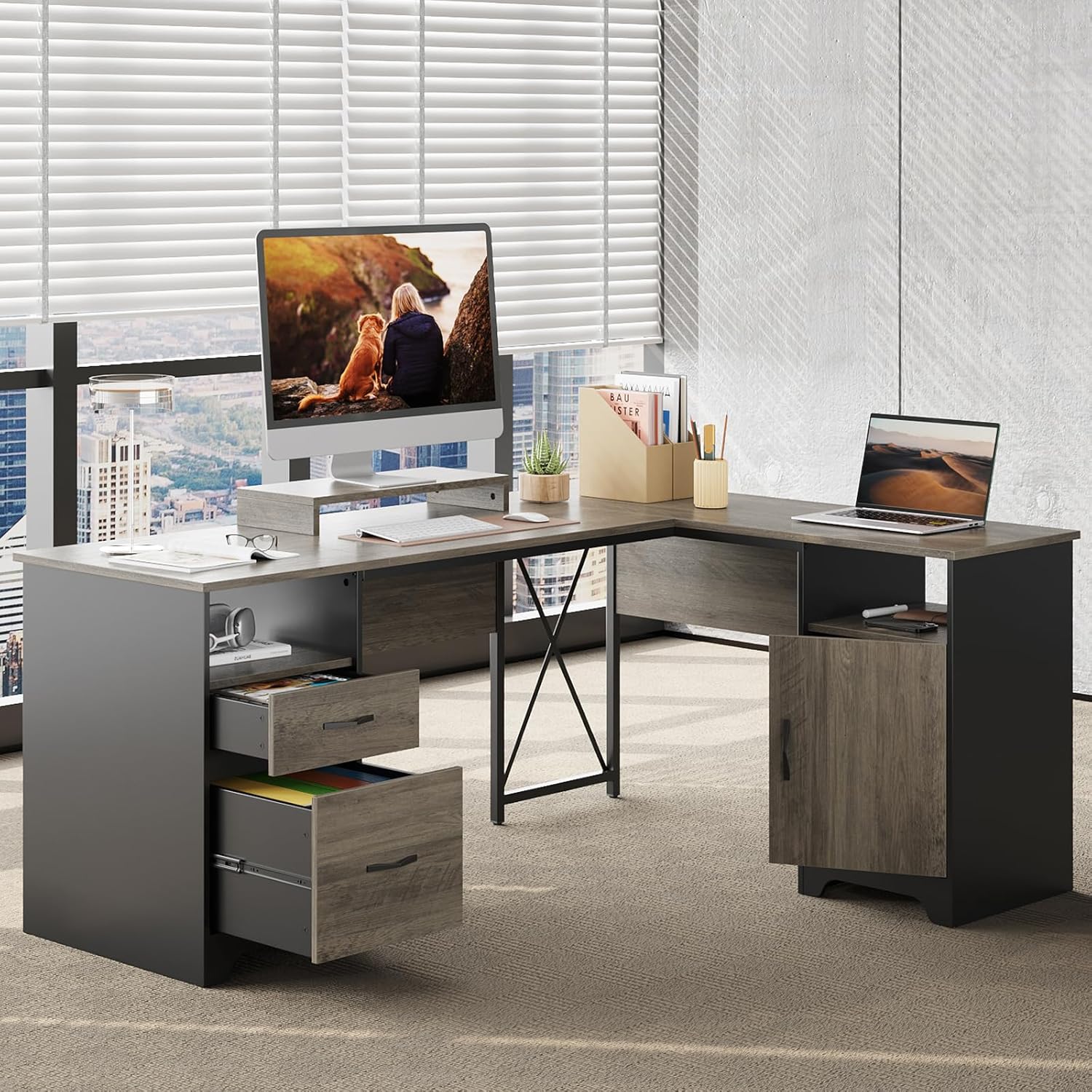
Image 3.1: Detailed product dimensions and individual component weight capacities.
4. അസംബ്ലി നിർദ്ദേശങ്ങൾ
Two people are recommended for smoother assembly. Use a power tool like a drill for faster screw tightening, but exercise caution to avoid overtightening.
4.1. അസംബ്ലി വീഡിയോ ഗൈഡ്
Video 4.1: Official assembly guide for the Bestier 63 Inch L Shaped Desk with File Drawers. Follow these steps for proper setup.
4.2. ഘട്ടം ഘട്ടമായുള്ള അസംബ്ലി
Refer to the included printed instruction manual for detailed diagrams and part identification. The general steps involve:
- ഘടകങ്ങൾ തയ്യാറാക്കുക: Unpack all parts and lay them out on a clean, soft surface to prevent scratches. Identify each part using the provided labels.
- അടിസ്ഥാന യൂണിറ്റുകൾ കൂട്ടിച്ചേർക്കുക: Construct the two pedestal base units that will support the desk. This typically involves attaching side panels to bottom and top panels using cam locks and dowels.
- Attach Crossbar and Support: Secure the X-crossbar and any central support beams to connect the main desk sections.
- ഡെസ്ക്ടോപ്പ് പാനലുകൾ ഇൻസ്റ്റാൾ ചെയ്യുക: Carefully place and secure the main L-shaped desktop panels onto the assembled base units.
- Assemble Drawers and Cabinet: Construct the storage drawer, file drawer, and cabinet door according to the instructions. Install the drawer slides.
- Integrate Storage: Insert the assembled drawers into their respective compartments and attach the cabinet door.
- Add Monitor Stand: Place the removable monitor stand in your desired position on the desktop.
- അന്തിമ പരിശോധനകൾ: Ensure all connections are secure and the desk is stable.
5. ഉൽപ്പന്ന സവിശേഷതകൾ
Your Bestier L Shaped Desk is designed with several features to enhance your workspace:
- വിശാലമായ എൽ ആകൃതിയിലുള്ള ഡിസൈൻ: A 63" x 47" desktop provides ample room for multiple monitors, documents, and office essentials.
- ബഹുമുഖ സംഭരണം: Includes 2 open storage compartments, a storage drawer, a file drawer for letter/A4/legal-size hanging files, and a dust-free storage cabinet.
- കരുത്തുറ്റ നിർമ്മാണം: Supported by two pedestals and an X crossbar for enhanced stability, capable of supporting up to 280 lbs on the tabletop.
- Ergonomic Removable Monitor Stand: Allows for comfortable viewing angles, reducing eye and neck strain.

Image 5.1: Key features of the desk, highlighting the monitor stand, drawer mechanisms, and sturdy construction.
ചിത്രം 5.2: കഴിഞ്ഞുview of the versatile storage options, including file drawer compatibility.
5.1. Product Series Overview
വീഡിയോ 5.3: ഒരു ഓവർview of the Bestier Industrial Computer Desk Series, showcasing various configurations and features.
6. പ്രവർത്തന നിർദ്ദേശങ്ങൾ
- Using Drawers: Pull drawers gently to open and push firmly to close. Avoid slamming to ensure longevity of the smooth drawer glides.
- Adjusting Monitor Stand: The monitor stand is removable. Lift it off the desktop and reposition as needed for optimal viewing.
- കേബിൾ മാനേജുമെന്റ്: Utilize any integrated cable management holes or channels to keep your cords organized and prevent tangles.
7. പരിചരണവും പരിപാലനവും
- വൃത്തിയാക്കൽ: പരസ്യം ഉപയോഗിച്ച് മേശയുടെ പ്രതലങ്ങൾ തുടയ്ക്കുകamp cloth for general cleaning. For stubborn marks, use a mild, non-abrasive cleaner. Follow with a dry cloth to prevent water spots.
- കഠിനമായ രാസവസ്തുക്കൾ ഒഴിവാക്കുക: Do not use harsh chemicals or abrasive cleaning pads, as these can damage the laminated finish.
- ഉപരിതലം സംരക്ഷിക്കുക: Use coasters for drinks and pads under hot items to protect the desktop from heat and moisture damage.
- പതിവ് പരിശോധന: എല്ലാ സ്ക്രൂകളും കണക്ഷനുകളും ഇറുകിയതും സുരക്ഷിതവുമാണെന്ന് ഉറപ്പാക്കാൻ ഇടയ്ക്കിടെ പരിശോധിക്കുക. ആവശ്യമെങ്കിൽ വീണ്ടും മുറുക്കുക.

Image 7.1: Benefits of the engineered wood construction, emphasizing durability and ease of maintenance.
8 സ്പെസിഫിക്കേഷനുകൾ
| ബ്രാൻഡ് | ബെസ്റ്റിയർ |
| മോഡൽ നമ്പർ | H104815R-GRW-M |
| ഉൽപ്പന്ന അളവുകൾ | 47"D x 63"W x 30"H |
| ഇനത്തിൻ്റെ ഭാരം | 93 പൗണ്ട് |
| മെറ്റീരിയൽ തരം | എഞ്ചിനീയറിംഗ് വുഡ്, മെറ്റൽ |
| ഫിനിഷ് തരം | ലാമിനേറ്റഡ് |
| ഡ്രോയറുകളുടെ എണ്ണം | 2 |
| ഷെൽഫുകളുടെ എണ്ണം | 2 (Open) + 1 (Enclosed) |
| പരമാവധി ഭാരം ശുപാർശ | 280 Pounds (Tabletop) |
| ഉൾപ്പെടുത്തിയ ഘടകങ്ങൾ | Removable Monitor Stand |
| അസംബ്ലിക്ക് ശുപാർശ ചെയ്യുന്ന ആളുകൾ | 2 |
9. പ്രശ്നപരിഹാരം
If you encounter any issues with your Bestier L Shaped Desk, please refer to the following common solutions:
- വോളിബിംഗ് ഡെസ്ക്: Ensure the desk is placed on a flat, even surface. Check all screws and connections for tightness and re-tighten if loose.
- ഡ്രോയറുകൾ സുഗമമായി സ്ലൈഡുചെയ്യുന്നില്ല: Verify that the drawer slides are correctly installed and free from obstructions. Ensure all screws on the slides are secure.
- വിട്ടുപോയ ഭാഗങ്ങൾ: Double-check the package contents against the parts list in the assembly manual. Contact customer support for assistance with missing parts.
- അസംബ്ലി ബുദ്ധിമുട്ടുകൾ: Review the assembly video and step-by-step instructions carefully. Ensure you are using the correct hardware for each step.
10. വാറൻ്റിയും പിന്തുണയും
This Bestier L Shaped Desk comes with a പരിമിത വാറൻ്റി. For specific details regarding coverage and duration, please refer to the warranty information provided with your purchase or contact Bestier customer support.
തിരികെ നൽകൽ നയം: ഈ ഉൽപ്പന്നം 30 ദിവസത്തെ എളുപ്പത്തിലുള്ള റിട്ടേണുകൾക്ക് യോഗ്യമാണ്.
For any product issues, questions, or support, please contact Bestier USA customer service. Bestier is committed to providing satisfying solutions.
നിങ്ങൾക്ക് സന്ദർശിക്കാം Bestier Store on Amazon കൂടുതൽ വിവരങ്ങൾക്കും മറ്റ് ഉൽപ്പന്നങ്ങൾ അടുത്തറിയുന്നതിനും.