
എകെ 2
User Manual: Mini PC CPU Fan for ACEPC AK2
Model: AK2 | Brand: Generic
ആമുഖം
This manual provides essential information for the installation, operation, and maintenance of your new Mini PC CPU Fan, specifically designed for the ACEPC AK2 Mini PC. Please read this manual thoroughly before installation to ensure proper function and longevity of the product.
സുരക്ഷാ വിവരങ്ങൾ
- Always disconnect power from the Mini PC before installing or removing the fan.
- Handle the fan by its edges to avoid damaging the blades or electronic components.
- Ensure proper grounding to prevent electrostatic discharge (ESD) damage to sensitive components.
- ചെറിയ ഭാഗങ്ങൾ കുട്ടികളിൽ നിന്ന് അകറ്റി നിർത്തുക.
- Do not attempt to modify the fan or its wiring. This may void the warranty and cause damage.
ഉൽപ്പന്നം കഴിഞ്ഞുview
The Mini PC CPU Fan for ACEPC AK2 is a compact cooling solution designed to maintain optimal operating temperatures for your Mini PC's central processing unit. It features a blower-style design with a 3-pin or 4-pin power connector for compatibility.
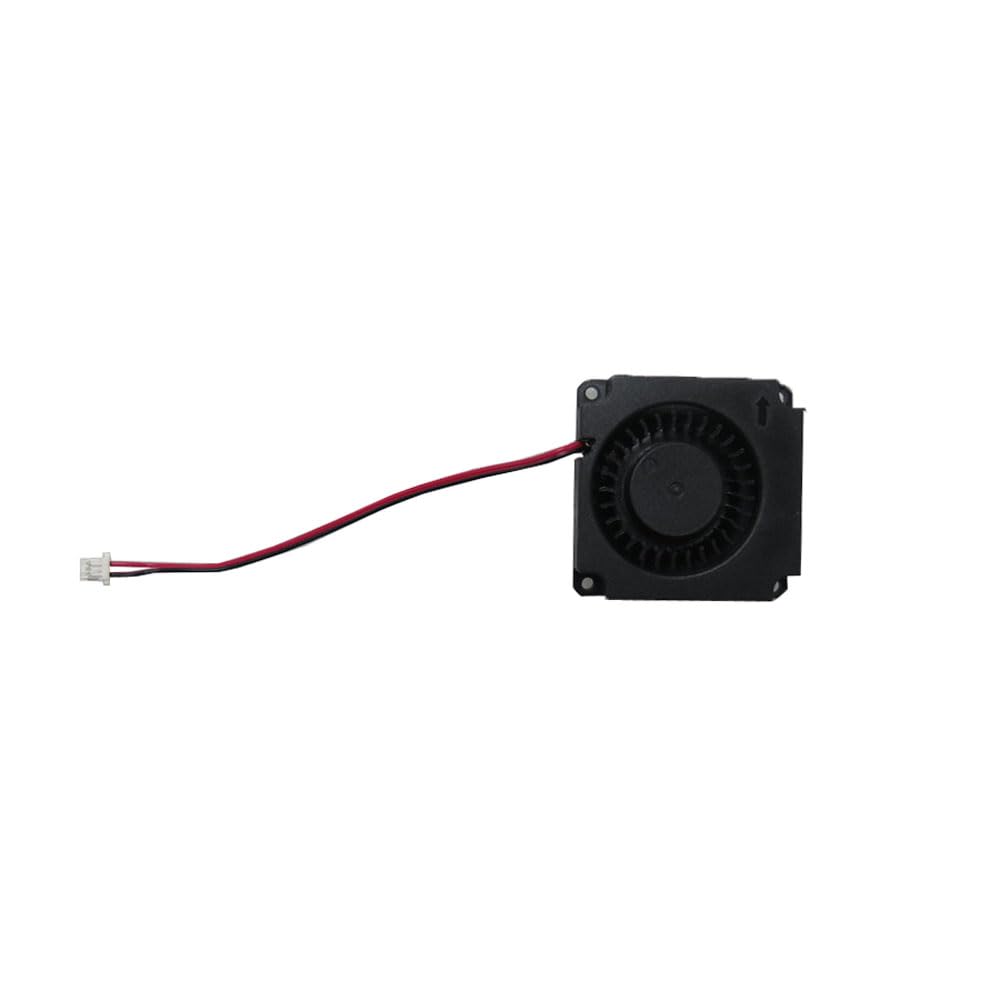
ചിത്രം 1: കഴിഞ്ഞുview of the Mini PC CPU Fan. This image shows the compact black fan unit with its attached red and black wires leading to a white 3-pin or 4-pin connector.
സജ്ജീകരണവും ഇൻസ്റ്റാളേഷനും
Follow these steps carefully to install the CPU fan into your ACEPC AK2 Mini PC:
- Prepare the Mini PC: Ensure the Mini PC is powered off and unplugged from the wall outlet.
- സി തുറക്കുകasing: സി ശ്രദ്ധാപൂർവ്വം തുറക്കുക.asing of your ACEPC AK2 Mini PC according to its specific service manual or instructions. This usually involves removing screws from the bottom or back panel.
- Locate the CPU Fan Slot: Identify the existing CPU fan or the designated mounting area for the new fan.
- Remove Old Fan (if applicable): If replacing an old fan, gently disconnect its power cable from the motherboard and unscrew any mounting screws. Carefully lift the old fan out.
- പുതിയ ഫാൻ ഇൻസ്റ്റാൾ ചെയ്യുക: Position the new Mini PC CPU Fan in the designated slot. Ensure the airflow direction (often indicated by an arrow on the fan housing) is correct for optimal cooling.
- ഫാൻ സുരക്ഷിതമാക്കുക: Use the appropriate screws to secure the fan to the Mini PC's chassis or motherboard. Do not overtighten.
- പവർ ബന്ധിപ്പിക്കുക: Carefully connect the fan's 3-pin or 4-pin power connector to the corresponding fan header on the Mini PC's motherboard. Ensure the connector is fully seated and oriented correctly.
- അടയ്ക്കുക സിasing: Carefully reassemble the Mini PC's casing, ensuring all screws are replaced and the case is securely closed.
- ടെസ്റ്റ് പ്രവർത്തനം: Plug in and power on the Mini PC. Verify that the new CPU fan spins and operates quietly. Monitor CPU temperatures to confirm effective cooling.
പ്രവർത്തന നിർദ്ദേശങ്ങൾ
Once installed, the Mini PC CPU Fan operates automatically, controlled by the Mini PC's motherboard based on CPU temperature. No manual intervention is typically required for its operation.
- Ensure adequate ventilation around your Mini PC to allow for efficient heat dissipation.
- Avoid blocking the air intake or exhaust vents of the Mini PC.
മെയിൻ്റനൻസ്
Regular maintenance helps ensure the longevity and efficiency of your CPU fan:
- പൊടി നീക്കം: Periodically (e.g., every 3-6 months), power off and unplug your Mini PC. Open the casing and use compressed air to gently blow dust out of the fan blades and heatsink fins. Hold the fan blades to prevent them from spinning rapidly during cleaning, which can damage the bearings.
- പരിശോധന: Visually inspect the fan for any signs of damage, loose wires, or excessive dust buildup.
- Do not use liquid cleaners directly on the fan or internal components.
ട്രബിൾഷൂട്ടിംഗ്
| പ്രശ്നം | സാധ്യമായ കാരണം | പരിഹാരം |
|---|---|---|
| ഫാൻ കറങ്ങുന്നില്ല |
|
|
| അസാധാരണമായ ശബ്ദം പുറപ്പെടുവിക്കുന്ന ഫാൻ |
|
|
| Mini PC overheating |
|
|
സ്പെസിഫിക്കേഷനുകൾ
| മോഡൽ നമ്പർ | എകെ 2 |
| ബ്രാൻഡ് | ജനറിക് |
| ഉൽപ്പന്ന അളവുകൾ | 11.81 x 7.87 x 3.94 ഇഞ്ച്; 1.32 പൗണ്ട് |
| പവർ കണക്റ്റർ തരം | 3-Pin or 4-Pin |
| തണുപ്പിക്കൽ രീതി | നിർബന്ധിത വായു |
| അനുയോജ്യമായ ഉപകരണങ്ങൾ | Desktop (specifically ACEPC AK2 Mini PC) |
| ഇനത്തിൻ്റെ വിവരണം | Laptop Parts (as per product listing, though it's for Mini PC) |
വാറൻ്റി വിവരങ്ങൾ
ഈ ഉൽപ്പന്നം എ 90 ദിവസത്തെ വാറൻ്റി from the date of purchase. This warranty covers defects in materials and workmanship under normal use. For warranty claims, please retain your proof of purchase.
കൂടാതെ, എ 30 ദിവസത്തെ റീഫണ്ട്/മാറ്റിസ്ഥാപിക്കൽ നയം may apply as per the seller's terms. Please refer to your purchase platform for specific return instructions.
ഉപഭോക്തൃ പിന്തുണ
For technical assistance, troubleshooting beyond this manual, or warranty inquiries, please contact the seller or manufacturer directly. The seller for this product is Gaocheng NBpart.
Please have your product model number (AK2) and purchase details ready when contacting support.
Ask a question about this manual
Ask about setup, troubleshooting, compatibility, parts, safety, or missing instructions. Manuals+ will review the question and use this page’s manual context to help answer it.