
1. ആമുഖം
This manual provides detailed instructions for the installation, operation, and maintenance of the Intellinet 48-Port L3 Managed Gigabit PoE+ Switch, Model 562041. This device is designed for enterprise networks requiring efficient and scalable routing solutions with high-powered Power over Ethernet (PoE) capabilities.
2 സുരക്ഷാ വിവരങ്ങൾ
Observe the following safety precautions to prevent damage to the device and injury to personnel:
- ഉപകരണത്തിൻ്റെ ശരിയായ ഗ്രൗണ്ടിംഗ് ഉറപ്പാക്കുക.
- Do not expose the switch to water or excessive humidity.
- നിർദ്ദിഷ്ട താപനിലയിലും ഈർപ്പത്തിലും ഉപകരണം പ്രവർത്തിപ്പിക്കുക.
- Use only the power cable provided or a compatible replacement.
- Do not open the switch casing; യോഗ്യതയുള്ള ഉദ്യോഗസ്ഥരെ സർവീസ് ചെയ്യാൻ റഫർ ചെയ്യുക.
- അമിതമായി ചൂടാകുന്നത് തടയാൻ സ്വിച്ചിന് ചുറ്റും മതിയായ വായുസഞ്ചാരം ഉറപ്പാക്കുക.
3. പാക്കേജ് ഉള്ളടക്കം
പാക്കേജിൽ എല്ലാ ഇനങ്ങളും ഉണ്ടെന്ന് ഉറപ്പാക്കുക:
- Intellinet 48-Port L3 Managed Gigabit PoE+ Switch (Model 562041)
- പവർ കേബിൾ
- 19" rackmount brackets
- റബ്ബർ പാദങ്ങൾ
- നിർദ്ദേശങ്ങൾ (ഈ മാനുവൽ)
4. ഉൽപ്പന്നം കഴിഞ്ഞുview
The Intellinet 562041 is a robust Layer 3 managed switch featuring 48 Gigabit PoE+ ports and six 10G SFP+ uplink slots. It supports a total power budget of 850 watts for PoE devices.
4.1 ഫ്രണ്ട് പാനൽ
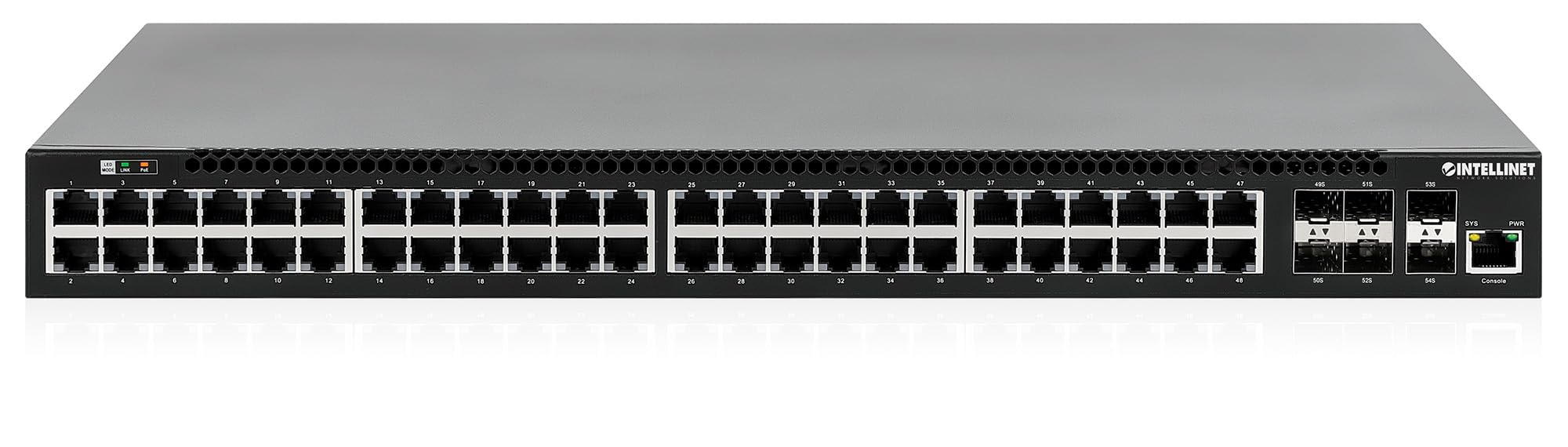
മുൻ പാനലിൽ ഇവ ഉൾപ്പെടുന്നു:
- 48 x 10/100/1000 Mbps RJ45 Ports: These ports support Power over Ethernet Plus (PoE+) for connecting compatible devices.
- 6 x 10 Gigabit SFP+ Slots: For high-speed uplink connections to other network devices.
- LED സൂചകങ്ങൾ: Provide status information for power, system, link activity, and PoE status.
- കൺസോൾ പോർട്ട്: For local management and configuration.


4.2 പിൻ പാനൽ

The rear panel typically includes the AC power input and cooling fans for heat dissipation.

5. സജ്ജീകരണം
5.1 ഫിസിക്കൽ ഇൻസ്റ്റലേഷൻ
The switch can be installed in a standard 19-inch equipment rack or placed on a desktop.
- റാക്ക്മൗണ്ട് ഇൻസ്റ്റാളേഷൻ: Attach the provided rackmount brackets to the sides of the switch using the included screws. Secure the switch into a standard 19-inch rack.
- ഡെസ്ക്ടോപ്പ് ഇൻസ്റ്റാളേഷൻ: Attach the provided rubber feet to the bottom of the switch to prevent scratching and ensure stability. Place the switch on a flat, stable surface.
5.2 പവർ കണക്ഷൻ
Connect the provided power cable to the AC power input on the rear panel of the switch and then to a grounded electrical outlet. Ensure the power switch is in the OFF position before connecting the power cable.
5.3 നെറ്റ്വർക്ക് കണക്ഷനുകൾ
- PoE ഉപകരണങ്ങൾ: Connect PoE-compatible devices (e.g., IP cameras, VoIP phones, wireless access points) to any of the 48 Gigabit RJ45 ports. The switch will automatically detect and provide power to these devices.
- അപ്ലിങ്ക് കണക്ഷനുകൾ: Insert compatible SFP+ transceivers into the 10 Gigabit SFP+ slots and connect them to your core network or other high-speed devices using appropriate fiber optic cables.
- കൺസോൾ കണക്ഷൻ: For initial configuration or direct management, connect a console cable from your computer to the console port on the switch.
5.4 പ്രാരംഭ കോൺഫിഗറേഷൻ
Refer to the separate software configuration guide for detailed instructions on accessing the switch's management interface (web-based GUI or command-line interface via console port) and performing initial setup, including IP address assignment, user accounts, and basic network settings.
6. പ്രവർത്തന നിർദ്ദേശങ്ങൾ
6.1 Layer 3 Routing
This switch offers dynamic Layer 3 IP routing capabilities, including OSPF (Open Shortest Path First), RIP (Routing Information Protocol), and VRRP (Virtual Router Redundancy Protocol). These protocols enable efficient and scalable routing within complex network environments.

6.2 പവർ ഓവർ ഇഥർനെറ്റ് (PoE+)
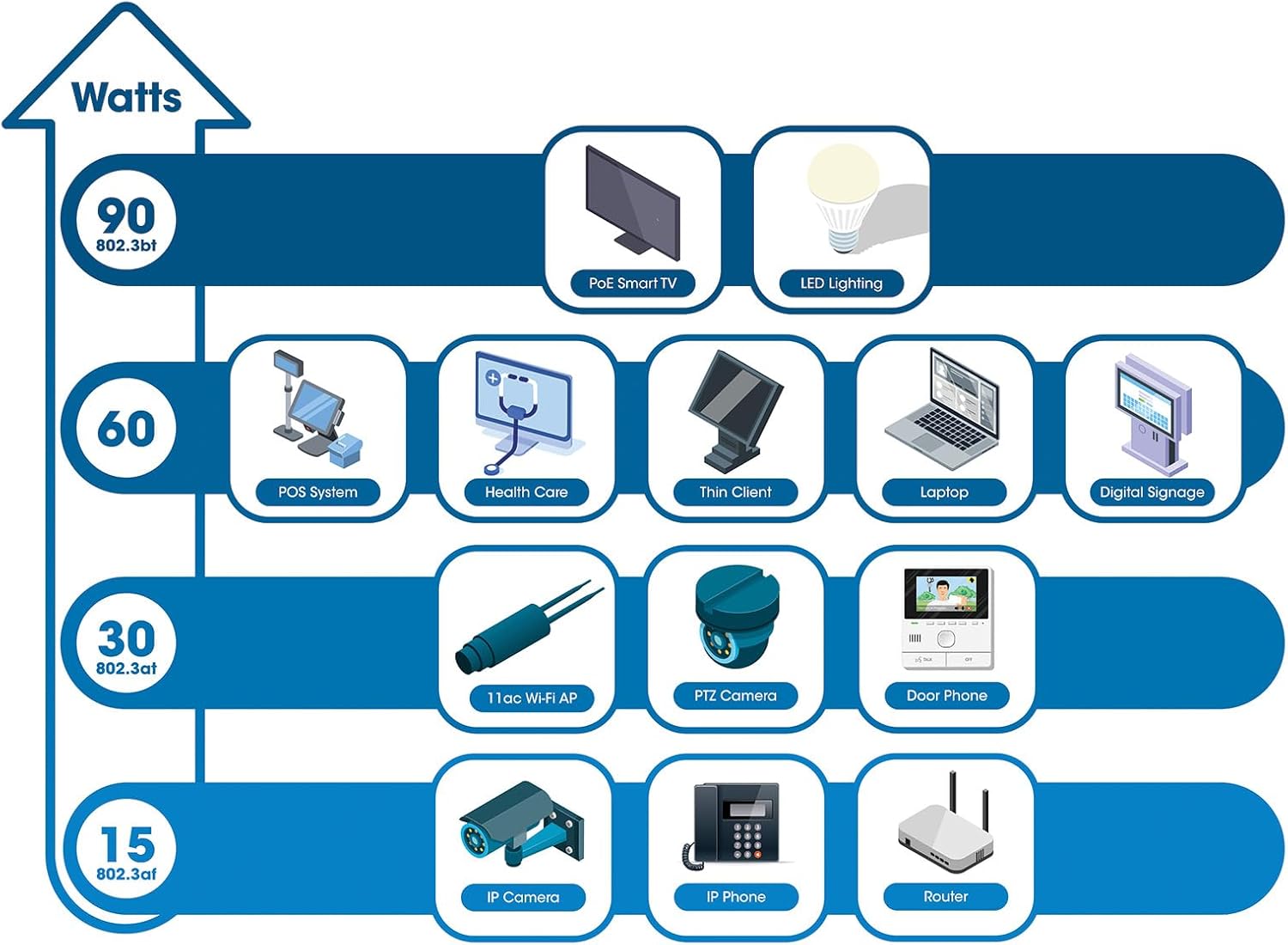
The switch provides up to 30 watts of power per port across its 48 PoE+ ports, with a total power budget of 850 watts. This allows for seamless integration of various PoE devices without the need for separate power adapters.
6.3 PoE Scheduling
The switch supports PoE scheduling, allowing administrators to define specific times for powering on, powering off, or rebooting connected PoE devices. This feature can optimize power consumption and enhance network security.


6.4 Self-Healing Functionality (PDM)
The Powered Device Monitor (PDM) feature enables the switch to proactively monitor the status of connected PoE devices. If a device becomes unresponsive, the PDM can automatically restart the PoE port to restore functionality, minimizing downtime and maintaining network integrity.
6.5 ക്ലൗഡ് മാനേജ്മെന്റ്
The switch supports cloud management capabilities, allowing for remote configuration, monitoring, and troubleshooting of the device from a centralized platform. Refer to the cloud management documentation for setup and usage details.
7. പരിപാലനം
7.1 ഫേംവെയർ അപ്ഡേറ്റുകൾ
Regularly check the Intellinet Network Solutions website for the latest firmware updates. Applying firmware updates can improve performance, add new features, and address security vulnerabilities. Follow the instructions provided with the firmware update package carefully.
7.2 വൃത്തിയാക്കൽ
To clean the switch, power it off and disconnect all cables. Use a soft, dry cloth to wipe the exterior. Do not use liquid or aerosol cleaners. Ensure ventilation openings are free from dust and debris.
7.3 പരിസ്ഥിതി പരിഗണനകൾ
Ensure the switch operates within its specified temperature and humidity ranges. Avoid placing the switch in direct sunlight, near heat sources, or in areas with high dust accumulation.
8. പ്രശ്നപരിഹാരം
സ്വിച്ച് ഉപയോഗിച്ച് നിങ്ങൾ നേരിട്ടേക്കാവുന്ന പൊതുവായ പ്രശ്നങ്ങളെ ഈ വിഭാഗം അഭിസംബോധന ചെയ്യുന്നു.
8.1 വൈദ്യുതിയില്ല
- പവർ കേബിൾ സ്വിച്ചിലേക്കും പ്രവർത്തിക്കുന്ന ഒരു ഇലക്ട്രിക്കൽ ഔട്ട്ലെറ്റിലേക്കും സുരക്ഷിതമായി ബന്ധിപ്പിച്ചിട്ടുണ്ടെന്ന് ഉറപ്പാക്കുക.
- Ensure the power switch on the rear panel is in the ON position.
- Check the power outlet with another device to confirm it is functional.
8.2 പോർട്ടിൽ ലിങ്ക് ഇല്ല
- Check the Ethernet cable connection at both ends. Ensure it is securely plugged in.
- Verify the cable is not damaged. Try a different cable.
- ബന്ധിപ്പിച്ചിരിക്കുന്ന ഉപകരണം ഓണാണെന്നും ശരിയായി പ്രവർത്തിക്കുന്നുണ്ടെന്നും ഉറപ്പാക്കുക.
- Check the port status in the switch's management interface.
8.3 PoE ഉപകരണം പവർ സ്വീകരിക്കുന്നില്ല
- Confirm the connected device is a PoE-compatible device.
- നിർദ്ദിഷ്ട പോർട്ടിനായി PoE സ്റ്റാറ്റസ് LED പരിശോധിക്കുക.
- കണക്റ്റുചെയ്ത എല്ലാ ഉപകരണങ്ങളും മൊത്തം PoE പവർ ബജറ്റ് (850W) കവിയുന്നില്ലെന്ന് ഉറപ്പാക്കുക.
- Utilize the Powered Device Monitor (PDM) feature to automatically restart the port if the device is unresponsive.
- Check PoE settings in the switch's management interface.
9 സ്പെസിഫിക്കേഷനുകൾ
| ഫീച്ചർ | സ്പെസിഫിക്കേഷൻ |
|---|---|
| മോഡൽ നമ്പർ | 562041 |
| ബ്രാൻഡ് | ഇന്റർനെറ്റ് നെറ്റ്വർക്ക് സൊല്യൂഷനുകൾ |
| തുറമുഖങ്ങളുടെ എണ്ണം | 54 (48 x Gigabit PoE+, 6 x 10G SFP+) |
| ഇൻ്റർഫേസ് തരം | പിഒഇ, എസ്എഫ്പി |
| Maximum Power (PoE Budget) | 850 വാട്ട്സ് |
| ഡാറ്റ കൈമാറ്റ നിരക്ക് | 10 Gigabits Per Second (SFP+ uplinks) |
| ഇനത്തിൻ്റെ ഭാരം | 6.2 കിലോഗ്രാം (13.64 പൗണ്ട്) |
| ഉൽപ്പന്ന അളവുകൾ (L x W x H) | 13.78 x 17.32 x 1.73 ഇഞ്ച് |
| ഉയർന്ന താപനില റേറ്റിംഗ് | 104 ഡിഗ്രി ഫാരൻഹീറ്റ് (40°C) |
| താഴ്ന്ന താപനില റേറ്റിംഗ് | 32 ഡിഗ്രി ഫാരൻഹീറ്റ് (0°C) |
| അനുയോജ്യമായ ഉപകരണങ്ങൾ | Desktop, Router, PoE devices (IP cameras, VoIP phones, WAPs) |
| ഉൾപ്പെടുത്തിയ ഘടകങ്ങൾ | 19" rackmount brackets, Instructions, Rubber feet, power cable |
| യു.പി.സി | 766623562041 |
10. വാറൻ്റിയും പിന്തുണയും
10.1 വാറൻ്റി വിവരങ്ങൾ
This Intellinet Network Solutions product is covered by a 3 വർഷത്തെ നിർമ്മാതാവിന്റെ വാറന്റി. വാറന്റി ക്ലെയിമുകൾക്കായി നിങ്ങളുടെ വാങ്ങലിന്റെ തെളിവ് സൂക്ഷിക്കുക. സാധാരണ ഉപയോഗത്തിൽ മെറ്റീരിയലുകളിലും വർക്ക്മാൻഷിപ്പിലുമുള്ള വൈകല്യങ്ങൾ വാറന്റി ഉൾക്കൊള്ളുന്നു.
10.2 സാങ്കേതിക പിന്തുണ
For technical assistance, product documentation, or to register your product, please visit the official Intellinet Network Solutions webസൈറ്റിൽ ബന്ധപ്പെടുക അല്ലെങ്കിൽ അവരുടെ ഉപഭോക്തൃ പിന്തുണയുമായി ബന്ധപ്പെടുക. കോൺടാക്റ്റ് വിവരങ്ങൾ സാധാരണയായി നിർമ്മാതാവിന്റെ വെബ്സൈറ്റിൽ കാണാം. webസൈറ്റ് അല്ലെങ്കിൽ ഉൽപ്പന്ന പാക്കേജിംഗിൽ.