
Acekool 0XHWSTFL001
അസെക്കൂൾ പോർട്ടബിൾ എയർ കണ്ടീഷണർ ഉപയോക്തൃ മാനുവൽ
Model: 0XHWSTFL001
ആമുഖം
This user manual provides detailed instructions for the operation, installation, and maintenance of your Acekool Portable Air Conditioner. Please read this manual thoroughly before using the appliance and retain it for future reference.
ഉൽപ്പന്നം കഴിഞ്ഞുview

Figure 1: Acekool Portable Air Conditioner and its remote control.
The Acekool Portable Air Conditioner is a versatile 3-in-1 unit designed to cool, dehumidify, and circulate air as a fan. It features an 8000 BTU ASHRAE cooling capacity, suitable for rooms up to 350 sq.ft. Key features include an LED control panel, remote control, sleep mode, and a 24-hour timer.
ബോക്സിൽ എന്താണുള്ളത്

ചിത്രം 2: ഉൽപ്പന്ന പാക്കേജിൽ ഉൾപ്പെടുത്തിയിരിക്കുന്ന എല്ലാ ഘടകങ്ങളും.
- 1 x പോർട്ടബിൾ എയർ കണ്ടീഷണർ യൂണിറ്റ്
- 1 x വിൻഡോ കിറ്റ്
- 1 x ഹോസ് കണക്റ്റർ
- 1 x Window Kit Adapter
- 1 x എക്സ്ഹോസ്റ്റ് ഹോസ്
- 1 x ഡ്രെയിൻ പൈപ്പ്
- 1 x റിമോട്ട് കൺട്രോൾ
- 1 x ഫിക്സിംഗ് സ്ക്രൂകൾ
- 1 x ഉപയോക്തൃ മാനുവൽ
സജ്ജീകരണവും ഇൻസ്റ്റാളേഷനും
Follow these steps for proper setup and installation to ensure optimal performance of your portable air conditioner.

Figure 3: Visual guide for exhaust hose and window kit installation.
- എക്സ്ഹോസ്റ്റ് ഹോസിൻ്റെ ഒരറ്റത്തേക്ക് ഹോസ് കണക്റ്റർ ബന്ധിപ്പിക്കുക.
- എക്സ്ഹോസ്റ്റ് ഹോസിൻ്റെ മറ്റേ അറ്റത്തേക്ക് വിൻഡോ കിറ്റ് അഡാപ്റ്റർ ബന്ധിപ്പിക്കുക.
- Attach the hose connector to the exhaust air outlet of the air conditioner unit.
- Extend the adjustable window kits to fit your window in place and tighten the nuts.
- Install the window partitions to fit the window (suitable for horizontal or vertical slide windows).
- Insert the exhaust hose adapter into the window kit, then install the ventilation tube to the window partitions.
Video 1: Official product video demonstrating the features and setup of the 8000 BTU Air Conditioner.
പ്രവർത്തന നിർദ്ദേശങ്ങൾ
നിയന്ത്രണ പാനലും റിമോട്ട് കൺട്രോളും

Figure 4: LED Touch Panel with Remote Control functionality.
The unit can be operated using the LED touch control panel on top of the unit or the included wireless remote control. The control panel provides easy access to all functions.
ഓപ്പറേറ്റിംഗ് മോഡുകൾ

Figure 5: Three-in-one modes: Cool, Dry, and Fan.
- രസകരമായ മോഡ്: Provides powerful cooling for rooms up to 350 sq.ft., with adjustable temperature settings from 61°F to 88°F.
- ഡ്രൈ (ഡീഹ്യുമിഡിഫയർ) മോഡ്: Removes up to 45 pints of moisture per day, helping to reduce humidity in the room. Features self-evaporation technology.
- ഫാൻ മോഡ്: Circulates air with two adjustable wind speeds (Low/High) without cooling.
അധിക സവിശേഷതകൾ
- സ്ലീപ്പ് മോഡ്: Activates energy-saving operation with an ultra-low noise level of 50 dB for undisturbed sleep. Activated by pressing Increase and Speed simultaneously.
- 24-മണിക്കൂർ ടൈമർ: Allows you to customize the cooling duration to suit your schedule.
- Auto Air Swing: Features automatic horizontal swing wind and manual vertical wind for widespread oscillation, cooling every corner of your room.
- പോർട്ടബിലിറ്റി: Equipped with 4 rotatable wheels for easy movement and storage.

Figure 6: Airflow direction control with automatic horizontal swing and manual vertical adjustment.
മെയിൻ്റനൻസ്
എയർ ഫിൽട്ടർ വൃത്തിയാക്കുന്നു
Regular cleaning of the air filter is essential for maintaining the efficiency and longevity of your air conditioner.

Figure 7: Detachable and washable air filter location.
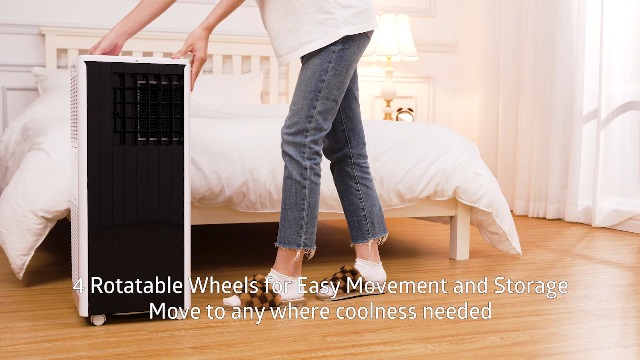
Figure 8: Cleaning the filter screen directly under water.
- Locate the air filter on the side of the unit.
- Gently pull out the filter screen.
- Wash the filter screen directly under running water.
- യൂണിറ്റിലേക്ക് വീണ്ടും ചേർക്കുന്നതിന് മുമ്പ് ഫിൽട്ടർ പൂർണ്ണമായും വായുവിൽ ഉണങ്ങാൻ അനുവദിക്കുക.
- Reinsert the dry filter screen back into its slot.
യൂണിറ്റ് ഡ്രെയിനിംഗ്
The unit features self-evaporation technology, which atomizes condensed water. However, in high humidity environments, manual draining may be required. Use the provided drain pipe for this purpose.

Figure 9: Drainage hole for excess water removal.
ട്രബിൾഷൂട്ടിംഗ്
If you encounter any issues with your Acekool Portable Air Conditioner, please refer to the following common troubleshooting steps. For problems not listed here, contact customer support.
| പ്രശ്നം | സാധ്യമായ കാരണം | പരിഹാരം |
|---|---|---|
| യൂണിറ്റ് ഓണാക്കുന്നില്ല | വൈദ്യുതി ഇല്ല; പവർ കോർഡ് പ്ലഗ് ഇൻ ചെയ്തിട്ടില്ല; സർക്യൂട്ട് ബ്രേക്കർ ട്രിപ്പ് ചെയ്തു. | Ensure unit is plugged into a working outlet; Check circuit breaker; Press the power button. |
| യൂണിറ്റ് ഫലപ്രദമായി തണുപ്പിക്കുന്നില്ല. | Air filter is dirty; Exhaust hose not properly installed; Room size too large; Doors/windows open. | Clean the air filter; Ensure exhaust hose is securely connected and vented outside; Close all doors and windows; Verify room size is within specifications. |
| യൂണിറ്റ് ശബ്ദമയമാണ് | Unit not on a flat surface; Obstruction in fan/air intake. | യൂണിറ്റ് പരന്നതും സ്ഥിരതയുള്ളതുമായ ഒരു പ്രതലത്തിൽ സ്ഥാപിക്കുക; ഏതെങ്കിലും തടസ്സങ്ങൾ ഉണ്ടോയെന്ന് പരിശോധിച്ച് നീക്കം ചെയ്യുക. |
| വെള്ളം ചോർച്ച | Drain plug not secured; Water tank full (in high humidity). | Ensure drain plug is tightly closed; Drain the water tank if full. |
സ്പെസിഫിക്കേഷനുകൾ
| ഫീച്ചർ | വിശദാംശങ്ങൾ |
|---|---|
| ബ്രാൻഡ് | അസെക്കൂൾ |
| മോഡൽ | Portable Air Conditioner (0XHWSTFL001) |
| കൂളിംഗ് പവർ | 8000 ബി.ടി.യു (ആഷ്റേ) / 5000 ബി.ടി.യു (ഡി.ഒ.ഇ) |
| കവറേജ് ഏരിയ | 350 ചതുരശ്ര അടി വരെ. |
| പ്രവർത്തനങ്ങൾ | കൂൾ, ഈർപ്പം കുറയ്ക്കുക, ഫാൻ |
| നിർജ്ജലീകരണ ശേഷി | 45 പൈൻ്റ്/ദിവസം |
| ശബ്ദ നില | 45 dB (സ്ലീപ്പ് മോഡിൽ 50 dB) |
| വാല്യംtage | 115 വോൾട്ട് |
| വാട്ട്tage | 699 വാട്ട്സ് |
| റഫ്രിജറൻ്റ് | R32 |
| അളവുകൾ (D x W x H) | 11.3" x 11.7" x 27.4" |
| ഇനത്തിൻ്റെ ഭാരം | 47.5 പൗണ്ട് |
വാറൻ്റിയും പിന്തുണയും
Your Acekool Portable Air Conditioner comes with a standard manufacturer's warranty. For detailed warranty information, product support, or service inquiries, please refer to the warranty card included in your package or visit the official Acekool website. You can also contact customer support through the retailer where you purchased the product.
കൂടുതൽ വിവരങ്ങൾക്കും പിന്തുണയ്ക്കും, സന്ദർശിക്കുക ആമസോണിലെ അസെക്കൂൾ സ്റ്റോർ.
Ask a question about this manual
Ask about setup, troubleshooting, compatibility, parts, safety, or missing instructions. Manuals+ will review the question and use this page’s manual context to help answer it.