
1. ആമുഖം
This manual provides instructions for the Akozon HBVW202012HD 1MP HD USB Camera Module. This module is designed for various applications requiring high-definition imaging and broad operating system compatibility.
പ്രധാന സവിശേഷതകൾ:
- 1MP High-Definition Imaging: Equipped with a 1-megapixel lens, providing clear images with a 50° field of view.
- OV9726 Chip: Utilizes the OV9726 photosensitive chip for consistent performance.
- സാർവത്രിക അനുയോജ്യത: Supports Windows XP, Windows 10, OS X, and Linux operating systems.
- OTG & UVC Protocol Support: Features a USB 2.0 interface for plug-and-play functionality without requiring additional drivers.
- ബഹുമുഖ പ്രയോഗങ്ങൾ: Suitable for consumer electronics, security systems, industrial applications, QR scanning, and face recognition.

ചിത്രം 1: മുൻഭാഗം view of the Akozon HBVW202012HD 1MP HD USB Camera Module, showing the lens and circuit board.
2. സജ്ജീകരണം
Follow these steps to set up your camera module:
- USB കേബിൾ ബന്ധിപ്പിക്കുക: Attach the provided USB cable to the camera module's connector. Ensure a secure connection.
- ഹോസ്റ്റ് ഉപകരണത്തിലേക്ക് കണക്റ്റുചെയ്യുക: Plug the USB connector into an available USB 2.0 port on your computer or compatible host device.
- ഡ്രൈവർ ഇൻസ്റ്റാളേഷൻ: The module supports the UVC protocol, enabling plug-and-play functionality on most compatible operating systems (Windows XP, Windows 10, OS X, Linux). No manual driver installation is typically required. The system should automatically detect and configure the device.
- കണക്ഷൻ സ്ഥിരീകരിക്കുക: After connecting, check your device manager or system settings to confirm that the camera module is recognized as a USB camera device.

Figure 2: The camera module connected to its USB cable, ready for integration.
3. പ്രവർത്തന നിർദ്ദേശങ്ങൾ
Once the camera module is successfully connected and recognized by your system, you can begin using it with compatible software applications.
അടിസ്ഥാന പ്രവർത്തനം:
- സോഫ്റ്റ്വെയർ അനുയോജ്യത: Use any standard webcam or camera application compatible with your operating system to access the video feed from the module.
- ഫംഗ്ഷൻ ആമുഖം: The module supports functions such as QR code scanning and face recognition, depending on the capabilities of the software application used.
- മാനുവൽ ഫോക്കസ്: The lens features manual adjustment for focusing. Rotate the lens barrel to achieve optimal image clarity for your specific application distance.

ചിത്രം 3: ഉദാamples of diverse applications for the HBVW202012HD camera module.
4. പരിപാലനം
Proper maintenance ensures the longevity and optimal performance of your camera module.
- വൃത്തിയാക്കൽ: Use a soft, dry cloth to gently clean the lens and module surface. Avoid abrasive materials or harsh chemicals. For stubborn smudges on the lens, a lens cleaning solution designed for optical surfaces can be applied to a microfiber cloth.
- സംഭരണം: Store the module in a cool, dry place away from direct sunlight and extreme temperatures. Protect it from dust and moisture when not in use.
- കൈകാര്യം ചെയ്യൽ: Handle the module by its edges to avoid touching the lens or electronic components. Avoid dropping or subjecting the module to strong impacts.
5. പ്രശ്നപരിഹാരം
If you encounter issues with your camera module, refer to the following common problems and solutions:
പൊതുവായ പ്രശ്നങ്ങളും പരിഹാരങ്ങളും:
- ക്യാമറ കണ്ടെത്തിയില്ല:
- Ensure the USB cable is securely connected to both the module and the host device.
- Try connecting to a different USB port on your device.
- നിങ്ങളുടെ കമ്പ്യൂട്ടർ അല്ലെങ്കിൽ ഹോസ്റ്റ് ഉപകരണം പുനരാരംഭിക്കുക.
- Verify that the operating system recognizes the device in Device Manager (Windows) or System Information (OS X/Linux).
- മോശം ചിത്രത്തിന്റെ ഗുണനിലവാരം:
- Adjust the manual focus of the lens by rotating the lens barrel until the image is clear.
- Ensure adequate lighting in the environment.
- Clean the lens surface if it appears dirty or smudged.
- Check the resolution settings in your camera application; ensure it is set to 1280x720 for optimal quality.
- വീഡിയോ ഫീഡ് ഇല്ല:
- Confirm that the camera application you are using is correctly configured to select the Akozon HBVW202012HD module as the video source.
- Close any other applications that might be using the camera.
- Update your operating system and USB drivers if available.
6 സ്പെസിഫിക്കേഷനുകൾ
Detailed technical specifications for the Akozon HBVW202012HD 1MP HD USB Camera Module:
| ഫീച്ചർ | സ്പെസിഫിക്കേഷൻ |
|---|---|
| ഉൽപ്പന്ന മോഡൽ | HBV-W202012HD |
| റെസലൂഷൻ | 1എംപി (1280x720) |
| ഫോട്ടോസെൻസിറ്റീവ് ചിപ്പ് | OV9726 (1/6 inch) |
| ഫീൽഡ് View (FOV) | 50° |
| ഫോക്കൽ ലെങ്ത് | 3.2 മി.മീ |
| ഔട്ട്പുട്ട് ഫോർമാറ്റ് | MJPG/YUY2 |
| ഫോക്കസ് മോഡ് | Manual (Adjustable Lens) |
| ഔട്ട്പുട്ട് ഇൻ്റർഫേസ് | USB 2.0 |
| പിന്തുണയ്ക്കുന്ന സിസ്റ്റങ്ങൾ | Windows XP, Windows 10, OS X, Linux |
| വയർ നീളം | ഏകദേശം 50 സെ.മീ / 19.7 ഇഞ്ച് |
| പ്രവർത്തന താപനില | -30℃ മുതൽ 70℃ വരെ |
| മൊഡ്യൂൾ അളവുകൾ | ഏകദേശം 30 x 25 x 14 മിമി / 1.2 x 1 x 0.6 ഇഞ്ച് |
| അധിക സവിശേഷതകൾ | Supports external LED infrared fill light connection |
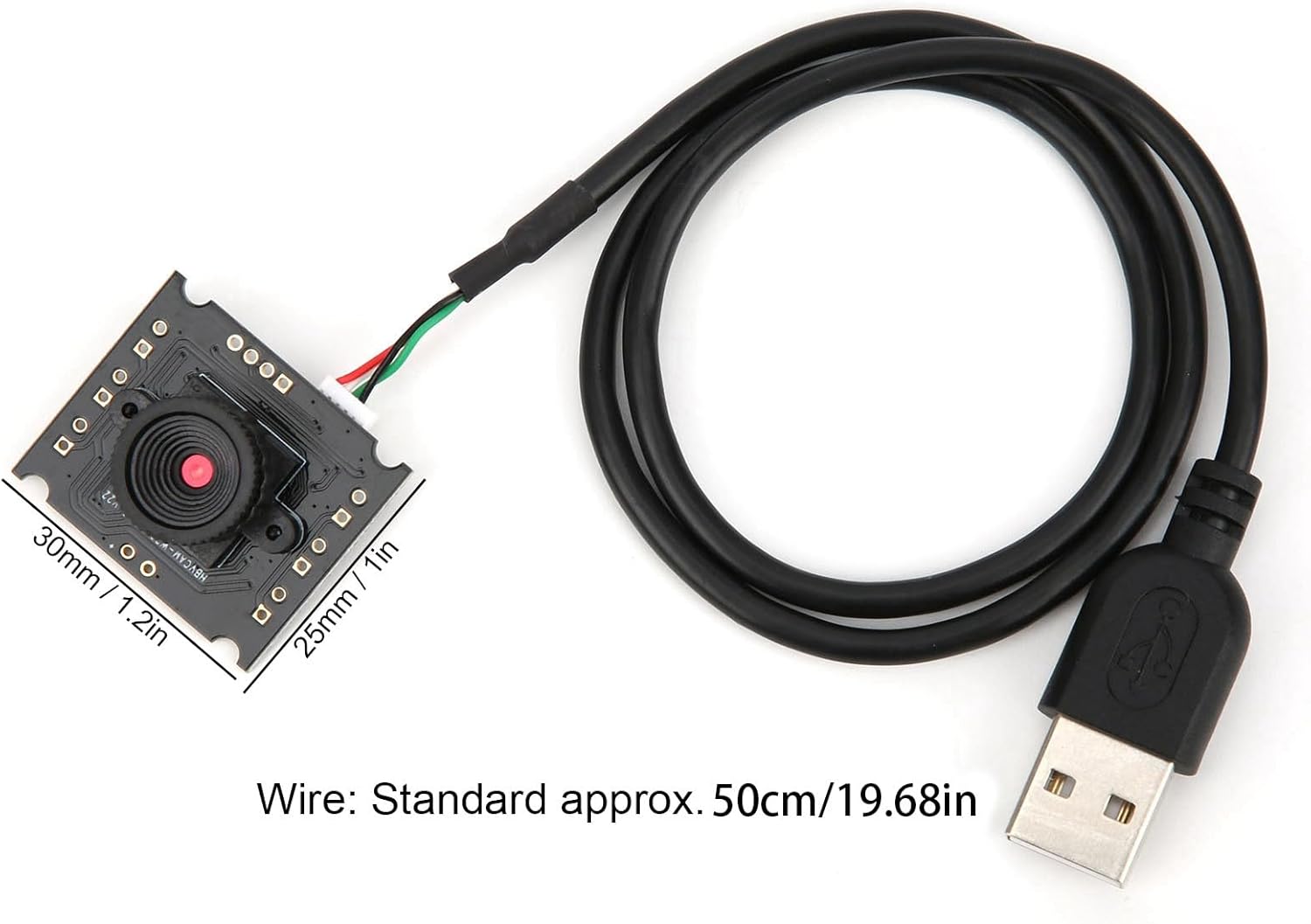
Figure 4: Dimensions of the camera module and standard cable length.

Figure 5: Visual comparison of normal pixel versus 1 megapixel high definition image clarity.
7. വാറൻ്റിയും പിന്തുണയും
For warranty information, technical support, or service inquiries, please refer to the documentation provided with your purchase or contact Akozon customer service through their official channels. Keep your purchase receipt as proof of purchase.