
ആമുഖം
This manual provides essential information for the safe and efficient operation of your DOOGEE T30E 11 inch Tablet. Please read this manual thoroughly before using the device to ensure proper functionality and to understand all features.

ചിത്രം: മുന്നിലും പിന്നിലും view of the DOOGEE T30E 11 inch Tablet, showcasing അതിന്റെ മിനുസമാർന്ന രൂപകൽപ്പനയും ക്യാമറ മൊഡ്യൂളും.
സജ്ജമാക്കുക
1. പാക്കേജ് ഉള്ളടക്കം
പാക്കേജിൽ എല്ലാ ഇനങ്ങളും ഉണ്ടെന്ന് ഉറപ്പാക്കുക:
- DOOGEE T30E Tablet
- ചാർജിംഗ് അഡാപ്റ്റർ
- USB കേബിൾ
- സിം എജക്റ്റ് ടൂൾ
- ദ്രുത ആരംഭ ഗൈഡ്
2. സിം കാർഡും TF കാർഡും ഇൻസ്റ്റാൾ ചെയ്യൽ
The DOOGEE T30E supports dual SIM cards or one SIM card and one TF card for expandable storage.
- ടാബ്ലെറ്റിന്റെ വശത്ത് സിം കാർഡ് ട്രേ കണ്ടെത്തുക.
- ട്രേയുടെ അടുത്തുള്ള ചെറിയ ദ്വാരത്തിലേക്ക് സിം എജക്റ്റ് ടൂൾ തിരുകുക, ട്രേ പുറത്തേക്ക് വരുന്നത് വരെ സൌമ്യമായി അമർത്തുക.
- Place your Nano-SIM card(s) and/or TF card into the designated slots on the tray. Ensure the gold contacts are facing down.
- ടാബ്ലെറ്റിലേക്ക് ട്രേ ശ്രദ്ധാപൂർവ്വം വീണ്ടും തിരുകുക, അത് ശരിയായ സ്ഥാനത്ത് ക്ലിക്കായി ഉറപ്പിക്കുന്നതുവരെ.

Image: Illustration of inserting SIM cards into the DOOGEE T30E tablet's tray, highlighting 4G network support.
3. പ്രാരംഭ പവർ ഓണും ചാർജിംഗും
Before first use, it is recommended to fully charge the tablet. Connect the USB cable to the tablet's charging port and the adapter to a power outlet.
- Press and hold the Power button until the DOOGEE logo appears.
- ഭാഷാ തിരഞ്ഞെടുപ്പ്, വൈ-ഫൈ കണക്ഷൻ, ഗൂഗിൾ അക്കൗണ്ട് ലോഗിൻ എന്നിവയുൾപ്പെടെയുള്ള പ്രാരംഭ സജ്ജീകരണം പൂർത്തിയാക്കാൻ ഓൺ-സ്ക്രീൻ നിർദ്ദേശങ്ങൾ പാലിക്കുക.
പ്രവർത്തന നിർദ്ദേശങ്ങൾ
1. പ്രദർശന, ദൃശ്യാനുഭവം
The DOOGEE T30E features an 11-inch IPS full-color HD display, offering vibrant visuals and a comfortable touch experience. It supports Widevine L1 for high-quality streaming of copyrighted content.

Image: Comparison illustrating the larger screen size of the 11-inch DOOGEE T30E tablet versus a standard 10-inch tablet.

Image: Display showing Widevine L1 support, indicating compatibility with major streaming platforms like Amazon Prime Video, YouTube, Disney, and Hulu for high-definition content.
2. ആൻഡ്രോയിഡ് 14 ഓപ്പറേറ്റിംഗ് സിസ്റ്റം
The tablet runs on Android 14, providing enhanced security, stability, and a rich user experience with features like:
- സമാന്തരം View: Optimizes landscape experience for certain applications.
- ടാസ്ക്ബാർ: Provides convenient multitasking capabilities.
- Privacy & Security: Advanced controls for managing permissions and protecting user data.

Image: Screenshot of the Android 14 interface on the DOOGEE T30E, highlighting new features such as Parallel View, Taskbar, and enhanced Privacy & Security settings.
3. പ്രകടനവും സംഭരണവും
Equipped with an octa-core processor, 9GB RAM (4GB physical + 5GB expansion), and 128GB ROM, the T30E delivers responsive performance. Storage can be expanded up to 1TB via a TF card.

Image: Diagram detailing the tablet's powerful and efficient performance components, including the Octa-Core processor, LPDDR4X RAM, ARM Cortex cores, Mali-G57 GPU, and eMMC 5.1 storage.

Image: Visual representation of the tablet's memory and storage, showing 9GB (4+5) RAM and 128GB ROM with 1TB TF expansion capability.
4. കണക്റ്റിവിറ്റി
Stay connected with versatile network options:
- 4G LTE: Provides cellular data connectivity for on-the-go internet access.
- വൈഫൈ: Supports 2.4GHz and 5GHz bands for fast and stable wireless internet.
- ബ്ലൂടൂത്ത് 5.0: For connecting wireless accessories like headphones and keyboards.

Image: The tablet displaying its high-quality dual speakers and icons for 4G Dual SIM, 2.4/5G WiFi, and Bluetooth 5.0, indicating ultra-fast connection capabilities.
5. ക്യാമറ സവിശേഷതകൾ
Capture moments and engage in video calls with the integrated cameras:
- പ്രധാന ക്യാമറ: 13MP for clear photos and videos.
- മുൻ ക്യാമറ: 5MP, ideal for video conferencing and selfies.
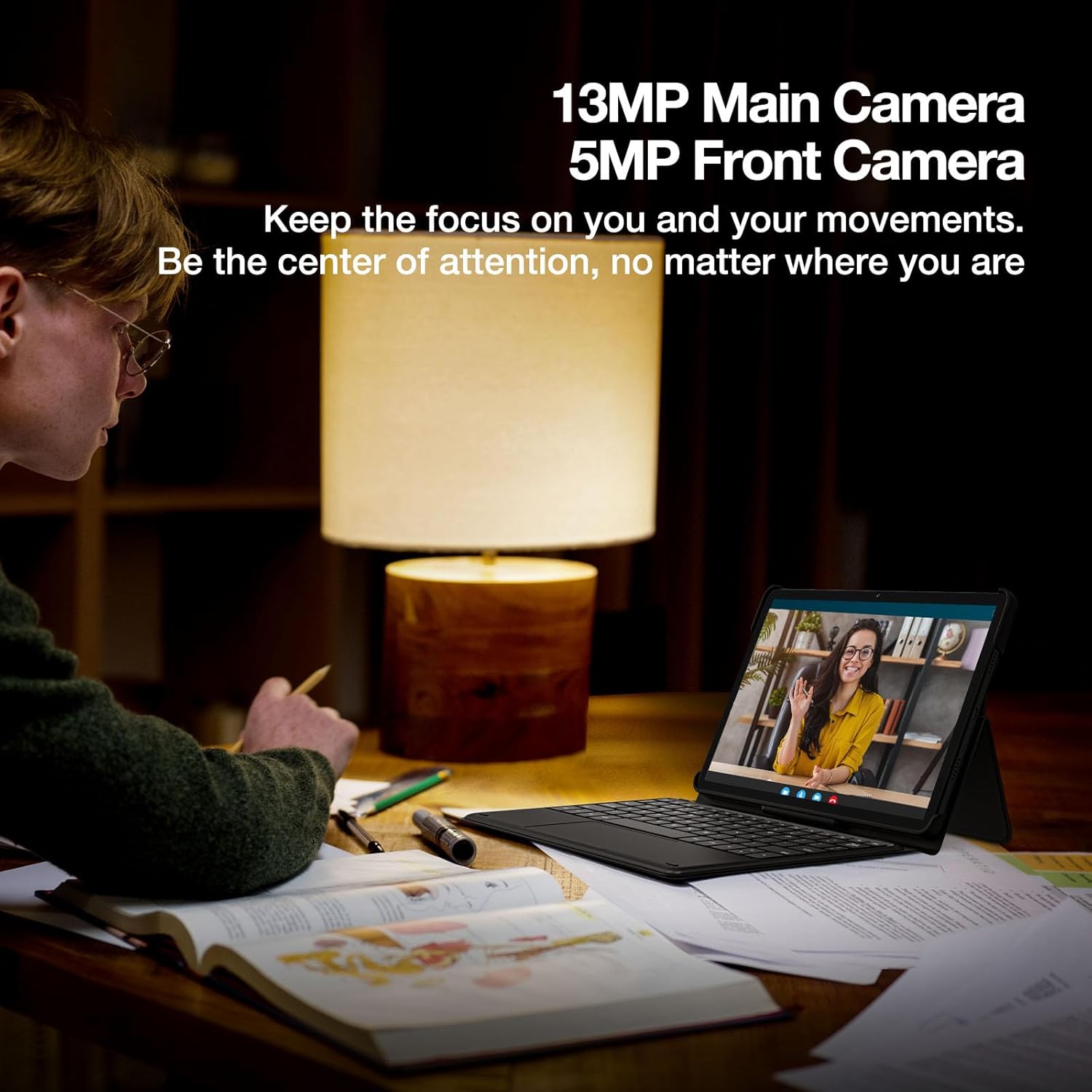
Image: A person engaged in a video call using the DOOGEE T30E tablet, emphasizing the 13MP main camera and 5MP front camera for clear communication.
6. ഓഡിയോ
Experience immersive sound with high-quality dual speakers and the convenience of a 3.5mm headphone jack.
7. ബാറ്ററി മാനേജ്മെന്റ്
The 8000mAh high-capacity battery provides extended usage times. The tablet supports 5V/2A 10W fast charging.
- 671 മണിക്കൂർ വരെ സ്റ്റാൻഡ്ബൈ സമയം.
- 17 മണിക്കൂർ വരെ സംഗീതം പ്ലേബാക്ക് ചെയ്യാം.
- 11 മണിക്കൂർ വരെ വീഡിയോ പ്ലേബാക്ക്.
- 9 മണിക്കൂർ വരെ ഗെയിമിംഗ്.
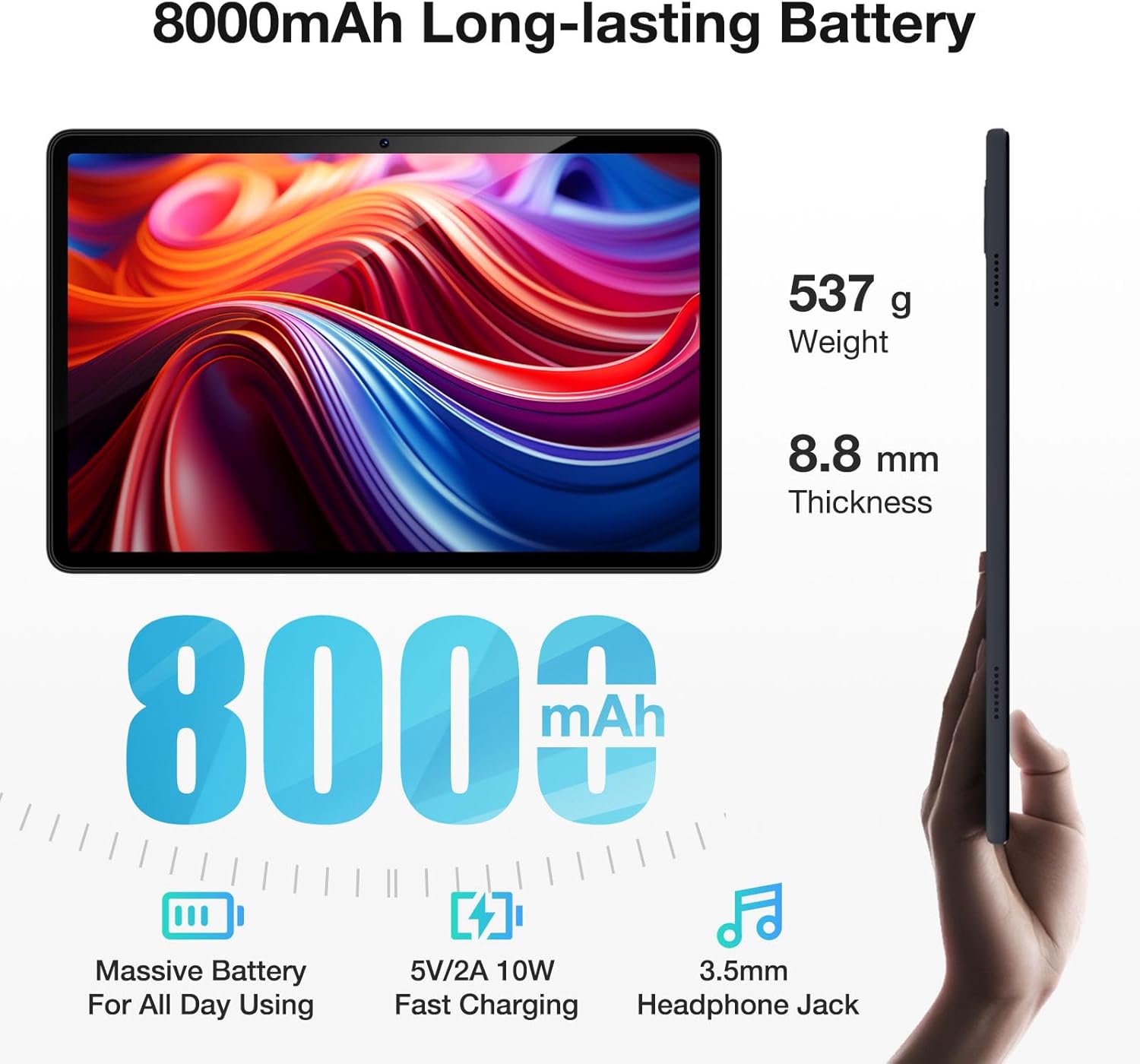
Image: The DOOGEE T30E tablet shown with its dimensions (8.8mm thickness, 537g weight) and key battery features, including 8000mAh capacity, 5V/2A 10W fast charging, and a 3.5mm headphone jack.

Image: Graphic illustrating the long-lasting 8000mAh battery, with estimated usage times for standby (671H), music (17H), video (11H), and gaming (9H).
8. നാവിഗേഷൻ
The tablet supports 5 satellite navigation systems for accurate positioning: GPS, Beidou, GLONASS, Galileo, and AGPS.

Image: The DOOGEE T30E tablet mounted in a car, displaying a navigation map, demonstrating its 5-satellite navigation capabilities for accurate positioning.
9. ഫേസ് ഐഡി
Unlock your tablet securely and conveniently using Face ID recognition.

Image: A user unlocking the DOOGEE T30E tablet using its Face ID feature, with a visual representation of facial recognition technology.
10. വയർലെസ് പ്രൊജക്ഷൻ
Easily connect your tablet to digital TVs, electronic blackboards, or projectors for a larger viewഅനുഭവം.

Image: A meeting room setup where the DOOGEE T30E tablet is wirelessly projecting its content to a large display, demonstrating its utility for meetings, movies, and games.
11. മൾട്ടിടാസ്കിംഗ്
Utilize the split-screen mode for enhanced productivity, allowing you to run two applications side-by-side.

Image: The DOOGEE T30E tablet displaying two applications simultaneously in split-screen mode, illustrating its multitasking capability.
മെയിൻ്റനൻസ്
1. വൃത്തിയാക്കൽ
- ടാബ്ലെറ്റിന്റെ സ്ക്രീനും ബോഡിയും വൃത്തിയാക്കാൻ മൃദുവായ, ലിന്റ് രഹിത തുണി ഉപയോഗിക്കുക.
- കഠിനമായ രാസവസ്തുക്കൾ, അബ്രസീവ് ക്ലീനറുകൾ, അല്ലെങ്കിൽ എയറോസോൾ സ്പ്രേകൾ എന്നിവ ഉപയോഗിക്കുന്നത് ഒഴിവാക്കുക.
- കഠിനമായ പാടുകൾക്ക്, ചെറുതായി dampവെള്ളം ഉപയോഗിച്ച് തുണി അല്ലെങ്കിൽ ഇലക്ട്രോണിക് ഉപകരണങ്ങൾക്കായി പ്രത്യേകം രൂപകൽപ്പന ചെയ്ത ഒരു സ്ക്രീൻ ക്ലീനർ.
2. സോഫ്റ്റ്വെയർ അപ്ഡേറ്റുകൾ
Regularly check for and install software updates to ensure optimal performance, security, and access to new features. You can usually find this option in the tablet's Settings menu under "System" or "About tablet".
3. ബാറ്ററി പരിചരണം
- ടാബ്ലെറ്റ് തീവ്രമായ താപനിലയിൽ (വളരെ ചൂട് അല്ലെങ്കിൽ വളരെ തണുപ്പ്) തുറന്നുകാട്ടുന്നത് ഒഴിവാക്കുക.
- ബാറ്ററി ഇടയ്ക്കിടെ പൂർണ്ണമായും തീർന്നുപോകാൻ അനുവദിക്കരുത്.
- ദീർഘകാല സംഭരണത്തിനായി, ബാറ്ററി ഏകദേശം 50% വരെ ചാർജ് ചെയ്യുക, തുടർന്ന് ഉപകരണം തണുത്തതും വരണ്ടതുമായ സ്ഥലത്ത് സൂക്ഷിക്കുക.
ട്രബിൾഷൂട്ടിംഗ്
If you encounter issues with your DOOGEE T30E tablet, refer to the following common solutions:
- ടാബ്ലെറ്റ് ഓണാക്കുന്നില്ല: ബാറ്ററി ചാർജ്ജ് ചെയ്തിട്ടുണ്ടെന്ന് ഉറപ്പാക്കുക. ചാർജർ കണക്റ്റ് ചെയ്ത് വീണ്ടും പവർ ചെയ്യാൻ ശ്രമിക്കുന്നതിന് മുമ്പ് കുറച്ച് മിനിറ്റ് കാത്തിരിക്കുക.
- സ്ക്രീൻ പ്രതികരിക്കുന്നില്ല: Try restarting the tablet by holding the power button for an extended period (e.g., 10-15 seconds).
- വൈഫൈ കണക്റ്റിവിറ്റി പ്രശ്നങ്ങൾ:
- നിങ്ങളുടെ വൈഫൈ റൂട്ടർ പുനരാരംഭിക്കുക.
- Forget the network on your tablet and reconnect.
- നിങ്ങൾ വൈഫൈ സിഗ്നലിന്റെ പരിധിയിലാണെന്ന് ഉറപ്പാക്കുക.
- ആപ്പുകൾ ക്രാഷാകുകയോ മരവിക്കുകയോ ചെയ്യുന്നു:
- ആപ്പ് അടച്ച് വീണ്ടും തുറക്കുക.
- ക്രമീകരണങ്ങൾ > ആപ്പുകൾ എന്നതിൽ ആപ്പിന്റെ കാഷെയും ഡാറ്റയും മായ്ക്കുക.
- ആപ്പ് അതിന്റെ ഏറ്റവും പുതിയ പതിപ്പിലേക്ക് അപ്ഡേറ്റ് ചെയ്തിട്ടുണ്ടെന്ന് ഉറപ്പാക്കുക.
- മന്ദഗതിയിലുള്ള പ്രകടനം:
- ആവശ്യമില്ലാത്ത പശ്ചാത്തല ആപ്ലിക്കേഷനുകൾ അടയ്ക്കുക.
- കാഷെ മായ്ക്കുക, താൽക്കാലികം files.
- Consider performing a factory reset as a last resort (കുറിപ്പ്: This will erase all data on the tablet, so back up important information first).
കൂടുതൽ സങ്കീർണ്ണമായ പ്രശ്നങ്ങൾക്ക്, ദയവായി ഉപഭോക്തൃ പിന്തുണയുമായി ബന്ധപ്പെടുക.
സ്പെസിഫിക്കേഷനുകൾ
Detailed technical specifications for the DOOGEE T30E tablet:
| ഫീച്ചർ | സ്പെസിഫിക്കേഷൻ |
|---|---|
| സ്ക്രീൻ ഡിസ്പ്ലേ വലുപ്പം | 11 ഇഞ്ച് |
| സ്ക്രീൻ റെസല്യൂഷൻ | 1280 x 800 പിക്സലുകൾ |
| പരമാവധി സ്ക്രീൻ റെസല്യൂഷൻ | 1280*800 പിക്സലുകൾ |
| ഓപ്പറേറ്റിംഗ് സിസ്റ്റം | ആൻഡ്രോയിഡ് 14 |
| പ്രോസസ്സർ | MediaTek Octa-Core |
| കമ്പ്യൂട്ടർ മെമ്മറി തരം | DDR3 SDRAM |
| മെമ്മറി സ്റ്റോറേജ് കപ്പാസിറ്റി | 128 GB (expandable up to 1TB with TF card) |
| റാം | 9 GB (4GB + 5GB RAM expansion) |
| വയർലെസ് തരം | 802.11ac, 802.11ax, 802.11g, 802.11n (2.4/5GHz WiFi) |
| സെല്ലുലാർ കണക്റ്റിവിറ്റി | 4G LTE (ഡ്യുവൽ സിം പിന്തുണ) |
| ബ്ലൂടൂത്ത് | ബ്ലൂടൂത്ത് 5.0 |
| ബാറ്ററി | 8000mAh Lithium Ion (5V/2A 10W Fast Charging) |
| ശരാശരി ബാറ്ററി ലൈഫ് | 2 ദിവസം വരെ (ഉപയോഗത്തെ ആശ്രയിച്ച്) |
| ഇനത്തിൻ്റെ ഭാരം | 1.96 പൗണ്ട് (ഏകദേശം 537 ഗ്രാം) |
| ഉൽപ്പന്ന അളവുകൾ | 10 x 7 x 0.4 ഇഞ്ച് (ഏകദേശം 254 x 178 x 10.2 മിമി) |
| നിറം | കറുപ്പ് |
| മോഡലിൻ്റെ പേര് | T30E |
വാറൻ്റിയും പിന്തുണയും
DOOGEE provides comprehensive support for your T30E tablet:
- 30 ദിവസത്തെ പണം തിരികെ നൽകൽ ഗ്യാരണ്ടി: If you are not satisfied with your purchase, you may be eligible for a refund or return within 30 days.
- 2-വർഷ പരിമിത വാറൻ്റി: The tablet is covered by a 2-year limited warranty against manufacturing defects.
- 24/7 ഓൺലൈൻ പിന്തുണ: Access to online support for any technical assistance or inquiries.

Image: Summary of after-sales support, including a 30-day money-back guarantee, 2-year limited warranty, and 24/7 online support.
For further assistance, please visit the official DOOGEE support webസൈറ്റ് അല്ലെങ്കിൽ അവരുടെ ഉപഭോക്തൃ സേവനവുമായി ബന്ധപ്പെടുക.