
Hyper HJ1002WHWWGL
HyperJuice 100W GaN Travel Charger
Model: HJ1002WHWWGL
ഉപയോക്തൃ മാനുവൽ
ആമുഖം
The HyperJuice 100W GaN Travel Charger is a compact, high-efficiency power adapter designed to charge up to four devices simultaneously. Utilizing advanced GaN (Gallium Nitride) technology, it delivers powerful and safe charging for a wide range of devices, including laptops, smartphones, tablets, and headphones. Its travel-ready design with interchangeable global adapters makes it an ideal companion for international use.
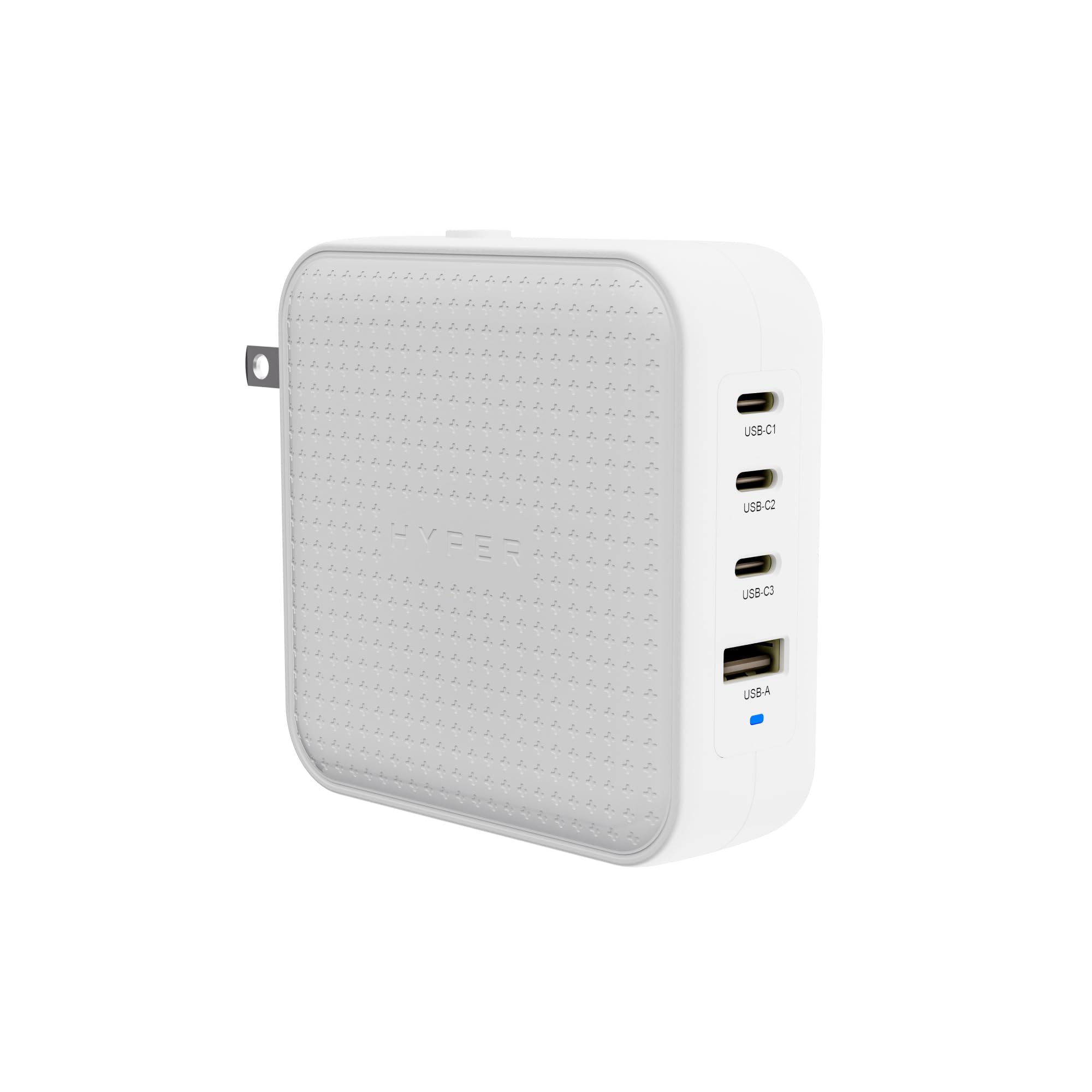
Image: HyperJuice 100W GaN Travel Charger, front view.
പാക്കേജ് ഉള്ളടക്കം
ആരംഭിക്കുന്നതിന് മുമ്പ്, നിങ്ങളുടെ പാക്കേജിൽ എല്ലാ ഇനങ്ങളും ഉണ്ടെന്ന് ഉറപ്പാക്കുക:
- HyperJuice 100W GaN Travel Charger Unit
- EU Pin Adapter
- UK Pin Adapter
- AU Pin Adapter
- C8 Adapter (for desktop use with a separate power cord)
- ഉപയോക്തൃ ഗൈഡും ഡോക്യുമെൻ്റേഷനും
വീഡിയോ: അൺബോക്സിംഗ്, പിന്നെയുംview of the HyperJuice 100W USB C Charger Block Portable Charger, showing the charger unit and included adapters.
സജ്ജമാക്കുക
- ശരിയായ അഡാപ്റ്റർ തിരഞ്ഞെടുക്കുക: Choose the appropriate pin adapter (EU, UK, AU, or the built-in US flat blade) for your region.
- അഡാപ്റ്റർ അറ്റാച്ചുചെയ്യുക: Align the chosen adapter with the charger unit and slide it into place until it clicks securely. For the built-in US flat blade, simply flip it out.
- പവറിലേക്ക് ബന്ധിപ്പിക്കുക: Plug the charger into a wall outlet. The charger is compatible with input voltag240V വരെ എസി.
- Desktop Charging (Optional): If you prefer a desktop setup, detach the travel adapter and connect the included C8 adapter. Then, attach a standard C8 power cord (sold separately) to the C8 adapter and plug it into a wall outlet. This extends the reach and provides flexible placement.

Image: The HyperJuice 100W GaN Travel Charger shown with its various global plug adapters, highlighting its travel-ready design.

Image: The HyperJuice 100W GaN Travel Charger configured with the C8 adapter, demonstrating its use as a desktop charging solution.
പ്രവർത്തന നിർദ്ദേശങ്ങൾ
The HyperJuice 100W GaN Travel Charger features three USB-C ports and one USB-A port, allowing for versatile charging of multiple devices.
- ബന്ധിപ്പിക്കുന്ന ഉപകരണങ്ങൾ: Use appropriate USB-C to USB-C or USB-A to device cables to connect your electronics to the charger ports.
- ഒരേസമയം ചാർജിംഗ്: The charger can power up to four devices concurrently. Its Smart Power Distribution Technology intelligently allocates power to each connected device for optimal charging efficiency.
- ഫാസ്റ്റ് ചാർജിംഗ്: The top two USB-C ports support 100W PD 3.0 speeds, capable of charging a MacBook Pro 14-inch from 0-50% in approximately 27 minutes. For iPhones, it can achieve 0-50% charge in about 30 minutes.
- Intelligent Power Delivery (PPS): The charger utilizes Programmable Power Supply (PPS) to dynamically adjust the wattage delivered to your device, ensuring it receives the optimal power level up to the port's maximum capacity.

Image: The HyperJuice 100W GaN Travel Charger connected to a wall outlet, simultaneously charging a laptop, tablet, smartphone, and headphones.

Image: The HyperJuice 100W GaN Travel Charger fast charging an iPhone, illustrating its intelligent power delivery.
സുരക്ഷയും കാര്യക്ഷമതയും
The HyperJuice 100W GaN Travel Charger is engineered for commercial-grade performance, prioritizing safety, efficiency, and durability.
- GaN ടെക്നോളജി: Gallium Nitride (GaN) technology enhances charging efficiency by up to 95%, reducing energy waste and allowing for a more compact and lightweight design compared to traditional silicone chargers.
- ഒപ്റ്റിമൈസ് ചെയ്ത തെർമൽ മാനേജ്മെന്റ്: The charger features an advanced thermal management system that allows it to operate 22% cooler than leading charger brands, ensuring stable and safe charging throughout its cycle.
- സുരക്ഷാ പരീക്ഷിച്ചു: Designed with upgraded safety features to protect your devices from overcurrent, overvoltagഇ, അമിത ചൂടാക്കൽ, ഷോർട്ട് സർക്യൂട്ടുകൾ.

Image: Graphic illustrating the commercial-grade design, maximum efficiency, upgraded safety features, and supreme reliability of the charger.

Image: Visual representation of GaN technology within the charger, emphasizing its compact and efficient nature.

ചിത്രം: ആന്തരികം view of the charger's circuit board, highlighting its thermal management design for cooler operation.
സ്പെസിഫിക്കേഷനുകൾ
| ബ്രാൻഡ് | ഹൈപ്പർ |
| മോഡൽ നമ്പർ | HJ1002WHWWGL |
| ആകെ വാട്ട്tage | 100W |
| മൊത്തം USB പോർട്ടുകൾ | 4 (3x യുഎസ്ബി-സി, 1x യുഎസ്ബി-എ) |
| കണക്റ്റർ തരം | യുഎസ്ബി ടൈപ്പ് സി, യുഎസ്ബി ടൈപ്പ് എ |
| അനുയോജ്യമായ ഉപകരണങ്ങൾ | USB-C Devices; USB-A Devices; PD 3.0; PPS; QC 2.0+/ 3.1 |
| ഇൻപുട്ട് വോളിയംtage | 240 വോൾട്ട് (എസി) |
| Putട്ട്പുട്ട് വോളിയംtage | 20 വോൾട്ട് (DC) |
| ഔട്ട്പുട്ട് കറൻ്റ് | 5 Amps |
| പവർ ഉറവിടം | കോർഡഡ് ഇലക്ട്രിക് |
| പ്രത്യേക ഫീച്ചർ | Travel (with interchangeable EU, UK, AU adapters) |
| നിറം | വെള്ള |
| ഇനത്തിൻ്റെ ഭാരം | 0.75 പൗണ്ട് |

Image: Diagram showing the USB-C and USB-A ports on the charger, along with a list of compatible devices and charging protocols.
മെയിൻ്റനൻസ്
- Keep the charger clean and dry. Use a soft, dry cloth to wipe the surface.
- Avoid exposing the charger to extreme temperatures, humidity, or direct sunlight.
- Do not attempt to disassemble or repair the charger yourself. This will void the warranty and may cause damage or injury.
- ഉപയോഗത്തിലില്ലാത്തപ്പോൾ തണുത്തതും ഉണങ്ങിയതുമായ സ്ഥലത്ത് ചാർജർ സൂക്ഷിക്കുക.
ട്രബിൾഷൂട്ടിംഗ്
If you encounter issues with your HyperJuice 100W GaN Travel Charger, please refer to the following common solutions:
- പവർ ഔട്ട്പുട്ട് ഇല്ല:
- ചാർജർ ഒരു വർക്കിംഗ് വാൾ ഔട്ട്ലെറ്റിൽ സുരക്ഷിതമായി പ്ലഗ് ചെയ്തിട്ടുണ്ടെന്ന് ഉറപ്പാക്കുക.
- Verify that the correct regional adapter is firmly attached to the charger unit.
- Check if the power outlet itself is functional by plugging in another device.
- സ്ലോ ചാർജിംഗ്:
- Confirm that your device and cable support fast charging protocols (PD 3.0, PPS, QC 2.0+/3.1).
- Ensure you are using a USB-C port for high-power devices like laptops, as USB-A ports have lower output.
- If multiple devices are connected, the power is distributed. Disconnecting less critical devices may increase charging speed for primary devices.
- ഉപകരണം തിരിച്ചറിഞ്ഞിട്ടില്ല:
- മറ്റൊരു ചാർജിംഗ് കേബിൾ പരീക്ഷിക്കുക.
- Connect the device to a different port on the charger.
- നിങ്ങളുടെ ഉപകരണം പുനരാരംഭിക്കുക.
- അമിത ചൂടാക്കൽ:
- While the charger has optimized thermal management, ensure it is used in a well-ventilated area and not covered.
- If the charger feels excessively hot, disconnect it immediately and allow it to cool down before reuse.
If these steps do not resolve the issue, please contact Hyper customer support.
വാറൻ്റിയും പിന്തുണയും
Hyper products are designed for reliability and performance. For specific warranty details and terms, please refer to the documentation included in your product package or visit the official Hyper webസൈറ്റ്.
For technical support, troubleshooting assistance, or product inquiries, please contact Hyper customer service through their official channels. Keep your purchase receipt and product model number (HJ1002WHWWGL) handy for faster service.
Ask a question about this manual
Ask about setup, troubleshooting, compatibility, parts, safety, or missing instructions. Manuals+ will review the question and use this page’s manual context to help answer it.