
BT028C
BT028C Cat Ear Headset Bluetooth Headphones User Manual
മോഡൽ: BT028C
ആമുഖം
വാങ്ങിയതിന് നന്ദി.asing the BT028C Cat Ear Headset Bluetooth Headphones. This manual provides detailed instructions on how to set up, operate, and maintain your new headphones. Please read this manual carefully before use to ensure proper functionality and to extend the lifespan of your device.
പാക്കേജ് ഉള്ളടക്കം
- BT028C Cat Ear Headset Bluetooth Headphones
- ഓഡിയോ കേബിൾ (3.5mm)
- ചാർജിംഗ് കേബിൾ (USB)
- ഉപയോക്തൃ മാനുവൽ (ഈ പ്രമാണം)
ഉൽപ്പന്നം കഴിഞ്ഞുview
The BT028C headphones feature a unique cat ear design with integrated LED lights, offering both wireless Bluetooth 5.0 connectivity and a wired 3.5mm audio option. They are designed for comfort and extended use, suitable for various entertainment purposes.

Figure 1: BT028C Cat Ear Headset in Turquoise. This image displays the overall design of the headphones, highlighting the cat ear features and the turquoise color variant.

ചിത്രം 2: വശം view of the BT028C headphones showing control buttons for volume adjustment, track navigation, and power on the earcup.

Figure 3: BT028C headphones with illuminated cat ears, demonstrating the light-up feature that adds a unique visual element.

Figure 4: The BT028C headphones folded for compact storage and enhanced portability, ideal for travel.
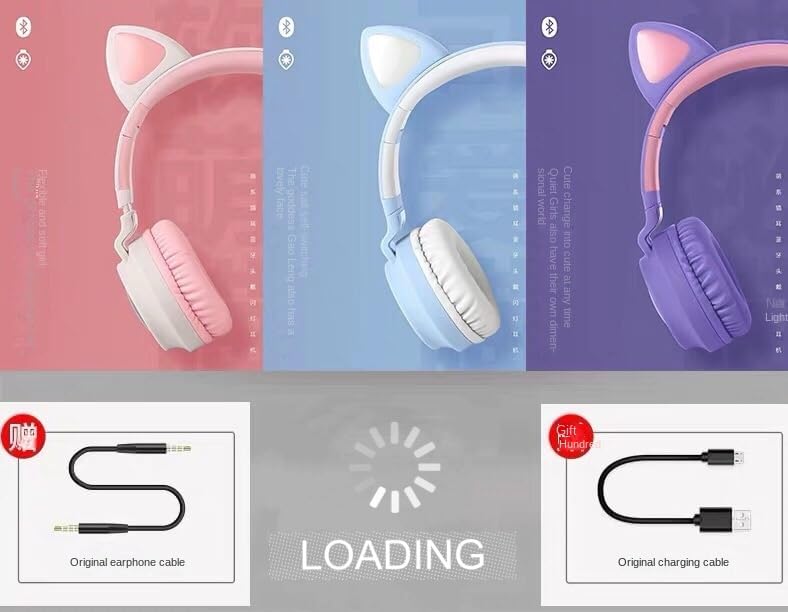
Figure 5: Various color options of the BT028C headphones along with the included 3.5mm audio cable and USB charging cable.
സജ്ജമാക്കുക
1. ഹെഡ്ഫോണുകൾ ചാർജ് ചെയ്യുന്നു
Before first use, fully charge the headphones. Connect the provided USB charging cable to the charging port on the headphones and the other end to a USB power source (e.g., computer USB port, wall adapter). The charging indicator light will illuminate during charging and turn off when fully charged.
- ചാർജിംഗ് സമയം: ഫുൾ ചാർജിനായി ഏകദേശം 2.5 മണിക്കൂർ.
- ബാറ്ററി ലൈഫ്: Over 8 hours of continuous use on a full charge.
2. Bluetooth Pairing (Wireless Mode)
- ഹെഡ്ഫോണുകൾ പൂർണ്ണമായും ചാർജ് ചെയ്തിട്ടുണ്ടെന്നും പവർ ഓഫ് ചെയ്തിട്ടുണ്ടെന്നും ഉറപ്പാക്കുക.
- Press and hold the Power button on the headphones until the indicator light flashes blue and red, indicating pairing mode.
- നിങ്ങളുടെ ഉപകരണത്തിൽ (സ്മാർട്ട്ഫോൺ, ടാബ്ലെറ്റ്, ലാപ്ടോപ്പ്), ബ്ലൂടൂത്ത് പ്രവർത്തനക്ഷമമാക്കി ലഭ്യമായ ഉപകരണങ്ങൾക്കായി തിരയുക.
- Select "BT028C" from the list of found devices.
- Once connected, the indicator light on the headphones will turn solid blue or flash slowly.
- The headphones have a transmission range of up to 10 meters (33 feet) in an open area.
3. വയർഡ് കണക്ഷൻ (ഓക്സ് മോഡ്)
To use the headphones in wired mode, connect one end of the provided 3.5mm audio cable to the AUX port on the headphones and the other end to the 3.5mm audio jack of your device. The headphones will automatically switch to wired mode, and the battery will not be consumed.
പ്രവർത്തന നിർദ്ദേശങ്ങൾ
പവർ ഓൺ/ഓഫ്
- പവർ ഓൺ: Press and hold the Power button for approximately 3 seconds until the indicator light turns on.
- പവർ ഓഫ്: ഇൻഡിക്കേറ്റർ ലൈറ്റ് ഓഫ് ആകുന്നതുവരെ ഏകദേശം 3 സെക്കൻഡ് നേരത്തേക്ക് പവർ ബട്ടൺ അമർത്തിപ്പിടിക്കുക.
സംഗീത പ്ലേബാക്ക്
- പ്ലേ/താൽക്കാലികമായി നിർത്തുക: മൾട്ടി-ഫംഗ്ഷൻ ബട്ടൺ (പലപ്പോഴും പവർ ബട്ടൺ അല്ലെങ്കിൽ ഒരു പ്രത്യേക പ്ലേ/പോസ് ബട്ടൺ) ഒരിക്കൽ അമർത്തുക.
- അടുത്ത ട്രാക്ക്: വോളിയം അപ്പ് (+) ബട്ടൺ അമർത്തിപ്പിടിക്കുക.
- മുമ്പത്തെ ട്രാക്ക്: വോളിയം ഡൗൺ (-) ബട്ടൺ അമർത്തിപ്പിടിക്കുക.
വോളിയം നിയന്ത്രണം
- വോളിയം കൂട്ടുക: Press the Volume Up (+) button briefly.
- വോളിയം താഴേക്ക്: Press the Volume Down (-) button briefly.
കോൾ പ്രവർത്തനങ്ങൾ
- ഉത്തരം/അവസാന കോൾ: മൾട്ടി-ഫംഗ്ഷൻ ബട്ടൺ ഒരിക്കൽ അമർത്തുക.
- കോൾ നിരസിക്കുക: മൾട്ടി-ഫംഗ്ഷൻ ബട്ടൺ 2 സെക്കൻഡ് അമർത്തിപ്പിടിക്കുക.
- അവസാന നമ്പർ വീണ്ടും ഡയൽ ചെയ്യുക: മൾട്ടി-ഫംഗ്ഷൻ ബട്ടൺ ഇരട്ട-അമർത്തുക.
Cat Ear Light Modes
The cat ears feature integrated LED lights. There is typically a dedicated button to control these lights. Press this button to cycle through different light modes (e.g., solid on, flashing, off). Refer to the specific button on your headphones for this function.
മെയിൻ്റനൻസ്
വൃത്തിയാക്കൽ
Wipe the headphones with a soft, dry, lint-free cloth. Do not use abrasive cleaners, alcohol, or chemical solvents, as these may damage the surface and internal components. The headphones have life waterproofing, but avoid submerging them in water.
സംഭരണം
When not in use, store the headphones in a cool, dry place away from direct sunlight and extreme temperatures. If storing for an extended period, charge the headphones periodically to maintain battery health.
ട്രബിൾഷൂട്ടിംഗ്
| പ്രശ്നം | സാധ്യമായ കാരണം | പരിഹാരം |
|---|---|---|
| ഹെഡ്ഫോണുകൾ പവർ ഓൺ ചെയ്യുന്നില്ല. | കുറഞ്ഞ ബാറ്ററി. | ഹെഡ്ഫോണുകൾ പൂർണ്ണമായും ചാർജ് ചെയ്യുക. |
| ഹെഡ്ഫോണുകളിൽ നിന്ന് ശബ്ദമില്ല. | Volume too low; not paired correctly; wired cable not fully inserted. | Increase volume on headphones and device; re-pair Bluetooth; ensure 3.5mm cable is fully inserted. |
| ഉപകരണവുമായി ജോടിയാക്കാൻ കഴിയില്ല. | ഹെഡ്ഫോണുകൾ ജോടിയാക്കൽ മോഡിൽ ഇല്ല; ഉപകരണം ബ്ലൂടൂത്ത് ഓഫാണ്; ഉപകരണത്തിൽ നിന്ന് വളരെ അകലെയാണ്. | Ensure headphones are flashing red/blue; turn on device Bluetooth; move headphones closer to device (within 10m). |
| പൂച്ച ഇയർ ലൈറ്റുകൾ പ്രവർത്തിക്കുന്നില്ല. | Lights turned off; low battery. | Press the light control button; charge the headphones. |
സ്പെസിഫിക്കേഷനുകൾ
- മോഡലിൻ്റെ പേര്: BT028C
- ബ്ലൂടൂത്ത് പ്രോട്ടോക്കോൾ: 5.0
- ട്രാൻസ്മിഷൻ ശ്രേണി: 10 മീറ്റർ (33 അടി)
- ചിപ്പ് തരം: ജെറി
- ബാറ്ററി ലൈഫ്: 8 മണിക്കൂറിലധികം
- ചാർജിംഗ് സമയം: 2.5 മണിക്കൂർ
- മെറ്റീരിയൽ: അക്രിലോണിട്രൈൽ ബ്യൂട്ടാഡീൻ സ്റ്റൈറൈൻ (എബിഎസ്)
- ഉപയോഗം: Head worn
- ശൈലി: Cartoon style
- വാട്ടർപ്രൂഫ് പ്രകടനം: Life waterproofing
- കണക്റ്റിവിറ്റി ടെക്നോളജി: വയർലെസ്, വയർഡ്
- ഹെഡ്ഫോൺ ജാക്ക്: 3.5 mm ജാക്ക്
- സംവേദനക്ഷമത: 105 ഡി.ബി
- ശബ്ദ നിയന്ത്രണം: സൗണ്ട് ഐസൊലേഷൻ
- പ്രതിരോധം: 32 ഓം
- നിർമ്മാതാവ്: Miaotou Yongle Era Industrial Co
വാറൻ്റിയും പിന്തുണയും
For warranty information or technical support, please refer to the purchase platform or contact the seller directly. Keep your proof of purchase for any warranty claims.
വിൽപ്പനക്കാരൻ: Wilson’s novelty shop
For further assistance, you may visit the product page on Amazon: ആമസോൺ ഉൽപ്പന്ന പേജ്
Ask a question about this manual
Ask about setup, troubleshooting, compatibility, parts, safety, or missing instructions. Manuals+ will review the question and use this page’s manual context to help answer it.