
TRIUMPHKEY 0430
TRIUMPHKEY Electric Glass Standing Desk User Manual
മോഡൽ: 0430
ആമുഖം
This manual provides detailed instructions for the assembly, operation, and maintenance of your TRIUMPHKEY Electric Glass Standing Desk. Please read this manual thoroughly before use to ensure safe and efficient operation.
The TRIUMPHKEY Electric Glass Standing Desk is designed to enhance your work or study space with its elegant design and functional features. It boasts a durable tempered glass surface, an electric height adjustment system with memory presets, integrated USB charging ports, and a convenient storage drawer.
സുരക്ഷാ നിർദ്ദേശങ്ങൾ
- ഉപയോഗിക്കുന്നതിന് മുമ്പ് എല്ലാ ഘടകങ്ങളും സുരക്ഷിതമായി ഉറപ്പിച്ചിട്ടുണ്ടെന്ന് ഉറപ്പാക്കുക.
- ഉയരം ക്രമീകരിക്കുമ്പോൾ കൈകളും വസ്തുക്കളും ചലിക്കുന്ന ഭാഗങ്ങളിൽ നിന്ന് അകറ്റി നിർത്തുക.
- Do not overload the desk. Refer to specifications for weight capacity.
- നൽകിയിരിക്കുന്ന പവർ അഡാപ്റ്റർ മാത്രം ഉപയോഗിക്കുക.
- Do not attempt to disassemble or repair the motor or electrical components yourself. Contact qualified service personnel.
- Keep liquids away from electrical components and charging ports.
- Place the desk on a level and stable surface.
പാക്കേജ് ഉള്ളടക്കം
അസംബ്ലി ചെയ്യുന്നതിനുമുമ്പ്, എല്ലാ ഭാഗങ്ങളും നിലവിലുണ്ടെന്നും കേടുപാടുകൾ സംഭവിച്ചിട്ടില്ലെന്നും ഉറപ്പാക്കുക. ഏതെങ്കിലും ഭാഗങ്ങൾ നഷ്ടപ്പെട്ടിട്ടുണ്ടെങ്കിലോ കേടുപാടുകൾ സംഭവിച്ചിട്ടുണ്ടെങ്കിലോ, ദയവായി ഉപഭോക്തൃ പിന്തുണയുമായി ബന്ധപ്പെടുക.
- Glass Desktop with Integrated Drawer and Control Panel
- ഡെസ്ക് കാലുകൾ (2)
- Foot Supports (2)
- ക്രോസ്ബാർ/ഫ്രെയിം ഘടകങ്ങൾ
- പവർ അഡാപ്റ്ററും കേബിളും
- അസംബ്ലി ഹാർഡ്വെയർ (സ്ക്രൂകൾ, റെഞ്ച് മുതലായവ)
- ഉപയോക്തൃ മാനുവൽ (ഈ പ്രമാണം)

Image: Packaging of the TRIUMPHKEY Electric Glass Standing Desk, showing the brown cardboard box with product details and handling instructions.
സജ്ജീകരണവും അസംബ്ലിയും
The TRIUMPHKEY Electric Glass Standing Desk is designed for straightforward assembly. The table plate (glass top with drawer and control panel) comes as a single unit, simplifying the process.
- ഘടകങ്ങൾ അൺപാക്ക് ചെയ്യുക: പാക്കേജിംഗിൽ നിന്ന് എല്ലാ ഭാഗങ്ങളും ശ്രദ്ധാപൂർവ്വം നീക്കം ചെയ്ത് പോറലുകൾ ഉണ്ടാകാതിരിക്കാൻ മൃദുവായതും വൃത്തിയുള്ളതുമായ ഒരു പ്രതലത്തിൽ വയ്ക്കുക.
- ഡെസ്ക്ടോപ്പിൽ കാലുകൾ ഘടിപ്പിക്കുക: Align the desk legs with the pre-drilled holes on the underside of the glass desktop. Secure them using the provided screws and tools. Ensure the motor and cable connections are not pinched.
- Attach Foot Supports: Connect the foot supports to the bottom of each desk leg. Tighten all screws firmly.
- പവർ ബന്ധിപ്പിക്കുക: Plug the power adapter into the desk's power input port, then plug the adapter into a standard electrical outlet.
- പ്രാരംഭ പരിശോധന: Before placing items on the desk, perform a test run of the height adjustment function to ensure smooth operation.

Image: An assembled TRIUMPHKEY Electric Glass Standing Desk, white in color, with a monitor and keyboard, situated in a modern room with plants and wooden flooring.
പ്രവർത്തന നിർദ്ദേശങ്ങൾ
ഉയരം ക്രമീകരിക്കൽ
The desk features an electric lift system allowing height adjustment between 72cm (28.3 inches) and 118cm (46.5 inches).
- ഉയരം ക്രമീകരിക്കുന്നു: ഉപയോഗിക്കുക യുപി (▲) ഒപ്പം ഡൗൺ (▼) buttons on the control panel to raise or lower the desk to your desired height.
- മെമ്മറി പ്രീസെറ്റുകൾ: The desk can store up to 3 common height settings.
- നിങ്ങൾക്ക് ആവശ്യമുള്ള ഉയരത്തിലേക്ക് ഡെസ്ക് ക്രമീകരിക്കുക.
- Press and hold one of the memory buttons (1, 2, അല്ലെങ്കിൽ 3) until you hear a beep or the display flashes, indicating the height has been saved.
- സംരക്ഷിച്ച ഉയരം തിരിച്ചുവിളിക്കാൻ, അനുബന്ധ മെമ്മറി ബട്ടൺ അമർത്തുക (1, 2, അല്ലെങ്കിൽ 3). The desk will automatically move to the stored position.

Image: Two TRIUMPHKEY Electric Glass Standing Desks side-by-side, illustrating the height adjustment range from a lower sitting position to a higher standing position.

Image: Close-up of the desk's control panel, showing the UP/DOWN arrows, three memory preset buttons (1, 2, 3), a USB-A charging port, and a Type-C charging port.
Integrated Charging Ports
The desk is equipped with USB-A and Type-C charging ports for convenient charging of your electronic devices.
- Simply connect your smartphone, tablet, or other compatible device to the USB-A or ടൈപ്പ്-സി port on the control panel.
- Ensure the desk is powered on for the charging ports to function.
സ്റ്റോറേജ് ഡ്രോയർ
A built-in drawer provides organized storage for office supplies, keeping your desktop clutter-free.
- Pull the drawer gently to open and push to close.
- The drawer is divided into compartments for efficient organization of pens, notebooks, and other small items.

Image: The open storage drawer of the desk, displaying its internal compartments and dimensions (e.g., 62cm width, 30cm depth, 5cm height for main compartment, with smaller sections).
Glass Desktop Features
The tempered glass surface offers both aesthetic appeal and practical functionality.
- Writable Surface: The glass can be used as a whiteboard for notes and ideas. Use dry-erase markers and wipe clean with a soft cloth.
- വൃത്തിയാക്കാൻ എളുപ്പമാണ്: The smooth glass surface is simple to clean with a damp തുണിയും മിതമായ ക്ലീനറും.
- ഈട്: The 5mm thick tempered glass provides a sturdy and wear-resistant work surface.

ചിത്രം: ഒരു ക്ലോസ്-അപ്പ് view of the glass desktop, showing text written on it with a dry-erase marker, and icons indicating its writable surface, easy-to-clean property, and 50kg weight capacity.
മെയിൻ്റനൻസ്
- ഗ്ലാസ് വൃത്തിയാക്കൽ: Use a soft, lint-free cloth and a glass cleaner or mild soap and water solution. Avoid abrasive cleaners or harsh chemicals that could damage the glass.
- ഫ്രെയിം ക്ലീനിംഗ്: പരസ്യം ഉപയോഗിച്ച് മെറ്റൽ ഫ്രെയിം തുടയ്ക്കുകamp തുണി. തുരുമ്പ് തടയാൻ ഉടൻ ഉണക്കുക.
- Motor and Cables: Periodically check the motor and power cables for any signs of wear or damage. Ensure cables are not tangled or pinched.
- പൊതു പരിചരണം: Avoid placing extremely hot or cold items directly on the glass surface without protection. Do not drop heavy or sharp objects on the glass.
ട്രബിൾഷൂട്ടിംഗ്
| പ്രശ്നം | സാധ്യമായ കാരണം | പരിഹാരം |
|---|---|---|
| ഡെസ്ക് അനങ്ങുന്നില്ല. | പവർ കേബിൾ വിച്ഛേദിക്കപ്പെട്ടു; ഓവർലോഡ്; മോട്ടോർ തകരാർ. | Check power connection. Reduce weight on desk. Unplug and replug power after 30 seconds to reset. |
| Uneven height adjustment. | Obstruction; Unbalanced load. | Ensure no obstructions. Distribute weight evenly on the desktop. |
| ഓപ്പറേഷൻ സമയത്ത് ശബ്ദം. | Normal motor sound; Loose components. | A slight motor sound is normal. Check all screws and connections for tightness. |
| ചാർജിംഗ് പോർട്ടുകൾ പ്രവർത്തിക്കുന്നില്ല. | Desk not powered on; Device incompatibility. | Ensure desk is plugged in and powered. Try a different device or cable. |
ഈ പരിഹാരങ്ങൾ പരീക്ഷിച്ചതിനുശേഷവും പ്രശ്നം നിലനിൽക്കുകയാണെങ്കിൽ, ദയവായി ഉപഭോക്തൃ പിന്തുണയുമായി ബന്ധപ്പെടുക.
സ്പെസിഫിക്കേഷനുകൾ
| ഫീച്ചർ | വിശദാംശങ്ങൾ |
|---|---|
| ബ്രാൻഡ് | ട്രയംഫ്കി |
| മോഡൽ നമ്പർ | 0430 |
| ഉൽപ്പന്ന അളവുകൾ (D x W x H) | 47.24"D x 23.62"W x 46.46"H (120cm x 60cm x 72-118cm) |
| ക്രമീകരിക്കാവുന്ന ഉയരം പരിധി | 72 സെ.മീ - 118 സെ.മീ (28.3 ഇഞ്ച് - 46.5 ഇഞ്ച്) |
| നിറം | വെള്ള |
| മികച്ച മെറ്റീരിയൽ തരം | Tempered Glass (5mm thick) |
| അടിസ്ഥാന മെറ്റീരിയൽ | അലോയ് സ്റ്റീൽ |
| ഭാരം ശേഷി | 50 കി.ഗ്രാം (110 പൗണ്ട്) |
| ഇനത്തിൻ്റെ ഭാരം | 30 കിലോഗ്രാം (66 പൗണ്ട്) |
| പ്രത്യേക സവിശേഷതകൾ | Adjustable Height, Electric, Built-in USB-A & Type-C Ports, Storage Drawer, Writable Glass Surface, 3 Memory Presets |
| അസംബ്ലി ആവശ്യമാണ് | അതെ |
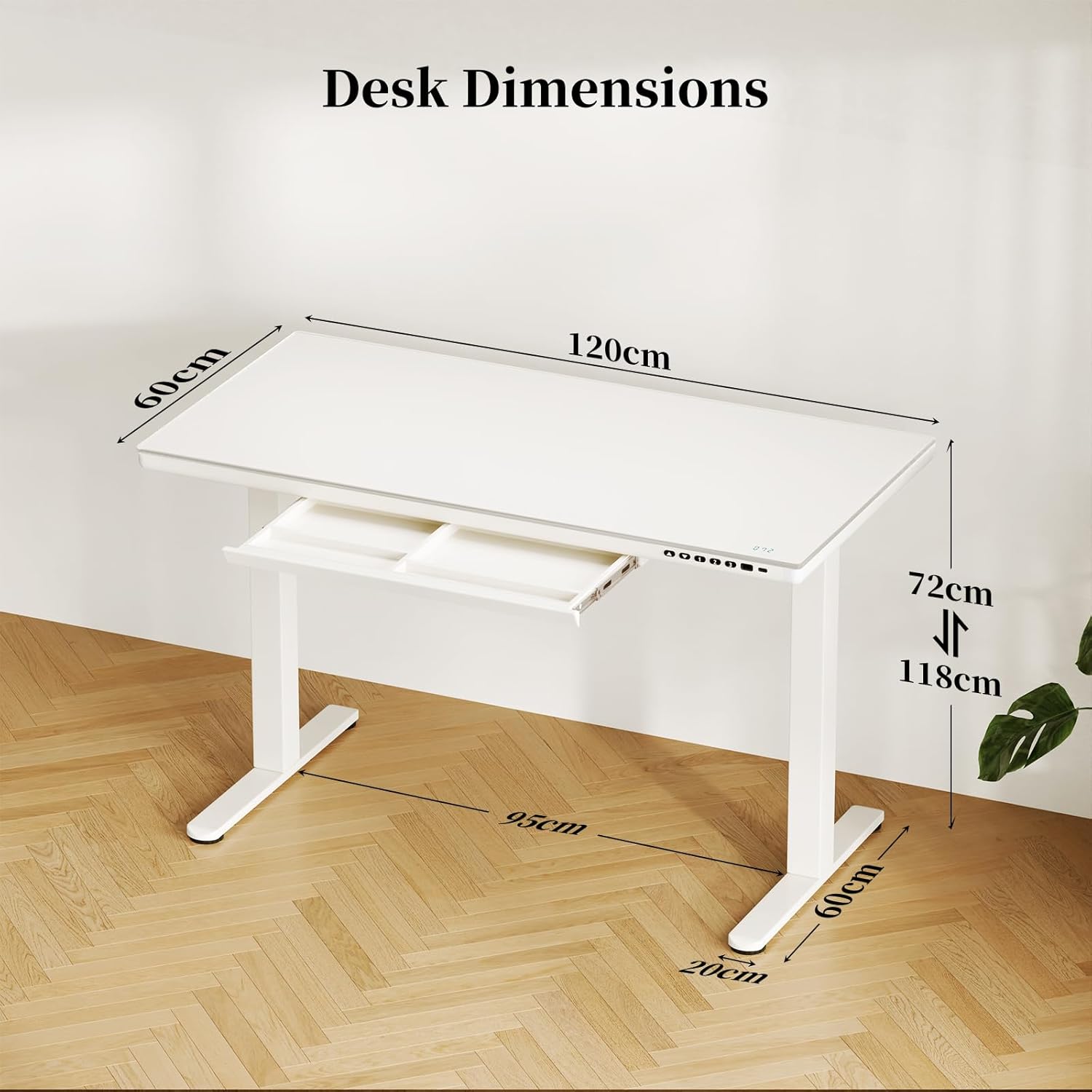
Image: Diagram showing the dimensions of the TRIUMPHKEY Electric Glass Standing Desk: 120cm length, 60cm width, and adjustable height from 72cm to 118cm.
വാറൻ്റിയും പിന്തുണയും
For warranty information or technical support, please refer to the contact details provided with your purchase or visit the official TRIUMPHKEY webസൈറ്റ്.
You can also reach out to customer support via the platform where you purchased the product.

Image: A generic icon representing customer support services.
Ask a question about this manual
Ask about setup, troubleshooting, compatibility, parts, safety, or missing instructions. Manuals+ will review the question and use this page’s manual context to help answer it.