
1. ആമുഖം
This manual provides detailed instructions for the proper use and care of your VILTROX AF 16mm f/1.8 Z Full Frame Lens. Designed for Nikon Z-mount cameras, this ultra-wide-angle prime lens offers a large F1.8 aperture, advanced autofocus capabilities, and a built-in LCD screen for enhanced control and information display. Please read this manual thoroughly before using the lens to ensure optimal performance and longevity.
2. ഉൽപ്പന്നം കഴിഞ്ഞുview
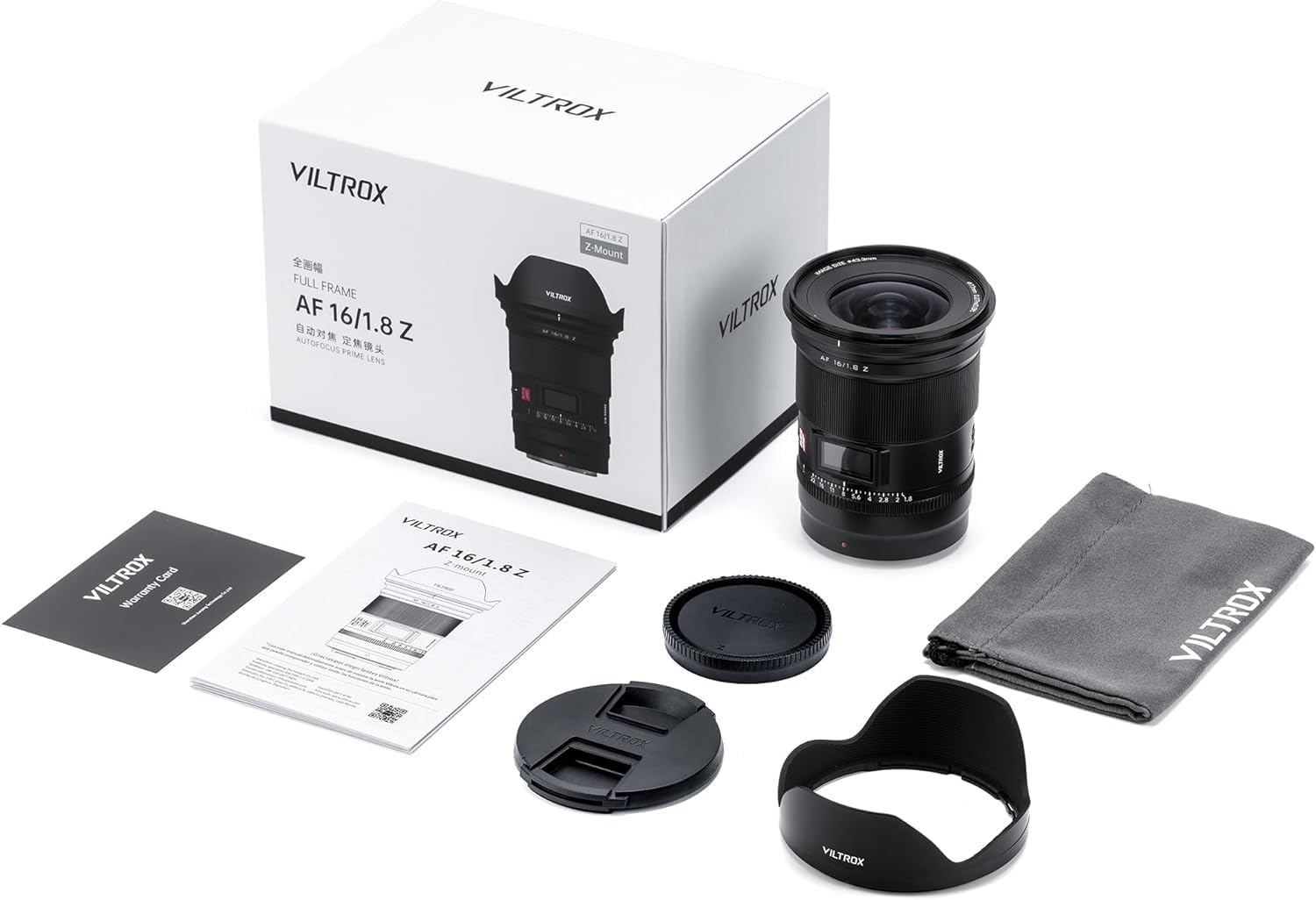
2.1 പാക്കേജ് ഉള്ളടക്കം
നിങ്ങളുടെ പാക്കേജിൽ എല്ലാ ഇനങ്ങളും ഉണ്ടെന്ന് ഉറപ്പാക്കുക:
- Viltrox AF 16mm f/1.8 Lens
- 1 x ലെൻസ് ക്യാപ്പ്
- 1 x Rear Lens Cap
- 1 x Lens Hood
- 1 x ഉൽപ്പന്ന മാനുവൽ
2.2 Lens Components and Features
The VILTROX AF 16mm f/1.8 Z lens incorporates several key features for optimal photographic performance:
- വലിയ F1.8 അപ്പർച്ചർ: Enables excellent low-light performance and shallow depth of field for creative bokeh.
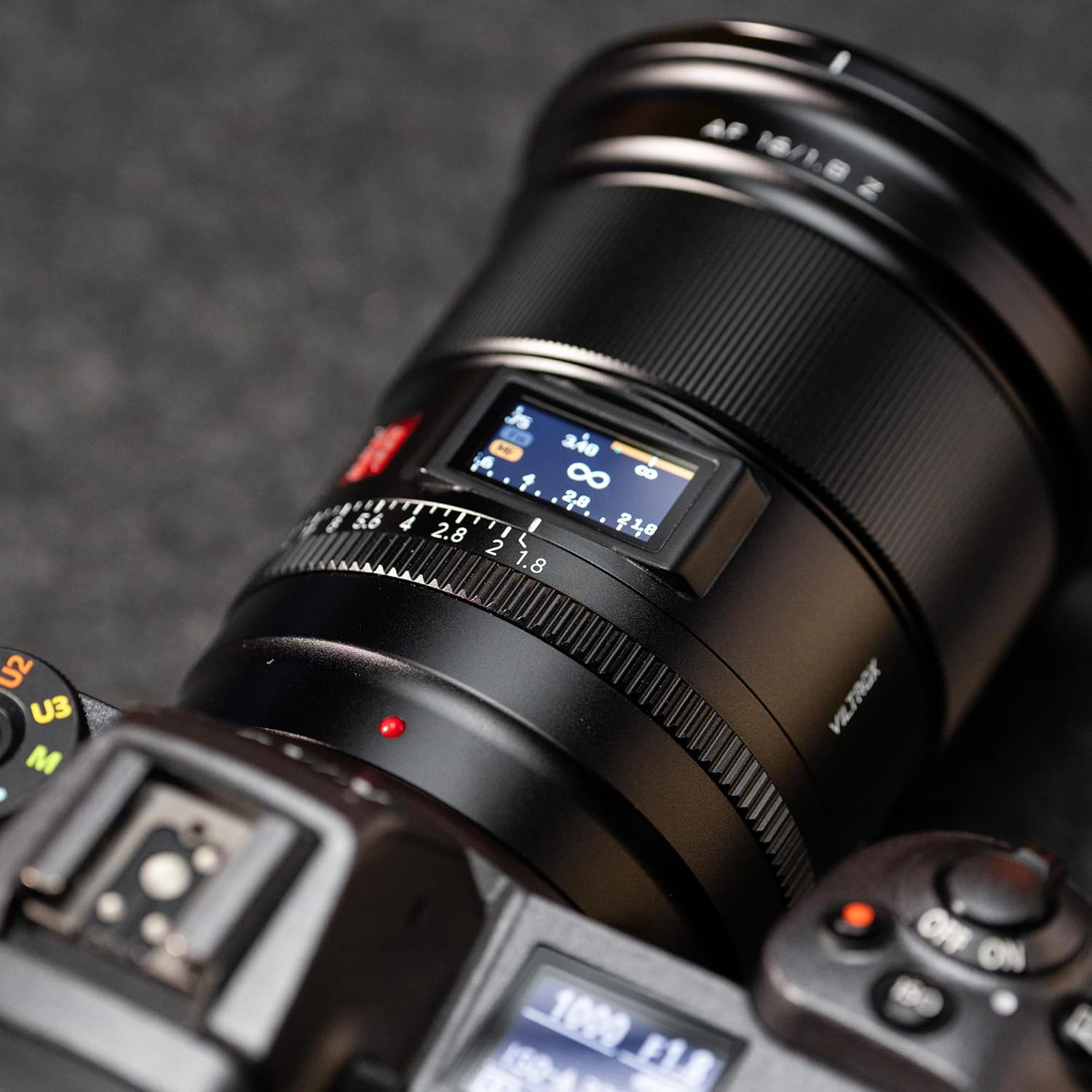
- Built-in LCD Display: Shows critical shooting parameters such as aperture value and focus distance in real-time.
- SMT Stepping Motor: Provides fast, accurate, and quiet autofocus, suitable for both still photography and video recording.
- AF/MF സ്വിച്ച്: Allows seamless transition between autofocus and manual focus modes.
- Click Aperture Ring Switch: Toggle between a clicked aperture ring for tactile feedback or a clickless aperture for smooth video adjustments.
- Customizable Function Buttons: Two rubber-covered buttons offer programmable functionality for quick access to preferred settings.
- വിപുലമായ ഒപ്റ്റിക്കൽ ഡിസൈൻ: Composed of 15 elements in 12 groups, including 4 ED glass and 3 aspherical lenses, to minimize distortion and ensure high image quality, sharpness, and contrast.
- Multi-layer Coating: Reduces flare and ghosting while enhancing light transmission.
- പൊടി തടയൽ: Designed with features to resist dust ingress.
- Firmware Upgrade Support: Allows for future performance enhancements and compatibility updates.


3. സജ്ജീകരണം
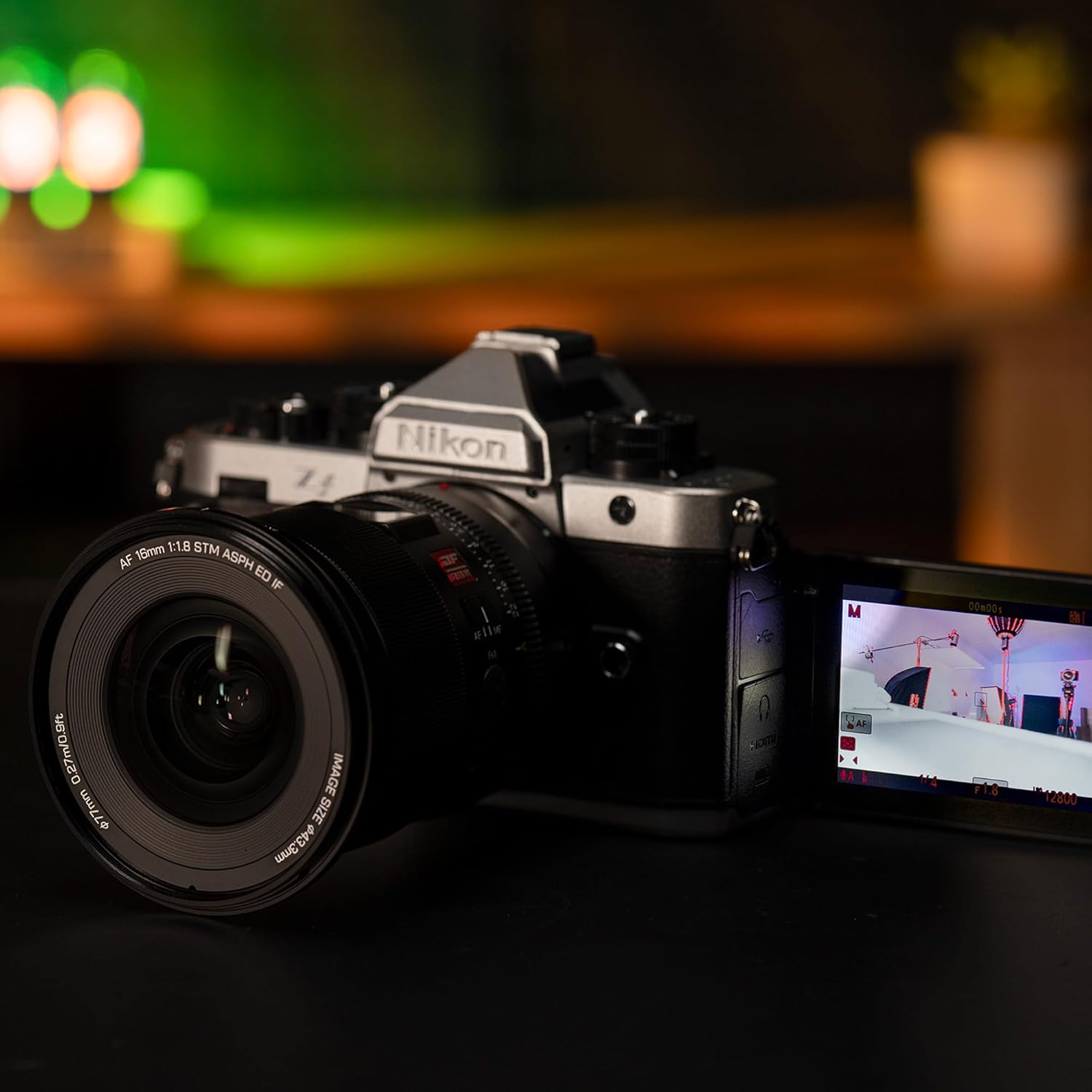
3.1 ലെൻസ് ഘടിപ്പിക്കൽ
- നിങ്ങളുടെ ക്യാമറ ഓഫാക്കിയിട്ടുണ്ടെന്ന് ഉറപ്പാക്കുക.
- Remove the rear lens cap from the VILTROX 16mm f/1.8 Z lens and the body cap from your Nikon Z-mount camera.
- ലെൻസ് ബാരലിലെ ചുവന്ന ഡോട്ട്, നിങ്ങളുടെ ക്യാമറയുടെ ലെൻസ് മൗണ്ടിലെ അനുബന്ധ ചുവന്ന ഡോട്ടുമായി വിന്യസിക്കുക.
- ക്യാമറ മൗണ്ടിലേക്ക് ലെൻസ് സൌമ്യമായി തിരുകുക, അത് സ്ഥലത്ത് ക്ലിക്ക് ചെയ്യുന്നത് വരെ ഘടികാരദിശയിൽ തിരിക്കുക. ലെൻസിനെ ബലമായി പിടിക്കരുത്.
- Attach the lens hood by aligning its mark with the mark on the front of the lens, then twist until it locks.
3.2 പ്രാരംഭ ക്രമീകരണങ്ങൾ
After attaching the lens, power on your camera. The lens's LCD screen will activate, displaying current aperture and focus distance. You may need to adjust camera settings to recognize the lens and enable autofocus.
4. പ്രവർത്തന നിർദ്ദേശങ്ങൾ
4.1 എൽസിഡി ഡിസ്പ്ലേ ഉപയോഗിക്കുന്നത്
The integrated LCD display provides real-time information:
- അപ്പേർച്ചർ മൂല്യം: Displays the current f-stop.
- ഫോക്കസ് ദൂരം: Shows the distance to the focused subject in meters (m) and feet (ft).
4.2 Autofocus (AF) and Manual Focus (MF) Switching
Locate the AF/MF switch on the side of the lens barrel. Slide the switch to your desired mode:
- AF (ഓട്ടോഫോക്കസ്): The lens will automatically focus on your subject. The SMT stepping motor ensures fast and quiet operation.
- എംഎഫ് (മാനുവൽ ഫോക്കസ്): Allows you to manually adjust focus using the focus ring on the lens.
4.3 Aperture Ring Operation
The lens features an aperture ring with a click switch:
- "ഓൺ" സ്ഥാനം: The aperture ring will provide tactile clicks at each f-stop, ideal for still photography where precise, stepped adjustments are preferred.
- "ഓഫ്" സ്ഥാനം: The aperture ring will operate smoothly without clicks, which is beneficial for video recording to achieve seamless aperture transitions.

4.4 ഇഷ്ടാനുസൃതമാക്കാവുന്ന ഫംഗ്ഷൻ ബട്ടണുകൾ
The lens is equipped with two customizable function buttons. Refer to your camera's manual for instructions on how to assign specific functions to these buttons, such as AF-ON, depth-of-field preview, or other preferred settings.
5. പരിപാലനം
5.1 ലെൻസ് വൃത്തിയാക്കൽ
- ലെൻസ് പ്രതലങ്ങളിൽ നിന്ന് പൊടി നീക്കം ചെയ്യാൻ മൃദുവായ, ലിന്റ് രഹിത തുണി അല്ലെങ്കിൽ ലെൻസ് ബ്രഷ് ഉപയോഗിക്കുക.
- For stubborn smudges or fingerprints, apply a small amount of lens cleaning solution to a clean microfiber cloth and gently wipe the lens in a circular motion from the center outwards.
- Never use abrasive materials or harsh chemicals, as these can damage the lens coatings.
- Avoid touching the glass elements directly with your fingers.
5.2 സംഭരണം
- When not in use, always attach the front and rear lens caps to protect the glass elements.
- ലെൻസ് തണുത്തതും വരണ്ടതുമായ സ്ഥലത്ത് സൂക്ഷിക്കുക, നേരിട്ടുള്ള സൂര്യപ്രകാശത്തിൽ നിന്നും കടുത്ത താപനിലയിൽ നിന്നും അകറ്റി നിർത്തുക.
- ദീർഘകാലത്തേക്ക് സൂക്ഷിക്കുകയാണെങ്കിൽ, പൂപ്പൽ വളർച്ച തടയാൻ ഒരു ഈർപ്പം കുറയ്ക്കുന്ന ഏജന്റ് ഉപയോഗിക്കുന്നത് പരിഗണിക്കുക.
6. പ്രശ്നപരിഹാരം
6.1 Lens Not Detected by Camera
- Ensure the lens is securely mounted to the camera body and has clicked into place.
- Power off the camera, remove the lens, clean the electronic contacts on both the lens and camera with a clean, dry cloth, then reattach the lens and power on.
- Check your camera's firmware version. Some users have reported compatibility issues with specific Nikon Z8 firmware versions (e.g., Firmware 5.10). Refer to the compatibility list below or VILTROX's official website for the latest firmware updates for your lens.
6.2 Autofocus Issues
- Verify the AF/MF switch on the lens is set to AF.
- Ensure there is sufficient light for the autofocus system to operate effectively.
- Check your camera's autofocus settings (e.g., AF area mode, AF-C/AF-S).
6.3 ഇമേജ് ഗുണനിലവാര ആശങ്കകൾ
- വിഗ്നിംഗ്: Noticeable vignetting (darkening at corners) may occur at the maximum aperture (f/1.8). Stopping down the aperture (e.g., to f/2.8 or smaller) can reduce this effect.
- ഫ്ലെയർ: When shooting directly into bright light sources, some lens flare may occur. Using the included lens hood can help mitigate this.
- മൃദുത്വം: While the lens is designed for sharpness, ensure proper focus. Slight softness at the extreme edges may be present at very wide apertures.
6.4 Firmware Compatibility Table
The following table outlines known compatibility with various Nikon Z camera models and firmware versions. It is recommended to keep both your camera and lens firmware updated for optimal performance.

7 സ്പെസിഫിക്കേഷനുകൾ
| ഫീച്ചർ | വിശദാംശങ്ങൾ |
|---|---|
| ബ്രാൻഡ് | വിൽട്രോക്സ് |
| മോഡൽ | AF 16mm f/1.8 Z |
| ഫോക്കൽ ലെങ്ത് | 16 മി.മീ |
| പരമാവധി അപ്പേർച്ചർ | f/1.8 |
| ലെൻസ് തരം | വൈഡ് ആംഗിൾ പ്രൈം |
| അനുയോജ്യമായ മൗണ്ടിംഗുകൾ | നിക്കോൺ ഇസഡ് |
| ഒപ്റ്റിക്കൽ ഡിസൈൻ | 15 elements in 12 groups (including 4 ED glass, 3 aspherical lenses) |
| ഓട്ടോഫോക്കസ് മോട്ടോർ | SMT Stepping Motor |
| ഉൽപ്പന്ന അളവുകൾ | 1.1 x 2.36 x 2.36 ഇഞ്ച് (ഏകദേശം, ഉൽപ്പന്ന ഡാറ്റയെ അടിസ്ഥാനമാക്കി) |
| ഇനത്തിൻ്റെ ഭാരം | 2.44 pounds (approximate, based on product data) |
8. വാറൻ്റിയും പിന്തുണയും
For warranty information, please refer to the warranty card included in your product package or visit the official VILTROX website. For technical support, troubleshooting assistance beyond this manual, or service inquiries, please contact VILTROX customer support directly through their official channels.
പിന്തുണയുമായി ബന്ധപ്പെടുമ്പോൾ നിങ്ങളുടെ വാങ്ങൽ രസീതും ഉൽപ്പന്ന സീരിയൽ നമ്പറും കൈവശം വയ്ക്കുക.