
1. പ്രധാന സുരക്ഷാ നിർദ്ദേശങ്ങൾ
Please read all instructions carefully before using this treadmill. Retain this manual for future reference.
- Always place the treadmill on a flat, stable surface. Do not place it on a carpet, as this may affect heat dissipation.
- ഓപ്പറേഷൻ സമയത്ത് ട്രെഡ്മില്ലിൽ നിന്ന് കുട്ടികളെയും വളർത്തുമൃഗങ്ങളെയും അകറ്റി നിർത്തുക.
- Ensure the safety key is properly attached before starting the treadmill. In case of emergency, pull the safety key to stop the machine.
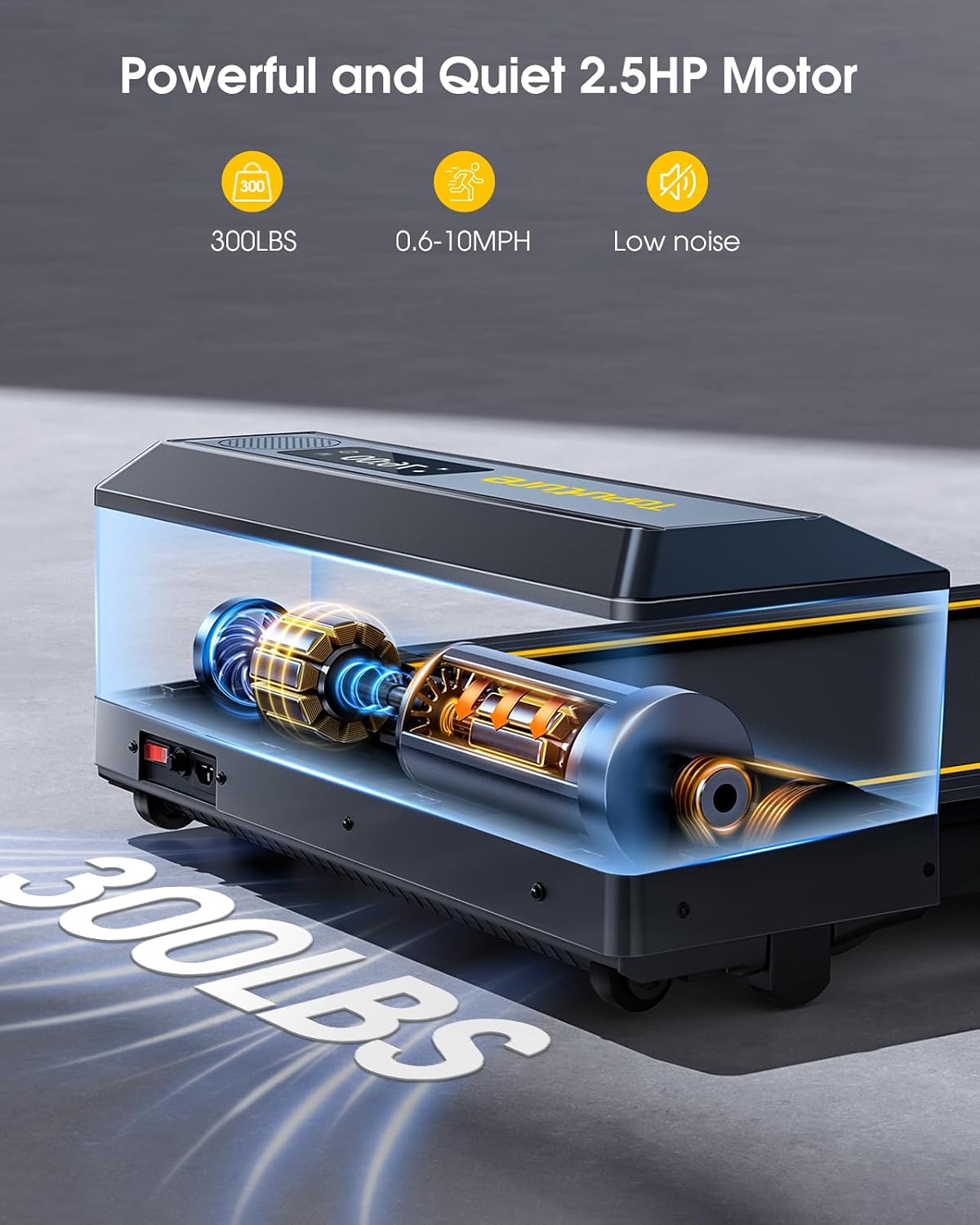
- പരമാവധി ഭാര ശേഷി 300 പൗണ്ട് (ഏകദേശം 136 കിലോഗ്രാം) കവിയരുത്.
- Wear appropriate athletic footwear. Avoid loose clothing that could get caught in moving parts.
- തലകറക്കം, ഓക്കാനം, നെഞ്ചുവേദന, അല്ലെങ്കിൽ മറ്റ് അസാധാരണ ലക്ഷണങ്ങൾ എന്നിവ അനുഭവപ്പെടുകയാണെങ്കിൽ, ഉടൻ തന്നെ വ്യായാമം നിർത്തി ഒരു ഡോക്ടറെ സമീപിക്കുക.
- Unplug the treadmill from the power outlet when not in use, before cleaning, or performing maintenance.
- ട്രെഡ്മില്ലിൽ കേടുപാടുകളുണ്ടെങ്കിൽ, അല്ലെങ്കിൽ അത് ശരിയായി പ്രവർത്തിക്കുന്നില്ലെങ്കിൽ, അത് പ്രവർത്തിപ്പിക്കരുത്.
2. പാക്കേജ് ഉള്ളടക്കം
പാക്കേജിൽ എല്ലാ ഘടകങ്ങളും ഉണ്ടെന്ന് ഉറപ്പാക്കുക:
- TOPUTURE 2-in-1 Folding Treadmill Unit
- റിമോട്ട് കൺട്രോൾ
- പവർ കോർഡ്
- ഉപയോക്തൃ മാനുവൽ (ഈ പ്രമാണം)
- Lubricant (for maintenance)
3. ഉൽപ്പന്നം കഴിഞ്ഞുview
The TOPUTURE 2-in-1 Folding Treadmill is designed for both walking and running, offering versatility for home and office use.
പ്രധാന സവിശേഷതകൾ:
- 2-ഇൻ-1 ഡിസൈൻ: Functions as an under-desk walking pad and a full running treadmill.
- ശക്തമായ മോട്ടോർ: 2.5 HP motor supports speeds from 0.6 to 10 MPH.
- Dual LED Screen: Displays real-time workout data.
- Large Running Area: 104 x 42 cm (41" x 16.5") for comfortable use.
- ഷോക്ക് അബ്സോർപ്ഷൻ സിസ്റ്റം: 7-layer non-slip belt and silicone absorbers protect joints.
- കണക്റ്റിവിറ്റി: Bluetooth speaker and smart app control.
- ഹൃദയമിടിപ്പ് നിരീക്ഷണം: Integrated sensors for real-time tracking.
- സ്ഥലം ലാഭിക്കൽ: Foldable design with transport wheels for easy storage.
ഘടകങ്ങൾ:
- ബെൽറ്റ് പ്രവർത്തിക്കുന്നു
- Handrails (foldable)
- Control Panel with Dual LED Display
- സുരക്ഷാ കീ സ്ലോട്ട്
- ഗതാഗത ചക്രങ്ങൾ
- Power Switch and Inlet

4. സജ്ജീകരണവും അസംബ്ലിയും
The TOPUTURE treadmill requires no assembly. Follow these steps for initial setup.
4.1 അൺപാക്കിംഗ്
Carefully remove the treadmill from its packaging. Inspect for any damage during transit. Keep packaging materials for potential future transport or returns.
4.2 ട്രെഡ്മിൽ തുറക്കൽ
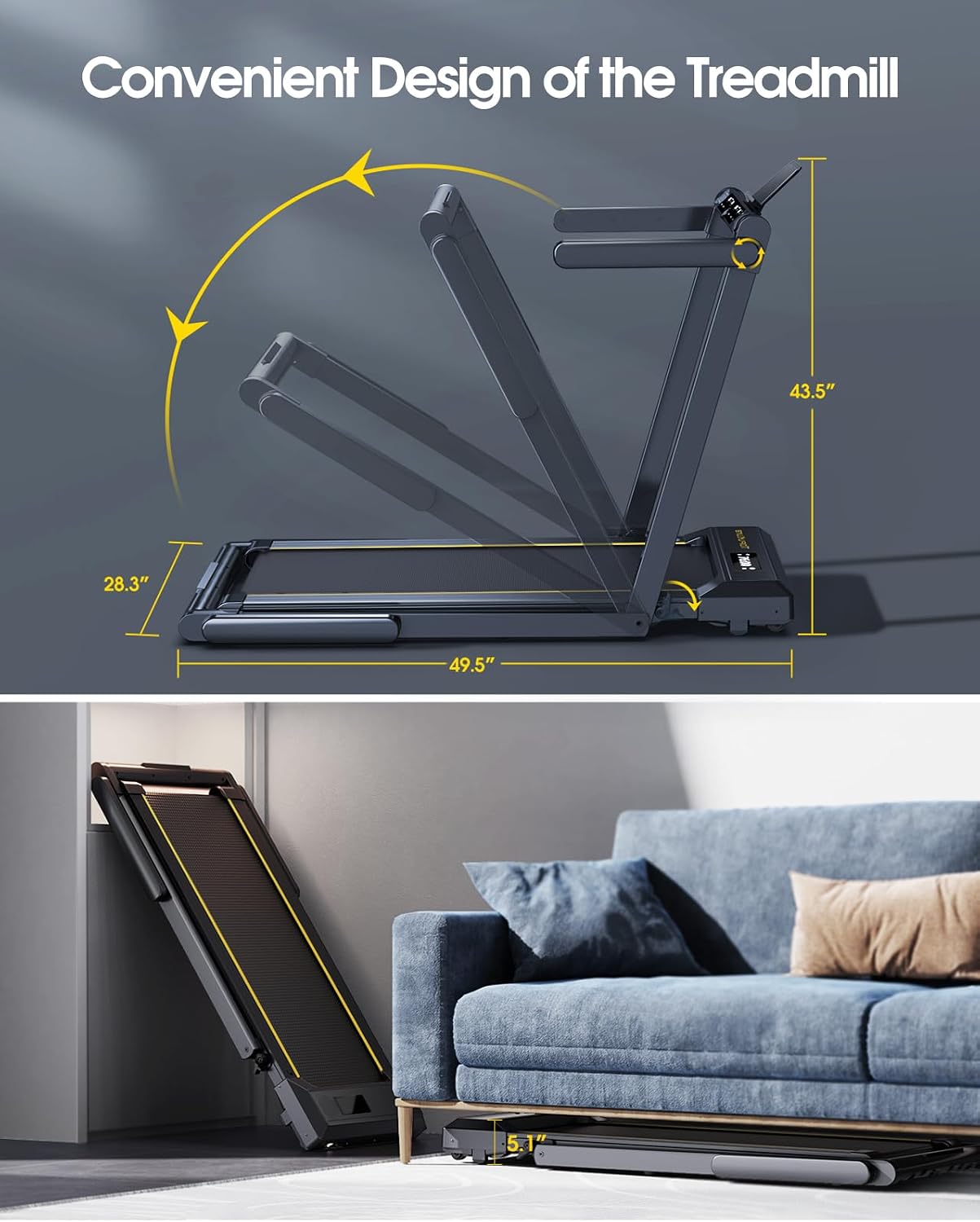
The treadmill can be used in two configurations: folded for walking or unfolded for running.
- To transition from walking pad to running treadmill, lift the handrail assembly until it locks into place.
- To fold for storage or walking mode, release the quick-release buckle and lower the handrail assembly.
4.3 പ്ലേസ്മെൻ്റ്
Place the treadmill on a firm, level surface. Ensure there is adequate clear space around the treadmill (at least 2 meters behind and 0.5 meters on each side) for safe operation. Do not place the treadmill on a carpet, as this can impede motor cooling and lead to overheating.
4.4 പവർ കണക്ഷൻ
Connect the power cord to the treadmill's power inlet and then plug it into a grounded electrical outlet. Ensure the power switch is in the 'OFF' position before plugging in.
5. പ്രവർത്തന നിർദ്ദേശങ്ങൾ
5.1 പവർ ഓൺ/ഓഫ്
Flip the main power switch located near the power cord inlet to the 'ON' position. The display will illuminate.
5.2 സുരക്ഷാ കീ
Attach the safety key clip to your clothing. Insert the magnetic end of the safety key into the designated slot on the control panel. The treadmill will not start without the safety key in place. Pulling the safety key will immediately stop the treadmill.
5.3 ഓപ്പറേറ്റിംഗ് മോഡുകൾ
The treadmill offers two distinct operating modes:
5.3.1 Walking Mode (Under Desk)
- In this mode, the handrail is folded down.
- Speed range: 0.6 - 5 MPH.
- Ideal for light exercise or walking while working.
5.3.2 റണ്ണിംഗ് മോഡ്
- In this mode, the handrail is upright and locked.
- Speed range: 5 - 10 MPH.
- Suitable for jogging and running workouts.

5.4 നിയന്ത്രണ പാനലും റിമോട്ട് നിയന്ത്രണവും
The treadmill can be controlled via the touch screen on the unit or the included remote control.
5.4.1 Display Functions:
The dual LED screen displays the following metrics:
- സമയം: നിങ്ങളുടെ വ്യായാമത്തിന്റെ ദൈർഘ്യം.
- വേഗത: നിലവിലെ വേഗത MPH-ൽ.
- കലോറികൾ: കണക്കാക്കിയ കലോറികൾ കത്തിച്ചു.
- ദൂരം: Distance covered in miles.
- ഹൃദയമിടിപ്പ്: Your pulse rate (when using sensors).

5.4.2 നിയന്ത്രണ ബട്ടണുകൾ:
- ആരംഭിക്കുക/നിർത്തുക: Initiates or pauses/stops the workout.
- വേഗത +/-: Adjusts the running speed.
- വഴികൾ: Cycles through different display modes or workout programs.
- പ്രോഗ്രാം (PROG): Selects from 12 preset workout programs.
- താൽക്കാലികമായി നിർത്തുക: The remote control includes a pause button to temporarily stop your workout without losing data.
5.5 Bluetooth Speaker Connectivity
To play audio through the treadmill's built-in Bluetooth speaker:
- ട്രെഡ്മിൽ ഓണാക്കിയിട്ടുണ്ടെന്ന് ഉറപ്പാക്കുക.
- നിങ്ങളുടെ മൊബൈൽ ഉപകരണത്തിൽ ബ്ലൂടൂത്ത് പ്രവർത്തനക്ഷമമാക്കുക.
- ഇതിനായി തിരയുക the treadmill's Bluetooth name (e.g., 'TOPUTURE Treadmill') in your device's Bluetooth settings.
- Pair your device. You can now play music through the treadmill's speakers.
5.6 സ്മാർട്ട് ആപ്പ് നിയന്ത്രണം
Enhance your workout experience by connecting the treadmill to a compatible fitness app.
- Download the recommended 'Sport APP' from your device's app store.
- Open the app and follow the on-screen instructions to connect to your TOPUTURE treadmill via Bluetooth.
- Utilize the app to access various training courses and track your progress.
5.7 ഹൃദയമിടിപ്പ് നിരീക്ഷണം
നിങ്ങളുടെ ഹൃദയമിടിപ്പ് അളക്കാൻ:
- Grip the metal sensor parts on both sides of the treadmill screen with both hands.
- Hold for approximately 3 seconds. Your heart rate will be displayed on the screen.
6. പരിപാലനം
പതിവ് അറ്റകുറ്റപ്പണികൾ നിങ്ങളുടെ ട്രെഡ്മില്ലിന്റെ ദീർഘായുസ്സും മികച്ച പ്രകടനവും ഉറപ്പാക്കുന്നു.
6.1 ലൂബ്രിക്കേഷൻ
The running belt requires periodic lubrication to reduce friction and wear. The unique lubrication hole design makes this process straightforward.
- ആവൃത്തി: Lubricate every 30-50 hours of use, or every 1-2 months depending on usage.
- നടപടിക്രമം: Apply a small amount of the provided silicone lubricant into the lubrication hole located on the side of the treadmill deck. Run the treadmill at a low speed (e.g., 1-2 MPH) for a few minutes to distribute the lubricant evenly.
6.2 വൃത്തിയാക്കൽ
Regularly clean the treadmill to prevent dust and debris buildup.
- പുറം: Wipe down the frame and control panel with a soft, damp തുണി. ഉരച്ചിലുകൾ ഉള്ള ക്ലീനറുകൾ ഒഴിവാക്കുക.
- റണ്ണിംഗ് ബെൽറ്റ്: Periodically wipe the running belt with a damp cloth to remove sweat and dust. Ensure the treadmill is unplugged before cleaning.
6.3 ബെൽറ്റ് ക്രമീകരണം
If the running belt feels loose, slips, or is off-center, it may require adjustment. Refer to the detailed instructions in the full user manual or contact customer support for guidance on how to properly tension and center the belt using the adjustment bolts at the rear of the treadmill.
7. പ്രശ്നപരിഹാരം
നിങ്ങളുടെ ട്രെഡ്മില്ലിൽ നിങ്ങൾ നേരിട്ടേക്കാവുന്ന സാധാരണ പ്രശ്നങ്ങളെ ഈ വിഭാഗം അഭിസംബോധന ചെയ്യുന്നു.
| പ്രശ്നം | സാധ്യമായ കാരണം | പരിഹാരം |
|---|---|---|
| ട്രെഡ്മിൽ പവർ ഓൺ ആകുന്നില്ല. | Power cord not plugged in; Power switch off; Safety key not in place. | Ensure power cord is securely plugged in; Turn power switch ON; Insert safety key correctly. |
| ഓടുമ്പോൾ ബെൽറ്റ് തെന്നി വീഴുകയോ മടി കാണിക്കുകയോ ചെയ്യുന്നു. | ബെൽറ്റ് വളരെ അയഞ്ഞിരിക്കുന്നു; ലൂബ്രിക്കേഷൻ അപര്യാപ്തമാണ്. | Adjust belt tension (refer to manual or support); Apply lubricant as per Section 6.1. |
| പ്രവർത്തന സമയത്ത് അസാധാരണമായ ശബ്ദം. | Loose components; Lack of lubrication; Foreign object. | Check for loose screws; Lubricate belt; Inspect for any objects under the belt. |
| ഡിസ്പ്ലേ ശരിയായി പ്രവർത്തിക്കുന്നില്ല. | Loose cable connection; Software glitch. | Power cycle the treadmill (turn off, unplug, wait 1 minute, plug in, turn on); Contact customer support if issue persists. |
| റിമോട്ട് കൺട്രോൾ പ്രതികരിക്കുന്നില്ല. | Dead batteries; Obstruction. | Replace remote control batteries; Ensure no objects are blocking the signal path. |
If you encounter an issue not listed here, or if the suggested solutions do not resolve the problem, please contact TOPUTURE customer support for assistance.
8. ഉൽപ്പന്ന സവിശേഷതകൾ
| ഫീച്ചർ | സ്പെസിഫിക്കേഷൻ |
|---|---|
| മോഡൽ നമ്പർ | TP1 |
| മോട്ടോർ കുതിരശക്തി | 2.5 എച്ച്.പി |
| Speed Range (Walking Mode) | 0.6 - 5 മൈൽ / മണിക്കൂർ |
| Speed Range (Running Mode) | 5 - 10 മൈൽ / മണിക്കൂർ |
| Running Area (L x W) | 104 സെ.മീ x 42 സെ.മീ (41" x 16.5") |
| പരമാവധി ഭാരം ശേഷി | 300 പൗണ്ട് (ഏകദേശം 136 കിലോഗ്രാം) |
| ഉൽപ്പന്ന അളവുകൾ (അൺഫോൾഡ്) | 125.7 x 71.8 x 110.5 cm (approx. 49.5" x 28.3" x 43.5") |
| ഉൽപ്പന്ന അളവുകൾ (മടക്കിയത്) | 133 x 71.8 x 13 cm (approx. 52.4" x 28.3" x 5.1") |
| ഇനത്തിൻ്റെ ഭാരം | 39.5 കി.ഗ്രാം (87.08 പൗണ്ട്) |
| മെറ്റീരിയൽ | അലുമിനിയം അലോയ് സ്റ്റീൽ |
| ഡിസ്പ്ലേ തരം | Dual LED Screen |
| പ്രത്യേക സവിശേഷതകൾ | No Assembly, Touch Screen, Foldable, Heart Rate Monitor, Built-In Speaker, Compact, Shock Absorbent |
9. വാറണ്ടിയും ഉപഭോക്തൃ പിന്തുണയും
TOPUTURE is committed to providing quality products and customer satisfaction. For any assistance, questions, or warranty inquiries, please contact our after-sales service team.
You can find more information and contact details on the official TOPUTURE store page: Visit the TOPUTURE Store
Please have your model number (TP1) and purchase information ready when contacting support.