
LIGE ST6 PRO-E
LIGE ST6 PRO-E Smart Watch User Manual
Model: ST6 PRO-E | Brand: LIGE
ആമുഖം
This manual provides detailed instructions for the LIGE ST6 PRO-E Smart Watch. It covers product features, setup procedures, operational guidelines, maintenance tips, and troubleshooting information to ensure optimal use of your device.
ബോക്സിൽ എന്താണുള്ളത്
- സ്മാർട്ട് വാച്ച്
- ചാർജർ കേബിൾ
- Smartwatch Manuals
- Watch Setting Tools
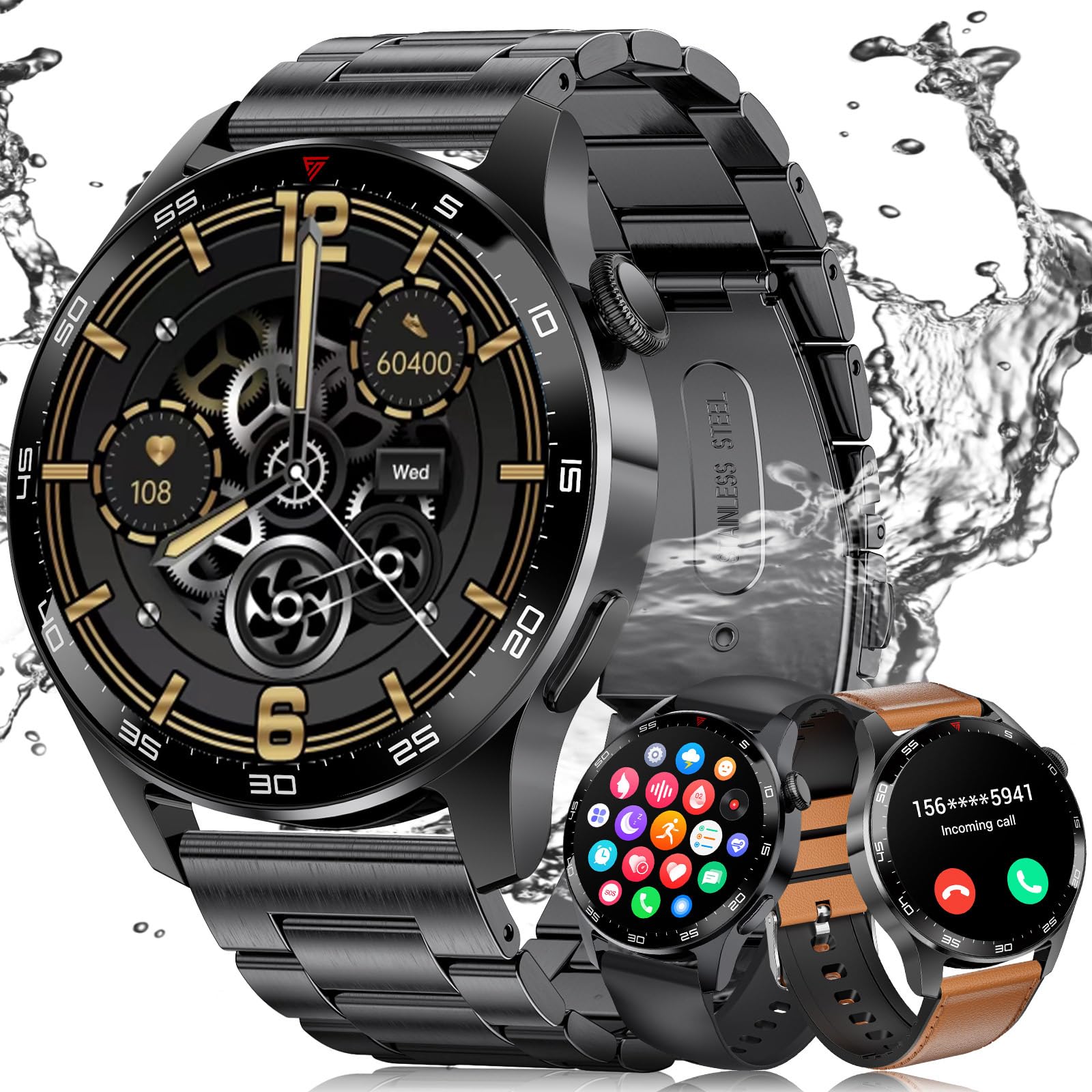
- Watch Straps (3 types: black stainless steel, black silicone, brown leather)
സജ്ജമാക്കുക
1. ആപ്പ് ഇൻസ്റ്റാളേഷനും ഉപകരണ ജോടിയാക്കലും
To use all features of your LIGE ST6 PRO-E Smart Watch, download and install the "GloryFit" app on your smartphone. The watch is compatible with Android 5.0+ and iOS 9.0+ devices.
- നിങ്ങളുടെ സ്മാർട്ട്ഫോണിന്റെ ബ്ലൂടൂത്ത് പ്രവർത്തനക്ഷമമാക്കിയിട്ടുണ്ടെന്ന് ഉറപ്പാക്കുക.
- Open the "GloryFit" app and follow the on-screen instructions to add a new device.
- Select "ST6 PRO" from the list of available devices.
- നിങ്ങളുടെ ഫോണിലും സ്മാർട്ട് വാച്ചിലും പെയറിംഗ് അഭ്യർത്ഥന സ്ഥിരീകരിക്കുക.
- Allow the "GloryFit" app to run in the background to maintain a stable connection.
2. Strap Adjustment and Replacement
Your smartwatch comes with three interchangeable straps: black stainless steel, black silicone, and brown leather. Use the provided watch setting tools to adjust or replace straps.
- To remove a strap: Locate the spring bar on the underside of the strap where it connects to the watch body. Use the tool to push the spring bar inward and gently pull the strap away.
- To attach a strap: Insert one end of the spring bar into the lug hole on the watch. Use the tool to push the other end of the spring bar inward, align it with the opposite lug hole, and release. Ensure the strap is securely fastened.
- For the stainless steel strap: Use the provided pin removal tool to adjust the length by pushing out pins from the links you wish to remove. Reinsert pins to secure the adjusted length.
പ്രവർത്തന നിർദ്ദേശങ്ങൾ
1. അടിസ്ഥാന നാവിഗേഷൻ
- മുകളിലേക്കും താഴേക്കും സ്വൈപ്പ് ചെയ്യുക: ദ്രുത ക്രമീകരണങ്ങളോ അറിയിപ്പുകളോ ആക്സസ് ചെയ്യുക.
- ഇടത്തേക്ക്/വലത്തേക്ക് സ്വൈപ്പ് ചെയ്യുക: Navigate through widgets like activity, heart rate, weather, music control.
- സൈഡ് ബട്ടൺ അമർത്തുക: ഹോം സ്ക്രീനിലേക്ക് മടങ്ങുക അല്ലെങ്കിൽ ആപ്പ് മെനു ആക്സസ് ചെയ്യുക.
- കിരീടം തിരിക്കുക: Scroll through menus and watch faces.

2. ബ്ലൂടൂത്ത് കോളിംഗും അറിയിപ്പുകളും
Once paired with your phone, the smartwatch supports Bluetooth calls and smart notifications.
- കോളുകൾ ചെയ്യുന്നു: Access the "Call" function from the app menu, use the dial pad to enter a number, or select from contacts.
- കോളുകൾക്ക് ഉത്തരം നൽകുന്നു: When an incoming call is received, tap the green icon on the watch screen to answer.
- അറിയിപ്പുകൾ: Receive alerts for messages from social media apps (e.g., WeChat, Facebook, WhatsApp) directly on your watch.
- ശല്യപ്പെടുത്തരുത്: Swipe down on the watch face and tap the crescent moon icon to activate "Do Not Disturb" mode.

3. ആരോഗ്യ നിരീക്ഷണം
The watch provides continuous health monitoring features.
- ഹൃദയമിടിപ്പ് നിരീക്ഷണം: ദിവസം മുഴുവൻ നിങ്ങളുടെ ഹൃദയമിടിപ്പ് ട്രാക്ക് ചെയ്യുന്നു.
- രക്തത്തിലെ ഓക്സിജൻ (SpO2) നിരീക്ഷണം: നിങ്ങളുടെ രക്തത്തിലെ ഓക്സിജന്റെ അളവ് അളക്കുന്നു.
- ഉറക്ക നിരീക്ഷണം: Records sleep patterns, including deep sleep, light sleep, and REM.
- കലോറി ഉപഭോഗം: Tracks calories burned based on activity.

4. ഫിറ്റ്നസ് ട്രാക്കിംഗും സ്പോർട്സ് മോഡുകളും
The smartwatch supports over 100 sports modes and tracks daily activity.
- പ്രവർത്തന ട്രാക്കിംഗ്: Monitors steps, distance, and active time.
- സ്പോർട്സ് മോഡുകൾ: Select from various modes like outdoor running, cycling, skipping, swimming, and more to track specific workout data.

5. അധിക സവിശേഷതകൾ
- സംഗീത നിയന്ത്രണം: വാച്ചിൽ നിന്ന് നേരിട്ട് നിങ്ങളുടെ ഫോണിലെ സംഗീത പ്ലേബാക്ക് നിയന്ത്രിക്കുക.
- റിമോട്ട് ക്യാമറ: നിങ്ങളുടെ ഫോണിന്റെ ക്യാമറയ്ക്ക് റിമോട്ട് ഷട്ടറായി വാച്ച് ഉപയോഗിക്കുക.
- കാലാവസ്ഥാ പ്രവചനം: തത്സമയ കാലാവസ്ഥാ അപ്ഡേറ്റുകൾ നേടുക.
- അലാറം ക്ലോക്ക്: ഒന്നിലധികം അലാറങ്ങൾ സജ്ജമാക്കുക.
- വോയ്സ് അസിസ്റ്റന്റ്: Interact with your phone's voice assistant.
- Find Phone/Watch: Locate your phone using the watch, or vice-versa via the app.
- Customized Watch Faces: Choose from various pre-installed watch faces or use your own photos.

മെയിൻ്റനൻസ്
1 ബാറ്ററി ലൈഫ്
The LIGE ST6 PRO-E Smart Watch is equipped with a 400mAh battery. Average service life is up to 3 days, with standby time exceeding 7 days. Ensure the "GloryFit" app is allowed to run in the background to optimize battery performance and maintain connectivity.

2. വാട്ടർപ്രൂഫ് റേറ്റിംഗ്
The smartwatch has an IP68 waterproof rating, making it resistant to dust and immersion in water up to 1.5 meters for 30 minutes. It is suitable for daily use and light water activities like swimming, but not for diving or high-pressure water activities.
ട്രബിൾഷൂട്ടിംഗ്
- കണക്റ്റിവിറ്റി പ്രശ്നങ്ങൾ: Ensure Bluetooth is on, the watch is within 9-10 meters of your phone, and the "GloryFit" app is running in the background without being closed by your phone's system.
- കൃത്യമല്ലാത്ത ആരോഗ്യ ഡാറ്റ: Ensure the watch is worn snugly on your wrist. Clean the sensor regularly.
- വാച്ച് ഓണാക്കുന്നില്ല: കുറഞ്ഞത് 30 മിനിറ്റെങ്കിലും വാച്ച് ചാർജ് ചെയ്യുക. എന്നിട്ടും ഓണാകുന്നില്ലെങ്കിൽ, ഉപഭോക്തൃ പിന്തുണയുമായി ബന്ധപ്പെടുക.
- ആപ്പ് സമന്വയിപ്പിക്കുന്നില്ല: Check your phone's internet connection and ensure the "GloryFit" app has all necessary permissions. Restart both the watch and the app.
സ്പെസിഫിക്കേഷനുകൾ
| ഫീച്ചർ | വിശദാംശങ്ങൾ |
|---|---|
| മോഡൽ നമ്പർ | ST6 PRO-E |
| സ്ക്രീൻ വലിപ്പം | 1.43 Inches HD AMOLED |
| ബാറ്ററി ശേഷി | 400 mAh ലിഥിയം പോളിമർ |
| കണക്റ്റിവിറ്റി | ബ്ലൂടൂത്ത് 5.2 |
| വാട്ടർപ്രൂഫ് റേറ്റിംഗ് | IP68 |
| അനുയോജ്യത | ആൻഡ്രോയിഡ് 5.0+ / ഐഒഎസ് 9.0+ |
| മെമ്മറി സ്റ്റോറേജ് | 256 MB |
| ഇനത്തിൻ്റെ ഭാരം | 4.16 ഔൺസ് |
| പ്രത്യേക സവിശേഷതകൾ | Fitness Tracker, Always On Display, Phone Call, Sleep Monitor, 100+ Sports Modes, Blood Oxygen (SpO2) Monitor, Heart Rate Monitor, Calorie Tracker, Alarm Clock, Stopwatch, Timer, Pedometer, Camera Control, Music Playback/Control, Sedentary Reminder, Weather, Notifications. |
വാറൻ്റിയും പിന്തുണയും
LIGE is committed to ensuring customer satisfaction. If you have any questions or require assistance with your LIGE ST6 PRO-E Smart Watch, please do not hesitate to contact our customer service. We are dedicated to providing reliable service and a positive experience.
Ask a question about this manual
Ask about setup, troubleshooting, compatibility, parts, safety, or missing instructions. Manuals+ will review the question and use this page’s manual context to help answer it.