
1. ആമുഖം
Thank you for choosing the TRIUMPHKEY Electric Standing Desk. This manual provides detailed instructions for the safe assembly, operation, and maintenance of your new desk. Please read this manual thoroughly before installation and use, and retain it for future reference. This desk is designed to provide a versatile and ergonomic workspace, allowing you to easily switch between sitting and standing positions.

Image 1: The TRIUMPHKEY Electric Standing Desk, showcasing its sleek design and functionality in a typical workspace.
2. സുരക്ഷാ നിർദ്ദേശങ്ങൾ
- ഉപയോഗിക്കുന്നതിന് മുമ്പ് എല്ലാ ഘടകങ്ങളും സുരക്ഷിതമായി ഉറപ്പിച്ചിട്ടുണ്ടെന്ന് ഉറപ്പാക്കുക.
- പരിക്കുകൾ ഒഴിവാക്കാൻ ഓപ്പറേഷൻ സമയത്ത് കുട്ടികളെയും വളർത്തുമൃഗങ്ങളെയും മേശയിൽ നിന്ന് അകറ്റി നിർത്തുക.
- Do not overload the desk. The maximum weight capacity is 60 kg (132 lbs).
- Avoid placing liquids directly on the control panel or motor components.
- Do not attempt to disassemble or repair the motor or control system yourself. Contact qualified service personnel if issues arise.
- പവർ കോർഡ് നുള്ളിയില്ലെന്നും കേടുപാടുകൾ സംഭവിച്ചിട്ടില്ലെന്നും ഉറപ്പാക്കുക.
- Operate the desk on a level surface to ensure stability.
3. പാക്കേജ് ഉള്ളടക്കം
Please check that all parts are present and undamaged before beginning assembly. If any parts are missing or damaged, please contact customer support.
- Desktop (120x60cm)
- Desk Legs (2 units)
- Foot Pads (4 units)
- നിയന്ത്രണ പാനൽ
- മോട്ടോർ, പവർ അഡാപ്റ്റർ
- ഹെഡ്ഫോൺ ഹാംഗർ
- കേബിൾ ഹോൾ കവർ
- Assembly Hardware (screws, Allen keys, etc.)
- ഇൻസ്ട്രക്ഷൻ മാനുവൽ
4. അസംബ്ലി നിർദ്ദേശങ്ങൾ
Follow these steps carefully for proper assembly. All screws are coded for easy identification. It is recommended to assemble the desk on a soft, clean surface to prevent scratches.
- ഘടകങ്ങൾ അൺപാക്ക് ചെയ്യുക: Carefully remove all parts from the packaging and lay them out on a protected surface. Verify all parts are present against the package contents list.
- ഡെസ്ക് കാലുകൾ ഘടിപ്പിക്കുക: Secure the desk legs to the desktop using the provided screws. Ensure the T-shaped structure of the legs is correctly oriented.
- ഫുട് പാഡുകൾ ഇൻസ്റ്റാൾ ചെയ്യുക: Attach the foot pads to the bottom of the desk legs for stability and floor protection.
- മൗണ്ട് കൺട്രോൾ പാനൽ: Secure the control panel to the underside of the desktop in the desired location, typically on the front edge.
- Connect Motor and Power: Connect the motor cable to the control panel and the power adapter. Plug the power adapter into a suitable power outlet.
- ആക്സസറികൾ ഇൻസ്റ്റാൾ ചെയ്യുക: Attach the headphone hanger to the side of the desk and insert the cable hole cover into the designated opening on the desktop.
- കേബിൾ മാനേജുമെന്റ്: Route all cables neatly using the integrated cable holes to maintain a tidy workspace.
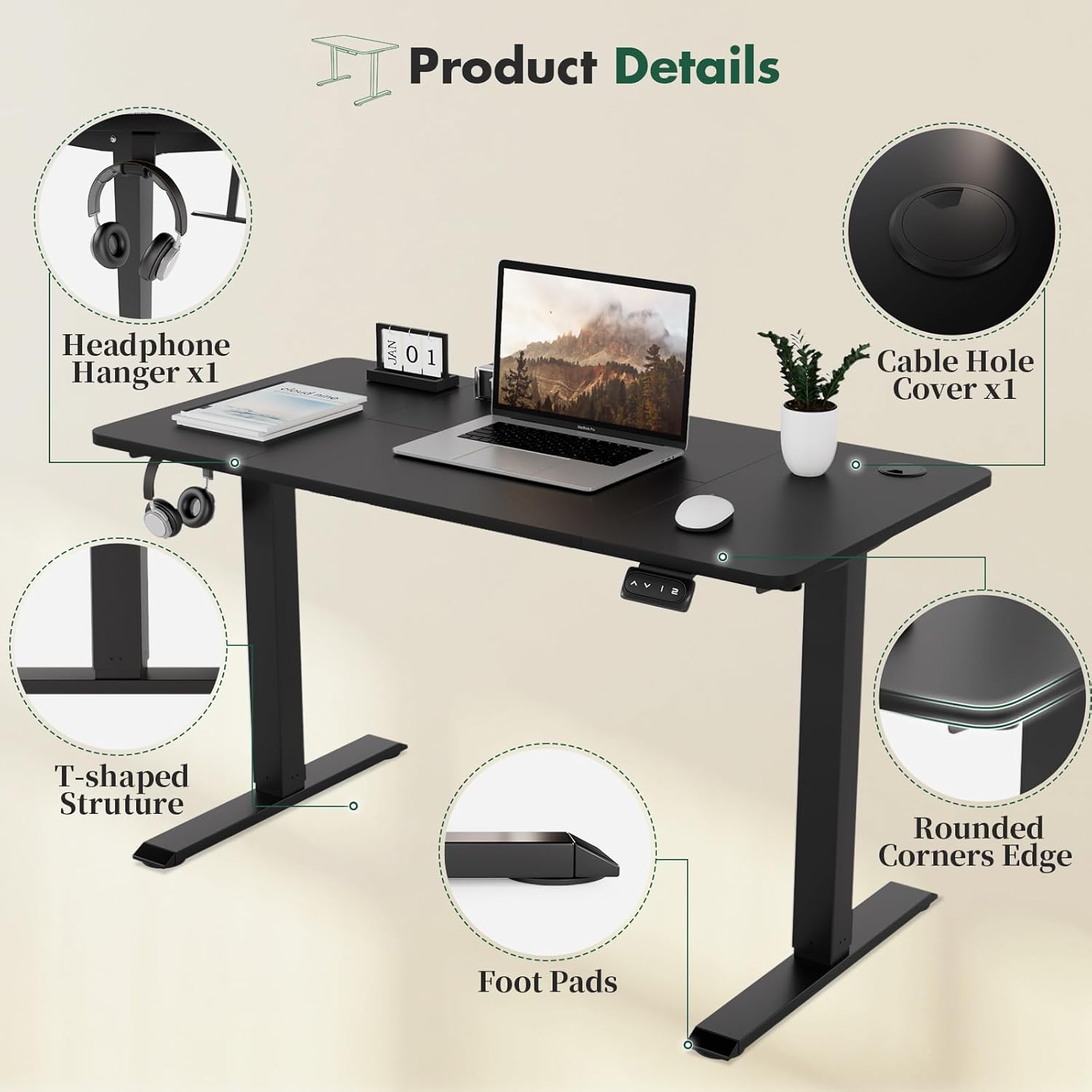
Image 2: Key product details, illustrating the headphone hanger, cable management hole, rounded corners, stable T-shaped leg structure, and protective foot pads.
5. പ്രവർത്തന നിർദ്ദേശങ്ങൾ
The TRIUMPHKEY Electric Standing Desk features an intuitive control panel for height adjustment and memory presets.
5.1. Basic Height Adjustment
- ഉയിർപ്പിക്കാൻ: അമർത്തിപ്പിടിക്കുക യുപി (▲) button. The desk will move upwards. Release the button at your desired height.
- താഴ്ത്താൻ: അമർത്തിപ്പിടിക്കുക ഡൗൺ (▼) button. The desk will move downwards. Release the button at your desired height.
5.2. മെമ്മറി പ്രീസെറ്റുകൾ
The desk includes two memory modes (1 and 2) to store your preferred sitting and standing heights.
- Set a Memory Height:
a. Adjust the desk to your desired height using the UP or DOWN buttons.
b. Press and hold the desired memory button (1 or 2) until you hear a beep or the display flashes, indicating the height has been saved. - Recall a Memory Height:
a. Simply press the corresponding memory button (1 or 2). ഡെസ്ക് സംരക്ഷിച്ച ഉയരത്തിലേക്ക് സ്വയമേവ നീങ്ങും.

Image 3: The intelligent keypad, showing the Up, Down, and two Memory Height buttons for easy desk adjustment.
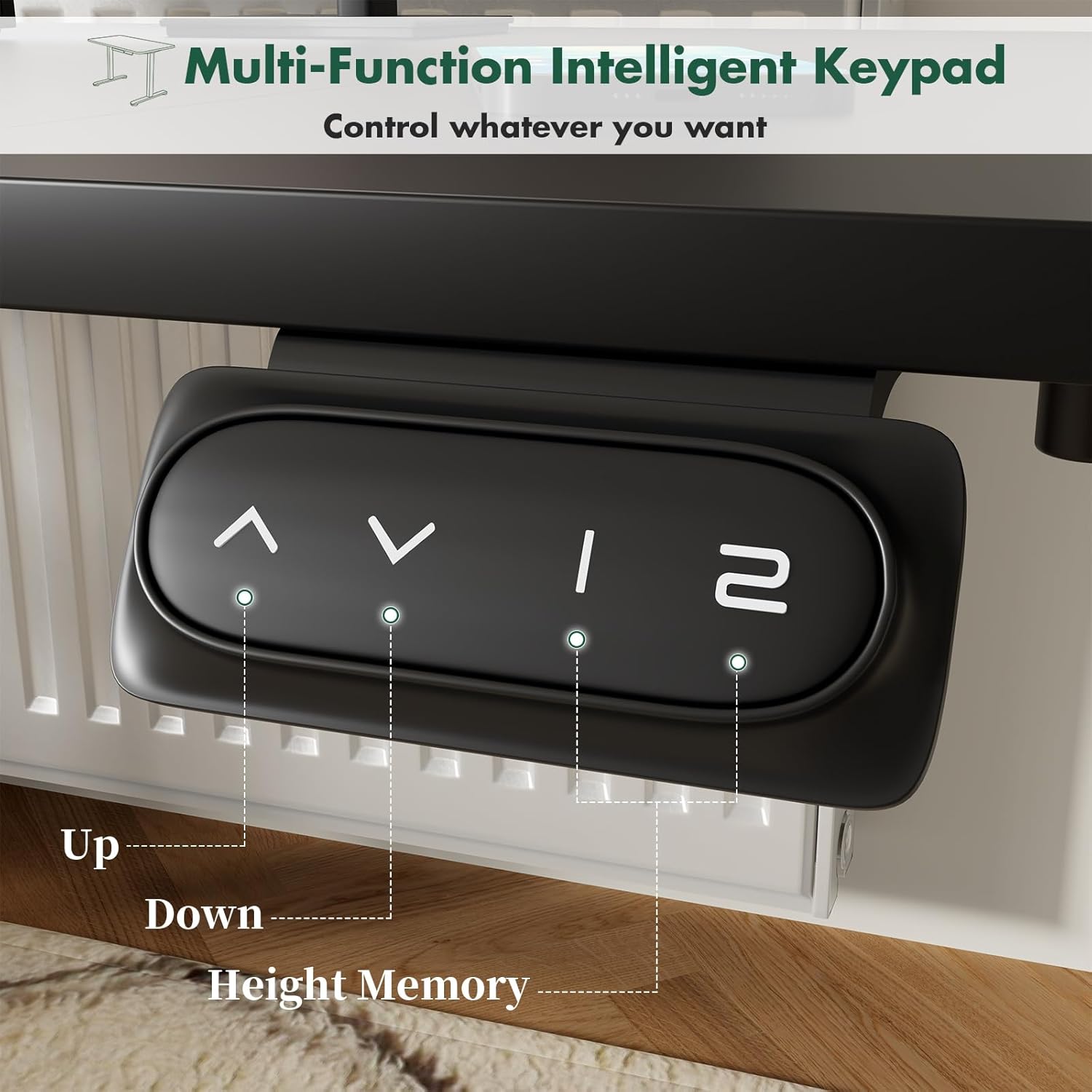
Image 4: Visual representation of the desk's height adjustment capabilities, accommodating various user heights and postures.
6. പരിപാലനം
- വൃത്തിയാക്കൽ: Wipe the desk surface and legs with a soft, damp തുണി. ഫിനിഷിന് കേടുവരുത്തുന്ന ഉരച്ചിലുകൾ നിറഞ്ഞ ക്ലീനറുകളോ കഠിനമായ രാസവസ്തുക്കളോ ഒഴിവാക്കുക.
- കേബിൾ പരിശോധന: Periodically inspect the power cord and motor cables for any signs of wear or damage.
- ഫാസ്റ്റനർ പരിശോധന: ഇടയ്ക്കിടെ എല്ലാ സ്ക്രൂകളും ഫാസ്റ്റനറുകളും പരിശോധിച്ച് അവ ഇറുകിയതാണെന്ന് ഉറപ്പാക്കുക. ആവശ്യമെങ്കിൽ വീണ്ടും മുറുക്കുക.
- പരിസ്ഥിതി വ്യവസ്ഥകൾ: Keep the desk in a dry environment. Avoid extreme temperatures or high humidity.
7. പ്രശ്നപരിഹാരം
If you encounter any issues with your TRIUMPHKEY Electric Standing Desk, please refer to the following common problems and solutions:
| പ്രശ്നം | സാധ്യമായ കാരണം | പരിഹാരം |
|---|---|---|
| ഡെസ്ക് അനങ്ങുന്നില്ല. | Power cord disconnected; Motor cable loose; Overload protection activated. | Check power connection; Reconnect motor cable; Remove excess weight. |
| മേശ അസമമായി നീങ്ങുന്നു | Uneven weight distribution; Loose fasteners. | Distribute weight evenly; Tighten all assembly screws. |
| മെമ്മറി പ്രീസെറ്റുകൾ പ്രവർത്തിക്കുന്നില്ല | Presets not properly saved. | Re-save memory presets by holding the button until confirmed. |
| പ്രവർത്തന സമയത്ത് അസാധാരണമായ ശബ്ദം | Loose components; Obstruction. | Check for loose screws; Ensure no objects are obstructing the lifting mechanism. |
If the problem persists after attempting these solutions, please contact TRIUMPHKEY customer support for further assistance.
8 സ്പെസിഫിക്കേഷനുകൾ
- ബ്രാൻഡ്: ട്രയംഫ്കി
- മോഡൽ നമ്പർ: TRIUMPHKEY-NA
- Desktop Dimensions: 120cm (L) x 60cm (W)
- ഉയരം ക്രമീകരിക്കൽ ശ്രേണി: 71 സെ.മീ - 119 സെ.മീ (27.95" - 46.85")
- ലിഫ്റ്റിംഗ് മെക്കാനിസം: ഇലക്ട്രിക്
- മെമ്മറി പ്രീസെറ്റുകൾ: 2
- പരമാവധി ഭാരം ശേഷി: 60 കി.ഗ്രാം (132 പൗണ്ട്)
- നിറം: കറുപ്പ്/വെളുപ്പ്
- പ്രത്യേക സവിശേഷതകൾ: Height Adjustable, Memory Mode, Cable Holes, Headphone Hanger, Rounded Corners

ചിത്രം 5: ഡൈമൻഷണൽ ഓവർview and weight capacity of the TRIUMPHKEY Electric Standing Desk.
9. വാറൻ്റിയും പിന്തുണയും
For warranty information or technical support, please refer to the warranty card included with your product or visit the official TRIUMPHKEY webസൈറ്റ്. നിങ്ങൾക്ക് എന്തെങ്കിലും ചോദ്യങ്ങളുണ്ടെങ്കിലോ സഹായം ആവശ്യമുണ്ടെങ്കിലോ, ദയവായി ഞങ്ങളുടെ ഉപഭോക്തൃ സേവന ടീമുമായി ബന്ധപ്പെടാൻ മടിക്കരുത്.