
ആമുഖം
This instruction manual provides comprehensive guidance for the installation, operation, and maintenance of your Mount-It! Full Motion Dual Monitor Mount with Spring Arms. Designed for monitors ranging from 17 to 32 inches and weighing up to 19.8 pounds per screen, this mount offers versatile adjustment options to enhance your workspace ergonomics and productivity. Please read these instructions carefully before beginning installation.
പ്രധാന സവിശേഷതകൾ
- പൂർണ്ണ ചലന ക്രമീകരണം: Effortlessly adjust monitor height, tilt (+/-90°), swivel (+/-180°), and rotation (+/-180°) for optimal viewing angles and screen sharing.
- സാർവത്രിക അനുയോജ്യത: Supports two monitors from 17 to 32 inches, with a weight capacity of up to 19.8 lbs (9 kg) per arm. Compatible with VESA patterns 75x75mm and 100x100mm.
- ഫ്ലെക്സിബിൾ ഇൻസ്റ്റലേഷൻ: Includes both C-clamp and grommet mounting options to suit various desk types and preferences.
- Adjustable Spring Tension: Allows for precise tension adjustment to match the weight of your monitors, ensuring smooth and stable positioning.
- സംയോജിത കേബിൾ മാനേജ്മെൻ്റ്: Hidden channels keep cables organized and out of sight, contributing to a clean and clutter-free desk.
പാക്കേജ് ഉള്ളടക്കം
ഇൻസ്റ്റാളേഷനുമായി മുന്നോട്ടുപോകുന്നതിനുമുമ്പ് എല്ലാ ഘടകങ്ങളും നിലവിലുണ്ടെന്ന് ദയവായി പരിശോധിക്കുക:
- Dual Monitor Arm Assembly (2 arms, 1 pole)
- ഡെസ്ക് Clamp അടിസ്ഥാനം
- ഗ്രോമെറ്റ് ബേസ്
- VESA പ്ലേറ്റുകൾ (2 യൂണിറ്റുകൾ)
- ഹാർഡ്വെയർ കിറ്റ് (സ്ക്രൂകൾ, വാഷറുകൾ, സ്പെയ്സറുകൾ)
- Hex Keys / Allen Wrenches
- ഇൻസ്ട്രക്ഷൻ മാനുവൽ
സജ്ജീകരണ നിർദ്ദേശങ്ങൾ
1. Choose Mounting Option (C-Clamp അല്ലെങ്കിൽ ഗ്രോമെറ്റ്)
The Mount-It! Dual Monitor Mount offers two installation methods: C-Clamp for desk edges and Grommet for desks with existing holes. Select the option that best suits your desk setup.
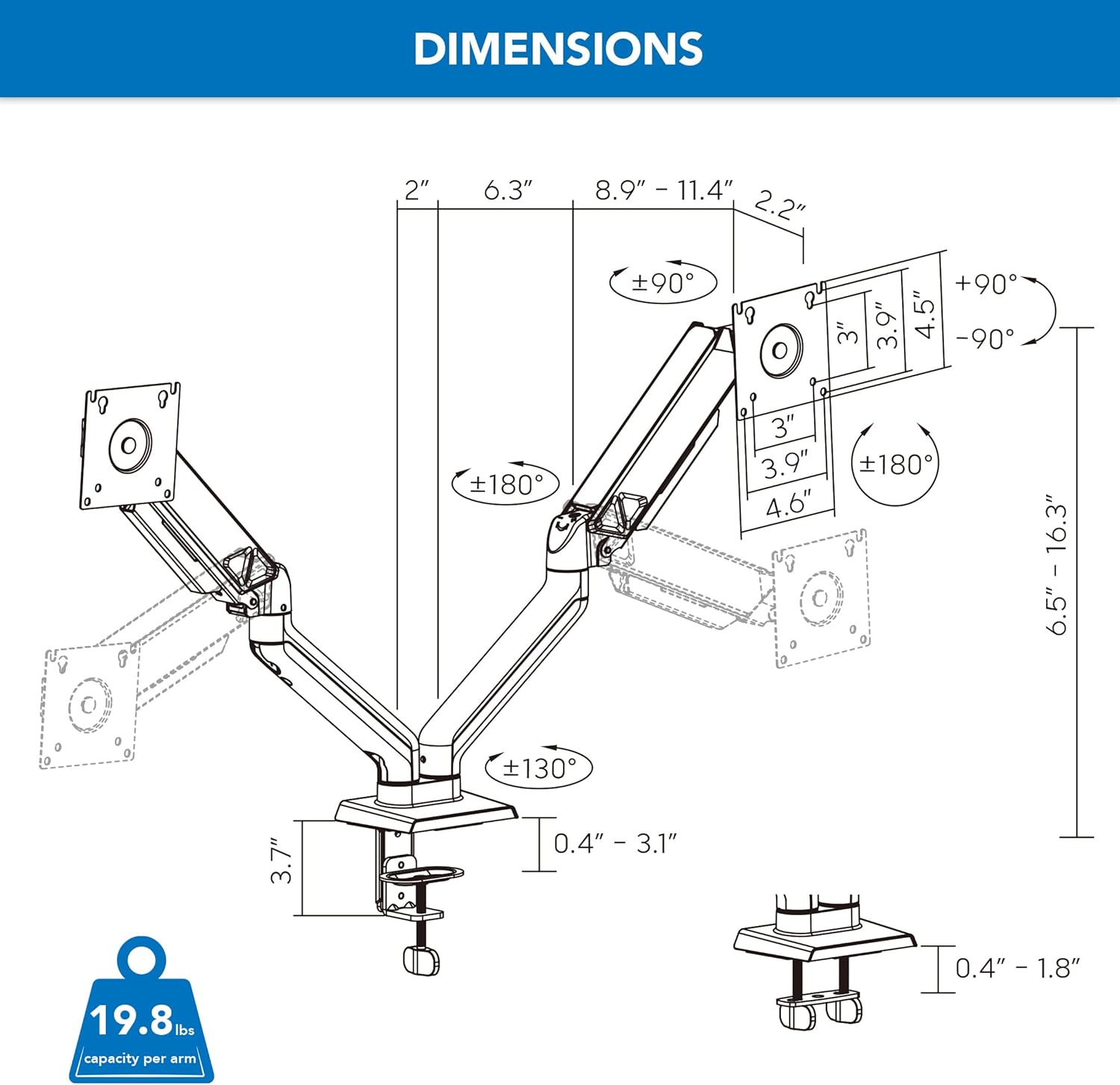
Image: Illustration of C-Clamp and Grommet mounting options for the monitor arm, demonstrating how each attaches to a desk surface.
2. Attach Base to Desk
Secure the chosen base (C-Clamp or Grommet) to your desk according to the provided hardware instructions. Ensure it is firmly tightened to provide a stable foundation for your monitors.
3. Attach Monitor Arms to Base
Slide the monitor arms onto the central pole of the base. The quick-release joints allow for easy attachment. Ensure they click securely into place.

Image: Close-up of the monitor arm base showing quick-release joints and integrated cable management channels.
Video: Official Mount-It! video demonstrating the features and setup of the dual monitor mount, including arm attachment and adjustability.
4. Attach Monitors to VESA Plates
Align your monitors with the VESA plates on the arms. This mount is compatible with 75x75mm and 100x100mm VESA patterns. Secure them using the provided VESA screws. Ensure the screws are tightened firmly but do not overtighten.

ചിത്രം: പിൻഭാഗം view of two monitors securely attached to the VESA plates of the monitor arms, showcasing the mounting mechanism.
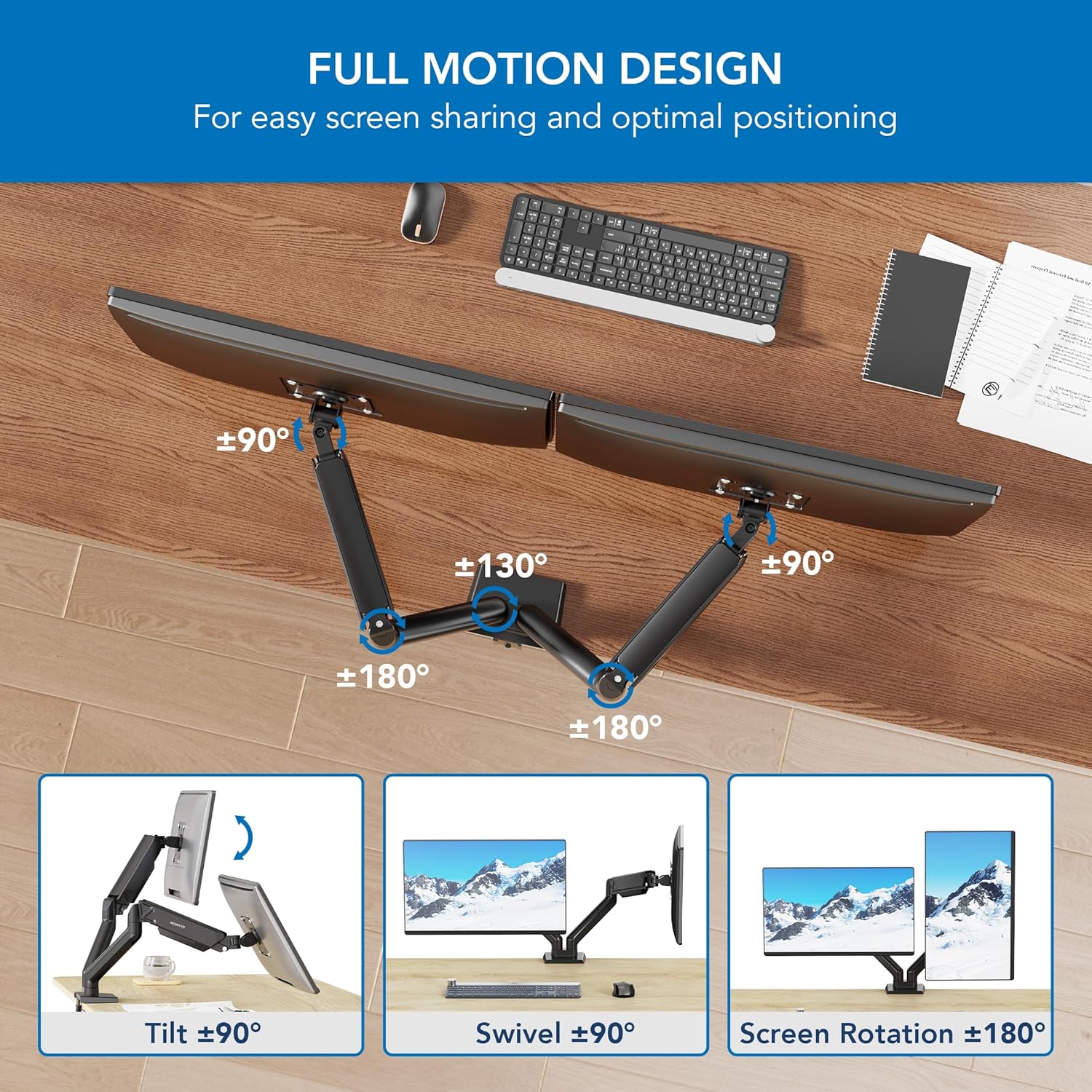
Image: Diagram illustrating the universal compatibility of the mount with 17-32 inch monitors and VESA 75x75mm and 100x100mm patterns, along with weight capacity.
പ്രവർത്തന നിർദ്ദേശങ്ങൾ
1. Adjust Spring Tension
After attaching your monitors, use the included hex key to adjust the spring tension in each arm. Turn clockwise to increase tension for heavier monitors, and counter-clockwise to decrease tension for lighter monitors. This ensures the arms hold your monitors securely at any desired height and allows for smooth movement.

Image: Visual guide on adjusting the spring tension for optimal monitor positioning, showing the hex key insertion point.
2. സ്ക്രീൻ ക്രമീകരണം
The full-motion design allows for extensive adjustments to customize your viewഅനുഭവം:
- ഉയരം ക്രമീകരിക്കൽ: Effortlessly raise or lower your monitors along the pole and via the spring arms to achieve optimal eye-level positioning for ergonomic comfort.
- സ്വിവൽ: Swivel the monitors up to +/-180° horizontally for easy screen sharing or collaborative work.
- ടിൽറ്റ്: Tilt the screens up to +/-90° vertically to reduce glare from lights or windows and optimize viewകോണുകൾ.
- റൊട്ടേഷൻ: Rotate the monitors up to +/-180° to switch between landscape and portrait orientation, depending on your task requirements.

Image: Diagram illustrating the full motion capabilities including tilt, swivel, and rotation for optimal screen positioning and flexibility.
3. കേബിൾ മാനേജ്മെന്റ്
Utilize the integrated cable management channels located along the underside of the arms. Route your monitor power and video cables through these channels to keep them organized and out of sight, contributing to a neat and organized workspace.
മെയിൻ്റനൻസ്
- പതിവ് പരിശോധനകൾ: Periodically inspect all screws and connections to ensure they remain tight and secure. Re-tighten if necessary.
- വൃത്തിയാക്കൽ: Clean the mount and arms with a soft, damp തുണി. അബ്രാസീവ് ക്ലീനറുകളോ കഠിനമായ രാസവസ്തുക്കളോ ഉപയോഗിക്കുന്നത് ഒഴിവാക്കുക, കാരണം ഇവ ഫിനിഷിന് കേടുവരുത്തും.
- ടെൻഷൻ അഡ്ജസ്റ്റ്മെൻ്റ്: If you change monitors or notice that the arms become too loose or too stiff over time, re-adjust the spring tension as described in the Operating Instructions.
ട്രബിൾഷൂട്ടിംഗ്
| പ്രശ്നം | സാധ്യമായ കാരണം | പരിഹാരം |
|---|---|---|
| Monitor sags or doesn't hold position. | Spring tension is too low for monitor weight. | Increase spring tension by turning the hex key clockwise in the adjustment port. |
| Monitor is difficult to move or too stiff. | Spring tension is too high for monitor weight. | Decrease spring tension by turning the hex key counter-clockwise in the adjustment port. |
| മൗണ്ട് അസ്ഥിരമാണ് അല്ലെങ്കിൽ ആടുന്നു. | അടിസ്ഥാന clamp/grommet not tightened sufficiently to the desk. | C-cl ഉറപ്പാക്കുകamp or grommet bolt is securely tightened to the desk surface. |
| Monitors are not perfectly level. | Minor adjustment needed at the VESA plate. | Slightly loosen the tilt screw on the VESA plate, adjust the monitor to be level, then re-tighten the screw. |
സ്പെസിഫിക്കേഷനുകൾ
- മോഡൽ: MI-8752BLK
- സ്ക്രീൻ വലിപ്പം അനുയോജ്യത: 17" മുതൽ 32" വരെ
- Weight Capacity per Arm: 19.8 പൗണ്ട് വരെ (9 കി.ഗ്രാം)
- VESA അനുയോജ്യത: 75x75mm, 100x100mm
- മൗണ്ടിംഗ് ഓപ്ഷനുകൾ: C-Clamp, ഗ്രോമെറ്റ്
- മെറ്റീരിയൽ: അലോയ് സ്റ്റീൽ
- നിറം: കറുപ്പ്
- ചലന തരം: ആർട്ടിക്കുലേറ്റിംഗ്, സ്വിവൽ
- Maximum Arm Extension: ഏകദേശം 17.7 ഇഞ്ച് (45 സെ.മീ)
- ഉയരം ക്രമീകരിക്കൽ ശ്രേണി: Up to 16.3 inches (41.4 cm) from desk surface

Image: Technical drawing with detailed dimensions and weight capacity of the monitor mount, including arm reach and height.
വാറൻ്റിയും പിന്തുണയും
This Mount-It! full motion dual monitor arm comes with a Lifetime Warranty, ensuring long-term reliability and peace of mind. Our knowledgeable and responsive US-based customer support team is available to answer any questions you may have during standard business hours.
For further assistance, product registration, or to explore other Mount-It! products, please visit our official store: Mount-It! Store on Amazon


