
1. ആമുഖം
The Eoxsmile 12000mAh NOAA Emergency Weather Radio is a versatile and essential device designed for emergency preparedness, outdoor activities, and daily use. It integrates multiple functions including AM/FM/Shortwave radio reception, NOAA weather alerts, a powerful LED flashlight, a reading lamp, and a portable power bank. With its robust design and multiple power options, this radio ensures you stay informed and connected in various situations.
2. ഉൽപ്പന്ന സവിശേഷതകൾ
- NOAA കാലാവസ്ഥാ മുന്നറിയിപ്പ്: Automatically scans 7 NOAA Weather Stations and provides loud siren and red light alerts for local hazards, even when the radio is off (with timer preset).
- ഒന്നിലധികം ഊർജ്ജ സ്രോതസ്സുകൾ: Features a 12000mAh rechargeable battery, with recharging options via solar panel, hand crank, 5V/2A power adapter (included), and USB-C cord (included). Also supports 3x AAA backup batteries (not included).
- പോർട്ടബിൾ പവർ ബാങ്ക്: Built-in 12000mAh battery allows charging of mobile phones and other USB-powered devices during emergencies.
- സംയോജിത ലൈറ്റിംഗ്: Equipped with a 2.5W/3W bright LED flashlight (up to 70 meters range) and a 2W/2.5W reading lamp (covers 20㎡ room), both with adjustable brightness.
- ഡിജിറ്റൽ ഡിസ്പ്ലേ: LCD backlight screen shows time, frequency, battery level, WX alert, and lock icons for intuitive operation.
- SOS അലാറം: A dedicated SOS button activates a super loud siren and red strobe light for emergency signaling.
- റേഡിയോ ബാൻഡുകൾ: Supports AM (520-1710 KHz), FM (87-108 MHz), and Shortwave (2.3-22.00 MHz) bands, along with 7 NOAA Weather Bands.
- അധിക സവിശേഷതകൾ: 3.5mm earphone jack for private listening, 16-level volume control, extended telescopic antenna, and a lock function to prevent accidental operation.
3. പാക്കേജ് ഉള്ളടക്കം
താഴെ പറയുന്ന ഇനങ്ങൾക്കായി ബോക്സ് ചെക്ക് ചെയ്യുക:
- Eoxsmile 12000mAh NOAA Emergency Weather Radio
- 1* 5V/2A Adapter
- 1* USB-C ചാർജിംഗ് കേബിൾ
- 1* കാരബൈനർ
- 1* Portable Hand Strap
- 1* User Manual (this document)
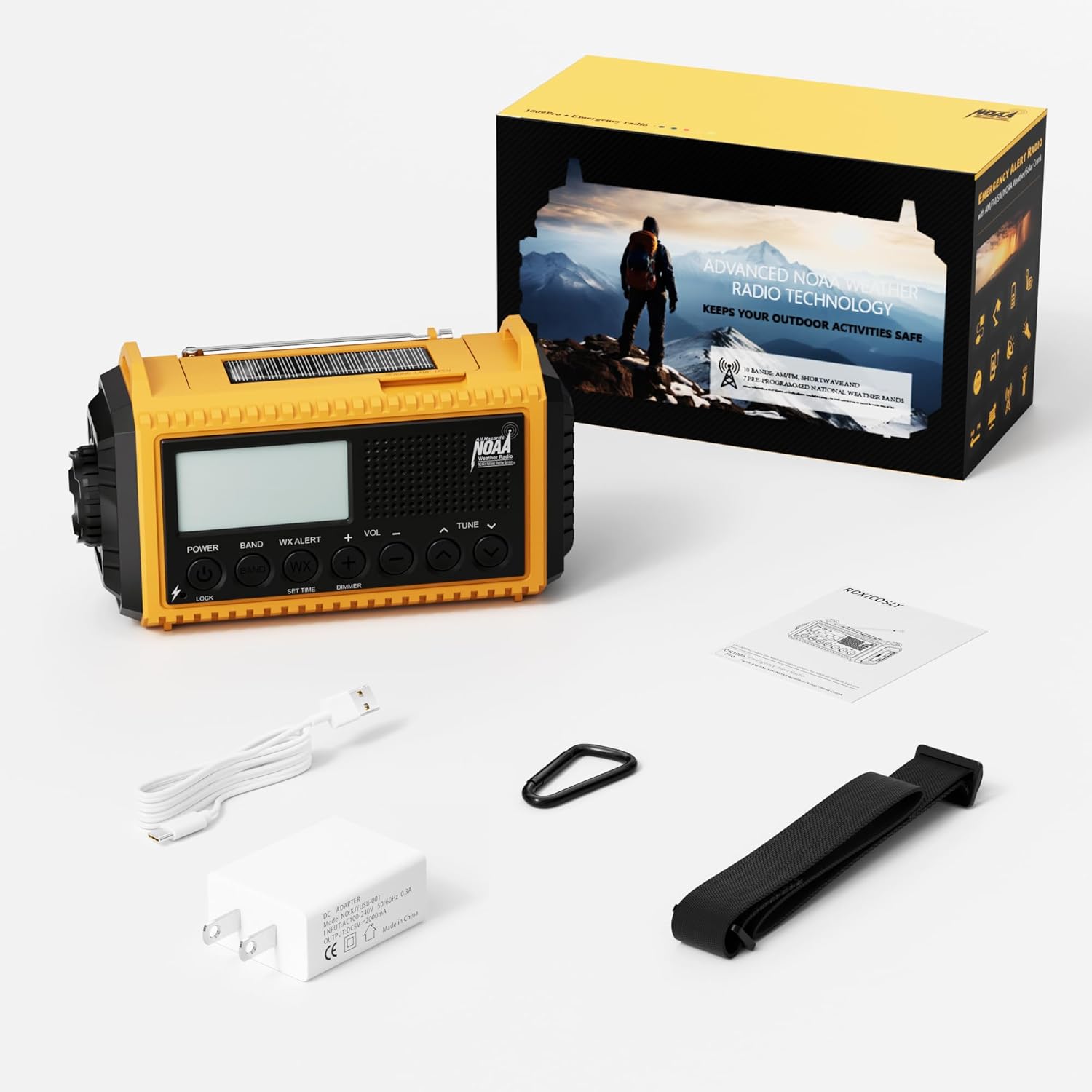
ചിത്രം 3.1: ഉൽപ്പന്ന പാക്കേജിൽ ഉൾപ്പെടുത്തിയിരിക്കുന്ന ഉള്ളടക്കങ്ങൾ.
4. ഘടക ഐഡന്റിഫിക്കേഷൻ
Familiarize yourself with the various parts of your Eoxsmile Emergency Weather Radio:

ചിത്രം 4.1: മുൻഭാഗം view of the radio with key components.
- LCD ഡിസ്പ്ലേ: Shows time, frequency, battery level, and alert indicators.
- നിയന്ത്രണ ബട്ടണുകൾ: Power, Band, WX Alert, Volume (+/-), Tune (up/down), Set Time, Dimmer, Lock.
- ടെലിസ്കോപ്പിക് ആന്റിന: മെച്ചപ്പെട്ട റേഡിയോ സ്വീകരണത്തിനായി നീട്ടാവുന്നതാണ്.
- LED ഫ്ലാഷ്ലൈറ്റ്: Located on the side, provides bright directional light.
- എൽ വായിക്കുന്നുamp: Integrated into the top handle, provides ambient light.
- ഹാൻഡ് ക്രാങ്ക്: Foldable handle on the back for manual power generation.
- സോളാർ പാനൽ: Located on the top, for solar charging.
- USB-C ഇൻപുട്ട് പോർട്ട്: റേഡിയോയുടെ ആന്തരിക ബാറ്ററി ചാർജ് ചെയ്യുന്നതിന്.
- USB-A ഔട്ട്പുട്ട് പോർട്ട്: ബാഹ്യ ഉപകരണങ്ങൾ ചാർജ് ചെയ്യുന്നതിന് (പവർ ബാങ്ക് പ്രവർത്തനം).
- 3.5 എംഎം ഹെഡ്ഫോൺ ജാക്ക്: സ്വകാര്യ ഓഡിയോ ശ്രവണത്തിനായി.
- SOS ബട്ടൺ: Activates emergency alarm and strobe light.
- ബാറ്ററി കമ്പാർട്ട്മെൻ്റ്: Located on the back, for optional AAA batteries.
5. ഉപകരണം പവർ ചെയ്യുന്നു
Your Eoxsmile Emergency Weather Radio offers six different ways to power it, ensuring reliability in any situation:

Figure 5.1: Six ways to power your radio.
- USB-C ചാർജിംഗ്: Connect the included USB-C cable to the radio's USB-C input port and plug the other end into the 5V/2A adapter or any compatible USB power source. This is the primary and fastest charging method.
- ഹാൻഡ് ക്രാങ്ക്: Extend the hand crank handle located on the back of the radio. Rotate the crank clockwise or counter-clockwise at a steady pace (approximately 130-150 RPM) for 3-5 minutes to generate power for short-term use or to initiate charging.
- സോളാർ പാനൽ: Place the radio with the solar panel facing direct sunlight. The solar panel provides a trickle charge to maintain the battery level and is most effective for extending battery life rather than rapid charging.
- Built-in 12000mAh Rechargeable Battery: The radio comes with a high-capacity internal Lithium Polymer battery. This battery powers all functions and can be recharged via USB-C, hand crank, or solar.
- AAA Batteries (Backup): Open the battery compartment on the back and insert 3 AAA batteries (not included). This serves as an alternative power source when the internal rechargeable battery is depleted and other charging methods are unavailable.
- എ സി അഡാപ്റ്റർ: Use the included 5V/2A AC adapter with the USB-C cable for wall charging.
6. സജ്ജീകരണം
Before first use, it is recommended to fully charge the internal battery.
- പ്രാരംഭ ചാർജ്: Connect the radio to a power outlet using the USB-C cable and 5V/2A adapter. The battery indicator on the LCD screen will show charging progress. A full charge may take several hours.
- Install AAA Batteries (Optional): If you wish to use AAA batteries as a backup, open the battery compartment on the back of the radio and insert 3 new AAA batteries, observing the correct polarity.
- Attach Hand Strap/Carabiner: Secure the portable hand strap or carabiner to the designated attachment points for easy carrying.
7. പ്രവർത്തന നിർദ്ദേശങ്ങൾ
7.1 റേഡിയോ പ്രവർത്തനം (AM/FM/SW)
- പവർ ഓൺ/ഓഫ്: അമർത്തുക പവർ റേഡിയോ ഓണാക്കാനോ ഓഫാക്കാനോ ഉള്ള ബട്ടൺ.
- ബാൻഡ് തിരഞ്ഞെടുക്കുക: അമർത്തുക ബാൻഡ് button repeatedly to cycle through AM, FM, SW, and NOAA Weather Bands.
- ട്യൂൺ സ്റ്റേഷനുകൾ: ഉപയോഗിക്കുക ട്യൂൺ + or ട്യൂൺ - buttons to manually adjust the frequency. For automatic scanning, press and hold the ട്യൂൺ + or ട്യൂൺ - ബട്ടൺ.
- വോളിയം ക്രമീകരിക്കുക: ഉപയോഗിക്കുക VOL+ or വോളിയം - buttons to adjust the listening volume (16 levels).
- ആന്റിന വിപുലീകരിക്കുക: For optimal FM and SW reception, fully extend the telescopic antenna. For AM, the internal antenna is generally sufficient.
- ഹെഡ്ഫോൺ ഉപയോഗം: Insert 3.5mm headphones into the headphone jack for private listening.
7.2 NOAA കാലാവസ്ഥാ മുന്നറിയിപ്പ്
The radio can automatically monitor NOAA Weather Stations for hazard alerts.

Figure 7.2.1: NOAA Weather Alert function.
- Activate WX Alert: അമർത്തുക WX അലേർട്ട് button. The radio will automatically scan 7 NOAA Weather Stations.
- Set Alert Timer: അമർത്തി ശേഷം WX അലേർട്ട്, ഉപയോഗിക്കുക ട്യൂൺ + or ട്യൂൺ - buttons to preset a timer (e.g., 4H, 6H, 8H, 12H, 16H, 20H, 24H, or ON always). The radio will remain in alert mode for the set duration, even if turned off.
- അലേർട്ടുകൾ സ്വീകരിക്കുന്നു: When a weather alert is received, the radio will emit a loud siren for 9 seconds and the red alert light will flash.
7.3 ഫ്ലാഷ്ലൈറ്റും റീഡിംഗ് എൽamp
The radio provides two lighting options for various needs.
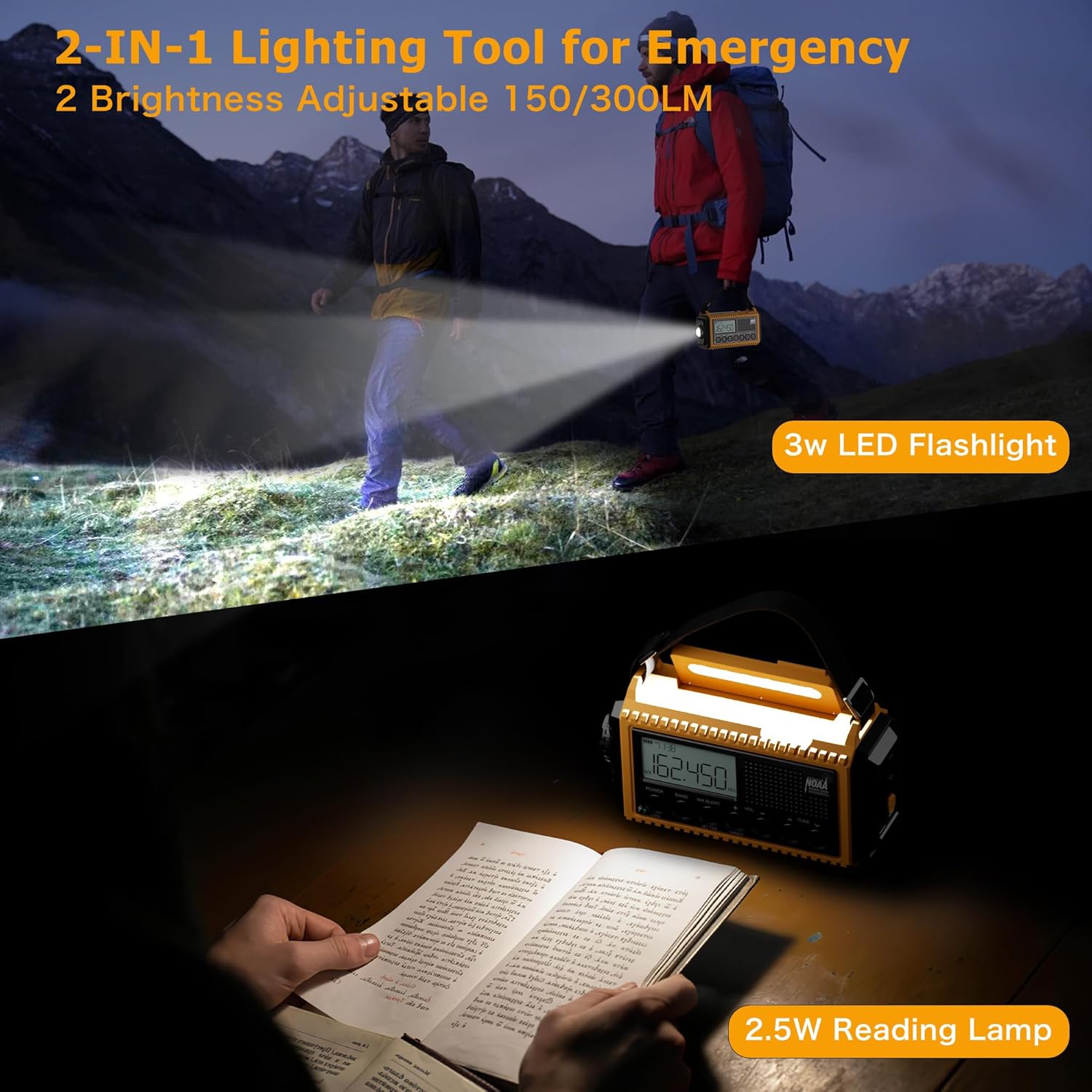
Figure 7.3.1: Flashlight and Reading Lamp ഉപയോഗത്തിലാണ്.
- ഫ്ലാഷ്ലൈറ്റ്: Press the dedicated flashlight button (usually on the side or front) to turn it on. Press again to adjust brightness or turn off.
- എൽ വായിക്കുന്നുamp: Lift the handle to reveal the reading lamp. റീഡിംഗ് l അമർത്തുകamp button (often integrated with the dimmer) to turn it on. Press again to adjust brightness or turn off.
7.4 SOS അലാറം
In emergency situations, activate the SOS alarm to attract attention.
- SOS സജീവമാക്കുക: അമർത്തുക SOS button (typically red or clearly marked). This will trigger a super loud siren and a flashing red strobe light.
- SOS നിർജ്ജീവമാക്കുക: അമർത്തുക SOS button again to turn off the alarm.
7.5 പവർ ബാങ്ക് പ്രവർത്തനം
Use the radio to charge your mobile devices.

Figure 7.5.1: Charging a phone using the radio's power bank function.
- ഉപകരണം ബന്ധിപ്പിക്കുക: Plug your device's USB charging cable into the USB-A output port on the radio.
- ചാർജിംഗ്: The radio will begin charging your device. Ensure the radio has sufficient battery charge for this function.
7.6 LCD Digital Screen
The LCD screen provides essential information at a glance.
- സമയ പ്രദർശനം: നിലവിലെ സമയം കാണിക്കുന്നു.
- ഫ്രീക്വൻസി ഡിസ്പ്ലേ: Shows the current radio frequency.
- ബാറ്ററി ലെവൽ ഇൻഡിക്കേറ്റർ: ശേഷിക്കുന്ന ബാറ്ററി ചാർജ് പ്രദർശിപ്പിക്കുന്നു.
- WX Alert Icon: Indicates when NOAA Weather Alert is active.
- ലോക്ക് ഐക്കൺ: Indicates when the lock function is engaged.
8. പരിപാലനം
Proper care will ensure the longevity of your radio.
- വൃത്തിയാക്കൽ: ഒരു സോഫ്റ്റ് ഉപയോഗിച്ച് റേഡിയോ തുടയ്ക്കുക, ഡിamp തുണി. കഠിനമായ രാസവസ്തുക്കളോ ഉരച്ചിലുകളുള്ള ക്ലീനറുകളോ ഉപയോഗിക്കരുത്.
- സംഭരണം: Store the radio in a cool, dry place away from direct sunlight and extreme temperatures. If storing for extended periods, ensure the internal battery is charged to about 50-70% and recharge every 3-6 months to prevent deep discharge.
- ബാറ്ററി കെയർ: Avoid fully depleting the internal rechargeable battery frequently. For optimal battery life, charge it regularly. Remove AAA batteries if the radio will not be used for a long time to prevent leakage.
9. പ്രശ്നപരിഹാരം
നിങ്ങളുടെ റേഡിയോയിൽ പ്രശ്നങ്ങൾ നേരിടുകയാണെങ്കിൽ, ഇനിപ്പറയുന്ന പൊതുവായ പ്രശ്നങ്ങളും പരിഹാരങ്ങളും പരിശോധിക്കുക:
| പ്രശ്നം | സാധ്യമായ കാരണം | പരിഹാരം |
|---|---|---|
| റേഡിയോ ഓൺ ആകുന്നില്ല. | ബാറ്ററി തീർന്നു. | Charge the radio using USB-C, hand crank, or solar. Check AAA batteries if installed. |
| മോശം റേഡിയോ സ്വീകരണം. | ആന്റിന നീട്ടിയിട്ടില്ല; ദുർബലമായ സിഗ്നൽ ഏരിയ. | Fully extend the telescopic antenna. Reposition the radio for better signal. |
| ബാഹ്യ ഉപകരണങ്ങൾ ചാർജ് ചെയ്യാൻ കഴിയില്ല. | Radio battery too low; incorrect cable. | Ensure the radio's internal battery is sufficiently charged. Use a compatible USB charging cable for your device. |
| NOAA alert not working. | WX Alert not activated; no active alerts. | Press the WX ALERT button. Ensure you are in an area with NOAA coverage. |
| LCD screen is dim or unresponsive. | Dimmer setting; low battery. | Press the DIMMER button to adjust brightness. Charge the radio. |
10 സ്പെസിഫിക്കേഷനുകൾ
| ഫീച്ചർ | വിശദാംശങ്ങൾ |
|---|---|
| മോഡൽ നമ്പർ | CR1009Ultra |
| ഉൽപ്പന്ന അളവുകൾ | 6.77 x 3.7 x 2.91 ഇഞ്ച് |
| ഇനത്തിൻ്റെ ഭാരം | 1 പൗണ്ട് |
| ബാറ്ററി ശേഷി | 12000mAh ലിഥിയം പോളിമർ (ഉൾപ്പെടുത്തിയിരിക്കുന്നു) |
| ബാക്കപ്പ് ബാറ്ററി | 3 x AAA ബാറ്ററികൾ (ഉൾപ്പെടുത്തിയിട്ടില്ല) |
| റേഡിയോ ബാൻഡുകൾ പിന്തുണയ്ക്കുന്നു | FM: 87-108 MHz / AM(MW): 520-1710 KHz / SW: 2.3-22.00 MHz / 7 NOAA Weather Band: 162.400MHz; 162.425MHz; 162.450MHz; 162.475MHz; 162.50MHz; 162.525MHz; 162.55MHz |
| കണക്റ്റിവിറ്റി ടെക്നോളജി | USB |
| പവർ സ്രോതസ്സുകൾ | Hand Crank, Solar Panel, Adapter, USB-C cord, Rechargeable Battery, AAA Batteries |
| ഫ്ലാഷ്ലൈറ്റ് പവർ | 2.5W/3W |
| എൽ വായിക്കുന്നുamp ശക്തി | 2W/2.5W |
| നിർമ്മാതാവ് | Bestway innovations LLC |
| മാതൃരാജ്യം | ചൈന |
11. വാറൻ്റിയും പിന്തുണയും
Eoxsmile provides an 18-month warranty for this product. If you have any questions or require support, please contact our customer service team. Refer to the contact information provided on the product packaging or our official webസഹായത്തിനുള്ള സൈറ്റ്.
കൂടുതൽ സഹായത്തിന്, ദയവായി സന്ദർശിക്കുക Eoxsmile Store on Amazon.