
DOOGEE V MAX Plus
DOOGEE V MAX Plus (2024) 5G Rugged Smartphone User Manual
Model: V MAX Plus | Brand: DOOGEE
1. ആമുഖം
Welcome to the user manual for your new DOOGEE V MAX Plus (2024) 5G Rugged Smartphone. This device is engineered for durability and high performance, featuring an ultra-large 22000mAh battery, a powerful 200MP camera system, and the latest Android 14 operating system. This manual provides essential information to help you set up, operate, maintain, and troubleshoot your device, ensuring you get the most out of its advanced capabilities and rugged design.
2. ബോക്സിൽ എന്താണുള്ളത്?
- 1 x DOOGEE V MAX Plus Cellphone
- 1 x Packing Box / 1 x Manual
- 1 x വാറൻ്റി കാർഡ്
- 1 x Type-C USB Cable / 1 x Charger
- 2 x Anti-explosion film
3. സജ്ജീകരണ ഗൈഡ്
3.1. പ്രാരംഭ ചാർജിംഗ്
Before first use, fully charge your DOOGEE V MAX Plus. Connect the provided Type-C USB cable to the phone's charging port and the charger to a power outlet. The device supports 33W fast charging, allowing for rapid power replenishment.

Image: The DOOGEE V MAX Plus highlighting its 22000mAh battery capacity and 33W Type-C fast charging capabilities, showing normal use, standby, calling, and reverse charging durations.

Image: A visual representation of the 33W fast charging feature, indicating quick power-up times and OTG reverse charging capability.
3.2. സിം കാർഡ് ഇൻസ്റ്റാളേഷൻ
The DOOGEE V MAX Plus supports dual SIM cards. Locate the SIM card tray on the side of the device. Use the provided SIM ejector tool to open the tray. Insert your Nano-SIM cards and/or a microSD card (up to 2TB) into the designated slots, ensuring correct orientation. Gently push the tray back into the phone until it clicks into place.
3.3. പവർ ഓൺ/ഓഫ്
To power on, press and hold the Power button (located on the side) until the DOOGEE logo appears. To power off, press and hold the Power button, then select 'Power off' from the options on the screen.
4. നിങ്ങളുടെ സ്മാർട്ട്ഫോൺ പ്രവർത്തിപ്പിക്കുക
4.1. ബാറ്ററി മാനേജ്മെന്റ്
The DOOGEE V MAX Plus is equipped with a massive 22000mAh battery, providing extended usage times. It supports 33W fast charging for quick recharges. Additionally, the OTG (On-The-Go) function allows your phone to act as a power bank to charge other compatible devices.
Video: Demonstrates the impressive 22000mAh battery life and its ability to power other devices via reverse charging, showcasing its utility for outdoor activities.
4.2. ഡിസ്പ്ലേയും യൂസർ ഇന്റർഫേസും
Experience smooth visuals on the 6.58-inch FHD+ IPS display with a 120Hz adaptive refresh rate. The phone runs on Android 14, offering enhanced privacy features, personalized settings, and a fluid user experience.

Image: The DOOGEE V MAX Plus showcasing its user interface running on the latest Android 14 operating system.

Image: The 6.58-inch FHD+ display with 120Hz refresh rate, highlighting its high resolution and smooth visual performance.
4.3. ക്യാമറ സിസ്റ്റം
Capture stunning photos and videos with the versatile camera setup: a 200MP main camera for incredible detail, a 32MP front camera for high-quality selfies, a 20MP night vision camera for low-light conditions, a 50MP wide-angle camera, and an 8MP telephoto camera.
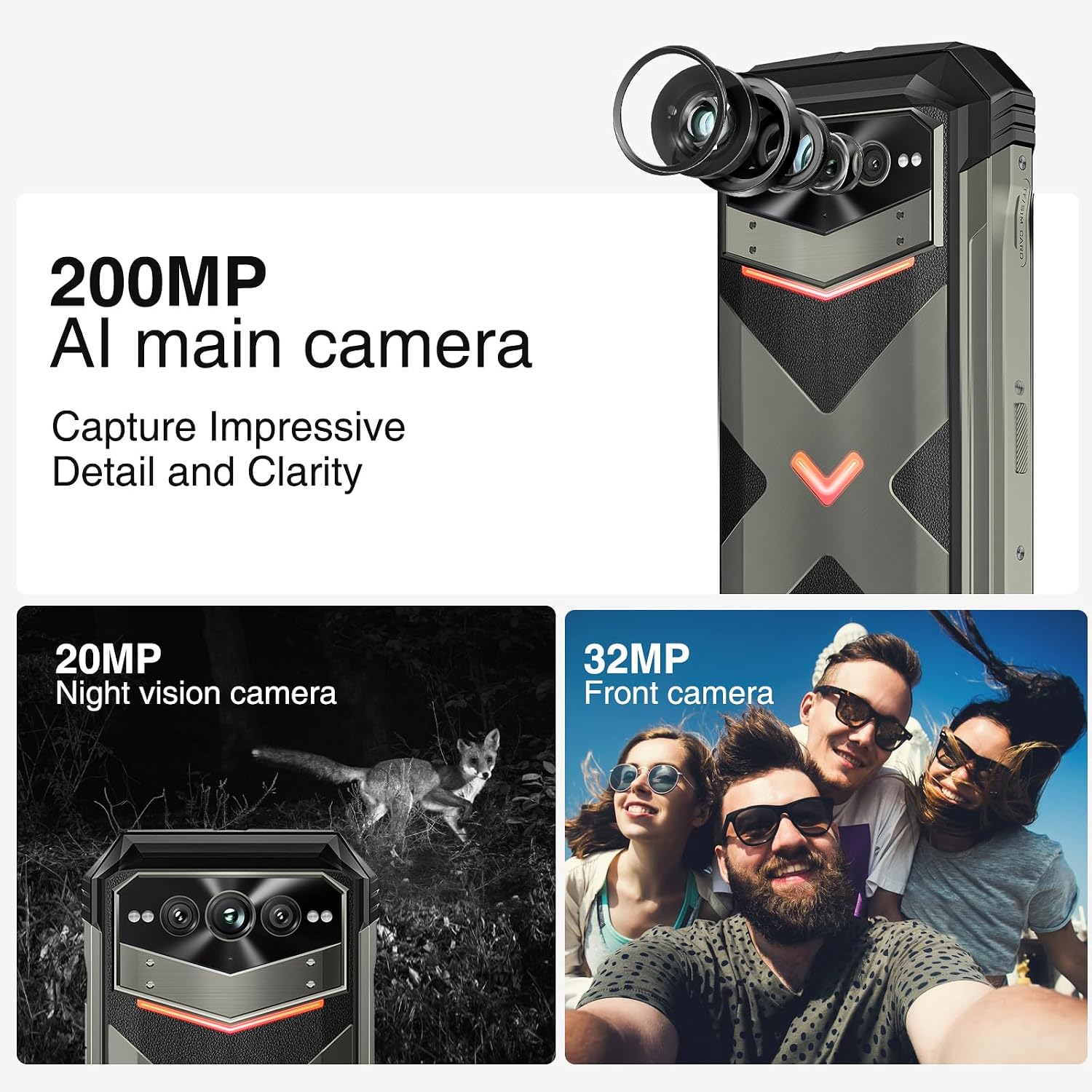
ചിത്രം: കഴിഞ്ഞുview of the DOOGEE V MAX Plus camera system, featuring the 200MP main camera, 32MP front camera, and 20MP night vision camera.
4.4. Intelligent Interaction Lights
The device features intelligent interaction lights with red, green, and blue colors. These lights can be customized for various scenarios, including incoming calls, music playback, SMS notifications, and charging status, adding a unique visual element.

Image: The intelligent interaction lights on the back of the DOOGEE V MAX Plus, demonstrating their customizable color options.
4.5. പ്രകടനവും സംഭരണവും
Powered by the MediaTek Dimensity 7050 5G Octa-core processor, the phone offers up to 36GB of RAM (16GB physical + 20GB virtual) for seamless multitasking. It comes with 512GB of built-in storage, expandable up to 2TB with a microSD card, providing ample space for all your data.

Image: An illustration of the MediaTek Dimensity 7050 5G processor, highlighting its octa-core architecture, 6nm advanced tech, and memory configurations (16GB base RAM + 20GB extended RAM, 512GB ROM).
4.6. Connectivity and Durability
The DOOGEE V MAX Plus supports 5G connectivity, Wi-Fi 6, NFC for convenient payments, and accurate navigation systems (GPS, Glonass, Galileo, Beidou). Its rugged design provides 360° protection with IP68/IP69K waterproof and dustproof ratings, and MIL-STD-810H shockproof compliance, making it ideal for harsh environments.
വീഡിയോ: ഒരു സമഗ്രമായ ഓവർview of the DOOGEE V MAX Plus, showcasing its ruggedness, display quality, camera features, and overall performance in various outdoor scenarios.

Image: The DOOGEE V MAX Plus demonstrating its certified triple protection (MIL-STD-810H, IP68/IP69K) against water immersion, drops, and concrete submersion.
5. പരിപാലനം
To ensure the longevity and optimal performance of your DOOGEE V MAX Plus, follow these maintenance guidelines:
- വൃത്തിയാക്കൽ: സ്ക്രീനും ബോഡിയും വൃത്തിയാക്കാൻ മൃദുവായ, ലിന്റ് രഹിത തുണി ഉപയോഗിക്കുക. ഉരച്ചിലുകളുള്ള വസ്തുക്കളോ കഠിനമായ രാസവസ്തുക്കളോ ഒഴിവാക്കുക.
- താപനില: Do not expose the device to extreme temperatures (hot or cold) for prolonged periods.
- സോഫ്റ്റ്വെയർ അപ്ഡേറ്റുകൾ: നിങ്ങളുടെ ഉപകരണത്തിന് ഏറ്റവും പുതിയ ഫീച്ചറുകൾ, സുരക്ഷാ പാച്ചുകൾ, പ്രകടന മെച്ചപ്പെടുത്തലുകൾ എന്നിവ ഉണ്ടെന്ന് ഉറപ്പാക്കാൻ സിസ്റ്റം അപ്ഡേറ്റുകൾ പതിവായി പരിശോധിച്ച് ഇൻസ്റ്റാൾ ചെയ്യുക.
- സംഭരണം: While the phone has ample storage, regularly back up important data and manage files to prevent performance degradation.
6. പ്രശ്നപരിഹാരം
നിങ്ങൾ നേരിട്ടേക്കാവുന്ന പൊതുവായ പ്രശ്നങ്ങൾക്കുള്ള പരിഹാരങ്ങൾ ഇതാ:
| ഇഷ്യൂ | സാധ്യമായ കാരണം / പരിഹാരം |
|---|---|
| ഉപകരണം ഓണാകില്ല | ബാറ്ററി ചാർജ്ജ് ചെയ്തിട്ടുണ്ടെന്ന് ഉറപ്പാക്കുക. ചാർജറുമായി കണക്റ്റ് ചെയ്ത് കുറച്ച് മിനിറ്റ് കാത്തിരുന്ന് വീണ്ടും പവർ ഓൺ ചെയ്യാൻ ശ്രമിക്കുക. |
| Poor network signal / Calls not connecting | Check your SIM card installation. Verify that your carrier (e.g., T-Mobile) is supported by the phone's frequency bands. Restart the device. |
| വൈഫൈ കണക്റ്റിവിറ്റി പ്രശ്നങ്ങൾ | Restart your Wi-Fi router and the phone. Forget the network and reconnect. Ensure Wi-Fi 6 compatibility with your router for optimal performance. |
| ബാറ്ററി പെട്ടെന്ന് തീരുന്നു | Close background apps. Reduce screen brightness. Disable unnecessary features like GPS or Bluetooth when not in use. Check for app updates. |
| ഉപകരണം മന്ദഗതിയിലാണ് അല്ലെങ്കിൽ പ്രതികരിക്കുന്നില്ല. | Clear cache of frequently used apps. Restart the phone. Ensure sufficient free storage space. |
7 സാങ്കേതിക സവിശേഷതകൾ
| ഫീച്ചർ | വിശദാംശങ്ങൾ |
|---|---|
| ബ്രാൻഡ് | ഡോഗി |
| മോഡലിൻ്റെ പേര് | V MAX Plus |
| ഓപ്പറേറ്റിംഗ് സിസ്റ്റം | ആൻഡ്രോയിഡ് 14 |
| സിപിയു മോഡൽ | MediaTek Dimensity 7050 (Octa-core) |
| ഇൻസ്റ്റാൾ ചെയ്ത RAM മെമ്മറി വലുപ്പം | 36 ജിബി (16 ജിബി ഫിസിക്കൽ + 20 ജിബി വെർച്വൽ) |
| മെമ്മറി സ്റ്റോറേജ് കപ്പാസിറ്റി | 512 GB (expandable up to 2TB with microSD) |
| സ്ക്രീൻ വലിപ്പം | 6.58 Inches FHD+ IPS |
| റെസലൂഷൻ | 1080x2408 |
| പുതുക്കിയ നിരക്ക് | 120 Hz |
| ബാറ്ററി ശേഷി | 22000 മില്ലിamp മണിക്കൂറുകൾ |
| ചാർജിംഗ് | 33W ഫാസ്റ്റ് ചാർജിംഗ്, OTG റിവേഴ്സ് ചാർജിംഗ് |
| പ്രധാന ക്യാമറ | 200MP AI Ultra-clear |
| മുൻ ക്യാമറ | 32എംപി |
| നൈറ്റ് വിഷൻ ക്യാമറ | 20എംപി |
| വൈഡ്-ആംഗിൾ ക്യാമറ | 50എംപി |
| ടെലിഫോട്ടോ ക്യാമറ | 8എംപി |
| വയർലെസ് കമ്മ്യൂണിക്കേഷൻ | 5G, Wi-Fi 6, Bluetooth, NFC |
| നാവിഗേഷൻ | ജിപിഎസ്, ഗ്ലോനാസ്, ഗലീലിയോ, ബീഡോ |
| ഈട് | IP68/IP69K Waterproof & Dustproof, MIL-STD-810H Shockproof |
| ഇനത്തിൻ്റെ ഭാരം | 9.2 ഔൺസ് (262 ഗ്രാം) |
| അളവുകൾ | 7.6 x 4.06 x 2.52 ഇഞ്ച് |
8. വാറൻ്റിയും പിന്തുണയും
Your DOOGEE V MAX Plus (2024) 5G Rugged Smartphone comes with a 2-വർഷ പരിമിത വാറൻ്റി. For any product-related inquiries, technical assistance, or warranty claims, please contact DOOGEE customer support. They offer 24/7 One-on-One Online Support നിങ്ങളെ സഹായിക്കാൻ.
Please refer to the warranty card included in your product packaging for specific terms and conditions.
Ask a question about this manual
Ask about setup, troubleshooting, compatibility, parts, safety, or missing instructions. Manuals+ will review the question and use this page’s manual context to help answer it.