
Zeblaze ZEBB3PRO
Zeblaze Beyond 3 Pro GPS Smartwatch User Manual
Model: ZEBB3PRO
ആമുഖം
This manual provides comprehensive instructions for the setup, operation, and maintenance of your Zeblaze Beyond 3 Pro GPS Smartwatch. Please read this manual thoroughly before using the device to ensure proper functionality and to maximize your user experience.
The Zeblaze Beyond 3 Pro is an advanced GPS smartwatch featuring a vibrant 2.15-inch AMOLED display, robust health monitoring capabilities, and extensive sports tracking modes. Its durable design, including Corning Gorilla Glass and a zinc metal frame, ensures longevity and reliability.
ഉൽപ്പന്നം കഴിഞ്ഞുview

ചിത്രം 1: ഫ്രണ്ട് view of the Zeblaze Beyond 3 Pro Smartwatch, showing the AMOLED display with time, date, heart rate, calories, and steps.
ചിത്രം 2: Various customizable watch faces available on the Zeblaze Beyond 3 Pro, demonstrating the versatility of the display.

ചിത്രം 3: The smartwatch displaying a list of workout modes, including indoor running, outdoor cycling, and yoga, highlighting its sports detection capabilities.

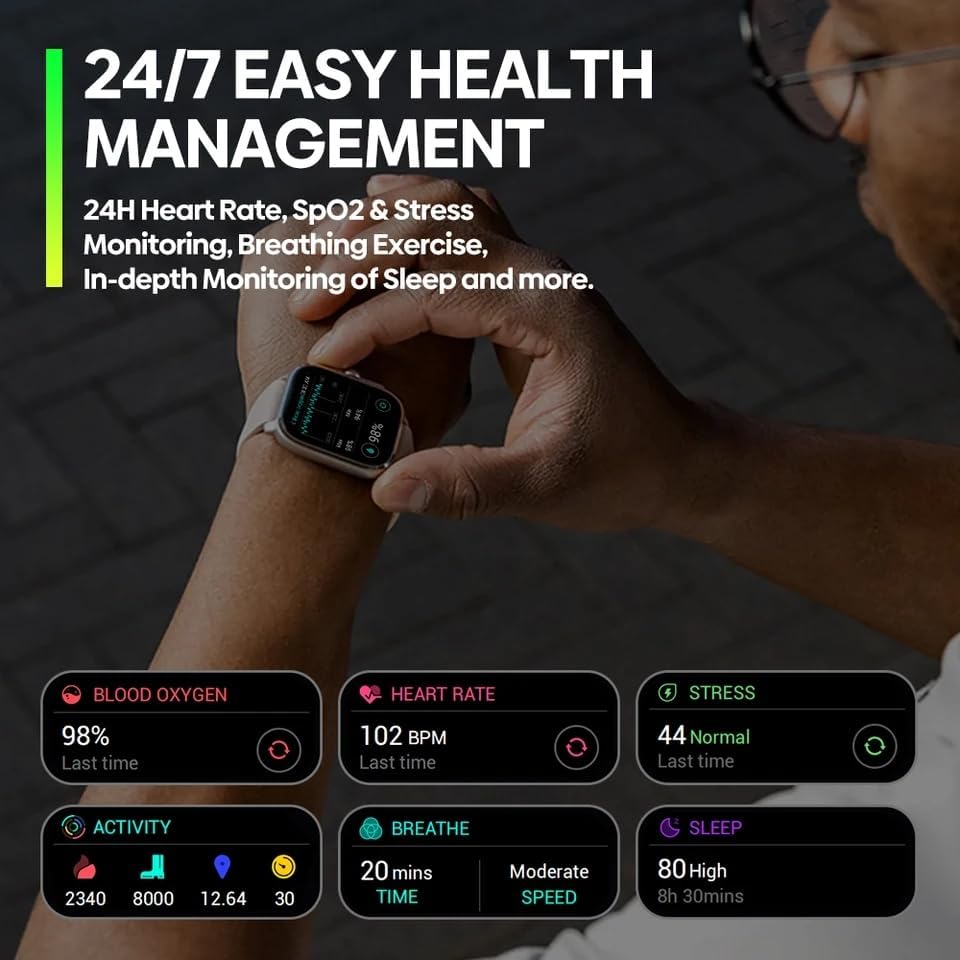
ചിത്രം 4: Health management screen showing blood oxygen, heart rate, stress, activity, breathing, and sleep data, indicating 24/7 health monitoring.

ചിത്രം 5: GPS tracking interface on the smartwatch, showing a route map and outdoor cycling activity, emphasizing its strong and precise GPS capabilities.

ചിത്രം 6: Close-up of the smartwatch display, detailing its 2.15" screen size, 94% screen-to-body ratio, up to 1000 nit brightness, and 330 PPI.
സജ്ജീകരണ ഗൈഡ്
1 ഉപകരണം ചാർജ് ചെയ്യുന്നു
Before initial use, fully charge your Zeblaze Beyond 3 Pro smartwatch.
- വാച്ചിന്റെ പിൻഭാഗത്തുള്ള ചാർജിംഗ് കോൺടാക്റ്റുകളുമായി മാഗ്നറ്റിക് ചാർജിംഗ് കേബിൾ ബന്ധിപ്പിക്കുക.
- കേബിളിന്റെ USB അറ്റം ഒരു സാധാരണ USB പവർ അഡാപ്റ്ററിലേക്ക് (5V/1A ശുപാർശ ചെയ്യുന്നു) അല്ലെങ്കിൽ ഒരു കമ്പ്യൂട്ടറിന്റെ USB പോർട്ടിലേക്ക് പ്ലഗ് ചെയ്യുക.
- വാച്ച് ഡിസ്പ്ലേ ഒരു ചാർജിംഗ് ഇൻഡിക്കേറ്റർ കാണിക്കും. പൂർണ്ണമായി ചാർജ് ചെയ്യാൻ സാധാരണയായി ഏകദേശം 2 മണിക്കൂർ എടുക്കും.
2. പവർ ഓൺ/ഓഫ്
- പവർ ഓൺ: Press and hold the side power button for a few seconds until the Zeblaze logo appears.
- പവർ ഓഫ്: From the watch face, swipe down to access quick settings, or navigate to "Settings" > "System" > "Power Off". Confirm your selection.
3. നിങ്ങളുടെ സ്മാർട്ട്ഫോണുമായി ജോടിയാക്കൽ
To unlock the full potential of your smartwatch, pair it with the companion application on your smartphone.
- Download the official Zeblaze companion app from the App Store (iOS) or Google Play Store (Android). ഇതിനായി തിരയുക "Zeblaze Fit" or refer to the QR code in the watch's initial setup screen.
- നിങ്ങളുടെ സ്മാർട്ട്ഫോണിൽ ബ്ലൂടൂത്ത് പ്രവർത്തനക്ഷമമാക്കിയിട്ടുണ്ടെന്ന് ഉറപ്പാക്കുക.
- Open the Zeblaze Fit app, create an account or log in.
- Follow the in-app instructions to add a new device. Select "Zeblaze Beyond 3 Pro" from the list of available devices.
- നിങ്ങളുടെ സ്മാർട്ട്ഫോണിലും സ്മാർട്ട് വാച്ചിലും പെയറിംഗ് അഭ്യർത്ഥന സ്ഥിരീകരിക്കുക.
കുറിപ്പ്: Maintain your smartphone within Bluetooth range for continuous data synchronization and notification delivery.
പ്രവർത്തന നിർദ്ദേശങ്ങൾ
1. അടിസ്ഥാന നാവിഗേഷൻ
- ടച്ച് സ്ക്രീൻ: മെനുകളിലൂടെയും സ്ക്രീനുകളിലൂടെയും നാവിഗേറ്റ് ചെയ്യാൻ മുകളിലേക്കോ താഴേക്കോ ഇടത്തേക്കോ വലത്തേക്കോ സ്വൈപ്പ് ചെയ്യുക. ഒരു ഇനം തിരഞ്ഞെടുക്കാൻ ടാപ്പ് ചെയ്യുക.
- സൈഡ് ബട്ടണുകൾ: The smartwatch features 3 physical buttons.
- ടോപ്പ് ബട്ടൺ: Typically acts as a back button or a shortcut to the app list.
- Middle Button (Crown): Rotates for scrolling, press to return to watch face or open app list.
- താഴെയുള്ള ബട്ടൺ: Customizable shortcut, often for sports modes.
2. Watch Faces and Always-On Display
Customize your watch face by long-pressing the current watch face on the home screen. Swipe left/right to browse available faces and tap to select. The Always-On Display (AOD) feature can be enabled or disabled in the watch settings under "Display".
3. ആരോഗ്യ നിരീക്ഷണം
The Zeblaze Beyond 3 Pro continuously monitors various health metrics.
- ഹൃദയമിടിപ്പ്: Access the Heart Rate app on the watch to view real-time heart rate and historical data.
- രക്ത ഓക്സിജൻ (SpO2): Use the SpO2 app to measure your blood oxygen saturation. Ensure the watch is snug on your wrist for accurate readings.
- സ്ട്രെസ് മോണിറ്ററിംഗ്: The watch estimates stress levels throughout the day.
- ഉറക്ക ട്രാക്കിംഗ്: Wear the watch to bed for automatic sleep analysis, including sleep stages ഉം ദൈർഘ്യവും.
- ശ്വസന വ്യായാമം: Guided breathing exercises are available to help manage stress.
All health data is synchronized with the Zeblaze Fit app for detailed analysis and trend tracking.
4. സ്പോർട്സ് മോഡുകളും GPS ട്രാക്കിംഗും
The smartwatch supports over 100 professional workout modes and features integrated GPS.
- ഒരു വർക്ക്ഔട്ട് ആരംഭിക്കുന്നു: Navigate to the "Workout" or "Sports" app on your watch. Select your desired activity (e.g., Outdoor Running, Cycling).
- ജിപിഎസ് ഏറ്റെടുക്കൽ: For outdoor activities, wait for the GPS signal to be acquired before starting your workout. This ensures accurate distance and route tracking.
- During Workout: The watch displays real-time metrics such as duration, distance, heart rate, and calories burned.
- Ending a Workout: Press the side button or swipe to pause/end the workout. Save the data to view summaries on the watch and in the app.
5. Notifications and Calls
Once paired with your smartphone, the watch can receive notifications for calls, messages, and app alerts.
- Enabling Notifications: Configure notification permissions within the Zeblaze Fit app on your smartphone.
- Viewing Notifications: വാച്ച് ഫെയ്സിൽ നിന്ന് താഴേക്ക് സ്വൈപ്പ് ചെയ്യുക view സമീപകാല അറിയിപ്പുകൾ.
- കോൾ മാനേജ്മെൻ്റ്: You can see incoming call alerts and choose to accept or reject calls directly from the watch.
മെയിൻ്റനൻസ്
1. നിങ്ങളുടെ സ്മാർട്ട് വാച്ച് വൃത്തിയാക്കൽ
- വാച്ച് ബോഡിയും സ്ട്രാപ്പും മൃദുവായ, ഡി-ക്ലാസ് ഉപയോഗിച്ച് പതിവായി വൃത്തിയാക്കുക.amp തുണി.
- For the charging contacts and heart rate sensor, use a dry cotton swab to gently remove any dust or debris.
- കഠിനമായ രാസവസ്തുക്കൾ, അബ്രസീവ് ക്ലീനറുകൾ, അല്ലെങ്കിൽ ലായകങ്ങൾ എന്നിവ ഉപയോഗിക്കുന്നത് ഒഴിവാക്കുക.
2. സ്ട്രാപ്പ് കെയർ
The silicone strap can be cleaned with mild soap and water. Ensure the strap is completely dry before reattaching it to the watch or wearing it.
3. ജല പ്രതിരോധം
The Zeblaze Beyond 3 Pro is designed with water resistance. However, it is not suitable for deep diving or high-pressure water activities. Avoid prolonged exposure to hot water or steam. After exposure to water, especially saltwater, rinse the watch with fresh water and dry it thoroughly.
4. സോഫ്റ്റ്വെയർ അപ്ഡേറ്റുകൾ
Periodically check for software updates via the Zeblaze Fit app. Updates often include performance improvements, bug fixes, and new features.
ട്രബിൾഷൂട്ടിംഗ്
| പ്രശ്നം | സാധ്യമായ പരിഹാരം |
|---|---|
| വാച്ച് ഓണാക്കുന്നില്ല. | വാച്ച് പൂർണ്ണമായും ചാർജ് ചെയ്തിട്ടുണ്ടെന്ന് ഉറപ്പാക്കുക. കുറഞ്ഞത് 30 മിനിറ്റെങ്കിലും ചാർജറുമായി ബന്ധിപ്പിക്കുക. |
| സ്മാർട്ട്ഫോണുമായി ജോടിയാക്കാൻ കഴിയില്ല. |
|
| കൃത്യമല്ലാത്ത ഹൃദയമിടിപ്പ്/SpO2 റീഡിംഗുകൾ. | Ensure the watch is worn snugly on your wrist, about one finger's width above the wrist bone. Avoid excessive movement during measurement. Clean the sensor on the back of the watch. |
| GPS signal acquisition is slow or fails. | നിങ്ങൾ ഒരു തുറന്ന പുറംഭാഗത്താണെന്ന് ഉറപ്പാക്കുക, അവിടെ തെളിഞ്ഞ കാലാവസ്ഥയാണ്. view of the sky. Avoid tall buildings or dense foliage. Wait patiently for the GPS icon to stabilize before starting your activity. |
| അറിയിപ്പുകൾ ലഭിക്കുന്നില്ല. |
|
സ്പെസിഫിക്കേഷനുകൾ
| ഫീച്ചർ | വിശദാംശങ്ങൾ |
|---|---|
| മോഡലിൻ്റെ പേര് | Zeblaze Beyond 3 Pro |
| മോഡൽ നമ്പർ | ZEBB3PRO |
| പ്രദർശിപ്പിക്കുക | 2.15-inch AMOLED, 415 x 505 pixels resolution, 330 PPI, up to 1000 nits brightness, Always-On Display |
| സംരക്ഷണം | Corning Gorilla Glass, Zinc Metal Frame with Perforated Carbon Coating |
| ബാറ്ററി ശേഷി | 300 mAh Li-pol |
| കണക്റ്റിവിറ്റി | ബ്ലൂടൂത്ത് 5.3 |
| ജിപിഎസ് | Integrated GPS (4 Satellite Positioning Systems) |
| ആരോഗ്യ നിരീക്ഷണം | 24H Heart Rate, SpO2, Stress Monitoring, Breathing Exercise, Sleep Monitoring |
| സ്പോർട്സ് മോഡുകൾ | 100+ Professional Workout Modes, Smart Sports Recognition |
| സ്ട്രാപ്പ് മെറ്റീരിയൽ | Silicone (22mm) |
| അനുയോജ്യമായ ഉപകരണങ്ങൾ | സ്മാർട്ട്ഫോൺ |
| ഓപ്പറേറ്റിംഗ് സിസ്റ്റം | ടൈസെൻ 4.0 |
വാറൻ്റിയും പിന്തുണയും
വാറൻ്റി വിവരങ്ങൾ
Your Zeblaze Beyond 3 Pro smartwatch comes with a standard manufacturer's warranty. Please refer to the warranty card included in your product packaging for specific terms and conditions, including warranty duration and coverage details. Keep your proof of purchase for warranty claims.
ഉപഭോക്തൃ പിന്തുണ
For technical assistance, troubleshooting beyond this manual, or warranty inquiries, please contact Zeblaze customer support through their official webസൈറ്റ് അല്ലെങ്കിൽ നിങ്ങളുടെ ഉൽപ്പന്ന പാക്കേജിംഗിൽ നൽകിയിരിക്കുന്ന ബന്ധപ്പെടാനുള്ള വിവരങ്ങൾ.
You may also visit the product page on Amazon for additional resources or to contact the seller, MiniTechno, for purchase-related support.
ഉൽപ്പന്ന പേജ് ലിങ്ക്
Ask a question about this manual
Ask about setup, troubleshooting, compatibility, parts, safety, or missing instructions. Manuals+ will review the question and use this page’s manual context to help answer it.