ആമുഖം
Thank you for choosing the Dafit Cross-Border Burst ZL02CPRO Smart Watch. This device is designed to assist you in monitoring your health, tracking your fitness activities, and staying connected. This manual provides essential information on setting up, operating, maintaining, and troubleshooting your smartwatch to ensure optimal performance.
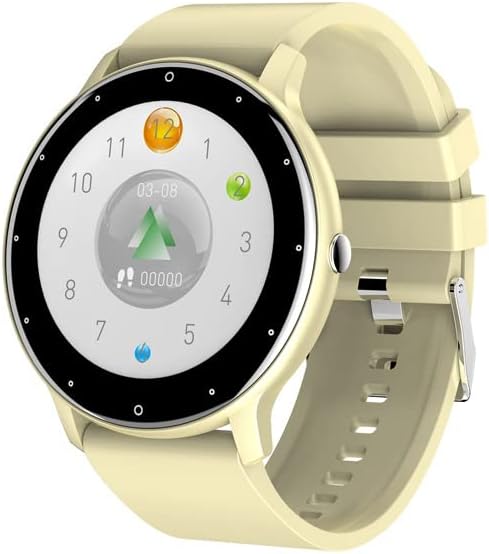
Image: The Dafit ZL02CPRO Smart Watch featuring a round display and a yellow silicone strap. The watch face shows a step counter and other activity metrics.
ബോക്സിൽ എന്താണുള്ളത്
തുറക്കുമ്പോൾ പാക്കേജ് ഉള്ളടക്കങ്ങൾ പരിശോധിക്കുക:
- Dafit Cross-Border Burst ZL02CPRO Smart Watch
- ഉപയോക്തൃ മാനുവൽ (ഈ പ്രമാണം)
- Wristbands (silicone or steel, depending on model)
- ചാർജിംഗ് കേബിൾ
സജ്ജമാക്കുക
1. സ്മാർട്ട് വാച്ച് ചാർജ് ചെയ്യുന്നു
Before first use, fully charge your smartwatch. Connect the provided charging cable to the charging port on the back of the watch and plug the USB end into a standard USB power adapter (not included) or a computer's USB port. A full charge takes approximately 2 hours.
2. Installing the Companion Application
To unlock the full functionality of your smartwatch, download and install the official companion application on your smartphone. ഇതിനായി തിരയുക "Dafit" or the specified app name in your device's app store (Google Play Store for Android, Apple App Store for iOS).
- അനുയോജ്യത: Android 5.0 or later; Apple iOS 9.0 or later.
3. നിങ്ങളുടെ സ്മാർട്ട്ഫോണുമായി ജോടിയാക്കൽ
- Ensure your smartwatch is charged and powered on.
- നിങ്ങളുടെ സ്മാർട്ട്ഫോണിൽ ബ്ലൂടൂത്ത് പ്രവർത്തനക്ഷമമാക്കുക.
- Open the companion application on your smartphone.
- Follow the in-app instructions to search for and connect to your smartwatch. The watch will typically appear as "ZL02CPRO" or a similar device name.
- ആവശ്യപ്പെടുകയാണെങ്കിൽ, നിങ്ങളുടെ ഫോണിലും സ്മാർട്ട് വാച്ചിലും ജോടിയാക്കൽ അഭ്യർത്ഥന സ്ഥിരീകരിക്കുക.
Maintain a Bluetooth distance within 10 meters for stable connection and notification reception.
4. ഭാഷാ ക്രമീകരണങ്ങൾ
The smartwatch supports multiple languages. You can typically adjust the language settings through the companion application or directly on the watch's settings menu. Supported languages include Chinese, English, German, Spanish, French, Russian, Arabic, Ukrainian, Italian, and Portuguese.
സ്മാർട്ട് വാച്ച് പ്രവർത്തിപ്പിക്കുന്നു
അടിസ്ഥാന നാവിഗേഷൻ
The smartwatch features a 1.28-inch round TFT full touch screen. Swipe left, right, up, or down to navigate through menus, access quick settings, and view different functions. Tap to select items.

Image: A display showing various customizable watch faces available for the ZL02CPRO Smart Watch, alongside an image of the watch being worn on a wrist.
പ്രധാന സവിശേഷതകൾ
- പ്രവർത്തന ട്രാക്കിംഗ്: The watch tracks your daily steps, calories burned, and distance traveled. This data is displayed on the watch and synchronized with the companion app for detailed analysis.
- ഹൃദയമിടിപ്പ് നിരീക്ഷണം: Monitor your heart rate throughout the day. Access real-time heart rate data on the watch or view historical trends in the app.
- ഉറക്ക നിരീക്ഷണം: The smartwatch automatically monitors your sleep patterns, including deep sleep, light sleep, and awake times. Review your sleep quality in the app.
- മൾട്ടി-സ്പോർട്സ് മോഡുകൾ: Select from various sport modes to track specific activities such as walking, running, cycling, and more. The watch records exercise time, calories, and other relevant metrics.
- അറിയിപ്പുകൾ: Receive notifications for incoming calls, SMS messages, and alerts from various applications directly on your wrist. Manage notification settings via the companion app.
- ബ്ലൂടൂത്ത് കോൾ പ്രവർത്തനം: Make and receive calls directly from your smartwatch when connected to your phone via Bluetooth.
- റിമോട്ട് കൺട്രോൾ: Control your smartphone's music playback and camera shutter remotely from your watch.
- കാലാവസ്ഥ റിപ്പോർട്ട്: Get real-time weather updates displayed on your watch (requires connection to the companion app and internet access).
- ഉദാസീനമായ ഓർമ്മപ്പെടുത്തൽ: Set reminders to encourage movement after periods of inactivity.
- Alarm Clock & Stopwatch: Utilize the built-in alarm clock and stopwatch functions for daily convenience.
- തെളിച്ച ക്രമീകരണം: Adjust the screen brightness to suit your environment.
- പവർ-സേവിംഗ് മോഡ്: Activate power-saving mode to extend battery life when needed.
ജല പ്രതിരോധം (IP68)
The smartwatch is IP68 waterproof, meaning it is resistant to dust and can withstand immersion in water up to 1.5 meters for 30 minutes. It is suitable for daily use such as washing hands or wearing in the rain. പ്രധാനപ്പെട്ടത്: Do not use the watch in hot water, showers, saunas, or during diving, as steam and high pressure can compromise the waterproof seals.
മെയിൻ്റനൻസ്
Cleaning the Smartwatch
Regularly clean your smartwatch to maintain its appearance and functionality:
- മൃദുവായ, ലിന്റ് രഹിത തുണി ഉപയോഗിച്ച് സ്ക്രീനും വാച്ച് ബോഡിയും തുടയ്ക്കുക.
- കഠിനമായ പാടുകൾക്ക്, dampതുണിയിൽ അൽപം വെള്ളം ചേർത്ത് നനയ്ക്കുക. കഠിനമായ രാസവസ്തുക്കളോ ഉരച്ചിലുകളോ ഉള്ള വസ്തുക്കൾ ഉപയോഗിക്കുന്നത് ഒഴിവാക്കുക.
- Ensure the charging contacts on the back of the watch are clean and dry before charging.
സ്ട്രാപ്പ് കെയർ
Keep the watch strap clean and dry, especially if it's silicone. If you have a steel mesh strap, ensure it is free from debris. Avoid prolonged exposure to direct sunlight or extreme temperatures, which can degrade strap materials.

Image: The Dafit ZL02CPRO Smart Watch in a rose gold finish with a matching pink mesh strap, displaying the time and date.
ബാറ്ററി കെയർ
ബാറ്ററി ആയുസ്സ് പരമാവധിയാക്കാൻ:
- ബാറ്ററി ഇടയ്ക്കിടെ പൂർണ്ണമായും കളയുന്നത് ഒഴിവാക്കുക.
- Store the watch in a cool, dry place if not used for extended periods, with the battery charged to about 50%.
- നൽകിയിരിക്കുന്ന ചാർജിംഗ് കേബിൾ മാത്രം ഉപയോഗിക്കുക.
ട്രബിൾഷൂട്ടിംഗ്
നിങ്ങളുടെ സ്മാർട്ട് വാച്ചിൽ പ്രശ്നങ്ങൾ നേരിടുകയാണെങ്കിൽ, ഇനിപ്പറയുന്ന പൊതുവായ പരിഹാരങ്ങൾ പരിശോധിക്കുക:
- വാച്ച് ഓണാക്കുന്നില്ല: Ensure the watch is fully charged. Connect it to the charger for at least 10 minutes before attempting to power it on again.
- ഫോണുമായി ജോടിയാക്കാൻ കഴിയില്ല:
- നിങ്ങളുടെ ഫോണിലും വാച്ചിലും ബ്ലൂടൂത്ത് പ്രവർത്തനക്ഷമമാക്കിയിട്ടുണ്ടെന്ന് ഉറപ്പാക്കുക.
- Make sure the watch is within 10 meters of your phone.
- നിങ്ങളുടെ ഫോണും സ്മാർട്ട് വാച്ചും പുനരാരംഭിക്കുക.
- നിങ്ങളുടെ ഫോണിലെ ബ്ലൂടൂത്ത് കാഷെ മായ്ക്കുക (ബാധകമെങ്കിൽ) വീണ്ടും ജോടിയാക്കാൻ ശ്രമിക്കുക.
- കമ്പാനിയൻ ആപ്പ് ഏറ്റവും പുതിയ പതിപ്പിലേക്ക് അപ്ഡേറ്റ് ചെയ്തിട്ടുണ്ടെന്ന് ഉറപ്പാക്കുക.
- Inaccurate Data (Steps, Heart Rate):
- വാച്ച് നിങ്ങളുടെ കൈത്തണ്ടയിൽ നന്നായി ധരിക്കുന്നുണ്ടെന്ന് ഉറപ്പാക്കുക, കൈത്തണ്ട അസ്ഥിക്ക് മുകളിൽ ഏകദേശം ഒരു വിരലിന്റെ വീതിയിൽ.
- വാച്ചിന്റെ പിൻഭാഗത്തുള്ള സെൻസർ വൃത്തിയാക്കുക.
- Update the watch firmware via the companion app if an update is available.
- അറിയിപ്പുകൾ ലഭിച്ചിട്ടില്ല:
- Check notification permissions for the companion app in your phone's settings.
- വാച്ച് ബ്ലൂടൂത്ത് വഴി ബന്ധിപ്പിച്ചിട്ടുണ്ടെന്ന് ഉറപ്പാക്കുക.
- കമ്പാനിയൻ ആപ്പിലെ അറിയിപ്പ് ക്രമീകരണങ്ങൾ പരിശോധിച്ചുറപ്പിക്കുക.
- ഹ്രസ്വ ബാറ്ററി ലൈഫ്:
- സ്ക്രീൻ തെളിച്ചം കുറയ്ക്കുക.
- ആവശ്യമില്ലെങ്കിൽ തുടർച്ചയായ ഹൃദയമിടിപ്പ് നിരീക്ഷണം പ്രവർത്തനരഹിതമാക്കുക.
- വാച്ചിലേക്ക് അറിയിപ്പുകൾ അയയ്ക്കുന്ന ആപ്പുകളുടെ എണ്ണം പരിമിതപ്പെടുത്തുക.
- Activate power-saving mode.
പ്രശ്നങ്ങൾ നിലനിൽക്കുകയാണെങ്കിൽ, കൂടുതൽ സഹായത്തിന് ഉപഭോക്തൃ പിന്തുണയുമായി ബന്ധപ്പെടുക.
സ്പെസിഫിക്കേഷനുകൾ
| ഫീച്ചർ | വിശദാംശങ്ങൾ |
|---|---|
| മോഡലിൻ്റെ പേര് | സിഎൻ101 |
| ബ്രാൻഡ് | ജനറിക് |
| ഡിസ്പ്ലേ സ്ക്രീൻ തരം | TFT സ്ക്രീൻ |
| സ്ക്രീൻ വലിപ്പം | 1.28 ഇഞ്ച് (വൃത്താകൃതി) |
| കേസ് മെറ്റീരിയൽ | പ്ലാസ്റ്റിക് പി.സി |
| സ്ട്രാപ്പ് മെറ്റീരിയൽ | Anti-static Silicone or Steel |
| ജല പ്രതിരോധം | IP68 |
| ബാറ്ററി ശേഷി | 230 മില്ലിamp മണിക്കൂറുകൾ |
| ബാറ്ററി ലൈഫ് | 5-7 ദിവസം (സാധാരണ ഉപയോഗം) |
| ചാർജിംഗ് സമയം | ഏകദേശം 2 മണിക്കൂർ |
| കണക്റ്റിവിറ്റി | ബ്ലൂടൂത്ത് |
| അനുയോജ്യത | ആൻഡ്രോയിഡ് 5.0+ / ഐഒഎസ് 9.0+ |
| ഇനത്തിൻ്റെ ഭാരം | 80 ഗ്രാം (2.82 ഔൺസ്) |
| മെമ്മറി സ്റ്റോറേജ് കപ്പാസിറ്റി | 640 ജിബി |
| ജിപിഎസ് | Yes (for movement track) |
വാറൻ്റിയും പിന്തുണയും
For warranty information and technical support, please refer to the documentation provided with your purchase or contact the retailer/manufacturer directly. If you have any questions or encounter issues not covered in this manual, do not hesitate to reach out to customer service.


