
1. ആമുഖം
The LEAUDIO XDUOO MH-02 is a versatile USB Digital-to-Analog Converter (DAC) and Tube Headphone Amplifier. It combines the warmth of tube pre-amplification with the power of a Class A transistor buffer, designed to enhance your audio experience. This manual provides detailed instructions for setup, operation, and maintenance of your MH-02 unit.
2. സുരക്ഷാ നിർദ്ദേശങ്ങൾ
- വൈദ്യുതി വിതരണം വോളിയം ഉറപ്പാക്കുകtage matches the requirements specified for the device (DC 12V/2A).
- യൂണിറ്റ് വെള്ളം, ഈർപ്പം അല്ലെങ്കിൽ തീവ്രമായ താപനില എന്നിവയിൽ തുറന്നുകാട്ടരുത്.
- നേരിട്ട് സൂര്യപ്രകാശം ഏൽക്കുന്ന സ്ഥലത്തോ താപ സ്രോതസ്സുകൾക്ക് സമീപമോ യൂണിറ്റ് സ്ഥാപിക്കുന്നത് ഒഴിവാക്കുക.
- അമിതമായി ചൂടാകുന്നത് തടയാൻ യൂണിറ്റിന് ചുറ്റും മതിയായ വായുസഞ്ചാരം ഉറപ്പാക്കുക.
- യൂണിറ്റ് സ്വയം തുറക്കാനോ നന്നാക്കാനോ ശ്രമിക്കരുത്. എല്ലാ സേവനങ്ങളും യോഗ്യതയുള്ള ഉദ്യോഗസ്ഥരെ ഏൽപ്പിക്കുക.
- കുട്ടികൾക്ക് ലഭ്യമാകാതെ സൂക്ഷിക്കുക.
3. പാക്കേജ് ഉള്ളടക്കം
പാക്കേജിൽ ഇനിപ്പറയുന്ന ഇനങ്ങൾ ഉണ്ടോ എന്ന് പരിശോധിക്കുക:
- XDUOO MH-02 Unit
- Power Adapter (DC 12V) (Typically included, please verify packaging)
- USB Cable (Typically included, please verify packaging)
4. ഉൽപ്പന്നം കഴിഞ്ഞുview
4.1 ഫ്രണ്ട് പാനൽ
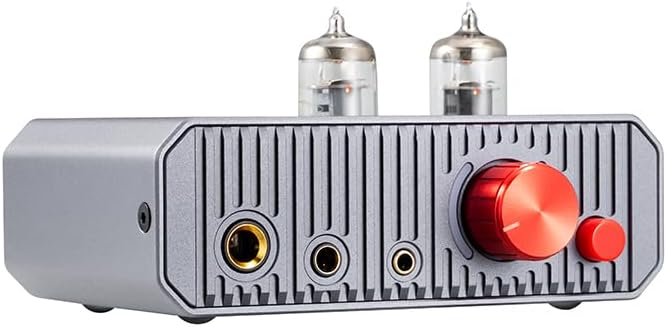
This image displays the front panel of the MH-02, highlighting the dual vacuum tubes, the prominent red volume control knob, the smaller red gain selection button, and the three distinct headphone output jacks.
- 6.35mm ഹെഡ്ഫോൺ ഔട്ട്പുട്ട്: സ്റ്റാൻഡേർഡ് ഹെഡ്ഫോൺ ജാക്ക്.
- 4.4mm ബാലൻസ്ഡ് ഹെഡ്ഫോൺ ഔട്ട്പുട്ട്: Balanced headphone jack for compatible headphones.
- 3.5mm ഹെഡ്ഫോൺ ഔട്ട്പുട്ട്: സ്റ്റാൻഡേർഡ് ഹെഡ്ഫോൺ ജാക്ക്.
- വോളിയം നോബ്: Controls the output volume for headphones and line out.
- Gain Button: Toggles between low and high gain settings.
- വാക്വം ട്യൂബുകൾ: Dual 6J1 tubes for pre-ampലിഫിക്കേഷൻ.
4.2 പിൻ പാനൽ

This image illustrates the rear panel of the MH-02, featuring the RCA input and output connections, the USB-C port for digital audio, the DC 12V power input, and the main power switch.
- RCA L/R IN: അനലോഗ് ഓഡിയോ ഇൻപുട്ട്.
- RCA L/R OUT: Analog audio line output.
- USB IN (Type-C): Digital audio input for USB DAC function.
- ഡിസി 12 വി: പവർ ഇൻപുട്ട് ജാക്ക്.
- വൈദ്യുതി സ്വിച്ച്: യൂണിറ്റ് ഓൺ അല്ലെങ്കിൽ ഓഫ് ടോഗിൾ ചെയ്യുന്നു.
5. സജ്ജീകരണം
5.1 Connecting to a USB Audio Device

This diagram illustrates two primary connection methods: USB for digital sources like laptops, and RCA for analog sources such as CD players, both leading to headphone output.
- Use a USB OTG cable (not included) to connect the MH-02's USB IN port to your computer (Windows, Linux, Mac OS X), iOS device, Android device, or HiFi player.
- Connect your headphones to one of the headphone output jacks on the front panel.
- Ensure the MH-02 is powered on.
- Select the MH-02 as the audio output device in your source device's sound settings.
5.2 Connecting to an Analog Audio Device
- Use an RCA audio cable to connect the AUX/Line output of your player (e.g., CD player) to the RCA L/R IN ports on the rear panel of the MH-02.
- Connect your headphones to one of the headphone output jacks on the front panel.
- Ensure the MH-02 is powered on.
5.3 പവർ കണക്ഷൻ
- Connect the provided DC 12V power adapter to the DC 12V input jack on the rear panel of the MH-02.
- പവർ അഡാപ്റ്റർ അനുയോജ്യമായ ഒരു മതിൽ ഔട്ട്ലെറ്റിലേക്ക് പ്ലഗ് ചെയ്യുക.
6. പ്രവർത്തന നിർദ്ദേശങ്ങൾ
6.1 പവർ ഓൺ/ഓഫ്
Flip the power switch on the rear panel to the 'ON' position to power on the unit. Flip it to 'OFF' to power off. A built-in relay mutes the circuit during power-on to prevent 'POP' noise and ensure optimal tube operation.

This image shows an internal relay, which is part of the built-in protection circuit designed to prevent 'POP' noise during power cycles.
6.2 വോളിയം നിയന്ത്രണം
Rotate the large red knob on the front panel clockwise to increase volume and counter-clockwise to decrease volume. Start with a low volume setting before playing audio to avoid sudden loud sounds.
6.3 Gain Switch Operation

This diagram explains the function of the gain switch: pressing the button activates 'LOW' gain, while leaving it unpressed selects 'HIGH' gain.
The small red button on the front panel is the gain switch. Press it gently to toggle between two gain settings: Low Gain (button pressed) and High Gain (button unpressed). Select the appropriate gain setting based on your headphones' impedance and sensitivity to achieve optimal sound and prevent over-driving or under-driving.
6.4 Using as a Pre-ampജീവപര്യന്തം
The MH-02 features a volume-controlled line output (RCA L/R OUT) that routes audio through its tube stage. This allows the unit to function as a pre-amplifier for other audio amplifiers or active speakers, potentially enhancing their sound quality.
7 സ്പെസിഫിക്കേഷനുകൾ
| പരാമീറ്റർ | മൂല്യം |
|---|---|
| വൈദ്യുതി വിതരണം | DC 12V/2A |
| കംപ്ലയിൻ്റ് ഒഎസ് | Windows, Linux, Mac OS X, iOS, Android |
| Sampling Rate Support (PCM) | 16-32ബിറ്റ്/44.1കെ-384കെഎച്ച്ട്സ് |
| Sampling Rate Support (DSD) | DSD64-256 |
| ഔട്ട്പുട്ട് പവർ | 1300mW (32Ω ലോഡ്) |
| ഫ്രീക്വൻസി പ്രതികരണം | 10Hz-60KHz (±0.5dB) |
| നേട്ടം | +12dB / +18dB |
| THD+N | 0.8% (1KHz, 32Ω load) |
| എസ്/എൻ അനുപാതം | 113dB |
| ക്രോസ്സ്റ്റോക്ക് | 70dB |
| യൂണിറ്റ് അളവുകൾ (L x W x H) | 12 x 10 x 6.4 സെ.മീ (ഏകദേശം 4.7 x 3.9 x 2.5 ഇഞ്ച്) |
| യൂണിറ്റ് ഭാരം | 0.42 Kg (approx. 14.8 ounces) |
| Item Weight (as listed) | 14.4 ഔൺസ് |
| നിർമ്മാതാവ് | LEAUDIO |
| ആദ്യ തീയതി ലഭ്യമാണ് | മെയ് 20, 2024 |
8. പ്രശ്നപരിഹാരം
- ശബ്ദമില്ല:
- യൂണിറ്റ് ഓണാക്കിയിട്ടുണ്ടെന്നും പവർ അഡാപ്റ്റർ സുരക്ഷിതമായി ബന്ധിപ്പിച്ചിട്ടുണ്ടെന്നും ഉറപ്പാക്കുക.
- Check all audio cables (USB, RCA, headphones) are correctly and securely connected.
- Verify the volume knob is turned up.
- If using USB, ensure the MH-02 is selected as the default audio output device on your computer or source device.
- Test with different headphones or source devices to isolate the issue.
- വികലമായ ശബ്ദം:
- Reduce the volume on both the MH-02 and your source device.
- Check the gain setting. If using sensitive headphones, try the 'Low Gain' setting.
- Ensure audio cables are not damaged or loose.
- Test with different audio files or sources.
- ഇടവിട്ടുള്ള കണക്ഷൻ:
- എല്ലാ കേബിൾ കണക്ഷനുകളിലും അയവ് ഉണ്ടോ എന്ന് പരിശോധിക്കുക.
- Try a different USB or RCA cable.
- വൈദ്യുതി വിതരണം സുസ്ഥിരമാണെന്ന് ഉറപ്പാക്കുക.
9. പരിപാലനം
- വൃത്തിയാക്കൽ: യൂണിറ്റിന്റെ പുറംഭാഗം വൃത്തിയാക്കാൻ മൃദുവായതും ഉണങ്ങിയതുമായ തുണി ഉപയോഗിക്കുക. ലിക്വിഡ് ക്ലീനറുകളോ ലായകങ്ങളോ ഉപയോഗിക്കരുത്.
- ട്യൂബ് മാറ്റിസ്ഥാപിക്കൽ: The 6J1 vacuum tubes have a finite lifespan. If you notice a significant degradation in sound quality or tube failure, contact the manufacturer or a qualified technician for replacement instructions. Ensure the unit is powered off and unplugged before attempting any tube replacement.
- സംഭരണം: When not in use for extended periods, store the unit in a cool, dry place away from direct sunlight and dust.
10. വാറൻ്റിയും പിന്തുണയും
വാറന്റി വിവരങ്ങൾ, സാങ്കേതിക പിന്തുണ, അല്ലെങ്കിൽ സേവന അന്വേഷണങ്ങൾ എന്നിവയ്ക്കായി, നിങ്ങളുടെ വാങ്ങലിനൊപ്പം നൽകിയിരിക്കുന്ന ഡോക്യുമെന്റേഷൻ പരിശോധിക്കുകയോ വിൽപ്പനക്കാരനെയോ/നിർമ്മാതാവിനെയോ നേരിട്ട് ബന്ധപ്പെടുകയോ ചെയ്യുക. വാറന്റി ക്ലെയിമുകൾക്കായി നിങ്ങളുടെ വാങ്ങലിന്റെ തെളിവ് സൂക്ഷിക്കുക.